
Crocoblock Subscription Plans Overview
Learn about the details of Crocoblock subscription plans and decide which suits your purposes best.
Crocoblock offers a flexible and convenient pricing range for our clients. There are some main alternative plans that users can adapt to their needs and apply the products they need to one or many sites:
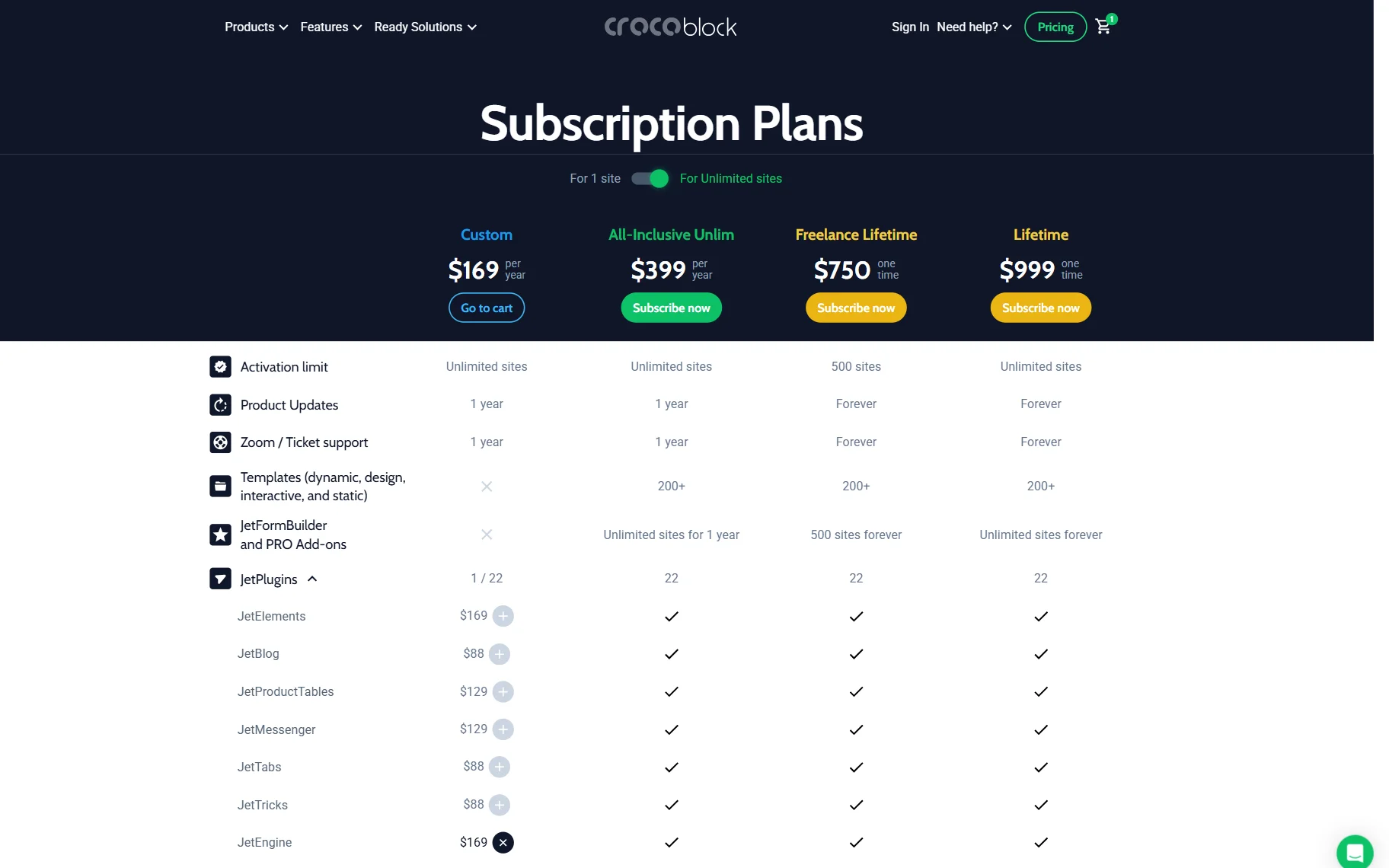
- Yearly subscription plans:
- Custom (For one project) subscription plans for one project and Custom (For Unlimited projects) for an unlimited number of projects;
- All-Inclusive subscription plan for one project and All-Inclusive Unlimited subscription plan for an unlimited number of projects.
- Lifetime subscription plans:
- Freelance Lifetime subscription plan for 500 projects;
- Lifetime subscription plan for an unlimited number of projects for a lifetime.
Every subscription plan provides the following:
- a 30-day guarantee and a refund according to the user’s request;
- 365/24/7 support through the ticket system, Zoom, and messengers (on the Crocoblock help center site, Telegram, and Facebook Messenger) within the validity period of the subscription plan;
- free product tutorials (including videos);
- frequent and regular free updates of all purchased products;
- proper maintenance of the installed Crocoblock products within the validity period of the subscription plan.
Custom Subscription Plans (For 1 project and For Unlimited Projects)
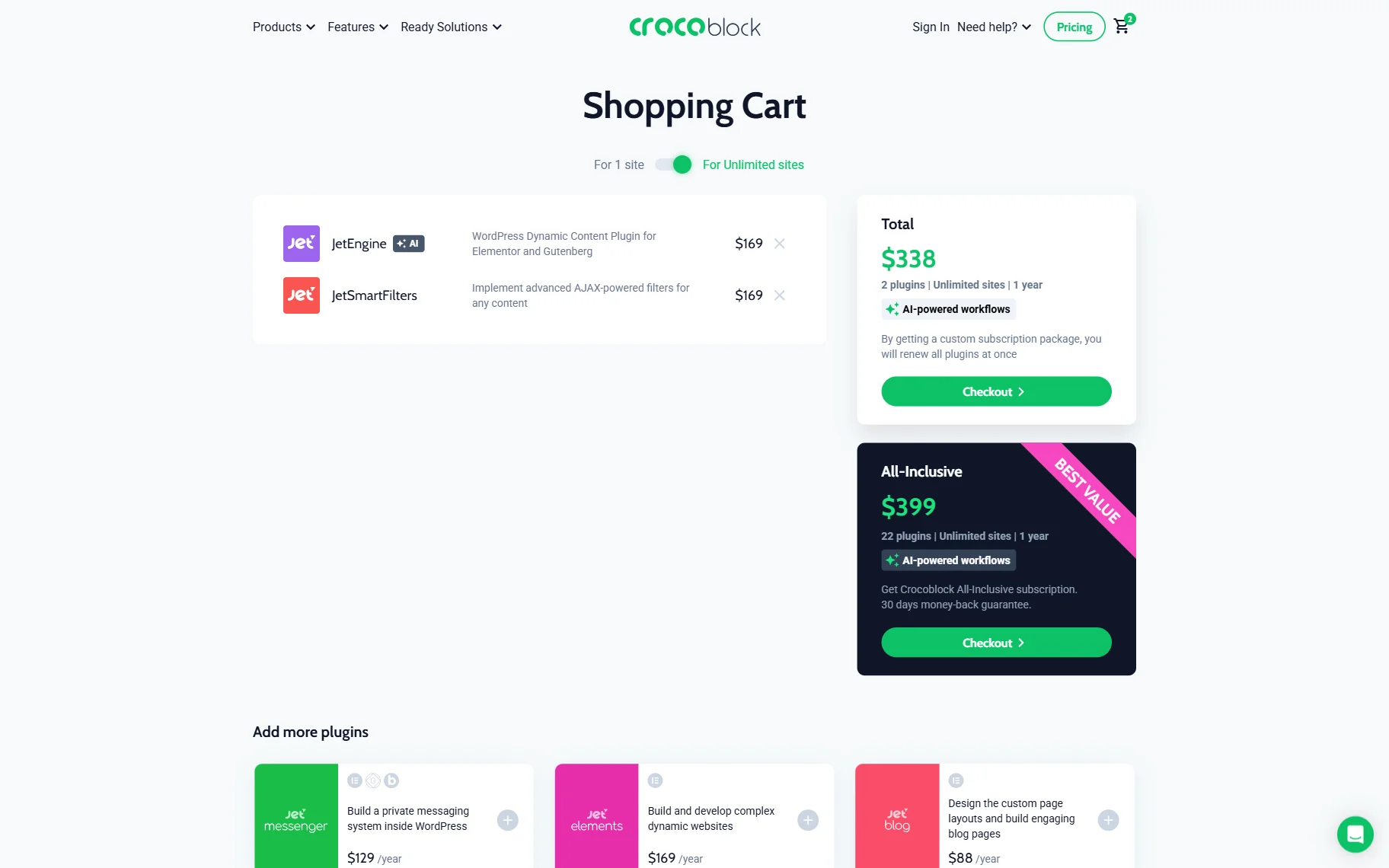
Custom Subscription implies that you create the required set of plugins by yourself. Define the type of website you want to build and organize the list of the necessary tools. Even if you buy only one plugin, it is a Custom Subscription too. The list of plugins you add to your custom plan is specified for one project.
If you want to use the same selection for other projects, switch the toggle in the cart to the “For Unlimited Sites” option.
All-Inclusive and All-Inclusive Unlim Subscription Plans
The difference between these yearly subscription plans is the possibility of applying Crocoblock products to one project and an unlimited number of projects within one year. Toggle the switch on the pricing page to see the difference between these plans.
These plans give all-inclusive access to all Crocoblock’s products and their updates for a year, as well as a 30-day money-back guarantee: 20+ plugins; free themes; installation Wizard; 12 dynamic templates, 47 design templates, and 50+ popup templates; JetThemeCore Compatibility Kit and JetElements Dynamic Data; 100% discount for all JetFormBuilder PRO add-ons; support; and free updates of all purchased products.
However, users have to renew their yearly subscription plans to prolong these plans, keep using the all-inclusive tools and benefits, and ensure that all products are updated and work correctly.
Additionally, users can upgrade their yearly plans to lifetime plans.
Freelance Lifetime and Lifetime Subscription Plans
Unlike the yearly subscription plans, users do not need to renew the lifetime plans. The lifetime plans include two plans: Freelance Lifetime and Lifetime. The difference between these plans is the possibility to apply for 500 projects (Freelance Lifetime) and an unlimited number of projects (Lifetime) without time limitations.
Both Lifetime plans include all-inclusive forever access to all Crocoblock’s products and their updates, as well as a 30-day money-back guarantee: 20+ plugins; free themes; installation Wizard; 12 dynamic templates, 47 design templates, and 50+ popup templates; JetThemeCore Compatibility Kit and JetElements Dynamic Data; 100% discount for all JetFormBuilder PRO add-ons; support; and free updates of all purchased products.
Users do not need to renew these plans each year, but they can upgrade the Freelance Lifetime plan to the Lifetime plan.
How to Upgrade Crocoblock Subscription?
If you already have one of our plugins and want a bigger package, you don’t need to pay for the one you already have once more. You can skip the full price for the upgrade by following a few simple steps:
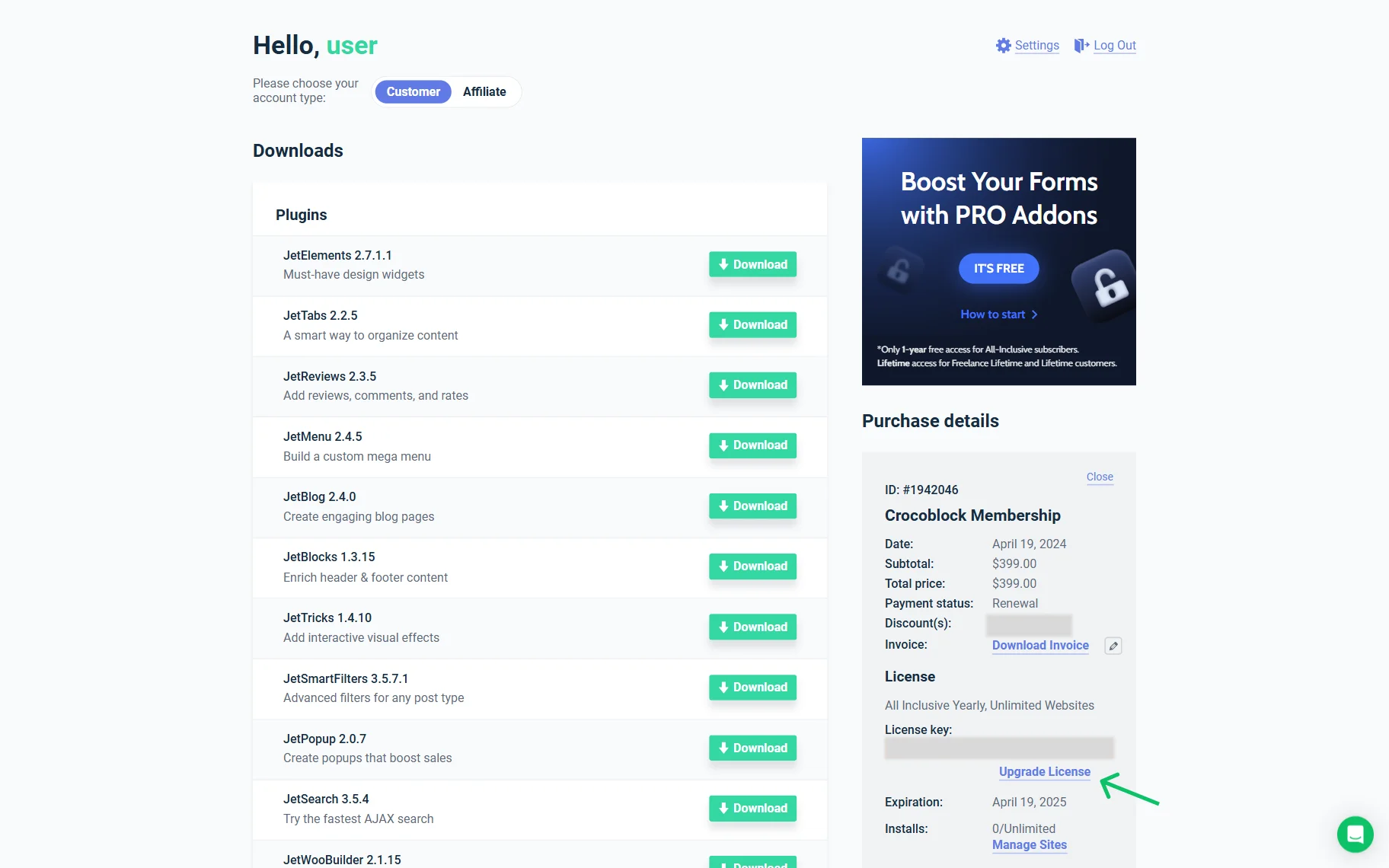
- Open the Account page and proceed to the Purchase Details section.
- Here, click the “Upgrade License” button next to your subscription.
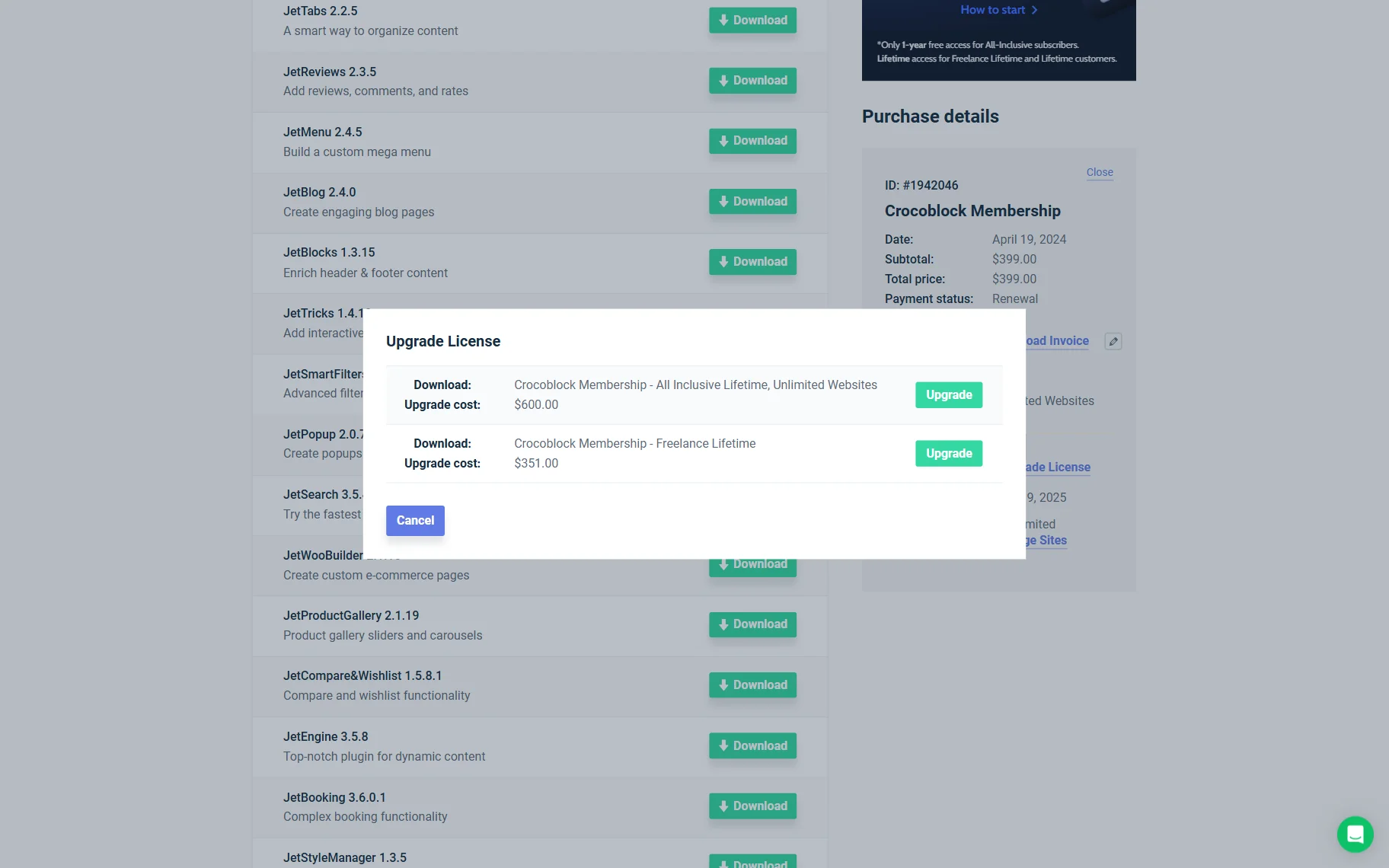
Pick the desired license and press the “Upgrade” button.
Follow the standard checkout steps and make a purchase. The price will be calculated, taking into account the difference between your current subscription and the cost of the chosen one. Now, the plan is upgraded.
If you have purchased multiple plugins and want to upgrade, please reach out to our support team. They will gladly generate a custom promo code for you.
Please note that only the cost of your single most expensive subscription will be credited toward the upgrade price. For example, if you have a JetEngine, Single site subscription ($75), and JetMenu, Single site ($55), then only the $75 from JetEngine will count toward your upgrade discount.
If you have the All-Inclusive One website and want to upgrade to the Unlimited option in the middle of the license period, go to your account, click the “Upgrade License” link, and follow the offered steps. Also, you can use the Crocoblock upgrade page and choose the necessary plan there. The scheme for upgrading from All–Inclusive to Lifetime is the same.
Remember that you only pay the difference between the plans in case of any subscription upgrade, and that’s it.
If you encounter any problems, please contact Crocoblock support.
FAQ
The main difference is the number of included products, project limits, and subscription duration. Custom plans let you choose only the plugins you need, All-Inclusive plans provide access to the entire Crocoblock toolkit for one year, and Lifetime plans offer permanent access without annual renewals. Both yearly and lifetime plans are available for single, multiple, or unlimited projects.
Yes. When upgrading your Crocoblock subscription, you only pay the difference between your current plan and the new one. If you own a single plugin, its purchase price is credited toward the upgrade. If you have multiple plugin licenses, contact the Crocoblock support team to receive a custom upgrade discount.
Only yearly subscription plans require renewal to continue receiving product updates, technical support, and access to included resources. Lifetime plans do not require renewal and provide ongoing access to all included Crocoblock products and future updates.
The best plan depends on how many websites you manage. Freelancers working on multiple client projects often choose the Freelance Lifetime plan for up to 500 projects, while agencies and developers managing unlimited websites typically benefit from the Unlimited or Lifetime Unlimited plans. Users building a single website can choose one-project Custom or All-Inclusive subscriptions.
Every Crocoblock subscription includes regular product updates, access to technical support during the subscription period, a 30-day money-back guarantee, product tutorials, and maintenance for purchased products. All-Inclusive and Lifetime plans also include the complete Crocoblock toolkit, templates, themes, the Installation Wizard, and discounts on JetFormBuilder Pro add-ons.
That’s it. Now you know the details of Crocoblock subscription plans and can consider all the pros and cons to make your decision.