A few years ago, when the first AI tools were released, it caused a huge hype, and everyone talked about AI: whether it would replace all of us, how it would change the future, and how fast it would take over humans. Now, it’s time to hype about AI agents for WordPress and how they will replace or reshape web development.
So, let’s dive into this rabbit hole.

AI Agents: How They Work and What They Can Actually Do
First, let’s figure out what AI agents are.
The difference between a chatbot and an agent
When you ask a typical AI chatbot a question, it generates a response and stops there. That’s the full interaction.
It may seem like it remembers things within the same conversation, but that’s just context being passed back into the model. It doesn’t have persistent memory by default, and it doesn’t take action on its own. Once the reply is generated, the process ends.
It also can’t directly interact with external systems unless it’s explicitly connected to them. For example, it won’t push code to your GitHub repository, update a database, or send an email unless there’s a tool that allows it to do that.
An AI agent works differently – it doesn’t just respond to a single prompt, but you give an agent a goal. From there, it works step by step to reach that goal. It plans what to do, takes actions, observes what happens, and adjusts. This continues until the task is complete or the agent reaches a point where it needs help.
For example:
- An interaction with a chatbot: “How do I build a REST API in Python?”
- An interaction with an AI agent: “Create a REST API, write the code, test it locally, and push it to this repository.”
The basic loop of AI agents
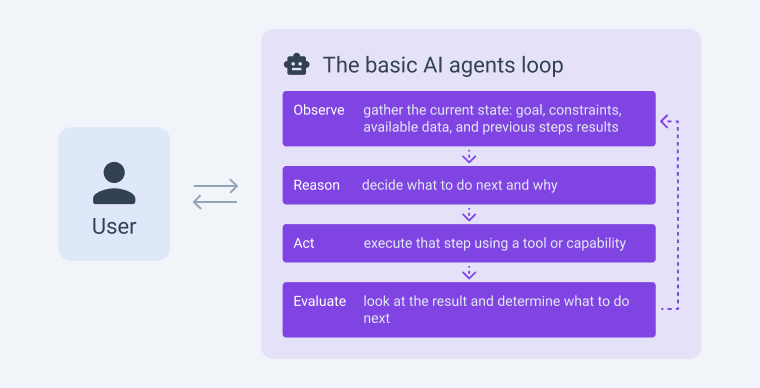
At the core of every agent is a loop that repeats until the job is done:
- Observe: gather the current state, including the goal, constraints, available data, and results from previous steps.
- Reason: decide what to do next and why.
- Act: execute that step using a tool or capability.
- Evaluate: look at the result and determine what to do next.
This loop turns a static model into something that can move through a task.
For example, let’s imagine an agent tasked with “summarize the latest changes in a library and highlight breaking changes”:
- Observe: no local information available;
- Reason: needs to fetch release notes;
- Act: use a web search or an API;
- Evaluate: data retrieved, but too long;
- Reason: needs to extract key points;
- Act: summarize;
- Evaluate: missing breaking changes;
- Reason: search specifically for “breaking changes”;
- Act: refine search and update summary.
This back-and-forth is the core behavior. So, the agent is not just producing text, but navigating the task.
Tools are what make agents useful
Without tools, an agent is mostly reasoning in text. It can think through steps, but it can’t affect anything outside its own output.
Tools give agents the ability to act.
Common tools include:
- Web search – find up-to-date information, documentation, or references;
- Code execution – write and run code, inspect outputs, fix errors;
- File operations – read inputs, write outputs, transform documents;
- API calls – interact with external systems like CRMs, databases, or payment services;
- Browser control – navigate websites, fill forms, extract structured data.
The important part is how tools are used.
The agent chooses which tool to call based on the current state of the task. It’s not following a hardcoded script. If one approach fails, one can try another.
For example, if a code execution step fails with an error, the agent can:
- read the error message;
- modify the code;
- run it again;
- repeat until it works or hits a limit.
Memory and context
Another key piece is memory, and basic chat systems rely only on the current conversation context, while agents can extend this in different ways:
- Short-term memory: what happened in the current task (steps taken, results, errors);
- Long-term memory: stored information across tasks (user preferences, past outputs, known patterns).
What agents can actually do today
In practice, agents are already useful across a range of tasks, especially where work is structured but multi-step.
A few concrete examples:
- Developer workflows. An agent can take a feature request, explore a codebase, write changes across multiple files, run tests, and suggest fixes when something breaks.
- Research and analysis. Given a topic, an agent can search for sources, extract relevant information, compare viewpoints, and produce a structured summary.
- Content pipelines. It can generate drafts, revise them based on guidelines, format them for different platforms, and store the results.
- Operations and back-office tasks. Agents can process incoming documents, extract key fields, validate them, and push updates into internal systems.
- Customer support assistance. An agent can look up order data, check policies, and prepare an action-ready response.
So, as you can see, agents are useful not because they are “smarter” in a general sense, but because they can act, adapt, and continue working until a task moves forward.
Examples of AI agents
Agent technology is still early, but certain categories are already well past the experimental stage. Coding agents in particular have moved from demos to daily use in real engineering workflows, and they’re a useful reference point for understanding what the agent model looks like in practice.
Coding agents
These are the clearest examples of true agents right now:
- OpenAI Codex. Codex is a software engineering agent that can work on a codebase, write features, fix bugs, run tests, and even propose pull requests. It runs tasks in its own environment and can handle multiple tasks at the same time.
- Claude Code. Anthropic’s coding agent works in a similar way. You give it a task like “add authentication to this app,” and it explores the codebase, edits files, runs commands, and iterates until it’s done or blocked.
- GitHub Copilot Workspace. Takes a GitHub issue and works through planning, editing, and testing before you review anything.
- Gemini CLI (Google). A terminal-based coding agent that can operate on large codebases, run commands, and handle long-context refactoring tasks.
- Aider. An open-source coding agent that runs in the terminal, works directly with your git repository.
- Replit Agent. Builds entire apps from a description, within Replit’s environment.
General-purpose agents
- ChatGPT (agent mode / tools-enabled GPTs). When connected to tools (browser, code execution, files), it can act as an agent: researching topics, writing outputs, running code, and refining results across multiple steps.
- Claude (tool-using agents). Claude can be set up with tools like web access or APIs, so it can perform multi-step workflows instead of just answering questions.
- Perplexity (agent-like search workflows). Goes beyond search by iterating across sources, refining queries, and building structured answers.
Research and “deep work” agents
- Deep Research-style agents (OpenAI, Google, others). These systems can browse dozens of sources, verify information, and compile structured reports over several minutes without interruption.
- SWE-agent (Princeton). Academic project, but notable because it was one of the first to benchmark agents against real software engineering tasks.
Browser and computer use
- Operator (OpenAI). Browses the web and interacts with sites on your behalf: filling forms, making reservations, completing purchases
- Claude Computer Use. Anthropic’s capability that lets Claude control a desktop environment directly.
- Skyvern. Automates browser workflows, specifically built for tasks like form filling and data extraction at scale.
Productivity and work
- Notion AI has moved beyond writing assistance into more agent-like task handling within workspaces.
- Zapier AI Agents. Builds and runs automation workflows using natural language.
- Microsoft Copilot (in 365). An agent-like tool across Word, Excel, Outlook, and Teams.
Voice
- ElevenLabs Conversational AI. Voice agents that can handle real-time phone or web conversations with tool access.
- Bland AI. Phone call agents are used mostly in sales and support workflows.
Infrastructure/building blocks
- Vertex AI Agent Builder (Google). Enterprise-grade agent building on Google Cloud.
- Amazon Bedrock Agents. Connects models to enterprise data and APIs.
- Haystack. An open-source framework, particularly strong for retrieval-augmented agent workflows.
Agent frameworks (what people use to build their own)
Most production agents aren’t built from scratch, and developers use frameworks that handle the complex parts like memory management, tool integration, and multi-step reasoning loops, so they can focus on defining what the agent should actually do.
- LangChain / LangGraph. The most widely adopted framework. LangChain handles the core building blocks: connecting models to tools, managing memory, and chaining steps. LangGraph extends it for agents that need branching logic.
- AutoGen (Microsoft). Built around multi-agent collaboration. Instead of one agent doing everything, you define multiple agents with different roles that communicate with each other. One writes code, another reviews it, and a third runs it and reports back, while AutoGen manages the coordination between them.
- CrewAI. Similar multi-agent approach, but more focused on role definition.
- OpenAI Agents SDK. More opinionated than LangChain, less flexible but easier to get into production. Includes built-in support for tool use, handoffs between agents, and guardrails for controlling behavior.
AI Agents in WordPress: 11 Questions to Crocoblock CTO
The growing popularity of AI agents is starting to reshape how we think about custom development. There’s a lot of excitement around “vibe coding,” along with claims that we may soon no longer need plugins or CMS platforms, and that the era of WordPress is coming to an end.
At the same time, this shift raises real questions and challenges, especially for WordPress plugin developers.
That’s why I want to explore these topics with Crocoblock CTO, Andrew Shevchenko.

✏️ Let’s start with rather philosophical and general topics.
Q: There’s a lot of enthusiasm right now around vibe coding and the idea that anyone can build software by just prompting an AI. What’s your honest take on that?
A: It really depends on what you’re trying to build.
For simple things, “vibe coding” works quite well. A basic landing page with a form, a small app, or a simple WordPress plugin can often be created or adjusted just by prompting an AI.
But two factors matter a lot:
- The complexity of the product.
The more complex the application, the harder it becomes to build it through prompts alone. Simple tools with limited functionality are manageable. Larger systems with multiple components quickly become difficult to control and coordinate through prompting. - Your understanding of the business logic.
AI can only work with what you describe. If you clearly understand how the product should behave, you can write precise prompts and define clear acceptance criteria. That directly improves the quality of the result. If your understanding is vague, the output will be, too.
For example, I’ve just built a small app for my daughter to manage her online class schedule. It has a simple backend where I input lesson times and links, and a front end that shows the schedule along with the current or next lesson. Because the logic was straightforward, the AI agent handled it well almost from the first prompt.
However, as complexity grows, the success rate drops. This isn’t new, as even before AI, larger systems had to be split into smaller components, and the same applies here. Once you’re dealing with several major parts, trying to build everything through prompting becomes inefficient.
That said, this limitation applies specifically to “vibe coding” through prompts. AI itself is still very useful for complex systems, especially with more structured approaches like spec-driven development.
Q: What’s the difference between a developer using agents effectively and someone who’s just prompting their way through a codebase without understanding it?
A: The difference is in the time you spend completing the task. If an AI agent reduces the time it takes to go from the start of a task to achieving the desired result, then it’s being used effectively.
If you’re just prompting your way through a large codebase with requests about what you want to do, it turns into a kind of guessing game, with no guaranteed result and unpredictable time costs.
And that’s something you simply can’t afford when working on a serious product with a large user base.
Q: What is the role of plugins in this upcoming “vibe coding era”? Do you think the bar for entry into plugin development is actually getting lower, or is it shifting, requiring different skills rather than fewer?
A: It depends on what kind of plugins we’re talking about.
Some commercial solutions will likely see less demand. At the same time, the number of small plugins that users create for their own specific needs will grow. Some of these may evolve into successful commercial products, while others will remain one-off solutions for personal use.
Whether this is good for the broader WordPress ecosystem is a bit mixed.
On one hand, we’ll see more unique plugins solving very specific problems, simply because someone needed them. On the other hand, we’ll also see an increase in nearly identical plugins, built once for a particular task and then never maintained.
As a result, long-term maintenance could become a real issue, especially for projects that depend on many of these kinds of plugins.
Q: Where do you see the hype outpacing the reality right now?
A: This technology is still evolving quite rapidly. What was just marketing hype yesterday may already be reality today. But in development, as in any field where AI is actively used, it is just a tool. A very powerful tool – one that changes the rules of the game – but still a tool that you need to know how to use.
So whether AI hype outpaces reality for you personally, or becomes that reality, depends on how and for what you use it.
✏️ Now, let’s talk about the ways Crocoblock adopts the recent trends.
Q: You started introducing AI features in Crocoblock plugins over a year ago, from the AI form builder and SQL query builder, to the Site Structure Builder, and now you have added MCP server support, which gives a lot more flexibility, but it’s still not a door for custom development. Do you plan to scale these instruments, add new ones, or add AI support to other plugins?
A: Some of these tools were specifically created as local assistants for a single task. For example, the SQL generator does its job; it’s not a magic wand, but it can help you generate even complex queries if you correctly describe what you need.
Meanwhile, the Site Structure Builder and MCP have strong potential for growth. Especially MCP. Going forward, we would like to expand it with tools that can be used on a daily basis, such as data analysis tools, and so on.
Q: And let’s discuss the routine and your insights on working with AI agents.
A: At the moment, we are at the stage of standardizing approaches to agent-based development within the team. Before that, everyone was experimenting with their own setups and tools.
Now we’ve come to the conclusion that to use agent-based development successfully, we need to adjust our overall development process, specifically by generating more documentation before starting work on features. It is convenient for the agent, since we have a stable source of context and are not dependent on how well a developer writes a prompt.
In the future, this will also be more convenient for the rest of the team, since all specifications will “live” inside the plugin rather than separately.
Q: How has the way your developer team works and the workflow changed since you started using coding agents?
A: In this regard, AI is not very different from a human developer. The quality of the result depends on clearly defined instructions at the start and final code review.
So for an AI agent, the same applies – the clearer the specification for the task, the better the result. And the only way to verify its quality is through code review and the QA phase.
✏️ Finally, it’s time to talk about the future.
Q: Is there a point at which agents could handle a full plugin build end-to-end, or is there something about that work that will keep requiring senior developer judgment?
A: For now, there must always be a human behind AI who defines the problem. A plugin is just the solution. Whether a “senior developer” is required depends on the scale of the plugin. Simply put, the more complex the plugin, the more technical expertise is required from the person managing the process.
Q: How do you think about hiring and team structure going forward – does a team extended by agents look different from what you have today?
A: Theoretically, AI will take over junior and mid-level roles. It will no longer be as important to know how to write a specific method based on someone’s specification, but rather to understand whether that method is needed at all and be able to describe it to the AI agent.
Q: What skills do you think become more valuable for developers as agents take on more of the execution work?
A: Understanding business logic, customers’ needs, and the ability to translate ideas into text so that an agent (or another person) can implement them.
Q: What’s the one thing about AI in software development that you think most people in the WordPress ecosystem are either underestimating or getting wrong?
A: I may be mistaken since I lack a complete picture, but based on my observations, people often go to extremes with AI.
Some unfairly criticize it, saying it still can’t do certain things. Others expect too much and are ready to vibe-code everything right away.
But as I mentioned earlier, AI is a tool. A very powerful one, but still something that needs to be used in the right context.
From my experience, not every task should be handled by an AI agent. That doesn’t make it ineffective. In the right situation, it can save you dozens of hours of work.
Some Statistics About Agentic AI
There is a whole new market around agentic WordPress AI projects, but, according to Gartner, over 40% of agentic AI projects will be canceled by the end of 2027, due to escalating costs, unclear business value, or inadequate risk controls.
They also predict that by 2028, roughly 15% of routine decisions and 33% of enterprise software apps will involve autonomous AI agents (vs. less than 1% now).
PwC also made a survey that shows this trend is real: about 79% of companies report having deployed AI agents in some form, and a McKinsey poll finds 62% of organizations are experimenting with agentic AI (23% actively scaling, 39% in pilot).
But does it make code better? The 2025 StackOverflow Developer Survey found 84% of respondents are using or plan to use AI assistants, with about 51% of professional developers using them daily. However, I like the questions this Dev.to article poses about the fact that the quality metrics don’t align with the productivity metrics.
FAQ
An AI agent is a system that can plan, act, and iterate toward a goal instead of just responding to a single prompt. It can use tools (code execution, APIs, browser) and refine its actions based on results. This makes it useful for multi-step workflows like coding or research.
Chatbots generate a response and stop, while agents operate in a loop: observe, reason, act, evaluate. Agents can take actions and adjust based on outcomes, not just produce text.
“Vibe coding” refers to building software mainly through prompts without deep technical understanding. It lowers the entry barrier but often leads to fragile or hard-to-maintain code. It works best for prototypes, not complex production systems.
No, agents can generate code, but they don’t replace ecosystems like WordPress that provide structure, standards, and scalability. Plugins still solve repeatable problems faster than generating everything from scratch.
They improve speed, but quality is inconsistent without human review. Agents can introduce subtle bugs or misunderstand architecture, and strong developer oversight is still required for production-grade systems.
Common use cases include coding assistance, research automation, content pipelines, and internal operations. They are especially effective in structured, multi-step tasks. Their value comes from execution, not just intelligence.
High costs, unclear ROI, and weak risk controls are major concerns. Many projects fail due to poor planning or overhyped expectations.
Takeaway
New things always bring some anxiety, hype, high hopes, and frustration. AI agents will definitely change the way WordPress works. But will they kill it or replace developers? Probably not. What they really do is speed things up, especially the boring, repetitive parts. But faster does not mean better by default, and that’s where things get tricky.
You can already see the difference: people who understand what they are building use agents as a tool, while others just generate code and hope it works. The CTO’s perspective in this article makes it clear that the real challenge now is not writing code, but making sure it actually makes sense, scales, and does not break everything later.