OttoKit (SureTriggers) Review: The Best Zapier Alternative for WordPress?
OttoKit (formerly SureTriggers) isn’t just another WordPress automation tool – it’s a powerful alternative to mainstream platforms like Zapier and Make. You can automate everything, from simple data entry to complex workflows, using this innovative solution.
Anyone can use OttoKit, including eCommerce entrepreneurs, digital marketers, freelancers, and web developers.
In this review, we’ll present a comprehensive overview of the functionality, user experience, customization options, and overall business impact of OttoKit.

How OttoKit Works
OttoKit is a SaaS application hosted on app.ottokit.com. It has a WordPress plugin that helps you connect your OttoKit account with your WordPress site.
It works on the simple principle of triggers and actions. When a trigger event occurs, it performs an action.
For example, an action could be to send a WhatsApp message when someone fills out a form or update your stock level spreadsheet when someone purchases an item.
One set of triggers and actions is called a workflow.
It’s easy to get started with OttoKit.
Who Is OttoKit For?
OttoKit is specifically designed for businesses that want to automate digital workflows.
Most types of businesses can use OttoKit to automate their work. It’s currently in use in various industries, including the following.
E-commerce store owners
Online stores that use Shopify or WooCommerce can use OttoKit. It’s useful for passing information about orders, managing inventory, and nurturing customers.
For example:
- Adding new customers to CRM/email marketing tools as they create accounts.
- Send order confirmation messages to customers via WhatsApp.
- Automatically adding order details to Google Sheets for analysis.
You can do a lot more by choosing the right triggers and actions for the apps you want to connect.
Digital marketing professionals
Digital marketers can automate workflows like:
- Automatically sharing new blogs on Twitter, LinkedIn, and Facebook.
- Add leads collected from contact forms into CRM applications.
- Generate social media post ideas with AI and store them in Google Sheets.
Educational content providers
Online course creators and LMS websites can use OttoKit to automate student enrollment, course material distribution, and tracking of student progress.
OttoKit integrates with popular LMS plugins, including LearnDash, TutorLMS, LifterLMS, and others.
Some workflow examples are as follows:
- enroll students in a specific course on your LMS platform;
- sending congratulatory messages upon course completion or passing tests;
- adding tags to contacts in CRM tools when students complete a specific lesson or course.
HR and administrative teams
Human resources teams can easily connect the apps they use daily to automate repetitive tasks.
Employee onboarding, scheduling, internal communication, and so much more can all be automated with SureTriggers.
Here are some examples:
- automate employee milestones (work anniversaries, achievements, etc.) on internal communication platforms;
- send and sign e-contracts when employees accept job offers;
- set up reminders for managers and employees when it’s time for performance reviews;
- automate the distribution of employee surveys for feedback on company policies, work environment, or team collaboration.
Those examples are just a glimpse of how OttoKit can automate time-consuming tasks. We’re sure you can think of many more.
Key Features and Functionality
OttoKit offers a suite of features to enhance and simplify the user experience.
Visual automation builder
OttoKit has a user-friendly drag-and-drop interface that makes it easy to create automations.
All you need to do is tell OttoKit what app you want to use, set a trigger, and configure the actions. You can do all those things in the automation builder.
You can zoom in and out, duplicate steps within one workflow or copy and paste them to another, and create automations however you like.

If you have used a drag-and-drop page builder before, you’ll feel right at home with OttoKit.
Integration with WordPress plugins and web apps
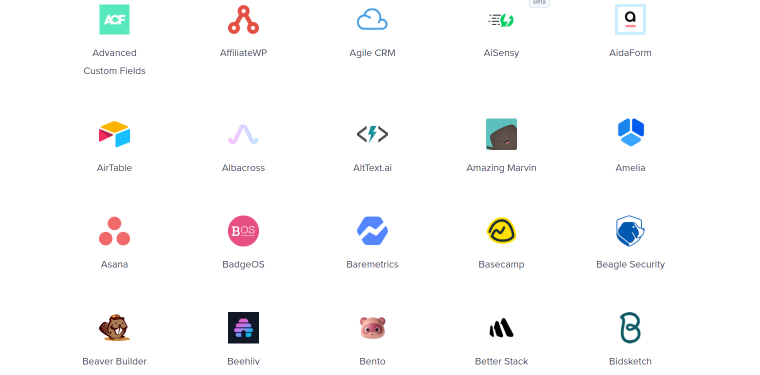
OttoKit integrates with the most popular WordPress plugins, WooCommerce, Elementor Pro, and several JetPlugins:
- Check out the JetEngine integration.
- Check out the JetFormBuilder integration.
You can also connect with popular apps like Google Sheets, Gmail, Notion, Slack, and more.
Automate without leaving the WordPress admin area
If you mostly work with WordPress, you can use OttoKit from the admin dashboard. You can perform the most common tasks within the dashboard, saving even more time.
OttoKit is hosted on cloud servers and doesn’t affect site speed in any way.
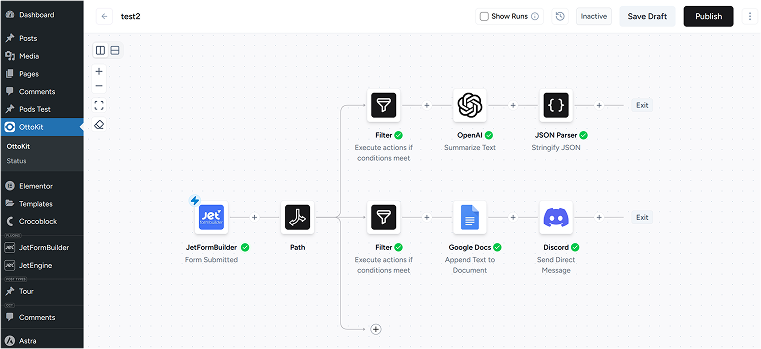
Advanced actions for flexible and complex workflows
If you need to create more complex automations, OttoKit can help. It has advanced features that allow you to develop efficient multi-step workflows.

You can also use conditions such as:
- You can use actions such as:
- Delay: time gaps or pauses in automated sequences for controlled timing.
- Schedule: to plan how often to run the workflow (once a day, once a week, etc).
- Branch: conditional pathways, allowing different outcomes based on specific criteria.
- Path: an advanced version of Branch. It helps divide your workflow into more than two action routes.
- Loop: helps you easily repeat actions or iterate over lists of information in your workflows.
- Filters: sort and select data based on specified criteria for targeted actions.
- Formatter: modify data formats to ensure desired presentation and consistency.
- API Integration: send or receive data from any app in your workflows by making API calls.
- AI Agent: helps you build AI Agents that can be used to automate your business processes.
- Human in the Loop: a powerful integration that allows you to get real human approvals for your workflows.
- JSON Parser: allows you to parse JSON strings into a mappable format.
- Code by OttoKit: add custom logic to your workflows using Python. Run scripts, manipulate data, and build powerful automations with full control.
- Email Parser: helps you extract valuable data from incoming emails and pass it into other apps so you can perform tasks like creating Trello cards from new emails.
Trigger button: one of the most useful features
The trigger button action starts workflows with a single click. The button can be linked to anything and perform all kinds of actions.
For example, when customers click to sign up, OttoKit will fetch their information and pass it to any application you set. It could enroll them in a course and automatically send a welcome message or email once someone signs up for a newsletter.
💡 Learn more about the trigger button.

Multi-step workflows and data mapping
With multi-step workflow functionality, you can implement complex automation sequences across multiple platforms.
For instance, a form submission on a website can trigger a series of actions, like adding the user to a CRM and sending login details via email or WhatsApp.
OttoKit also has a data mapping feature that lets you specify how data moves from one app to another. This allows you to handle both static and dynamic data very efficiently.
Pricing and Value for Money
You can get started with OttoKit for free with limited functionality. This gives you a taste of its potential without committing to anything.
The service also offers premium plans. These plans are tailored to handle more automations, more complex workflows, and larger projects.

Conclusion
OttoKit is a robust automation tool for WordPress. It blends extensive integration options, a user-friendly interface, and a flexible pricing structure.
Whether you’re looking to automate simple tasks or more complex workflows, OttoKit makes it easy. Is it really a Zapier alternative? You have to try and see for yourself.
It seems it has a bright future in the ever-evolving world of WordPress automation. As digital complexity and user demands rise, automation tools like this become even more important.