Pitching a care plan is like selling insurance. Nobody thinks they need it until everything breaks. And when you do bring it up, clients often look at you like you’re just trying to squeeze out an extra buck and upsell something they never asked for.
This article helps you elevate care plans from an add-on service to a must-have protection. Something that extends the lifespan of a website and drives more ROI from the budget clients invest in it.
What Is a Website Care Plan and Why Does It Matter?
A website care plan is an ongoing maintenance and support service designed to keep a website running smoothly, securely, and efficiently after it’s been launched. Think of it like routine checkups for your car—without them, even the best-built machine will eventually break down.
Depending on the provider, a care plan may include:
- regular software updates (WordPress core, themes, plugins);
- security monitoring and protection;
- daily or weekly backups;
- performance optimization;
- fixes for bugs or broken features;
- content updates upon request;
- technical support and priority access.
Most clients assume a website will just “work” once it’s built. But the truth is, websites are not set-it-and-forget-it tools. They rely on many moving parts that require regular attention. Without care, issues creep in—slow load times, security vulnerabilities, outdated software, and even full-site crashes.
In other words, a care plan isn’t just maintenance—it’s insurance for your digital storefront. It saves time, money, and stress by preventing problems before they happen and quickly resolving them if they do.
How to Sell Website Care Plans Without Feeling Pushy: 5 Steps That Build Trust and Drive Sales
1. Talk about care plans from day one—not as an add-on, but as a must-have
When someone buys a car, you don’t ask, “Would you like brakes with that?”. Same with websites. They need security, updates, and ongoing maintenance. But clients often don’t know that.
That’s why you should bring it up the moment you start a project—not as an afterthought or an upsell, but as a standard part of the service. This signals to clients the importance of care plans in protecting their initial investment in a functional and secure website.
2. Talk in a language they understand. Don’t assume they know what uptime is or why they need WordPress maintenance
Clients need to understand that a real care plan isn’t something the neighbor’s kid can handle for $10. But they don’t need to learn how backups are done or how plugins are updated.
What matters is translating your task list into simple, clear language they can easily grasp.
WordPress maintenance tasks explained in client-friendly language
| What you’ll do | What it means to the client |
| Plugin/Theme Updates | We keep your website’s design and tools up to date so nothing breaks, disjoints, or gets hacked. |
| Uptime Monitoring | We constantly check if your website is online, and if it ever goes down, even for a minute, we can fix it before anyone notices. |
| Performance Monitoring | We regularly check how fast your site comes up for your visitors. We fix anything slowing it down so they can get a smooth, fast experience, translating into more conversions for your business. |
| Vulnerability Monitoring | We scan for security issues and fix them before hackers can find them. This way, your data and reputation stay protected. |
| Backups | We make regular copies of your site and store them safely so we can quickly restore a relevant version if anything ever goes wrong. |
| WordPress & PHP Updates | We follow all news in the WordPress world so that we can keep the core system and its engine updated at all times. |
| Cache Clearing | We clear out old temporary files so your site loads faster and performs better. |
3. Craft a no-brainer website maintenance offer, giving extra value
When a client hears your offer, the bare minimum reaction should be: “Yeah, that makes sense.”
But if you want them to feel like they’re getting a steal, you’ve got to give extra value.
Think of those old TV ads: “But wait, there’s more!”
They worked then, and they still work now—because people love getting more than they paid for.
How to give extra value when selling care plans on their own?
Start by listing all the standard maintenance tasks (you can reference the table above or use this WordPress maintenance checklist), then stack the extras.
Add things like monthly care reports, priority support, free SEO tips… Or, if your pricing allows, be generous with extras like developer hours, content updates, or full-on SEO services.
The goal is to make it feel like a no-brainer deal that’s hard to match with other providers.
If your pricing doesn’t leave room for any extras, then it’s probably time to rethink your pricing model. Here’s a simple, science-backed way to do it in four steps:
- Create three or four care plans, each with different levels of service at different price points.
- Make the middle plan the sweet spot, not too cheap, not too pricey, just solid value.
- Anchor it with a more expensive plan right next to it, just like Starbucks does. That’s “price anchoring.” It makes the middle one feel like the best deal by comparison.
- Add a “decoy plan,” one that’s not really meant to sell, but you have it there to make the plan you do want people to buy look even better. And hey, if someone goes for the decoy? Good for you!
This strategy is not about tricking people. It’s about helping them feel confident in the choices they’re making.
How to give extra value when selling care plans as a part of a web development package?
The easiest way is to name your full-package price (including your maintenance costs) and frame the care plan as the added value.
You need to make sure your client understands exactly what they’re getting (and how much that’s worth). You can say something like: “We’ll maintain the website we’ll build for 6 months after launch. This service is usually worth $$$, but we include it at no extra charge.”
If you feel they’re still skeptical, put their worries to rest and make the decision easy for them by adding a clear guarantee: “If your website is not online 99% of the time, your next month is on us. And if something breaks from a standard update? We fix it immediately, at no extra charge.”
Bonus point: if you want to add a dose of exclusivity and scarcity, say something like: “We only take 50 care plan clients at a time to keep quality high.”
Now, you’re not just offering a service—you’re offering complete peace of mind.
And clients pay for that.
4. Transparency builds trust—let your clients know they’ll always stay in the loop
It’s tough for a non-tech-savvy client to fully trust a web developer. Going back to the car analogy, it’s like going to the mechanic when you know nothing about cars.
You hear the price, you hear the problem, and your first thought is, “Am I getting played? Is this really worth that much?”
You’re skeptical because you know they know more than you, and they could take advantage if they wanted to. The same thing happens with web developers. That’s why you lead with transparency. Acknowledge the doubt, and make it crystal clear: they’ll always know what they’re paying for.
Promise monthly reports that show exactly what’s been done—updates, speed boosts, security fixes—the whole deal. There are several WordPress maintenance plugins, like WP Umbrella, that let you send client maintenance reports giving an overview of everything done over the month in a personalized email and/or a branded PDF.
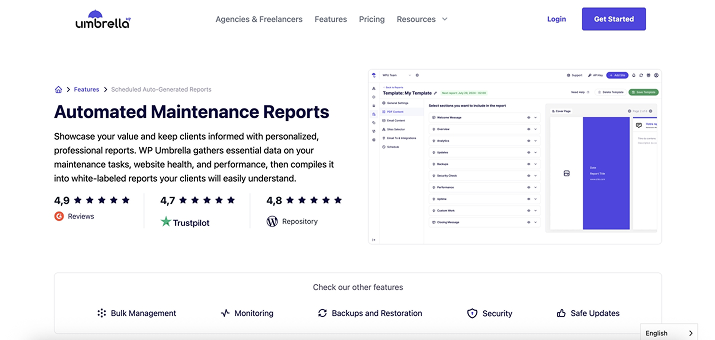
It’s the quickest way to prove the value of your service, build loyalty, and position yourself as a true professional who genuinely cares.
Because here’s the truth: when your client sits down for their finance meeting and can’t explain what your invoice is for… guess which service gets cut first?
5. Be proactive—reach out to local businesses with live (but struggling) websites
How many times have you landed on a local business website and thought, “Wow, this is slow…” or even insecure? That happens a lot. So here’s what you can do.
Reach out to reputable small and medium-sized businesses in your area. Make them aware of common problems such as slow load times, unoptimized images, expired SSL certificates—you name it.
Then, don’t sell the solution. Instead, tell them exactly how they can fix it themselves, step by step. But also mention that you can take care of it for them if they’d rather not deal with it. Just as a good “neighbor” would.
Chances are, they probably don’t have the time or expertise to fix it. Even if they do have someone in-house, pointing out something they missed plants a seed of doubt (unfortunately) and positions you as the expert.
Next thing you know?
- You land in their spam folder—in the worst-case scenario.
- You help a few businesses and get your agency’s name out there, in a realistic case scenario.
- Or, in the best-case scenario, you enroll them in your care plans and turn a cold outreach into steady MRR.
FAQ
A website care plan is an ongoing support service that keeps a WordPress site running smoothly, securely, and efficiently. It extends the lifespan of a website and increases the ROI from the money clients have already invested in its development.
Bring it up from the start. Frame it as a standard part of the project, not a nice-to-have add-on. Explain it in plain English, without jargon or technical details. Address your clients’ concerns by keeping your communication honest and transparent.
Make clients feel like they’re getting extra value. This doesn’t need to add big costs on your end—sometimes, the extra value comes from monthly care reports, priority support, free SEO tips, or a simple guarantee that things will work as they should. Clients appreciate peace of mind—and are willing to pay for it.
Definitely. Name your full-package price (including maintenance costs) and frame the care plan as added value.
There are several WordPress maintenance plugins, like WP Umbrella, that let you send client maintenance reports. These reports give an overview of everything that’s been done over the month in a personalized email and/or branded PDF.
Show that you know what you’re doing. Speak in simple language—no jargon. Be transparent and proactive with client communication.
Yes. Personalized, thoughtful outreach to relevant businesses is still an effective way to bring in new clients. Even if you don’t land a new client right away, you’ll build brand awareness that benefits your agency in the long run.
Bottom Line
If you do this right, your client will understand that care plans aren’t just optional extras. They’re the best protection for their website—the thing that makes every dollar they invest actually pay off.
Nobody can say exactly when a WordPress site will fall apart without maintenance. It could be months, years, or just until the next big plugin update.
But the reality is: without a care plan, clients end up burning cash, rebuilding their website again and again, and wondering why it still doesn’t work for them.