In WordPress development, one of the key tools you’ll rely on is the WP_Query class. It offers a flexible way to retrieve posts from the database beyond the standard WordPress loops, which rely on the main query.
I will talk about nuts and bolts, but also show you a way to deal with WP_Query and other WordPress classes without PHP knowledge – because, after all, we need a result. And there’s a unique tool that can help you get things done.
Classes, Objects, Methods, Parameters: What They Mean in Practice
When working with WP_Query, you’re dealing with object-oriented programming in PHP. To really understand what’s going on, it helps to know what classes, objects, and methods are in the runtime.
Class
A class is a definition stored once in memory (RAM). It contains:
- Properties – variable “slots” that an object will later fill with values.
- Methods – functions that are tied to that class (not just existing by themselves).
For example, in the WordPress core, you can find the file /wp-includes/class-wp-query.php, which defines the WP_Query class and has the list of properties such as $posts, $post_count, and $query_vars, as well as methods like have_posts(), the_post(), and query().
In practice, this means that the class defines the kind of data it can store and the operations it can perform. You can pass parameters to the class methods or constructor to provide input (like specifying which posts to retrieve), and those parameters are temporarily used by the method. Some of this input is then stored in class properties (such as $query_vars) so it can be used later by other methods.
Properties hold data inside the class. For WP_Query, examples include:
- $posts – stores the array of posts retrieved;
- $post_count – stores the number of posts retrieved;
- $found_posts – stores the total number of posts matching the query;
- $max_num_pages – stores the total number of pages available.
- Parameters are inputs passed to a method (or constructor) when it is invoked. They exist only while the method is executing. In WP_Query, $args passed to the constructor is a parameter that tells the class what posts to fetch.
You can find the full list of available parameters in the WordPress documentation.
If you use a nonexistent parameter, it will just be ignored. For example, there’s the author_name parameter. Using it, you define that only posts of certain authors will be displayed, and WordPress understands it. But if you use, let’s say, friend_name_color parameter, it will not do anything, simply because this parameter doesn’t exist in the WP_Query class. - Methods are functions defined inside the class that operate on its properties and can use parameters temporarily passed to them. For example, have_posts() reads $posts and $post_count to check if more posts are available, while the_post() updates the current post pointer and prepares the next post for template functions.
// 1. Parameters: define query arguments

$args = [

    'posts_per_page' => 2,          // regular parameter

    'author_name' => 'john',           // author parameter

    'meta_query' => [                // meta query parameter

        [

            'key' => 'color',       // meta field

            'value' => 'red',       // value to match

            'compare' => '=',       // comparison operator

        ]

    ]

];

// 2. Create a new WP_Query object (constructor receives $args)

$query = new WP_Query($args);

// 3. The constructor stores $args in a property

// $query->query_vars now holds both 'posts_per_page' and 'meta_query'

// 4. Methods operate on properties

if ( $query->have_posts() ) {          // method reads $query->posts and $query->post_count

    while ( $query->have_posts() ) {   // method updates internal pointer

        $query->the_post();            // method sets global $post for template

        echo get_the_title() . '<br>'; // displays the post title

    }

}
Object
While a class is the blueprint, an object is a real, live instance of that class in memory that you work with.
When you create an object, PHP allocates memory for it. Each object has its own copy of the class’s properties. That means multiple objects of the same class do not share property values. And, finally, the object is what you actually interact with in code. You call methods on it, read or update its properties, and it holds the state of that instance.
It’s important to note that an object exists only while the code is running (in RAM). When the script ends, the object is removed from memory.
For example, here $query1 and $query2 are two separate objects of the WP_Query class, and each object has its own memory space and its own values for properties like $posts or $post_count.
$query1 = new WP_Query([ 'posts_per_page' => 2 ]);

$query2 = new WP_Query([ 'posts_per_page' => 5 ]);
Each object has its own memory space and its own values for properties, such as posts_per_page (in the example above). So, changes in $query1 do not affect $query2.
What Is WP_Query?
WP_Query is a PHP class built into WordPress that allows developers to create custom queries to retrieve posts, pages, custom post types, and even custom taxonomies from the database. It gives full control over what content you fetch, how it is ordered, and how it is displayed.
The default WordPress loop (have_posts() / the_post()) is actually powered by an instance of WP_Query. When you need to customize what’s being queried, you instantiate your own query.
For example, let’s see how WP_Query is used to build a custom query to get the five latest products (custom post type product):
$args = [

    'post_type'      => 'product',

    'posts_per_page' => 5,

    'orderby'        => 'date',

    'order'          => 'DESC',

];

$query = new WP_Query($args);

if ($query->have_posts()) {

    while ($query->have_posts()) {

        $query->the_post();

        echo '<h2>' . get_the_title() . '</h2>';

    }

    wp_reset_postdata(); // important to reset after custom query

}
Key parameters (arguments) in WP_Query
Here are some of the most commonly used arguments:
- post_type – specifies posts, pages, or custom post types;
- posts_per_page – limits how many results are returned.;
- orderby and order – they control sorting (date, title, meta_value, etc.);
- meta_query – query posts based on custom field values;
- tax_query – query posts by taxonomy terms (categories, tags, custom taxonomies);
- paged – enables pagination.
For example, this is a query for posts from a “News” category, filtered by a “Featured” custom field:
$args = [

    'post_type' => 'post',

    'tax_query' => [

        [

            'taxonomy' => 'category',

            'field'    => 'slug',

            'terms'    => 'news',

        ],

    ],

    'meta_query' => [

        [

            'key'     => 'featured',

            'value'   => 'yes',

            'compare' => '=',

        ],

    ],

];

$query = new WP_Query($args);
So, basically, you will need WP_Query every time you want to display custom lists of posts – not only on Archive pages, but also as a result of applying filters.
WP_Query vs. The Main Query
Every WordPress page runs on top of a query. Without it, the system wouldn’t know what to display. The confusion often arises from the fact that WordPress has one automatic query (the main query) and then has all those tools to create as many custom queries as needed using WP_Query. They appear similar, but their purpose and scope differ.
The main query is the automatic query WordPress builds for each request (if no custom query is used). Its default values, such as post type, order, and posts per page, are defined in the WP_Query class. It is created before the template runs and stored in the global $wp_query object.
So when you:
- visit a blog archive, it fetches the latest posts;
- open a category page, it fetches posts in that category;
- load a single product, it fetches only that product, and so on.
You can modify it a little in Dashboard > Settings > Reading:
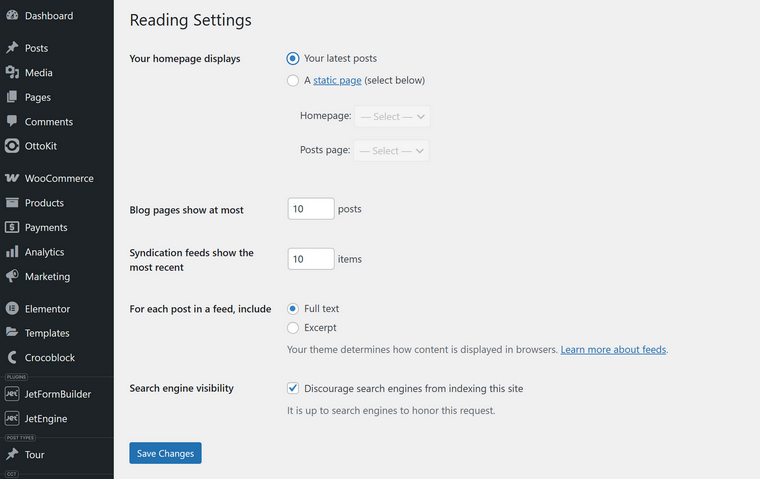
As you can see, not many options at all.
So, what if I want to modify it a bit more, but without using custom queries? You can do it by using the pre_get_posts hook. For example, here, I exclude posts that belong to the category with ID=5:
function exclude_category_from_blog( $query ) {

    if ( $query->is_home() && $query->is_main_query() ) {

        $query->set( 'cat', '-5' ); // exclude category with ID 5

    }

}

add_action( 'pre_get_posts', 'exclude_category_from_blog' );
What’s Happening Under the Hood When a WordPress Website Loads?
1. User makes a request
For instance, the browser asks for https://example.com/category/news/. The server points the request to WordPress’s index.php file in the root.
2. Bootstrap begins
The index.php file loads wp-blog-header.php. That file loads wp-load.php, which sets up the environment (constants, database, connection). Then it loads wp-config.php (your site settings), and eventually wp-settings.php, which boots the entire WordPress core.
At this point:
3. WP class takes over
After plugins and themes are loaded, WordPress runs the WP class (wp-includes/class-wp.php). The key method here is WP::main(), which handles the request lifecycle.
4. Query parsing (WP_Query instantiation)
Inside WP::main():
- It calls WP::parse_request() to figure out what kind of page the user is asking for (home, archive, single post, etc.).
- Then it creates the global $wp_query object:
$GLOBALS['wp_query'] = new WP_Query();The WP_Query constructor (__construct()) is defined in wp-includes/class-wp-query.php. That constructor calls the WP_Query::query() method, which builds SQL queries based on request variables and fetches the posts from the database.
And now, $wp_query contains:
- the results ($wp_query->posts);
- metadata (is_home, is_archive, is_single, etc.).
5. Main query is ready
So, WordPress sets $wp_the_query = $wp_query – an alias for the main query. The loop (have_posts(), the_post()) now works because it reads from the $wp_query variable.
6. Template loading
Finally, the template-loader.php checks the template hierarchy (e.g., category.php > archive.php > index.php), and it loads the correct theme file.
🥳 The final result – that theme file runs the loop, powered by the main query object.
Other Core WordPress Classes
WordPress relies on WP_Query for handling posts, but there are other types of objects, like users, taxonomies, comments, etc., and they have dedicated classes behind them. Similar to what WP_Query does, these classes define what data exists, how it’s stored in memory, and what operations you can perform.
Talking about users, the WP_User class defines all the properties and methods related to a WordPress user: ID, login, email, roles, and capabilities. When you create a WP_User object from this class, you get a live instance in memory that holds that user’s information. You can then interact with that object to check roles, add or remove capabilities, or retrieve any property you need.
Then comments – they are handled by the WP_Comment class. This class defines the structure for a comment, including the comment ID, the post to which it belongs, the author, the content, and any associated metadata. When you get a comment, WordPress gives you a WP_Comment object that provides methods to approve or unapprove comments, retrieve the text, or access the author’s details.
Terms, like categories, tags, or custom taxonomies, are managed by the WP_Term class. This class defines the properties for a term: term ID, name, slug, taxonomy type, and related data. When you work with a term in your code, WordPress gives you a WP_Term object with methods to get links, count posts, or retrieve child terms.
Other notable classes include WP_Post for individual posts, WP_Post_Type for post types, and WP_Taxonomy for taxonomies. There are, of course, many more classes, but those are the most used when it comes to fetching and displaying content that users get on the front end.
Why Query Builder Is a Game-Changer?
At the beginning of this article, I wrote that, despite all the apparent complexity, there’s a tool that does the job without requiring a deep dive into PHP details or WordPress documentation.
Query Builder by JetEngine is a unique tool that makes a complex querying approachable immediately.
Using it, you don’t have to remember all the classes, arrays, parameters, and subtle differences between classes. It’s definitely a one-of-a-kind solution, especially for non-developers. Query Builder unifies all of this into one visual interface, and you don’t have to think about the next step (which I haven’t even mentioned yet), which is displaying the results of these custom queries. Because if you were to write custom queries as code, you would have to insert them into the corresponding templates, which requires something similar to a custom framework. Most probably, you use a visual builder that overwrites your templates.
And here, the Query Builder is coming to the rescue, as you can use its query results in different builders or even without them, but only with the help of the JetEngine’s Listing Template feature – it supports Elementor, Bricks, but also the native Block Editor, so it will work with any website. By the way, Bricks’ native Dynamic Loop supports QueryBuilder’s queries as a source.
Also, with the help of Query Builder, you can do more than just standard queries. There are specialized query types, such as Merged Query for combining multiple queries, Current Query for context-specific listings, and even query types for repeaters or JetFormBuilder records. On top of that, there’s a fully-featured SQL query option, letting you fetch data directly from the database, either visually or with raw SQL with AI assistance if needed.
Once your query is ready, it’s immediately usable as a data source. You can plug it into JetEngine listing templates and display the results as a grid, slider, map, calendar, table, or even a graph. Also, you can use it with other Crocoblock plugins that support custom queries.
This is a quick overview of its interface – as you can see, all the parameters are available, along with dynamic macros that provide access to a vast variety of options.
FAQ
WP_Query is a PHP class that lets you fetch posts, pages, or custom post types based on parameters like author, category, or date. It’s the backbone for retrieving content programmatically.
The main query is WordPress’s automatic query for a page, stored in $wp_query. Custom queries are created with WP_Query or other tools, and they do not overwrite the main query unless explicitly set.
A class is a blueprint defining properties (data slots) and methods (functions). An object is a live instance of that class in memory. Properties hold the object’s data, and methods operate on it.
Yes, Query Builder supports raw SQL queries. You can either write the SQL yourself or use the visual interface with AI assistance to fetch data from the database.
You can use $wpdb – the global WordPress object that provides access to the database using the WordPress database class wpdb. It allows you to run safe SQL queries, retrieve results, and interact with any WordPress table without manually writing raw database connections. But it’s better not to overuse it.
Takeaway
Understanding WordPress queries isn’t just for developers but about knowing how content flows under the hood. Once you grasp the main query, custom queries, and how classes and objects work, you can understand what’s going on with your website on a deeper level. Also, you can get more creative with using Query Builder – the super-powerful tool by JetEngine for building all kinds of queries visually, in many different ways.