
Dynamic Function Feature for WordPress
Dynamic Function by JetEngine pulls data dynamically from the custom fields. Use it to output the min/max, summed, average, calculated values.
year







Use Dynamic Function to Perform
Dynamic Data Calculations

Count post values
Display calculation results using the Post Meta as a data source.
Pull term data
Show calculated values from Term Meta through dynamic filtering.
Query user data
Present dynamic data calculations pulled from the user meta fields.
WordPress Dynamic Function Use Cases

Display the venue capacity
Showcase the maximum allowed number of people/guests that can be present at the same venue at the same time.
Settings:
- Function – “Summed value”
- Data Source – “Post Meta”
- Field Name – “guests”
- Data Context – “Posts from current term”
- Taxonomy – “Rooms”
- Query by posts with status – “Publish”

Output the average project duration
Display the approximate project time on the User single page. Get data for calculations from completed tasks.
Settings:
- Function – “Average value”
- Data Source – “Post Meta”
- Field Name – “duration”
- Data Context – “Posts by current user”
- Query by posts with status – “Publish”
- Query by posts with types – “Projects”

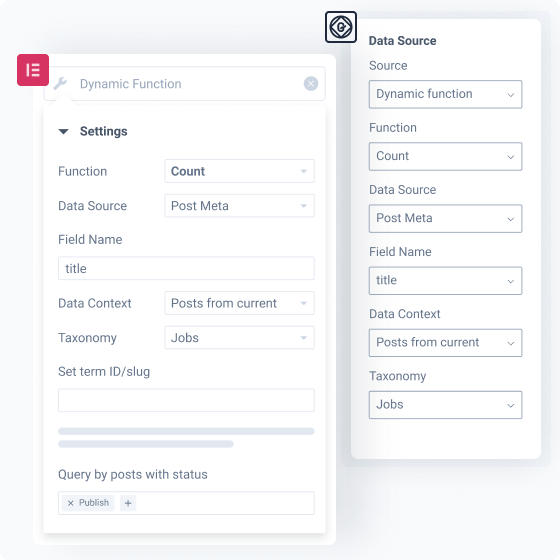
Showcase the published posts count
Output the total number of published posts relating to a certain category on the Term Archive page.
Settings:
- Function – “Count”
- Data Source – “Post Meta”
- Field Name – “title”
- Data Context – “Posts from current term”
- Taxonomy – “Jobs”
- Query by posts with status – “Publish”

Present the corporate experience
Demonstrate the company’s competence level by drawing data from the most experienced staff member's page.
Settings:
- Function – “Maximum value”
- Data Source – “User Meta”
- Field Name – “total_experience”

Display the lowest prices
Create a banner/text field showing the information about the lowest product prices and apply it site-wide.
Settings:
- Function – “Minimum value”
- Data Source – “Post Meta”
- Field Name – “price”
- Data Context – “All posts”
- Query by posts with status – “Publish”

Show the audience’s average age
Pull the users’ age from the website database and display the average value stats on any site page.
Settings:
- Function – “SQL query results”
- Query Column – “age”
- Additional Function – “Average”
Explore Modular Options & Settings
Why Dynamic Function Feature Excels Technically
Designed for WordPress creators who need flexibility, control, compatibility, and long-term maintainability.
Suits the stack you already run
Perfect match for existing WordPress builders, themes, plugins, and integration workflows without forcing teams to rebuild their environment.


Reinforced by active vulnerability monitoring
Security confidence is strengthened by external vulnerability coverage in addition to regular product maintenance.
Submit security bugsOpen architecture
Makes implementation visible and inspectable without locking project logic inside a black box.
Discover dev docsExtra dev tools
Extend the stack by adopting implementation-ready resources for custom solutions and edge cases.
Explore CodeLabLet Us Help You Get Started and Keep Growing
Everything you need to master the product, solve issues faster, and move forward safely — from docs and tutorials to direct support, examples, and community knowledge.
Learn and grow faster
Explore documentation, step-by-step tutorials, and practical onboarding resources to understand the workflow, use features surely, and keep building.


Learn from the community
See how others solve similar problems, share ideas, and exchange proven solutions. Join a space where you can learn from real use cases and keep improving over time.
Free support when you need it
- For all subscription plans
- Human-powered support
- 24/5 availability
- Live chat, tickets, and Zoom calls

What Other JetEngine Features You Get

Query Builder
Query and fetch custom data to the front end

Data Store
Build custom storage for post and content type data

Custom Fields
Add extra content details to website posts and pages