For today’s Made with Croco, we spoke with Lam Lai, CTO of a Vietnam-based web design agency that’s been delivering professional solutions since 2017. Long before founding his company, Lam discovered Crocoblock – and it quickly became a cornerstone of his workflow. By relying on just a few powerful plugins, he managed to reduce complexity, boost performance, and scale up with ease.
His latest innovation? A high-performance warranty ticket system that handles over 6,000 active tickets – all built with Bricks Builder, JetEngine, JetFormBuilder, and JetSmartFilters. It’s fast, scalable, and lightweight, all without writing a single line of code.
Introduction
Hi, I’m Lam Lai, and I work as the CTO of a website design agency in Vietnam. We’ve been active since 2017, but my journey with Crocoblock began even earlier.
I’m a big believer in simplicity. From the start, I’ve aimed to build streamlined websites that don’t depend on dozens of plugins or overcomplicated setups. That’s why I’ve stuck with four main tools for years:
- Bricks Builder, as it delivers outstanding performance optimization.
- JetEngine helps me manage CCT and build powerful queries.
- JetFormBuilder supports form progress saving and flexible webhook integration.
- JetSmartFilters helps to create intuitive search filters and pagination.
The Crocoblock plugins allow me to build complex, scalable systems using a no-code approach. Recently, I combined them with Bricks Builder to create a fully functional warranty management platform, and I’m excited to share how it works.

The Challenge
I needed a flexible, high-performing system to manage warranty tickets – over 5,000 and growing. It had to be:
- fast;
- scalable;
- intuitive for users;
- and, most importantly, easy to maintain.
Many systems like this require custom development or expensive SaaS tools. I wanted a better solution – one that I could fully control and customize. That’s where JetEngine came in.
The Solution
By combining Bricks Builder and JetEngine, I created a solution that could meet all these needs without writing custom code. Here’s how I built it:
Step 1: Initialize CCT and Query Builder
Enable the CCT feature in the JetEngine dashboard.

This step mainly involves declaring the basic fields, which are streamlined but flexible. This allows for a database-like experience, with improved performance and better structure for large datasets.

Step 2: Define Custom Query ID
I created a Custom Query to fetch data from the CCT and gave it a unique Query ID.
This Query ID is the key to connecting JetEngine with Bricks Builder and JetSmartFilters.

Step 3: Set up search with JetSmartFilters
Next, I created a search filter to allow users to find tickets easily. Using JetSmartFilters, I selected “Search” as the filter type and defined two data fields to search through.

Step 4: Declare display fields
Using Dynamic Data in Bricks Builder, I set up the layout for how each ticket should display.
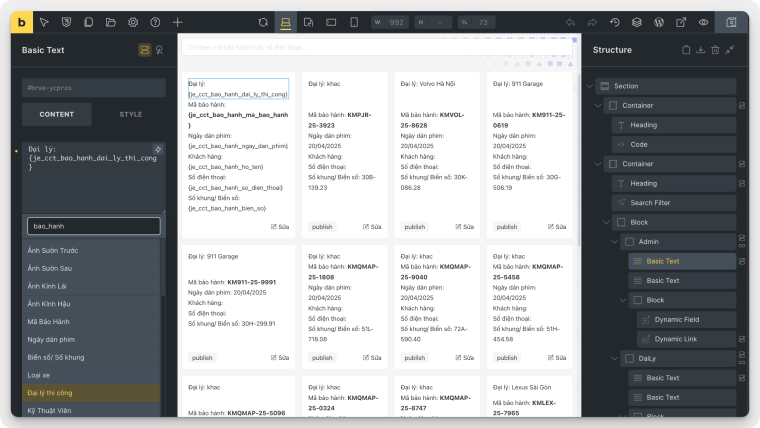
Then I wrapped everything in a Block and enabled the Query Loop, inserting the Custom Query ID to connect it with the data.

Step 5: Link Custom Query ID with search filter
Finally, I connected the search filter with the query loop by entering the same Custom Query ID into the filter settings.

That’s it – the search is now live, fast, and fully functional.
💡 The system is now handling over 6,000 warranty tickets smoothly, and it’s ready to scale even further.
Watch the full video demo here:
Tools Used
- Bricks Builder – for fast performance and visual design;
- JetEngine (CCT + Query Builder) – for scalable backend structure;
- JetFormBuilder – for forms with progress saving and webhook support;
- JetSmartFilters – for search and filtering.
Advice for Newbies
Don’t underestimate the power of combining no-code tools. With the right plugins and clear architecture, you can build enterprise-level systems on WordPress without a single line of custom code.
Take time to learn JetEngine and CCT properly. Once you understand how Custom Queries work, the possibilities are endless.
Final Thoughts
Crocoblock has empowered me to build everything from lightweight landing pages to complex platforms. Every site I launch is backed by this toolset.
If you’re serious about no-code development and scalability, this is a stack worth mastering.