WordPress.com launched its AI Website Builder in April 2025, marking a significant shift in how websites can be created on the platform. This tool uses AI to speed up the website creation process, allowing users to generate their web presence by describing what they want in natural language.
The launch comes at a time when AI-powered website builders are gaining traction, with WordPress positioning itself to maintain relevance in an increasingly competitive landscape.
Let’s dive into the platform and build a simple website for a tattoo studio, while checking all the pros and cons of the AI website builder.
NOTE
If you don’t have time for a lengthy review, feel free to scroll to the bottom, where you’ll find a comparison table.
AI Website Generation Process
The generation process is remarkably straightforward: users describe their website needs in plain English, including style preferences, and the AI analyzes this description to create a basic layout.

Within seconds, the AI website builder generates a website structure with relevant sub-pages, layouts, and placeholder content. The AI demonstrates essential comprehension of various industries and website types, from portfolios to eCommerce stores and business sites.
It can generate appropriate sections, page structures, and even suggested content based on the user’s description. For my example, I’ll use the prompt: “Tattoo studio website, with dark color scheme and red accents.”
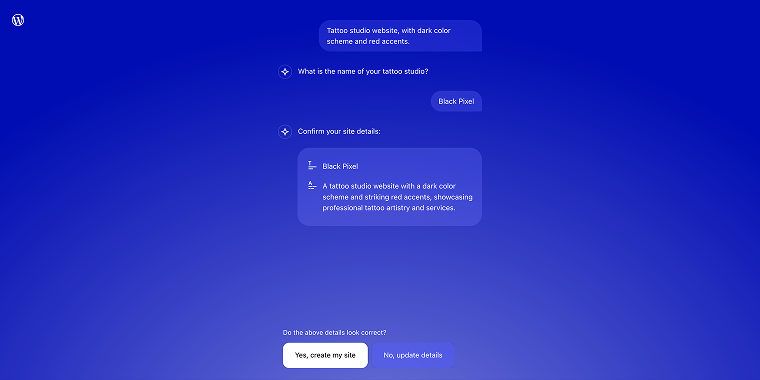
AI will ask for the name of a website to generate a website description. Then I’ll hit the “Yes, create my site” button, and the AI builder will display the final result for my preview.
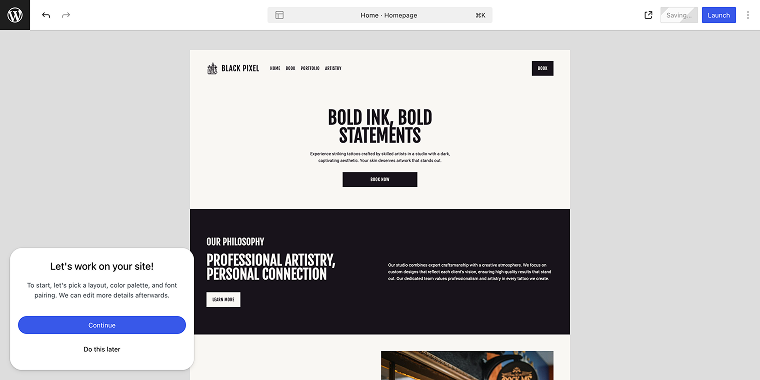
Customization options
NOTE
While the AI creates the initial structure, the Block editor provides customization and editing opportunities.
The pop-up window in the bottom left corner will allow you to fine-tune the looks. After clicking the “Continue” button, the so-called wizard will show you a set of layouts that you can apply to the home page. Most of them look pretty identical; you may spend some time generating alternative layouts, but they will still look like…a copy of a copy of a copy.
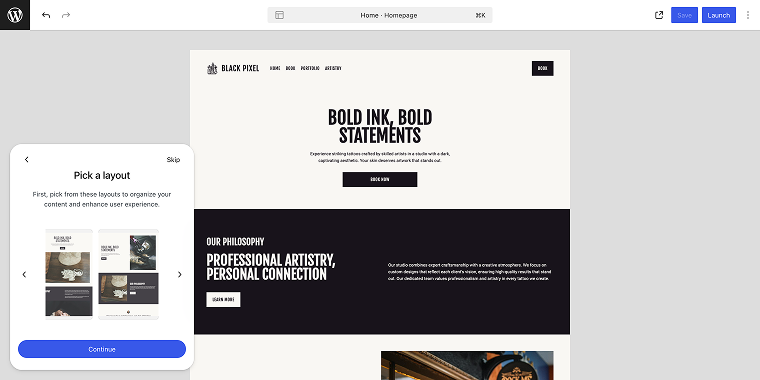
When you’re ready to pick the layout, click on the preferred option and then on the “Continue” button. On the next step, we can choose a color scheme. As in the previous step, you’re offered a set of alternatives, and if you don’t like them, you can generate a new set.
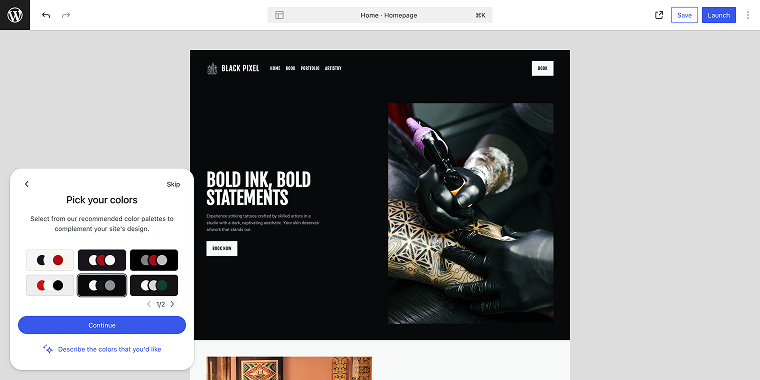
When you find a decent-looking color scheme, select it and click on the “Continue” button. Now you can choose a font pairing, select one of the prearranged options, or request AI to generate something different (by clicking the “Try something different” button). When you’re ready to continue, click the corresponding button. Please note that this is the final design step.
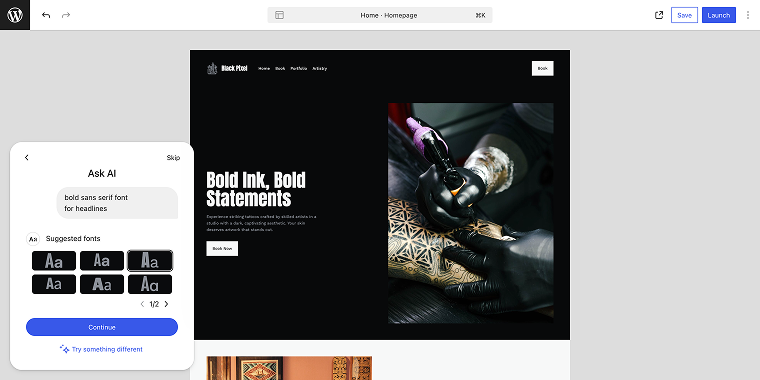
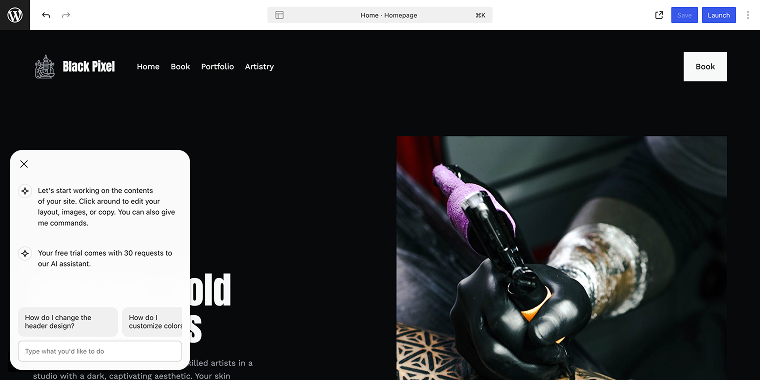
When the design stage is over, the AI will prompt you to navigate through the pages to regenerate the dummy content according to your website’s needs. Don’t forget that the free tier has a limit of 30 requests.
Features, Pricing, and Limitations
Now, let’s explore key aspects of WordPress AI Website Builder, including pricing and technical limitations, to help you decide if it’s right for your website needs.
Integration with the WordPress ecosystem
One of the strongest advantages of the WordPress AI Website Builder is its integration with the WordPress ecosystem of plugins. In a Business plan, you can install any plugin from WordPress.org. Overall, you can:
- add plugins from the WordPress repository;
- install standard WordPress themes;
- use familiar WordPress blocks and widgets;
- access the WordPress community network.
Speed of site generation
Initial site generation is impressively fast; typically, one can pass the design stage in 2-5 minutes. Such a rapid development significantly reduces the time investment, making it particularly valuable for:
- small businesses needing a web presence quickly;
- individuals creating personal sites;
- projects with tight deadlines or limited resources.
Loading speed
Sites created with the AI builder demonstrate strong performance metrics. The Lighthouse shows solid results (I’ve run the test through Incognito mode and WP admin view). All scores lie within the green zone, despite no optimization efforts being conducted.
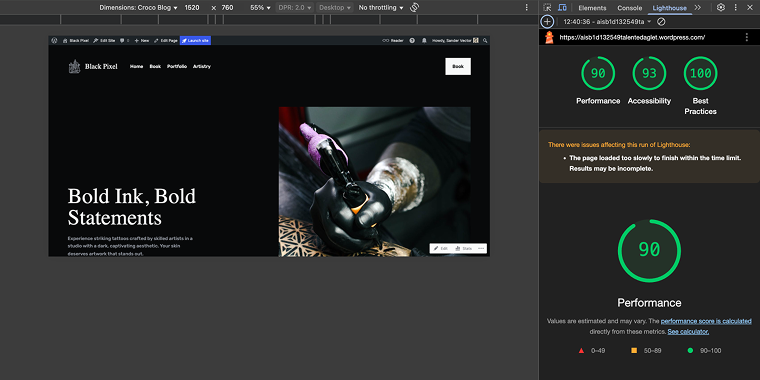
Having all the greens is good, but I don’t think they should mislead us. This is basically an empty website without plugins, so when we install some, the digits might turn yellow, requiring optimization in any case; still, these results are impressive.
SEO features
The AI builder attempted to incorporate SEO best practices but slightly overdid it. As we can see from the Ahrefs SEO Toolbar, the homepage has both a meta title and a description, but their lengths exceed the character limit by twice the acceptable amount.
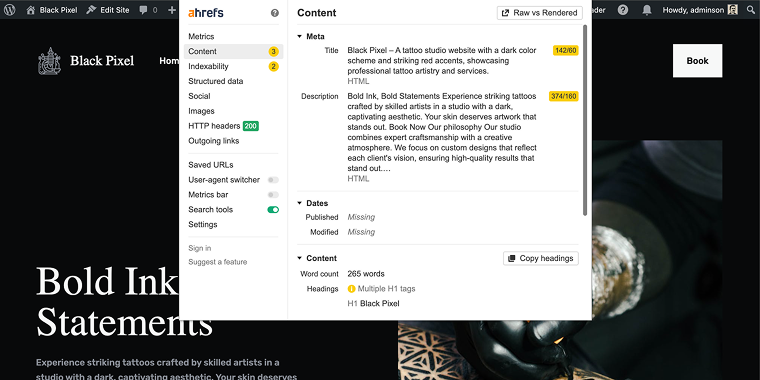
Also, there are multiple H1 tags, which is not critical and can be easily fixed.
As for the images, none of them had an alt description, and the Title field has a non-descriptive name, “Uploaded from Pexels 7005795.” Additionally, the File URL field shows that the image is located on the Pexels server and needs to be uploaded to the Media Library.
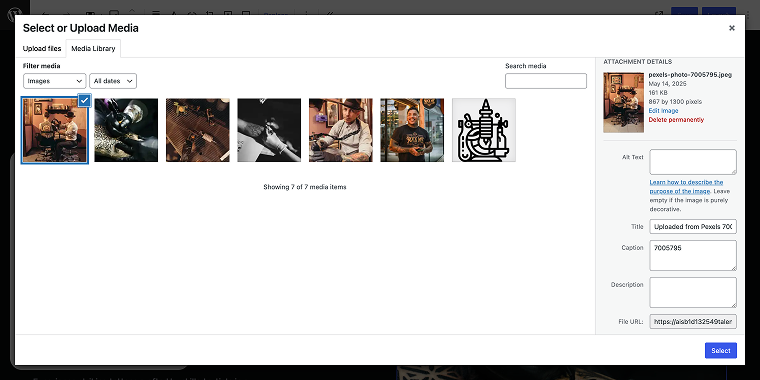
The thing I liked the most is that the WordPress AI uploaded several photos featuring the same person, which makes the home page look like a real website rather than a randomly generated thing.
Backend management (the redirect loop of a Free plan)
The backend management experience is similar to standard WordPress; the only thing that is extremely bothersome is a bizarre redirect loop of the Free plan. When I’m on the front end, and I click on the “Dashboard”:
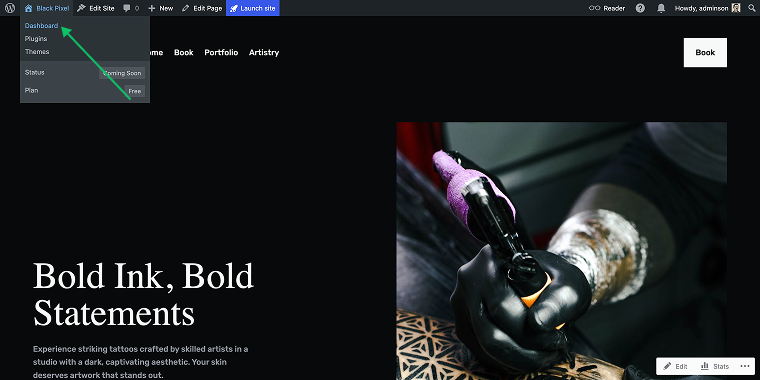
- I’m redirected to the site editor (which shows me a Choose a plan pop-up).
- The pop-up has a button “Manage all sites.” If I click it, I’m redirected to the Sites page.
- From the Sites page, I can visit my website’s Dashboard by clicking on the “WP Admin” button. And guess what happens when I click it? I’m redirected to the site editor with the Choose a plan pop-up. 😵💫
When I finally got lucky to get to the WordPress Dashboard, all links except ONE that I clicked led me to the site editor page, which displayed the Choose a plan pop-up. And guess which ONE link it was? The Plans page, where one can upgrade the website.
Upgrades (Pricing plans)
The WordPress AI Website Builder is available in two tiers:
- Free tier — includes basic AI site generation with a WordPress.com subdomain (the free tier serves as an entry point that allows users to test the capabilities before committing to a paid plan);
- Paid plans — offer custom domains, advanced customization features, removal of WordPress.com branding, and a free domain for 1 year:
- The Premium tier is priced at $8/mo (billed annually at $96) and offers impressive value for bloggers and small business owners, including installation of all premium themes.
- The Business tier is for more demanding projects, priced at $25 per month (billed annually at $300), and significantly expands the capabilities of a lesser tier, including the installation of plugins.

If you plan to build a store with this AI builder, you must choose a larger plan since WooCommerce is included in the Business tier.
Keep in mind that if you require more than 50GB of space, the cost of the tier will increase significantly. For example, if you need 100GB of storage, the monthly fee will be $75, which totals $900/year. This might be an overprice because the market offers less expensive solutions with the same specs, like the EasyWP Supersonic tier with 100GB storage for $19.88/mo or $68.88/year (renews for $114.88/year). 🤷
Easter egg in the pricing plans
While I was browsing the admin panel, I accidentally came across the third pricing plan called Personal. It can be accessed via a notification inside the WordPress Dashboard > Tools > Marketing section.
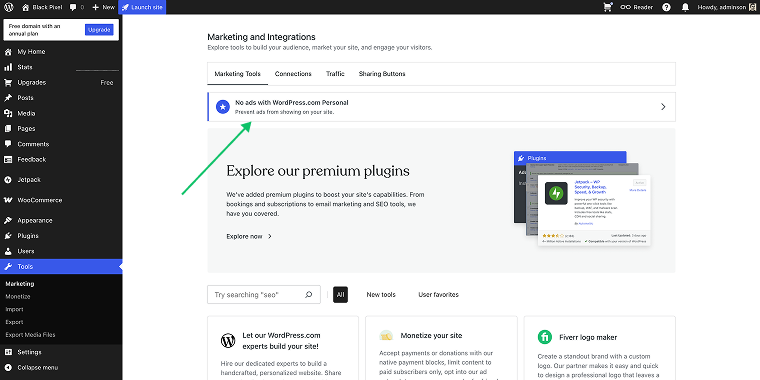
I can’t guarantee that you’ll receive the same notification; just know that you might have one. Also, I’m not sure why the cheapest plan was hidden, but please note that it does exist.
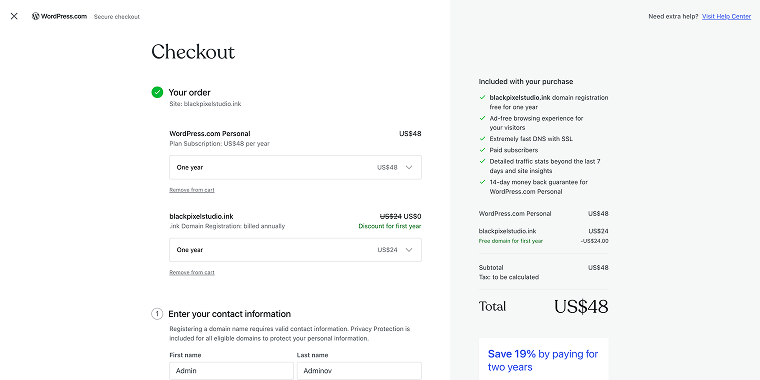
This plan provides a no-ads experience and a free domain for 1 year.
Another interesting option is the Add-Ons, where one can get:
- a domain (free for 3 months);
- ability to install Premium Themes and use Custom CSS;
- additional storage.
WooCommerce
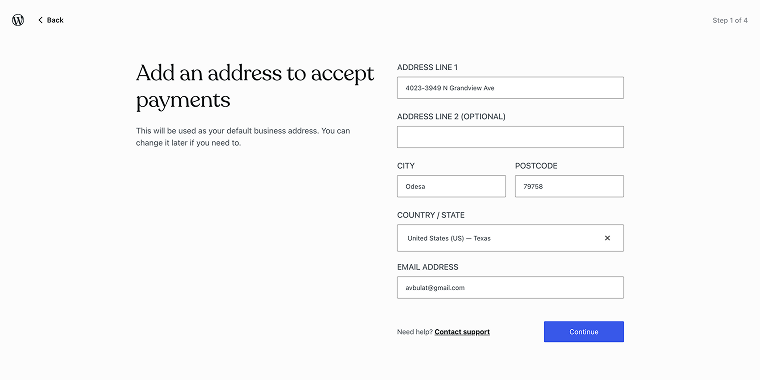
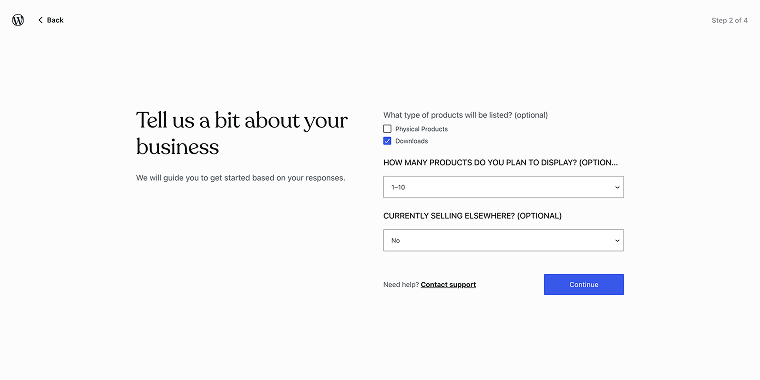
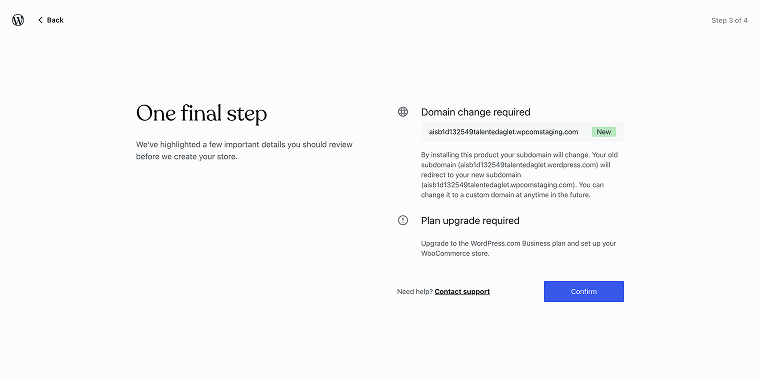
Starting a WooCommerce store is quite similar to setting up a self-hosted Woo store. After navigating to the WooCommerce section in the WordPress Dashboard, you are prompted to go through the onboarding process, which includes several steps.
Step 1 is an address form.
Step 2 requires basic info on your future store.
Step 3 is where you enter the domain name.
After that, you’re redirected to the checkout page to pay for the Business tier.
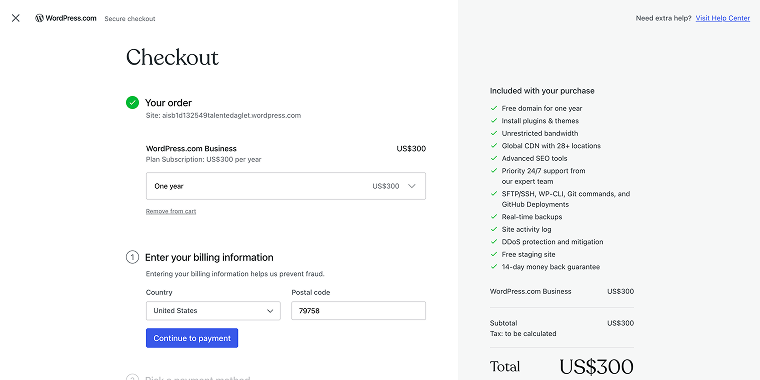
Running a WooCommerce store has its advantages, but the subscription cost can be a large con.
Design and technical limitations
Despite its capabilities, the AI has certain creative limitations; the layouts are based on the Twenty Twenty Four page layouts and templates, and most of the designs I’ve generated look quite similar. If you’re searching for something that will push creative boundaries, you might want to look elsewhere. The constraints worth noting:
- complex functionality requires additional plugins or custom development;
- advanced eCommerce features require configuration beyond what the AI can set up;
- some third-party services need manual configuration.
The platform itself might be a perfect place for users who don’t want to have hosting experience and don’t have complex technical requirements.
Comparing to Alternatives
The AI website builder is just a tiny fraction of what WordPress is capable of. In a self-hosted variant, when enhanced by toolkits like Crocoblock, it is in an entirely different league compared to traditional DIY builders like Wix or Squarespace.
WordPress with Crocoblock offers true freedom and unlimited potential. JetEngine‘s dynamic templating system supports sophisticated content relationships that traditional builders cannot accommodate.
For serious businesses, WordPress with Crocoblock allows growth without the limitations of closed platforms. The initial learning curve offers long-term flexibility and capabilities unmatched by DIY builders.
| WordPress AI Website Builder | Crocoblock Toolkit | Traditional DIY Builders (like Wix or Squarespace) | |
|---|---|---|---|
| Learning curve | Easier for beginners, steeper for advanced customization | Steep for beginners, rewarding for technical users | Easy entry point, but limiting for advanced needs |
| Growth perspectives | Better long-term scaling potential for growing websites; seamless upgrades to more complex WordPress configurations | Greater emphasis on developer tools and customization, which is excellent for agencies and developers building client sites | Limited by the platforms’ functionalities, often require migration to more robust solutions as needs grow |
| Design flexibility | AI designs with standardized patterns based on Twenty Twenty Four layouts; customizable but within system constraints | Granular control over design elements with JetStyleManager, JetBlocks, and JetElements | Visual editors with drag-and-drop interfaces; steeper learning curve for beginners, but limited technical ceiling |
| Dynamic content | Native to WordPress or provided by third-party plugins, AI can suggest content but requires a human touch. | Next to unlimited capabilities via dynamic fields, custom post types, and conditional visibility, it is power-user oriented | Limited by the platforms’ capabilities, which typically allow for basic content management without advanced dynamic options |
| Plugins/Themes | Integration with the WordPress.org ecosystem of themes and plugins | Advanced theme-building capabilities with JetEngine, JetThemeCore, and other plugins | Limited to proprietary options and third-party solutions with restricted customization |
| SEO | Basic SEO is included; premium plans offer advanced features from Jetpack | Requires additional plugins like Yoast or Rank Math | Basic SEO tools are included, but they are often less comprehensive than dedicated WordPress solutions |
| E-commerce capabilities | Basic through AI; advanced requires WooCommerce configuration | Powerful with JetWooBuilder and related plugins | Built-in, but often with transaction fees and limited customization |
| Pricing | Free tier available with premium plans starting at $8/mo. | A subscription-based toolkit (an All-Inclusive plan starts at $130/year for all plugins) plus WordPress hosting fees | Monthly subscriptions typically range from $16 to $160/month with feature-based tiers |
As you can see, the WordPress AI Builder, like traditional DIY builders, offers a more beginner-friendly approach compared to Crocoblock (which appeals more to designers and developers who are comfortable with technical customization).
FAQ
Site generation is fast, usually taking 2-5 minutes. This speed decreases the time needed for website creation, particularly benefiting small businesses, individuals, and projects with tight deadlines.
One of the strongest advantages of the WordPress AI Website Builder is its seamless integration with WordPress plugins. With the Premium plan ($8/month) or higher, you can install plugins from the WordPress.org repository or items from the Crocoblock toolkit.
The WordPress AI Website Builder incorporates SEO features but needs refinement. It generates meta titles and descriptions, which may require optimization. For better search performance, consider adding dedicated SEO plugins like Yoast or Rank Math, which are compatible with sites made through the WordPress AI Builder.
Conclusion
The WordPress AI Website Builder represents a significant leap in making website creation accessible to everyone. It effectively reduces the technical barriers to entry while leveraging the established WordPress ecosystem. The tool is especially suitable for:
- small businesses need a professional web presence;
- individuals with limited technical skills or time constraints;
- organizations requiring the quick deployment of standard website types;
- projects with limited budgets for web development.
For users willing to accept some creative constraints in exchange for speed and simplicity, the WordPress AI Website Builder offers great value, especially considering the free tier option for basic needs. As AI technology continues to evolve, we can expect this tool to become increasingly sophisticated, further blurring the line between AI-generated and professionally designed websites.