AI isn’t a headline anymore, as it’s everywhere. Both Divi and Elementor added built-in AI tools in the past year, turning what used to be manual design work into something that feels half-automated, half-assisted. Texts, images, and even code aren’t just auto-generated anymore but appear right inside the editor as you work.
It’s no surprise that Elementor, one of WordPress’s biggest players, jumped on the AI trend. What’s interesting is how far Divi has gone with its own AI features.
So let’s compare their AI tools.
How AI Fits into the Page Builder Workflow
AI inside page builders isn’t about replacing designers, but about speeding up all the small, repetitive steps that eat up time, e.g., filling out placeholder text, writing short blurbs, generating matching images, or tweaking button labels for different sections. In short, it turns blank blocks into something workable within seconds.
In Divi, AI appears in almost every field. You can ask it to write headlines, improve existing copy, or generate a background image that matches the mood of your layout. It reads the context of the module you’re editing, so it doesn’t just dump random text but tries to fit the style and tone of that section.
Elementor’s integration works more like an assistant that accompanies you throughout the build. It can create content, translate it, adjust tone, generate layouts for container sections, or even suggest a full sitemap through the new AI Site Planner. It feels like a lightweight project manager that knows what the next logical step is.
Feature Breakdown: What Each AI Does
Both Divi AI and Elementor AI promise the same thing: faster building with less manual input. As for me, the main difference is focus: while Divi’s AI works best at the micro level, e.g., for polishing modules, writing blurbs, and designing visuals on the fly.
Elementor’s AI, in its turn, covers the macro level, such as planning, structure, and consistency across pages.
Divi AI
Divi’s AI feels tightly connected to how the builder works. Every text, image, or code field can “think” for itself.
- Text generation. Instantly writes or rewrites headings, blurbs, or CTA copy inside a module. You can set the tone and polish the text by prompt adjustments.
- Image generation. Creates visuals from prompts right inside the image picker. You can regenerate, upscale, or restyle without leaving the builder.
- Code generation. Useful for making small CSS tweaks, creating hover effects, or adjusting layouts. Quite useful, as with Divi, custom CSS is often required in many cases.
- Layout creation. Can build entire sections or pages from a single prompt, matching Divi’s style presets and spacing system.
Other tools
The Divi Quick Sites feature was introduced at the end of 2024. Available in the Pro plan, it lets you generate sites from scratch, including images and content.
I can’t imagine that AI-generated texts and images can be used in real-world websites, for example, if you want to create a landing page for your product or service. However, it can be an option to start with.
powered by Divi-5 dynamic?
Elementor AI
Elementor’s AI is more open-ended. It’s less about one module and more about the whole build process.
- AI Containers. Creates whole blocks based on either a prompt, other container, or even a reference from the Internet. It uses Elementor widgets for creating such containers.
- Text AI. Writes, rewrites, shortens, expands, or translates copy on demand. You can choose a tone (such as friendly, formal, persuasive, etc.) and reuse it across multiple pages.
- Image AI. Offers advanced edits, such as background removal, generative fill, resizing, and canvas expansion, that are surprisingly close to Photoshop-level features.
- Code AI. Generates or explains custom HTML, CSS, or JavaScript for widget tweaks.
- AI Context. You can save an example of text and add the expected tone of voice to be used on future generated content, as well as information about your business.
Additional tools:
AI Site Planner. It’s a newer feature available on the Elementor website that outlines a full website structure, including pages, hierarchy, and suggested content for each. It’s designed to help plan before design begins. As of now, you can generate a collection of pages with simple wireframes and import them to your website. In the future, global styles will become available. The AI Site Planner does quite a good job of speeding up the site-building process and is free – probably because it’s in Beta.
The Angie plugin is one of Elementor’s newest experiments – an “agentic” AI tool meant to perform actions on your behalf inside the builder. In theory, it should execute multi-step tasks, such as inserting widgets, styling sections, or modifying layouts, based on plain-language prompts. In practice, it just doesn’t work. I tested several prompts similar to those shown in Elementor’s promo video, and it failed each time.
But what surprised me is that instead of using existing Elementor widgets, it generated raw HTML, even though I had Elementor Pro installed on the test site, so missing widget availability wasn’t the issue.
The only thing it handled correctly was image generation, which Elementor AI already excels at, and that was just a part of a prompt. What’s more surprising is that this tool is labeled as Beta, not Alpha, yet its functionality is far from reliable. Currently, Angie feels more like a concept than a usable product, but let’s see.
Side-by-side comparison
Let’s compare two tools head-to-head.
But before that, what is the price difference between them?
Elementor offers its AI tool for $48 per year, with 24,000 credits, up to $192 for 100,000 credits. A text or code prompt is one credit, an image costs 33 credits, and a container costs 40 credits. No unlimited option.
The AI Site Planner is currently a free tool.
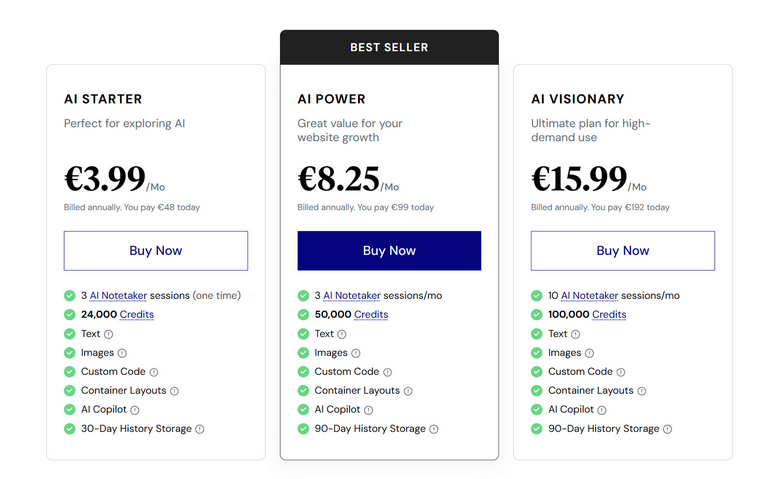
Determining the exact price for the Divi AI tool is trickier, as it comes in a bundle. If you already have Divi Lifetime, unlimited AI tool usage, plus some other perks like DonDivi, it will cost $193 per year. With Divi Pro, which costs $277 per year, you can enjoy all the existing perks of Divi, unlimited AI prompts, and the Divi Quick Sites feature.

So, Divi’s pricing is higher, but don’t forget that you will most likely use Elementor Pro, which means an additional $100 for one site or $465 for 1,000 sites per year.
But let’s see what they can do.
| Feature | Divi AI | Elementor AI |
| Text generation | Built into every text field, can write or refine copy using the surrounding context. | Can write, rewrite, translate, summarize, or adjust tone across widgets and pages. |
| Image generation | Inline generation inside image fields supports style variations and quick edits. | Includes full image editing tools like background removal, generative fill, resize, and extend canvas. |
| Layout generation | Can create ready-made sections or full pages from a single prompt that matches Divi’s design system. | Can generate container layouts or full page structures via the AI Site Planner.Also, it has an AI Copylot that can generate the next wireframe based on the existing structure. |
| Code assistance | Generates simple CSS, animations, and hover effects within modules. | Creates and explains custom HTML, CSS, or JavaScript for widgets and templates. |
| AI context/style memory | Reads module type and current design to match tone and spacing. | Learns writing tone, applies consistent style across multiple pages. |
| Site planning tools | The Divi Quick Sites feature in the Pro plan is for full-site generation. Without Pro, it’s limited to generating single pages or sections. | Dedicated AI Site Planner for sitemaps and page outlines. |
| Workflow speed | Very fast, minimal clicks inside the builder. | Slightly more steps, but covers a wider creative process. |
| Integration depth | Fully native to Divi modules and presets. | Fully integrated into Elementor’s widget and container system. |
| Extras | The Angie plugin – an agentic AI tool that can perform multi-step actions on your behalf. Still not working properly, even though it’s in Beta. Available for testing for free. |
With all being said, I would like to mention Elementor’s powerful functionality when it comes to images, particularly in removing objects or creating content-aware filling, which is extremely useful when you want to change image proportions and sizes.
With Divi, you can also expand and modify images, although there are fewer options available.
Overall, Elementor AI appears to be more suited for larger sites, offering comprehensive project planning, the ability to create wireframes (with styling in the future), and some text is already included.
Divi AI, in turn, is more suited for pinpoint applications, as it can generate a wireframe for one page at a time, unless you are a Pro user and can use the Divi Quick Sites feature.
Which One Wins?
Elementor AI and Divi AI are very close rivals. They have very similar instruments that deliver quite similar quality. However, I would highlight Elementor’s AI Copylot for container generation – it’s really powerful and flexible. Another very useful tool is the AI Site Planner, which can significantly speed up website creation. However, if you need more in-depth planning, including adding CPTs, custom fields, queries, and filters, you can combine Elementor AI with Crocoblock’s AI Website Structure Planner.
So, I would say that Elementor AI is a winner, as it offers a broader and strategic approach.
FAQ
No, Divi AI requires a separate subscription (Divi AI) or a Pro Divi license.
Yes, but with limits. You can use the basic text and image generation features in the free version, while tools like custom code require Elementor Pro.
Elementor AI currently leads here. Its background removal, resize, and generative fill features make it more powerful than Divi’s faster but simpler image generator.
Takeaway
It’s great to see builders trying to save us time – even if it comes at the cost of another AI tool subscription. Still, good design, strong copy, and authentic business presence online will always need real human work and expertise.
I’ve compared the AI tools from Elementor and Divi, and they’re close rivals. But since they belong to completely different ecosystems, it’s unlikely that Elementor users will switch to Divi for its AI features, or the other way around. In the end, both are winners in their own space.