You’re choosing a page builder setup for a new WordPress build, and the brief is the usual mix: it needs to look professional, the budget isn’t unlimited, and the client mentioned “maybe AI tools” somewhere in the call.
So, Elementor Free, Elementor Essential, or One?
This is the real decision most people are trying to make when they search “Elementor Free vs Pro.” Not “what is Elementor,” but “which tier covers what I need without paying for features I won’t use.”
Some context on where things stand: Elementor has over 10 million active WordPress installs and is used on 18.6% of all WordPress websites. Of those 10 million installs, an estimated two to three million run Elementor Pro, meaning the vast majority of Elementor users are on the free tier, either by choice or because they haven’t reached its limits yet.
That decision got more complicated in 2026, because Elementor’s lineup now includes a set of AI tools (starting from the One package) on top of the usual Free/Pro split for the WordPress CMS to build trendy and comprehensive websites.
This guide walks through Elementor free vs Pro 2026, what’s actually different, and we’ll have a closer look at the features comparison 2026, including the new AI layer to help you understand which tier will fit your project.
Elementor Free Version Overview
The Elementor Free widget count has shifted over the years; the current build is shipped with around 32 free widgets, as some have moved into Pro territory. The free widget set covers the basics:
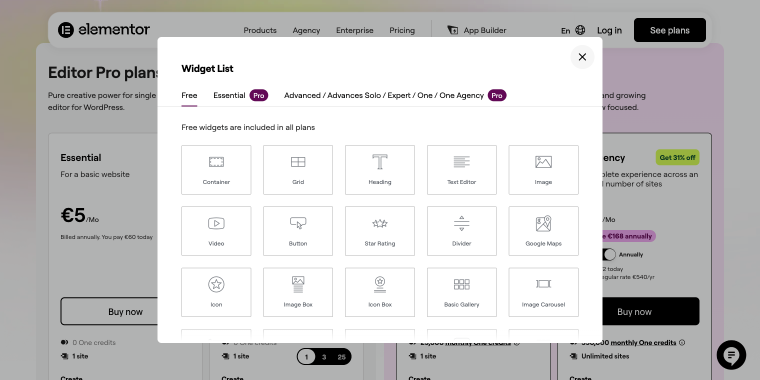
- design widgets, including Container, Grid, Heading, Button, Icon, Icon List, Counter, Testimonial, Tabs, Menu Anchor, Alert, etc.;
- content widgets, including Divider, Spacer, Text Editor, Accordion, etc.;
- image layout, video, and slider widgets including Image, Video, Image Box, Basic Gallery, Image Carousel, Sidebar, etc.;
- misc widgets, including Google Maps, Star Rating, Social Icons, SoundCloud, Shortcode, HTML, and others.
For a simple one-page portfolio, a small-business site, or a blog built on a solid theme, this is often sufficient.
Where Free starts to show its limits is in anything with repetitive, structured content. Take the Basic Gallery widget: it works fine for a dozen images, but there’s no built-in lazy-loading control.
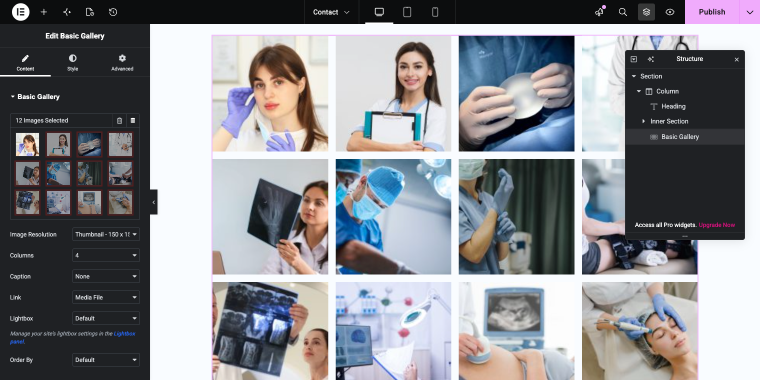
The fix isn’t upgrading to Pro; it’s usually a separate image optimization plugin, which adds its own complexity.
Elementor Pro Overview
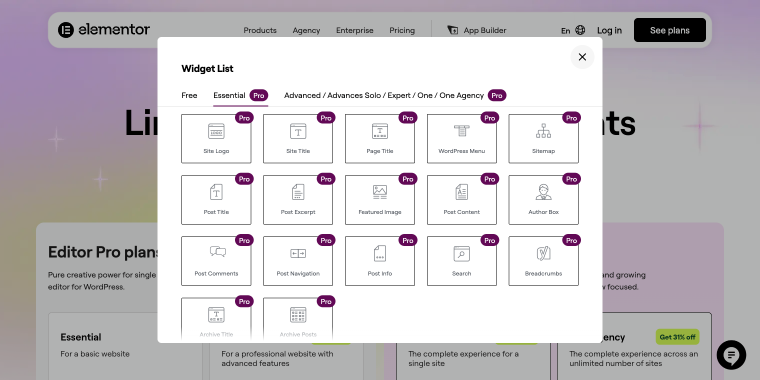
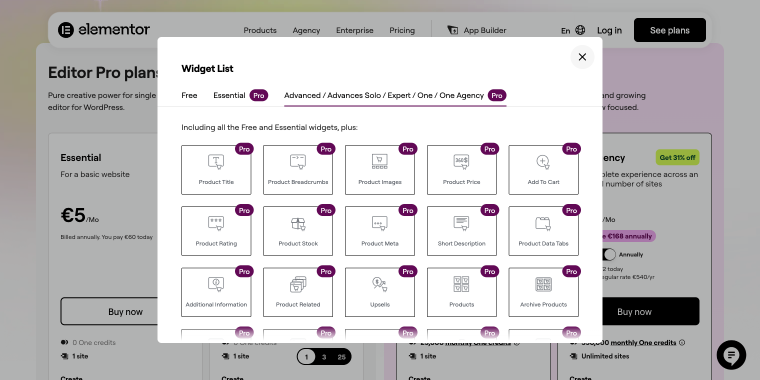
Pro starts where Free leaves off: everything in the Free version, plus the Theme Builder (headers, footers, single-post and archive templates), Popup Builder, full WooCommerce Builder, custom code and CSS support, and roughly 86 additional widgets, bringing the total widget count to over 100.
Theme elements help build and customize different parts of the website, including headers, footers, search bars, and more.
A set of WooCommerce widgets helps design different parts of a WooCommerce website.
What’s new in Elementor Pro for 2026
The core Pro feature set hasn’t changed fundamentally in years, but two things are worth noting for 2026:
- WooCommerce Builder now includes more granular cart and checkout customization than before, which is useful if you’re building a store and previously had to add custom code or a separate plugin for checkout layout tweaks.
- Cloud Templates are available alongside the existing template library. However, in practice, this is mostly an expanded template count rather than a new capability (the One Agency tier has a whopping amount of 50K templates).
Elementor Pro pricing (2026)
The core Pro feature set hasn’t changed fundamentally in years, but the pricing structure has been significantly reorganized. Elementor now offers two distinct product lines:
- Editor Pro plans (a pure page builder for single or multiple sites);
- One plans (an all-in-one bundle that adds AI credits, site optimization, and management tools to Pro).
| Plan | Price | Billed Annually | Sites |
|---|---|---|---|
| Essential | €5/month | €60/year | 1 |
| Advanced Solo | €6.50/month | €78/year (renews at €84) | 1 |
Both plans include the complete Pro feature set:
- Theme Builder;
- Popup Builder;
- Form Builder;
- WooCommerce Builder;
- Dynamic Content;
- custom code and CSS;
- premium support.
The difference between Essential and Advanced Solo comes down to the number of widgets. Essential ships with a smaller widget set, while Advanced Solo unlocks the full set of 85.
If your build needs WooCommerce-specific widgets or advanced form elements, Advanced Solo is the one to choose.
| Plan | Price | Billed Annually | Sites |
|---|---|---|---|
| One | €13/month | €156/year (renews at €228) | 1 |
| One Agency | €31/month | €372/year (renews at €540) | Unlimited |
The One Agency plan is also the only option that includes unlimited sites, replacing the Expert and Agency tiers from the old pricing structure.
Where Pro actually pays off
The jump from Free to Essential (€60/year) is worth it the moment you need a Theme Builder, meaning you’re building more than a handful of pages and don’t want to recreate the header and footer on each page manually. For a single business site with five static pages, Free will easily cover your needs. Beyond that, rebuilding the same structural markup across multiple templates by hand isn’t a good use of build time.
The jump to Advanced Solo (€78/year in the first year, €84 on renewal) makes sense if your build needs WooCommerce widgets or form elements beyond what Essential includes. For most general-purpose sites, Essential’s widget set won’t feel limited.
The One plans are worth considering separately; they’re covered in detail in the AI section below.
Elementor vs. Elementor Pro: Key Differences
The difference between Free and Pro isn’t just a handful of extra widgets; it’s the Theme Builder. Everything else is incremental.
The Theme Builder is structural: it lets you build and manage headers, footers, single-post templates, and archive pages directly in Elementor, rather than being limited to whatever your active theme provides. Without it, you’re designing inside a box defined by someone else’s theme decisions.
To see what changes when you upgrade, check out the Elementor free vs Pro feature comparison table below.
| Feature | Free | Pro |
|---|---|---|
| Theme Builder (headers, footers, archives) | No | Yes |
| Popup Builder | No | Yes |
| Form Builder | No | Yes |
| WooCommerce Builder | No | Yes |
| Dynamic content tags | No | Yes |
| Custom CSS per widget | No | Yes |
| Display conditions for widgets | No | Yes |
| Custom fonts and icons (locally hosted) | No | Yes |
| Third-party service integrations (reCAPTCHA, Facebook, etc.) | No | Yes |
| Role manager | No | Yes |
| In-editor AI (copy, image, CSS generation) | No | Yes |
| AI Site Planner | Yes (beta) | Yes |
| Angie (free credit tier) | Yes | Yes |
| Total widgets (approx.) | 30-40 | 100+ |
| Templates | 30+ basic | 200+ |
Elementor Free suits simple sites like portfolios or blogs on well-designed themes and is ideal for quick prototypes without paid tools. It’s also a good long-term option when using add-ons like JetThemeCore and JetEngine instead of Pro’s Theme Builder, making Pro’s paid features unnecessary.
Elementor Pro is ideal for larger sites that need consistent templates, saving time when rebuilding headers in a theme editor. It’s essential for contact forms, WooCommerce customization, and dynamic content linking. Starting in 2026, it’s the only tier with in-editor AI generation.
It’s not about when you need dynamic content (Custom Post Types, Relations, filtering) at a scale beyond Pro’s dynamic content tags. Elementor Pro provides tags to display data, but lacks tools to structure, relate to, or query it. JetEngine can fill this gap, whether you’re on Free or Pro.
READ MORE
Refer to this guide to learn which plugins you can discard if you have JetEngine.
Elementor Free vs Pro with AI Features in 2026?
“Elementor AI” isn’t a single feature anymore; it’s three separate tools, each with different gating between Free and Pro. The AI Site Planner and Angie’s free-credit tier both work with Elementor Free. In-editor AI generation requires Pro. If you want everything in one place, you’ll need either Pro with Angie’s paid tier or the Elementor One bundle.
If you keep wondering “Which Elementor version do I need for AI features?”, you’re not alone. Even people who use Elementor daily mix up Elementor AI, Angie, and the AI Site Planner. They’re not the same product, aren’t priced the same way, and don’t unlock at the same tier.
| Tool | What It Does | Free | Pro |
|---|---|---|---|
| AI Site Planner | Generates wireframe page structures before design starts | Available (beta) | Available |
| In-Editor AI | Generates copy, images, and custom CSS inside the editor | Not available | Included |
| Angie | Agentic assistant that builds widgets, code, and site assets | Free daily-credit tier; Tabs generation works | Form generation requires Pro |
The AI Site Planner is the easiest case: it’s free on both tiers, and useful for sketching a site’s page structure and content hierarchy before you open the editor.
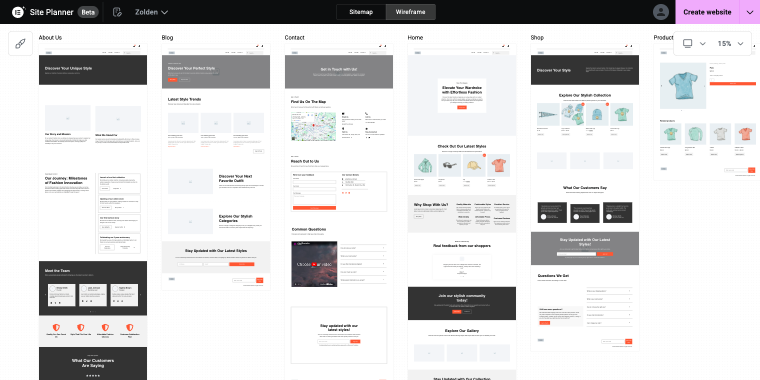
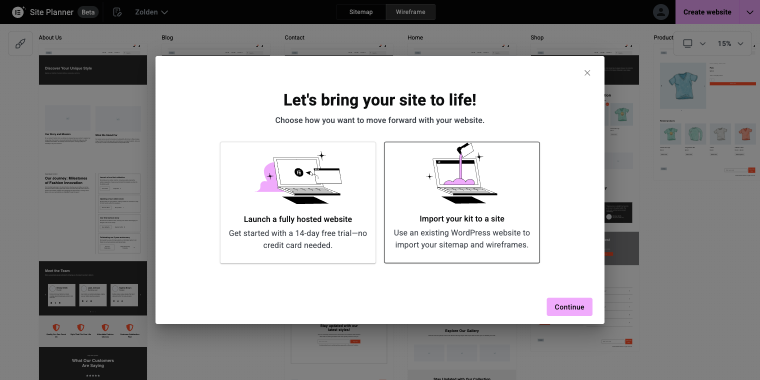
After mapping the structure, the tool can help you import the kit to your website.
In-editor AI is the opposite; it’s a Pro-only feature available in the editor and covers copywriting, image generation, and custom CSS on demand.
Angie sits in the middle. It’s a separate plugin from Elementor’s core AI features, works site-wide rather than just inside the Elementor editor, and ships with its own free credit tier, regardless of whether you’re on Elementor Free or Pro. The catch is that some of what Angie can build, such as generating a working contact form, requires an active Pro subscription, even though other actions, like generating a Tabs element, work fine on Free.
AI tools like these are good at generating content and code on demand, but they don’t replace structured dynamic data. If you’re building a directory, listing, or membership site that requires content to be organized, filtered, and related across post types, that’s a gap none of Elementor’s AI tools address, and it’s where a plugin like JetEngine comes in.
Elementor Add-ons
Each add-on focuses on improving specific aspects of website building rather than replacing Elementor Pro as a whole.
Design add-ons
Design add-ons for Elementor expand layout-building capabilities by offering additional widgets, styling options, and creative elements. They help designers create more visually appealing and flexible layouts.
Advanced global elements
Some add-ons introduce advanced site-wide features such as mega menus, sticky headers with more control, and enhanced form builders. These tools are essential for creating complex website structures and improving user experience.
Tools for dynamic content and custom fields
For websites that rely on dynamic data (e.g., blogs, eCommerce, and membership websites), add-ons provide better integration with custom fields, post types, and dynamic content sources. A good example is Crocoblock’s JetEngine, which specializes in managing dynamic data and custom fields efficiently.
These add-ons and plugins allow users to customize their sites more precisely, improve performance by enabling only necessary features, and add functionalities that go beyond the free and Pro versions of Elementor. JetEngine handles exactly this. If you’re building a property listing site where each listing connects to an agent post type, a neighborhood taxonomy, and a set of custom calculated fields (price per sqm, availability status), Elementor Pro’s dynamic tags will display that data. Meanwhile, JetEngine structures it, creates the relationships, and builds the query loop that populates your Listing Grid. The two aren’t competing; Pro’s dynamic content layer works better with JetEngine underneath it.
The same applies to WooCommerce builds that go beyond standard product templates. JetWooBuilder handles archive pages, single-product layouts, and cart/checkout customization with a level of control that Pro’s WooCommerce widgets don’t match.
FAQ
Elementor Free is completely free, with no hidden fees or usage limits. The only costs occur if you choose to upgrade to Pro, purchase an AI credit bundle, or add third-party plugins.
The biggest difference is that Theme Builder Pro lets you build and manage headers, footers, archive pages, and single-post templates directly in Elementor. Beyond that, Pro adds the Popup Builder, Form Builder, WooCommerce Builder, dynamic content tags, custom CSS per widget, and in-editor AI generation. Free covers basic page building on top of your active theme.
It depends on which AI tool you mean. The AI Site Planner is free on both tiers. Angie offers a free credit tier that works whether you’re on Free or Pro, though some Angie actions, such as generating a contact form, require an active Pro subscription. In-editor AI (copy, image, and CSS generation inside the editor) is Pro-only.
Elementor AI refers to in-editor AI, which includes copy, image, and CSS generation tools built directly into the Pro editor. Angie is a separate agentic plugin that works site-wide, not just within the Elementor editor. Both are built by the same company but are distinct products with different access tiers and credit systems.
In-editor AI is included with Pro plans, but it uses a credit system. Credits are consumed each time you generate content, images, or CSS. If you need more credits, Elementor One (€14/month) bundles 25,000 monthly credits with Pro features in a single subscription.
Conclusion
Having looked at an up‑to‑date Elementor Free vs Pro features comparison for 2026, the final decision still depends on your website’s complexity. For simpler sites, the free version of Elementor might be sufficient. However, for more complex sites, additional plugins like the Crocoblock suite can help you address design challenges and greatly expand your site’s overall functionality.
On the other hand, Elementor Pro is always a step up from the free version, offering useful tools like a theme builder, custom CSS editor, and other benefits that make website building more efficient and flexible. The downside is that it’s a paid version, and there’s no lifetime license. But if the question is “Which Elementor version do I need for AI features?”, now you definitely know the answer.
Ultimately, whether you should upgrade to Elementor Pro depends on your needs. If you’re still unsure, check out success stories from creators and websites built with Elementor and Crocoblock.