As a frequent Internet user, you will likely be familiar with HTTP vs. HTTPS and WWW. But what does it mean? What’s the difference? Knowing the answers to these questions can help you understand how to create a WordPress domain with effective SEO, high-level performance, and functionality, which users can trust.
In this article, I focus on the definitions and differences between HTTP, HTTPS, and WWW and explain how the usage of these elements affects the site’s SEO. Let’s get started!
HTTP vs. HTTPS: Understanding the Basics
To begin with, let’s focus on the primary definitions of HTTP and HTTPS protocols and what they are used for.
According to Q-Success DI Gelbmann GmbH statistics, in 2025-2026, HTTP is used by 34.7% of all websites, while HTTPS serves as the default protocol for 89.4% of the web’s sites.
What is HTTP, and what are its primary uses?
HTTP (Hypertext Transfer Protocol) is an application-layer protocol used for communication between a web browser and a web server.
HTTP is a stateless protocol, meaning each request is independent and does not retain information about previous interactions. Mechanisms like cookies and sessions are used to maintain state when needed.
It defines how requests and responses are structured and transmitted over the web. When you open a website, your browser sends an HTTP request to a server, and the server responds with the requested resources.
HTTP is primarily used to transfer hypermedia content, including:
It is the foundation of data communication on the World Wide Web, enabling web pages and related resources to be delivered and displayed in browsers.
What is HTTPS, and what are its primary uses?
HTTPS (Hypertext Transfer Protocol Secure) is a secure version of HTTP that enables encrypted communication between a web browser and a web server.
Since August 2014, it has been an approved ranking signal by Google, which has used encryption protocols like Transport Layer Security (TLS) to protect data transmitted over the web. This ensures that any information exchanged — such as login credentials, payment details, or form data — cannot be easily intercepted or altered by third parties.
HTTPS is primarily used to:
- secure data transfer between users and websites;
- protect sensitive information from unauthorized access;
- ensure data integrity during transmission;
- verify the authenticity of a website through SSL/TLS certificates.
It is a fundamental part of the modern web and is required by browsers and services like Google for secure and trustworthy user experiences.
Is HTTPS required in 2026?
Yes — HTTPS is no longer optional. It is a standard requirement for modern websites.
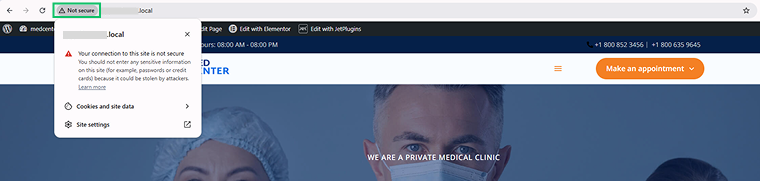
Since 2018, browsers like Google Chrome have marked HTTP websites as “Not Secure,” warning users that their connection may be unsafe. This can negatively impact user trust and engagement.
Following years of quick growth from 2015 to 2020, the adoption of HTTPS has reached a plateau, as shown by Google’s transparency report. Additionally, Google Chrome announced that by October 2026, the company intends to make “Always Use Secure Connections” the standard setting for its public-sites variant, beginning with the Chrome 154 update.
HTTPS is a confirmed ranking signal used by Google, meaning secure websites may have an advantage in search results. More importantly, it protects data by encrypting communication between the user and the server. Moreover, many modern web features (such as payment processing, geolocation, and some APIs) are only available on secure HTTPS connections.
Websites using HTTPS display a padlock icon in the browser’s address bar, indicating that the connection is secure and that data is transmitted safely.
How to set up HTTPS in WordPress?
Setting up HTTPS in WordPress is straightforward and involves a few essential steps to ensure that your site is fully secure:
- Install an SSL/TLS certificate
Most hosting providers offer free SSL certificates via Let’s Encrypt. You can usually enable it directly from your hosting control panel. This certificate allows your website to use HTTPS.
- Update WordPress URLs
Once the certificate is installed, update your site URLs to use HTTPS. For that, proceed to WordPress Dashboard > Settings > General. Change the WordPress Address (URL) and Site Address (URL) to “https://yourdomain.com”.
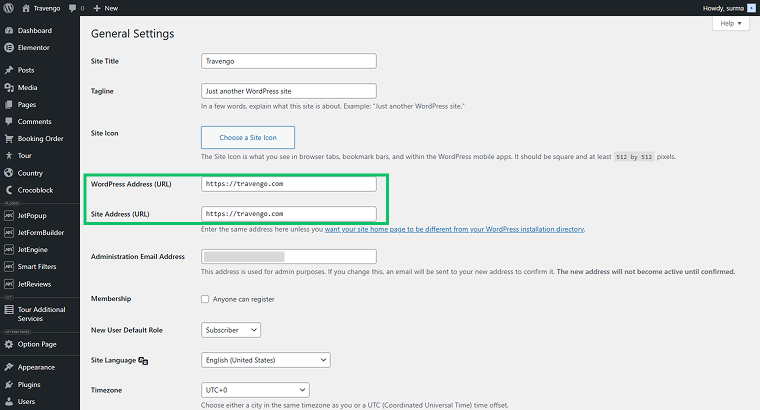
Don’t forget to click the “Save Changes” button after the settings are applied.
Alternatively, you can force SSL for the admin area by adding the following line to your wp-config.php file:
define('FORCE_SSL_ADMIN', true);- Flush permalinks
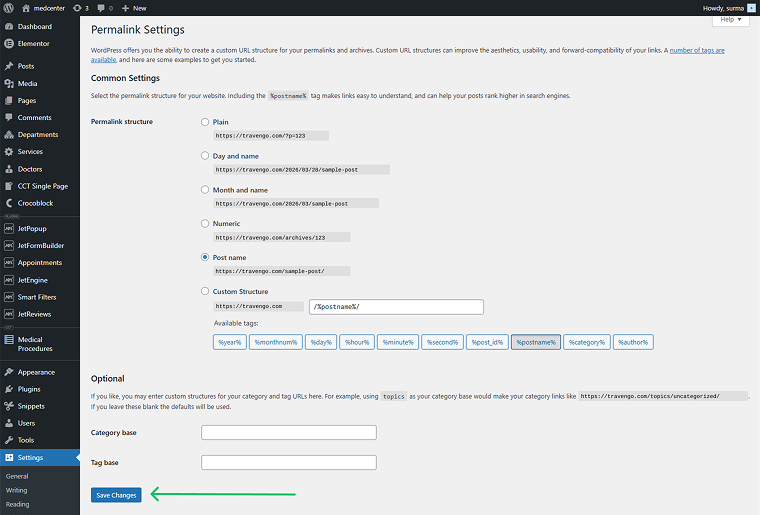
After updating your URLs, go to WordPress Dashboard > Settings > Permalinks and click the “Save Changes” button to flush the permalinks. This ensures all internal links are updated to HTTPS.
What is the main difference between HTTP and HTTPS?
The primary difference between HTTP and HTTPS is security.
HTTPS encrypts communication between the browser and the server using protocols like SSL/TLS. This ensures that data transmitted — such as passwords, personal information, or payment details — cannot be intercepted or tampered with by third parties.
According to W3Techs, at present, the SSL certificate market is highly centralized, with 90% of certificates issued by just six authorities. Let’s Encrypt holds a dominant 63.7% share, significantly ahead of GlobalSign’s 22.4% and Sectigo’s 5.9%. Because the remaining providers each hold under 0.1%, there is a stark concentration of power within the industry.
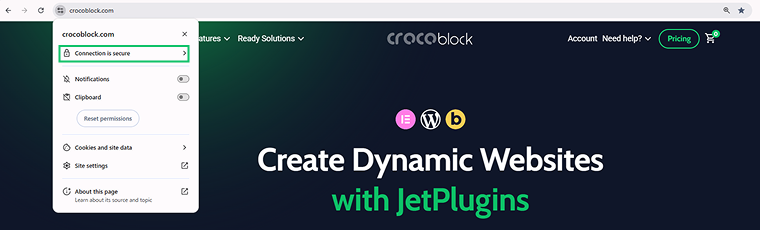
HTTPS URLs are easy to recognize: they start with “https://” and usually display a padlock icon in the browser’s address bar or, if you click the “View site information” icon, which indicates a secure connection. The padlock represents a valid SSL/TLS certificate issued by a trusted certificate authority.
HTTP, on the other hand, does not provide encryption or security guarantees. While it can be acceptable for websites that only share public information, it is not recommended for sites handling sensitive data, such as banking, eCommerce, or login forms.
Mixed content: what is it and how to fix the issue?
Mixed content term is used when talking about the sites that contain a mix of HTTPS (secure) and HTTP (insecure) content. This suggests that the existing SSL certificate for the website does not work properly. When one page loads an HTTP source, the browser blocks it and shows the warning that the page is not secure.
To check if the site has mixed content, go to the Chrome DevTools > Console. If the issue exists on the site, you will see the following errors in the Console.
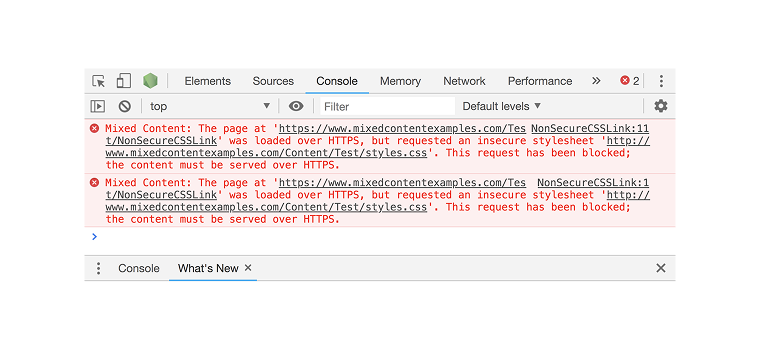
When moving a site from HTTP to HTTPS, it’s common to run into mixed content issues, where images, scripts, or styles are still loaded over HTTP. This can break layouts and trigger browser warnings. To prevent them, go through the following checklist:
- Replace HTTP links in your content
Use a plugin like Better Search Replace to perform a bulk replacement of URLs in your database:
- search for http://yourdomain.com;
- replace with https://yourdomain.com.
This updates internal links in posts, pages, and other content, ensuring everything points to HTTPS.
- Force HTTPS via .htaccess redirect
Set up a 301 redirect from HTTP to HTTPS to make sure all visitors and search engines are automatically redirected to the secure version. Transitioning from HTTP to HTTPS via a 301 redirect acts as a definitive server-side instruction, shifting both traffic and search bots from an unprotected URL (HTTP) to a secure one (HTTPS). Besides protecting user data, it optimizes SEO by transferring existing link authority and signals to search engines that the secure page is the primary version to be indexed.
This guarantees consistent HTTPS access and prevents duplicate content issues.
- Update dynamic URLs in JetEngine
If you’re using JetEngine for dynamic content, ensure that all meta fields storing URLs are updated to HTTPS. This prevents broken images, failed AJAX requests, and console warnings. However, the Better Search Replace plugin should have already performed those changes.
After making these changes, clear caches (browser, or plugins like WP Rocket) and check your site using Why No Padlock? to verify that all content is loaded securely.
HTTPS vs. WWW: What’s the Difference?
It’s important to understand that WWW and HTTP are not the same thing:
- WWW is a subdomain of your main domain (e.g., www.example.com).
- HTTP or HTTPS is a protocol that defines how data is transmitted between the browser and the server. HTTPS adds encryption and security.
They are separate concepts and do not imply each other — a URL can be https://example.com, https://www.example.com, or even http://example.com (though remember that HTTP is insecure). According to usage metrics, even though users typically input bare domains like example.com, it is standard industry protocol to configure hosting with the www subdomain (e.g., www.example.com).
WWW is not required for a website to function. Because WWW was the standard format in the early stages of the Internet, it quickly became an iconic identifier, rooted in history. Today, both example.com and www.example.com will work equally well, as long as you choose one version as the primary domain. Data on usage shows that although people frequently enter naked domains such as example.com, employing the www subdomain like www.example.com remains a standard practice in the hosting industry.
You can use a non-WWW domain (also called a “naked domain”) or a WWW subdomain. The main requirement is consistency — all other versions should redirect to your chosen primary domain.
WWW vs. non-WWW: SEO and technical differences
From the SEO perspective, there is no inherent advantage to choosing WWW or non-WWW, as long as canonicalization is correctly configured. Search engines like Google will treat both versions equally if only one is consistently used and properly defined.
However, there are some technical differences outlined below.
WWW:
- acts as a subdomain;
- can be configured using a CNAME (Canonical Name) record in the Domain Name System (DNS);
- offers more flexibility for advanced setups (e.g., Content Delivery Networks, subdomain-based configurations).
Non-WWW:
- also called a “root” or “naked” domain;
- cannot use CNAME in the same way;
- cookies are typically set for the root domain, which may affect subdomain behavior.
As the best practice, it is recommended to choose one version (WWW or non-WWW) as your primary domain and enforce it by:
- setting up 301 redirects from the alternative version;
- using consistent internal links;
- defining canonical URLs.
This ensures all traffic and SEO signals are consolidated into a single version.
Why Google may show non-WWW instead of WWW?
Google does not always display the version of your site that you expect. Instead, it selects a canonical version based on multiple signals, such as:
- internal linking consistency;
- XML sitemaps;
- canonical tags (rel=”canonical”);
- international targeting signals (e.g., hreflang).
If these signals are inconsistent, Google may choose the non-WWW version even if you prefer WWW (or vice versa).
To indicate your preferred domain version:
- Use canonical tags on all pages.
- Ensure your XML sitemap includes only the preferred URLs.
- Set up 301 redirects to enforce the correct version.
- Keep all internal links consistent.
Previously, you could set a preferred domain in Google Search Console, but this option is now deprecated. Today, Google relies entirely on the signals listed above.
How WWW and HTTP/HTTPS Affect SEO
The choice of WWW or non-WWW does affect SEO indirectly through canonicalization: search engines treat www.example.com and example.com as separate domains if both are accessible. If you don’t set a canonical version and proper redirects, your SEO authority can be split between the two versions, lowering your rankings.
Similarly, switching from HTTP to HTTPS changes the URL. It is strongly recommended to redirect HTTP to HTTPS and notify Google (via sitemaps, as it was listed earlier) to preserve SEO value.
The main step that should be completed is to choose one canonical URL and enforce it with:
- 301 redirects from all other versions;
- correct canonical tags in your pages;
- consistent internal linking.
This ensures all link equity, ranking signals, and user access go to a single, secure version of your site.
FAQ
Yes. HTTPS is a confirmed Google ranking signal since 2014.
No. WWW is a subdomain. HTTP and HTTPS are encryption protocols. They are unrelated and are aimed at different purposes.
No. Chrome marks HTTP sites as «Not Secure». Google penalizes HTTP in rankings. So we strongly recommend using the HTTPS encryption protocol.
Mixed content term is used when talking about the sites that contain a mix of HTTPS (secure) and HTTP (insecure) content. Browsers usually give warnings and notifications about the mixed content issue.
HTTP is not more secure than HTTPS because it does not possess security certificates such as SSL. Because HTTP does not have these security measures, it is not a recommended option for any website that contains secure data (like a banking website with credit card information). However, it is safe to browse a regular website.
The best time to use HTTP is for browsing a regular website; doing this is safe, as most websites will not contain personal or sensitive information. However, HTTP domains are unsuitable for any website that needs high-level security measures, such as a banking website. HTTP requests and responses (processed through an origin server) are also helpful because they can acquire information or resources from a server.
The easiest way to determine if a website uses HTTP or HTTPS is to check the web address. The URL will be at the beginning of the web address (for example, https://example.com). Additionally, browsers like Google show a padlock icon for sites with a secure connection, and give a “Not Secure” notification for sites with the HTTP protocol.
No, WWW is not a required element of the URL. It might be used for subdomains.
Final Thoughts
HTTP, HTTPS, WWW, and non-WWW are different parts of a URL, and each plays a specific role. HTTP / HTTPS defines how data is transferred, while WWW / non-WWW defines the hostname (domain structure). They are not interchangeable, but they have to be configured together correctly.
- HTTPS is essential — it secures data, builds user trust, and is a ranking factor used by Google.
- WWW or non-WWW is a choice for you to make — neither is better for SEO by default. Canonicalization is critical — all versions must point to one primary URL.
Here is the final comparison table for your understanding.
| HTTP | HTTPS | WWW | non-WWW | |
| Type | Protocol | Protocol (secure) | Subdomain | Root domain or no domain |
| Encryption | ❌ None | ✅ Encrypted (SSL/TLS) | — | — |
| SEO impact | ⚠️ No positive signal | ✅ Positive ranking signal | Neutral | Neutral |
| Browser trust | ⚠️ “Not Secure” warning | ✅ Trusted (padlock icon) | — | — |
| Cookie behavior | — | — | Configurable (can be isolated or shared) | Typically, the root scope (can be shared) |
| DNS / CDN setup | — | — | ✅ Supports CNAME (flexible) | ⚠️ Requires ALIAS/ANAME or CDN support |
I hope this article helped you understand HTTP, HTTPS, WWW, and non-WWW, what the difference between them is, and when to use them.