When creating submission forms, user experience is essential, especially for file uploads. Whether you’re collecting job applications, handling support tickets, or gathering user-generated content, how users interact with your forms can determine their overall experience.
The JetFormBuilder Drag & Drop File Upload Addon stands out as a powerful solution that turns the file upload process into a simple, efficient, and user-friendly task.
How to Use the Drag & Drop File Upload Addon?
The Drag & Drop File Upload add-on was developed in response to numerous customer requests for a more advanced, user-friendly file upload option. While JetFormBuilder’s existing Media Field effectively manages uploads, users often reach its limits. The standard Media Field, though functional, doesn’t meet all the needs of modern WordPress sites, such as:
- support for multiple MIME types;
- real-time progress updates during uploads;
- multi-file uploads with drag-and-drop reordering and storage options;
- role-based access restrictions for better security.
What Problems Does the Addon Solve?
WordPress file upload forms often cause frustration during user interactions. Users encounter difficulties due to awkward interfaces, limited file type options, and uncertainty about upload status. The new JetFormBuilder add-on addresses these issues by providing:
- drag-and-drop interface that eliminates the need for users to navigate multiple dialog boxes, making file uploads as simple as dragging files from their desktop directly into the form field;
- upload progress in real time, reducing anxiety about whether their files are being processed successfully;
- ability to reorder and remove files before submission provides users with full control over their uploads.
By using the WordPress Media Library interface, the add-on provides a familiar experience that users already recognize.
Features and Benefits
The JetFormBuilder Drag & Drop File Upload add-on offers impressive possibilities in terms of user experience and admin control.
Advanced upload interface and access control
Users can easily drag files from their computer into the form field, providing a straightforward and easy upload experience.

Upon default, users can utilize the WordPress native Media Library, which allows them to select from existing uploaded files. To trigger the Media Library window, one should click on the “Select from Media Library” button.
To enable this feature, go to the Drag and Drop File Upload block settings of your form.
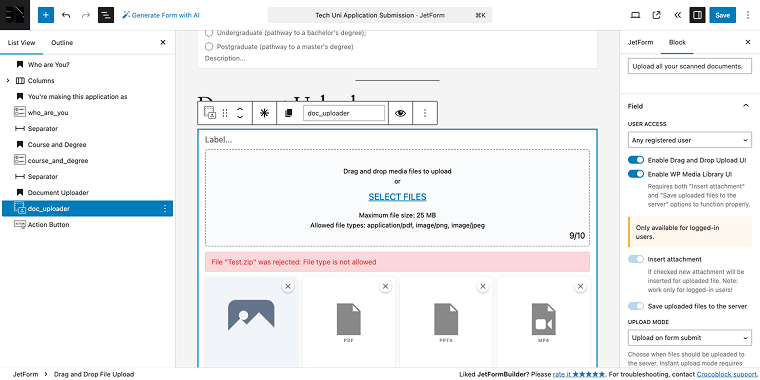
In the Field tab, there is a USER ACCESS dropdown (where you can select the user level access) and a set of toggles, including the one called Enable WP Media Library UI. When enabled on the front end, a button will appear that triggers the Media Library pop-up.
Restricting user roles to access the upload feature ensures security and proper access levels tailored to your site’s specific needs.
Upload management
Select immediate upload or upload upon submission, with real-time progress indicators.

Users can cancel uploads and remove items from the queue before they finish. Drag uploaded files in the preview to rearrange them as desired.
To adjust the upload options in the block settings, locate the UPLOAD MODE field and select either “Instant upload (immediately)” or “Upload on form submit.”

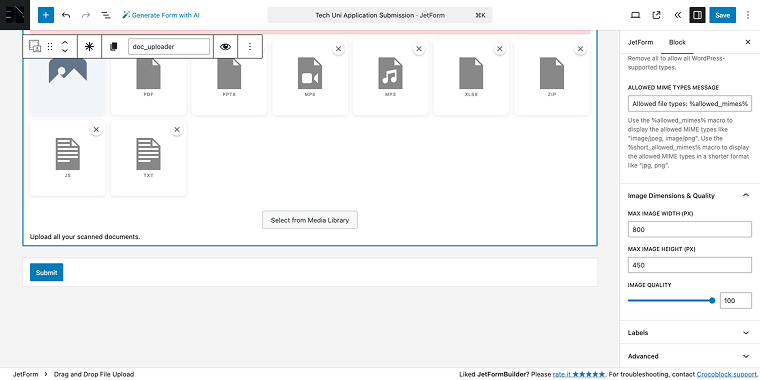
Additionally, the add-on can resize images dynamically (max width, height, and quality settings). This conserves server resources without requiring external scripts or plugins.
To access the relevant settings, locate the Image Dimensions & Quality tab in the block’s settings.
MIME type support
With extensive MIME type support, the add-on handles a wide variety of file types, including PDFs, videos, audio files, text documents, ZIP archives, and more. In case you want to limit the range of allowed files, you can specify these file types in a corresponding field.
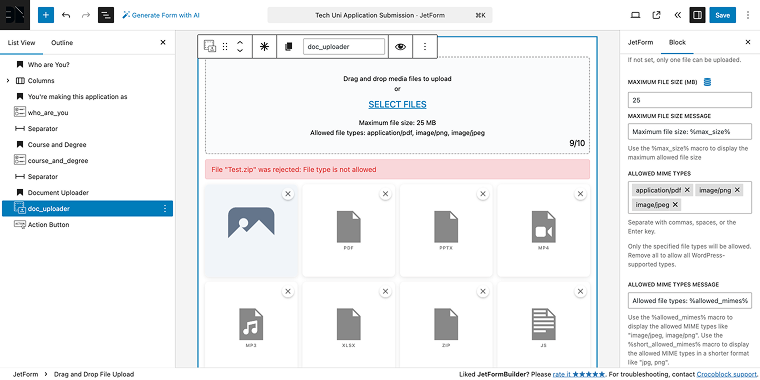
To access the relevant settings, locate the Field tab, which contains an ALLOWED MIME TYPES field where you can select only image files, text documents, and similar options.
JetPlugins integration capabilities
Like other Crocoblock assets, you’ll receive comprehensive support for JetEngine custom fields, applicable to both new uploads and existing files. For instance, with the Drag & Drop File Upload block, you can update media meta fields in JetEngine Meta Boxes, while sending files as email attachments (using the corresponding add-on), and so on.
If you’re planning to use this field for front-end post submission, you’ll need an Insert/Update Post form action where you can map the form fields to the corresponding meta fields.
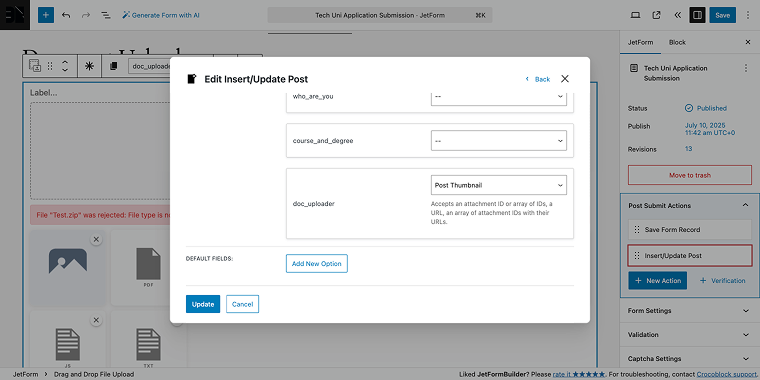
💡 Small tip: when updating the Featured Image in a post, upload multiple images, and the first uploaded one will be selected as the new featured image.
Future development and community input
The development team behind JetFormBuilder is committed to continuous improvement. We encourage users to provide feedback and suggestions through our GitHub repository. Your input directly shapes future feature development, helping the add-on adapt to real-world needs and new use cases.
NOTE
When it comes to JetPlugins’ customization potential, the sky’s the limit. If you have a unique build with JetPlugins, feel free to share it with our Discord community. There, you can also talk about features and functionalities with our team members and other Crocoblock users.
Drag & Drop File Upload Addon Case Studies
Job application portal
A recruitment agency might use the JetFormBuilder Drag & Drop File Upload add-on to make its hiring process smoother. The problem with the job application form is that applicants struggle with the bulky upload fields, which sometimes causes them to leave the forms when their portfolios or resumes don’t attach properly.
Implementation
The drag-and-drop upload field can be configured to accept resumes, cover letters, and portfolios in PDF and DOC formats. File size is limited to 10MB, and MIME type restrictions ensure that only valid document formats can be submitted.

By using instant upload mode, you can eliminate cases where applicants submit the form before the files finish uploading. This setup ensures reliable delivery and simplifies back-end processing by keeping uploads predictable.
Content submission platform
A blog or news portal could launch a contributor section using our add-on to collect articles, high-resolution images, and multimedia content from freelance writers and photographers.
Implementation
The submission form may combine drag-and-drop fields with the Media Library interface, allowing contributors to upload new files or reuse existing ones. To prevent oversized images, the form can use automatic resizing rules (max width, height, and compression settings).
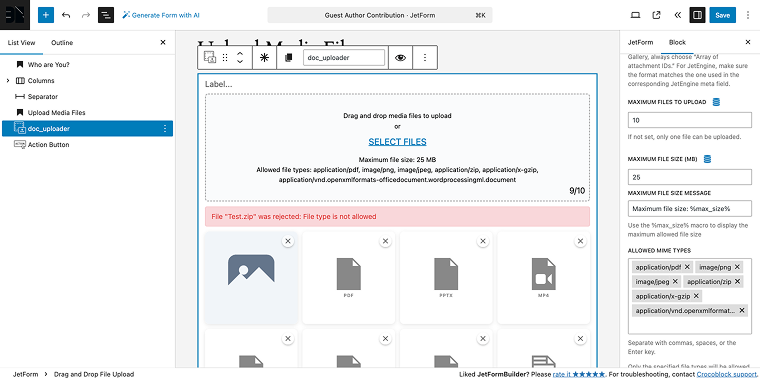
From a technical perspective, this ensures consistent media quality while reducing storage load and keeping the front-end display uniform.
ECommerce custom order system
A custom printing company might implement the add-on to collect client artwork, logos, and design references for personalized products.
Implementation
The drag-and-drop field can be integrated directly into product order forms, restricting MIME types to PNG, JPEG, TIFF, and vector-friendly PDF formats. Instant upload provides immediate validation feedback, reducing failed orders.
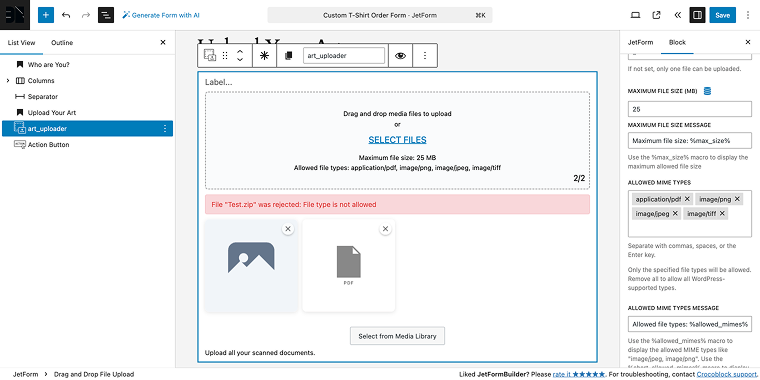
Files can be CC’d as attachments to the production team via JetFormBuilder’s Send Email action. This reduces clutter in the Media Library and streamlines order fulfillment.
FAQ
Yes, the add-on includes extensive access control features. You can specify which user roles are allowed to use the upload field, and you can set visibility to logged-in users only or all users. This helps keep your forms secure while providing the necessary functionality for your specific needs.
The add-on provides flexible upload options for this scenario. You can select either “Instant upload (immediately)” or “Upload on form submit.” With instant upload, files stay on the server even if the form isn’t finished, while the submit mode only processes files after the form is successfully submitted.
The add-on features an option to send files as email attachments without saving them to your server. This is especially useful for lead magnet campaigns, contact forms, or situations where you want to receive files via email but don’t need to store them permanently on your server. Enable the email attachment option and disable server storage in the field settings.
Conclusion
The JetFormBuilder Drag & Drop File Upload add-on marks a major advancement in WordPress form features, turning the file upload process from a potential obstacle into a smooth part of user interaction. By combining easy-to-use drag-and-drop features with thorough file management options, the add-on tackles real-world problems while offering the flexibility necessary for various uses.
Whether you’re developing customer support systems, content submission portals, or eCommerce solutions, the JetFormBuilder Drag & Drop File Upload add-on offers the foundation for creating outstanding user experiences that boost engagement and enhance operational efficiency.