When clients want to increase their visitor numbers, they typically fall into two categories: those seeking to sell products through an online store, and those aiming to generate leads through service-based websites. For both groups, advertising campaigns are usually the next logical step, and that’s where accurate tracking becomes absolutely critical.
For eCommerce shops, the goal is straightforward: track which campaigns drive actual purchases and eliminate those that don’t convert. For lead generation websites, success metrics include form submissions, phone clicks, and other valuable user actions that indicate genuine interest. Without proper tracking, agencies are essentially flying blind, unable to optimize campaigns or prove ROI to their clients.
Many of these high-performing websites are built using Crocoblock’s powerful ecosystem, including JetWooBuilder for sophisticated product pages, JetSmartFilters for seamless filtering experiences, and JetEngine for dynamic content management. While these tools create incredibly flexible and powerful front-ends, they also introduce complexity that can break standard tracking implementations, particularly in AJAX-heavy environments where traditional pixels often fail to function effectively.
Pixel Manager for WooCommerce, developed by SweetCode, was specifically designed to handle this complexity.

This plugin monitors WooCommerce shop visitors and gathers valuable data for conversion optimization, dynamic remarketing, and reporting, aiming to boost sales and reduce advertising costs through accurate eCommerce tracking. Currently trusted by over 10,000 agencies worldwide, it provides precise and reliable tracking, even in the most complex, AJAX-based environments common for Crocoblock-powered sites.
Why Native Platform Tracking Falls Short
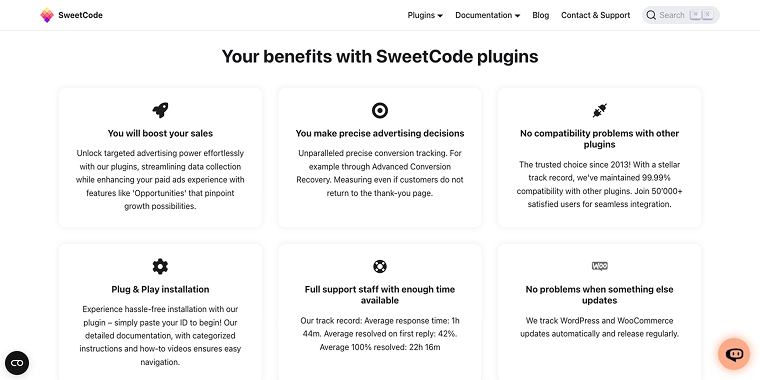
Before exploring Pixel Manager’s features, it’s important to understand why agencies can’t rely solely on native tracking from Google and Facebook. The iOS 14.5 update significantly altered the tracking environment, with research indicating that up to 88% of iOS Facebook users worldwide have opted out of app tracking, reaching 96% in the United States. Google is gradually discontinuing third-party cookies, and Apple has already blocked many through its Intelligent Tracking Prevention (ITP) feature.
This privacy-first approach means that traditional pixel implementations often miss important conversion data, resulting in incomplete attribution and subpar campaign optimization. For agencies handling multiple client campaigns, this data loss can seriously harm performance and client relationships.
Why Agencies Choose Pixel Manager for WooCommerce
Seamless integration with complex environments
The beauty of Pixel Manager lies in its seamless integration with modern WordPress ecosystems. It integrates natively with JetWooBuilder’s custom product pages, maintains tracking accuracy through JetSmartFilters’ AJAX filtering, and preserves data integrity in JetEngine’s dynamic content environments.
Unlike standard tracking implementations that break when users filter products or navigate through AJAX-loaded content, Pixel Manager maintains consistent data collection throughout the entire customer journey. Whether customers are using lazy loading, custom checkout flows, or complex product configurations, the tracking remains rock-solid. For agencies, this means no more explaining to clients why their conversion numbers don’t match reality.
The free version delivers enterprise-level features
What sets Pixel Manager apart is the extensive range of features available in the free version. While many tracking solutions offer only basic features before requiring paid upgrades, Pixel Manager’s free tier provides comprehensive tracking capabilities that would typically cost hundreds of dollars per month from other providers.
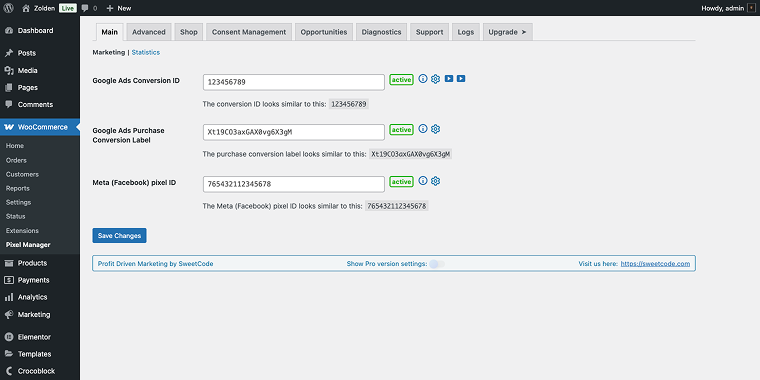
The plugin’s dashboard reflects this professional approach with its feature-rich interface. The Shop tab, for instance, provides granular control over crucial eCommerce settings, such as marketing value logic (choosing between order subtotal or total for accurate ROI reporting), dynamic remarketing activation, and flexible product identifier options.
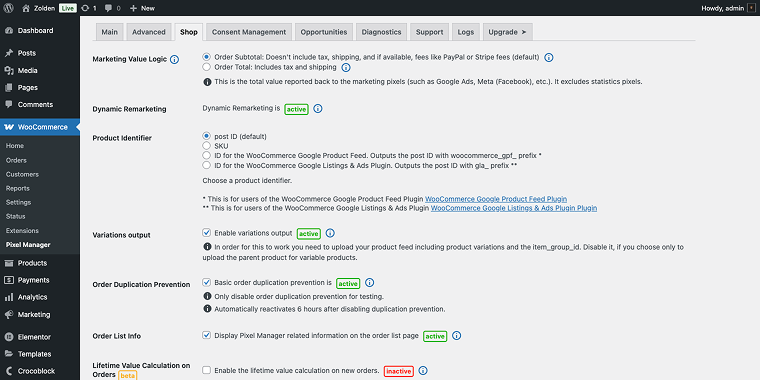
Users can easily configure variations output for stores with multiple product options, enable order duplication prevention to ensure accurate conversion tracking, and access lifetime value calculations, all through clearly labeled settings with helpful explanatory text and status indicators.
For those who enjoy long feature lists, here it is:
- Google Ads Pixel;
- Google Analytics 4 (GA4);
- Meta Pixel (Facebook/Instagram);
- Hotjar;
- Google Consent Mode v2;
- Google Tag Gateway;
- Enhanced E-Commerce (GA4);
- Google Ads dynamic remarketing;
- Google Shopping new customer parameter;
- Meta remarketing events;
- Cart and order tracking;
- Gateway Accuracy Report (e.g. Stripe, PayPal);
- AJAX and lazy load compatibility;
- Filter hooks for developers;
- Basic order duplication prevention.
Scalable growth options for advanced needs
As client businesses grow and their tracking requirements become more advanced, Pixel Manager grows with them through its Pro version. The premium tier extends platform support to include emerging advertising channels, such as TikTok, Pinterest, LinkedIn, and Microsoft Ads, as well as niche platforms like Snapchat, Reddit, Twitter/X, Outbrain, and Taboola.

The Pro version’s server-side tracking features directly address current privacy challenges. Meta Conversion API (CAPI) integration bypasses browser blocking, while Google Ads Enhanced Conversions enhance attribution accuracy by sending hashed customer data straight to Google’s servers. These server-side methods are essential for maintaining tracking precision in the post-iOS 14.5 environment.
Pro’s advanced behavioral tracking features include scroll tracking (valuable for measuring content engagement), phone click tracking, and link click monitoring – all essential for lead generation clients. The Automatic Conversion Recovery (ACR) feature is especially powerful, automatically detecting and reporting conversions that might otherwise be lost due to technical issues or attribution delays.
Here comes another long feature list:
Premium Pixel support (Pro)
- TikTok;
- Pinterest;
- LinkedIn;
- Microsoft Ads;
- Snapchat, Reddit, Twitter/X;
- Outbrain, Taboola;
- VWO.
Pro-only features
- Meta Conversion API (CAPI);
- Google Ads Enhanced Conversions;
- Server-side tracking;
- Scroll tracking;
- Phone and link click tracking;
- Google Ads Conversion Adjustments;
- Advanced order duplication protection;
- Automatic Conversion Recovery (ACR).
Trusted by developers
The plugin’s reputation extends beyond user reviews. Built by Aleksandar Vucenovic in Zurich, Switzerland, Pixel Manager for WooCommerce is recognized as an all-in-one solution for tracking WooCommerce customer data.

The development team’s commitment to accuracy and simplicity has earned endorsements from industry professionals who understand the technical challenges of eCommerce tracking.
FAQ
Pixel Manager is specifically built to handle complex WordPress configurations, including AJAX-heavy sites created with Crocoblock tools. Unlike typical tracking solutions that rely on dynamic filtering and lazy loading, Pixel Manager ensures consistent data collection across the entire customer journey, providing agencies with accurate conversion data for campaign optimization.
The free version includes extensive tracking for Google Ads, Google Analytics 4, Meta Pixel, Hotjar, enhanced eCommerce, dynamic remarketing, and AJAX compatibility. Typically, these features would cost hundreds of dollars per month from other providers, so it’s a highly valuable option for agencies handling multiple client campaigns.
The Pro version includes server-side tracking options like Meta Conversion API (CAPI) and Google Ads Enhanced Conversions. These methods bypass browser blocking and provide accurate tracking even when users decline app tracking, which is essential for proper attribution in the post-iOS 14.5 era.
Final Thoughts
Pixel Manager for WooCommerce addresses the key tracking challenges agencies encounter regularly. Used by over 10,000 agencies daily, with more than 2 million downloads and an average rating of 4.9 stars, it has become an essential tool for agencies focused on providing measurable results for their clients.