Building complex backend platforms typically requires extensive custom development, but what if you could create sophisticated systems with WordPress and the right toolkit? Andrea Sorrentino, an Italian web developer based in Panama City, has been doing exactly that for the past four years with Crocoblock.
Running a fully remote web agency that grows entirely through referrals, Andrea specializes in turning WordPress into structured backend systems. His secret? Mastering JetEngine’s Query Builder, Relations, and dynamic functionality to build “app-like” experiences without writing custom code.
In this interview, Andrea shares how he built 19etrou (a golf course directory and booking platform), and reveals his approach to building complex, permission-based systems that scale.
About Me
My name is Andrea Sorrentino. I’m 45 years old, Italian, and based in Panama City. I’ve been living in Panama for the past 16 years and abroad for 24.
I run my own web agency based in Panama, working fully remotely with clients worldwide. We don’t use social media; our growth has been entirely word of mouth, and for the past eight years, all clients have come through referrals. Together with my business partner, Federico Vulcano, we have created FreelancerWebmaster.com. We are also with SiteGround ambassadors.
I have 8 years of experience building WordPress sites, including 5 years with Elementor Pro and the Hello theme. I discovered Crocoblock 4 years ago, and it has definitely helped me take WordPress to another level.
I’m highly confident in most Crocoblock plugins, especially JetEngine and its powerful tools, such as the Query Builder, which I use extensively to build dynamic, data-driven websites. I enjoy building complex solutions using SQL queries, custom front-end dashboards for clients, and advanced dynamic functionality.
Favorite Types of Projects
In addition to complex websites, I use JetEngine in almost every project, even for simple WooCommerce sites, often paired with JetWooBuilder, JetSmartFilters, and JetProductGallery to build advanced custom product templates, filters, and dynamic layouts.
I also pair JetEngine with LearnDash to create LMS platforms with user dashboards, progress tracking, restricted content, and dynamic course/lesson structures.
In general, I enjoy projects where Crocoblock helps turn WordPress into a structured system:
- directory sites with filtering;
- client portals with role-based access;
- booking/lead workflows;
- and data-driven sites powered by CPTs, Relations, and Query Builder, including SQL when needed.
The Project I’m Proud Of
The project I’d like to tell you about is the 19etrou, a dynamic golf course directory and booking platform built with JetEngine. The site features advanced filtering with JetSmartFilters, enabling golfers to search for and discover courses by location, amenities, and availability.

The admin interface for 19etrou.com (don’t mix it up with the WordPress Dashboard) is basically a single-page application built with a Profile Builder.
The content updates dynamically based on query variables rather than navigating to new pages.
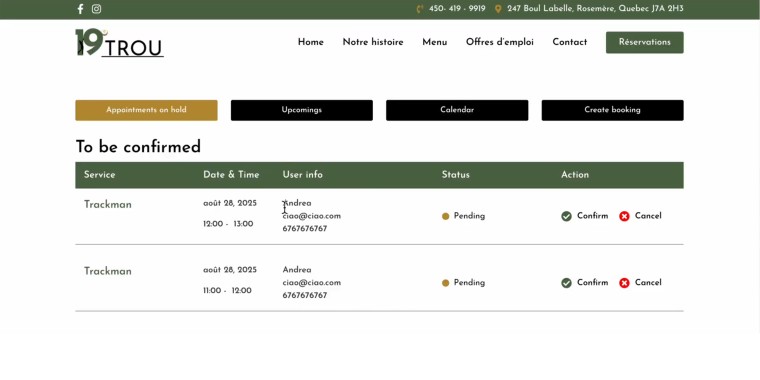
This system is managed through a custom Booking admin role and utilizes JetFormBuilder to handle data and custom fields. Key sections of the admin dashboard:
- Booking Slots — displays the most recently submitted reservations that have not yet been processed;
- Upcoming Bookings — lists all confirmed appointments. These are ordered by specific date and time slots to give the admin a clear view of future schedule requirements;
- Calendar — serves as a visual tool to separate confirmed bookings from pending ones, allowing quick differentiation of slot status;
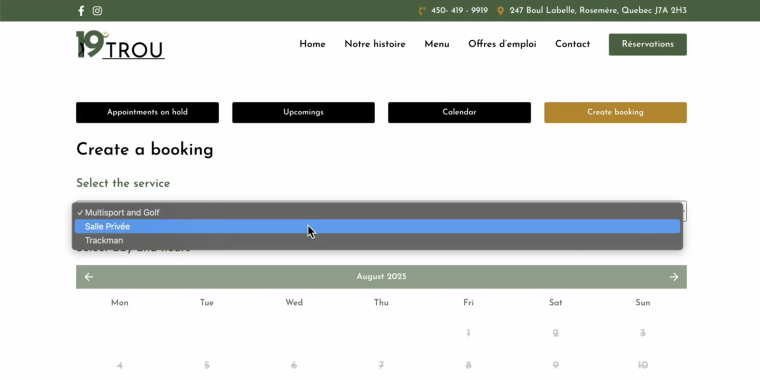
- Create Bookings – allows the admin to manually create new reservations with JetFormBuilder by selecting specific dates and times directly within the interface.
When an admin confirms a booking in the Booking Slots area, the appointment status updates, it is removed from the pending list, and it is marked as confirmed in the Calendar and Upcoming Bookings sections.
How Crocoblock Helped
I rarely rely on Elementor’s native dynamic features because I’m so used to JetEngine; it’s faster for me and much more scalable for complex logic. The features that saved the most time and simplified my workflow are:
- Dynamic metas or tax + Query Builder — to build fully dynamic templates and advanced logic without coding;
- Data Store — for features like favorites, wishlists, and recently viewed items (products or posts);
- Relations — to connect Users > CPTs and CPT > CPT (including grandparent relations);
- Custom database tables for CPTs – to improve performance and simplify queries.
Best Organization Tools
We use our own custom internal tool. For client projects, we most often work with Notion or GitHub, depending on the project and the client’s workflow.
The core stack
- Hosting — SiteGround trusted performance and reliability;
- Must-have plugin — JetEngine as the foundation of every complex build;
- Editor — Elementor Pro + Hello Theme clean, flexible, and fast;
- Performance — SiteGround Optimizer for caching;
- SEO — Rank Math;
- Translation — TranslatePress;
- Security & backup — SiteGround Security + SG daily backups / All-in-One WP Migration.
All wireframing and design work happens in Figma, ensuring pixel-perfect handoffs from design to development.
Team members
Andrea doesn’t work alone. His core team includes Federico Vulcano (Marketing/Strategy), Maria Nadali (Figma UX/UI), and Víctor Alcaraz (n8n & AI automations), plus external freelancers when projects demand specialized skills. For particularly complex custom-code requirements, they collaborate closely with Alessandro Viglione.
All-Inclusive plan gives the team unlimited access to the entire Crocoblock plugin suite across all client projects.
Advice for Newbies
I recommend starting with simple dynamic templates. Experiment with additional WooCommerce meta fields and display them dynamically on product templates. Then practice front-end posting with JetFormBuilder and scale up from there.
I recommend Crocoblock because it turns WordPress into a structured system: you can build dynamic templates, dashboards, permissions, and data-driven workflows without custom coding, while keeping everything scalable.
What do I plan to try next with Crocoblock tools? I want to push further with “app-like” front-end dashboards powered by Query Builder, Data Stores, and JetFormBuilder workflows.
Conclusion
Andrea’s work shows that WordPress, paired with Crocoblock’s ecosystem, can power sophisticated back-end platforms that rival custom-built applications. Using JetEngine’s Query Builder, Relations, and dynamic features, he’s built systems that handle complex business logic, role-based permissions, and real-time feature unlocking, all while maintaining the flexibility and familiarity of WordPress.
Whether you’re building directory sites, client portals, or industry-specific management platforms, Andrea’s advice is clear: start simple with dynamic templates, experiment with front-end posting, and gradually scale your skills. The power to transform WordPress into a structured application framework is already in your toolkit.
Ready to build your own backend platform? Explore what’s possible with Crocoblock’s All-Inclusive plan and start cooking.