When you’re building a WordPress site with Divi, the built-in blog module only goes so far to display posts dynamically on the page. However, perhaps you need more dynamic loops – for example, a product grid that pulls data from a custom post type, or a sleek list layout that combines dynamic content and filters. That’s where a good loop builder plugin comes in.
In this article, I’ll share the best Divi-friendly loop builder plugins for creating custom grids and list layouts, without needing to change PHP templates.
Top 4 WordPress Divi Loop Builder and Dynamic Content Plugins
By default, Divi is quite a static builder – at least, before version 5. However, only the Blog and Portfolio modules offer the ability to display posts on pages dynamically, and even that can be made a bit more flexible. But what is WordPress’s dynamic loop, in the first place?
Well, every WordPress site operates on a loop, which is the core query that fetches posts, pages, or custom post types from the database and displays them on the front end. By default, it’s what powers your blog archive, category pages, and search results.
A dynamic loop takes the same concept but lets you control it: you decide which content to pull (specific post types, taxonomies, and meta fields) and how to display it (grids, lists, sliders, or custom card layouts). Instead of hard-coding templates or relying on a single blog layout, you can design unique loops for products, portfolios, events, or anything else.
With Divi’s native modules, that level of control is limited. That’s why specialized loop builder plugins exist – they give you visual, drag-and-drop tools to build and style your own loops without touching PHP.
Divi 5 may bring more dynamic options, but if history is any guide, you’ll still need solid plugins to get true dynamic content control.
Divi Machine
🏆 Best for ACF-based dynamic loops and simple filters.

While Divi natively supports displaying custom fields dynamically, it does so only for the current post or page. But what if you want to include a loop of other posts in the current one, or display an archive as a grid of custom posts with custom fields arranged in your preferred way? That’s hard, to be precise, impossible, to achieve with Divi’s default instruments.
And Divi Machine solves this problem. It features a module that dynamically displays fields and content loops earlier created in Divi Theme Builder, which then form a post grid/slider to display posts along with their meta fields. It also has a filter functionality that allows filtering not only post objects but also meta fields.
It lacks the functionality to add custom fields on its own and relies on the ACF plugin. Therefore, you essentially need two plugins, preferably the premium version of ACF, to create a fully operational website.
Pricing: starting at £24.99 per year for one site or £74.99 for a lifetime license for one site. Note that it relies on ACF for creating custom fields.
Key features:
- functionality for building post loops and displaying custom fields inside them;
- supports displaying repeater fields;
- interface for adding custom post types and taxonomies;
- filters that can deal with custom fields;
- grid, slider, and map layouts available.
Pros:
- good functionality for creating dynamic loops;
- works with repeaters and map fields;
- has filter functionality and supports the ACF Relationship field type;
- affordable price.
Cons:
- querying by field values didn’t work for me on the demo site;
- querying by field values has only the “includes value” option, which is not flexible (not “equal or less than”/”equal or greater than,” etc.
- some users complain about its performance.
JetEngine by Crocoblock
🏆 Best for advanced content querying and complex projects.

Before discussing this plugin, it’s essential to note that JetEngine will have seamless integration once Divi 5 is released as a stable version. It means that it will have dedicated modules and Divi support when creating JetEngine’s Listing Templates (loops), as well as many other perks, just like it currently offers for the Block Editor, Elementor, and Bricks.
However, even now, with Divi 4, JetEngine has a lot to offer for adding dynamic content to your Divi websites, from creating CPTs, custom fields, option pages, or relations, to displaying field values after applying custom callbacks to them (e.g., fetch images by ID, format numbers, etc.). You can insert such values anywhere in the Divi layout using the Divi Dynamic Content button or, if callbacks are applied, JetEngine’s Shortcode Generator.
JetEngine has a unique feature called Query Builder for querying data with extra precision – in other words, you can handpick posts, products, users, and other data objects depending on their meta field values, taxonomies, relations – you name it. Based on it, you can build content loops, but until the full integration is on the way, you can use the native Gutenberg editor for creating them and then combine them with the Divi layout feature or vice versa, by inserting Gutenberg blocks into Divi using one of the free plugins like Reusable Blocks.
Key features:
- functionality for adding custom post types and custom fields;
- Meta Boxes – groups of fields that can be added to any post type or users;
- Option pages feature for adding a global set of fields, available anywhere on the website;
- Query Builder for precise content querying without writing code;
- dedicated database table support for enhanced performance;
- AI website structure and SQL query builders for streamlining work on complex projects.
Pricing: starting at $43 per year.
Pros:
- JetEngine has over 15 modules that can be switched on and off in addition to its powerful core functionality, allowing it to replace many premium plugins and even serve as a backend for any builder, even AI-generated front-ends.
- ACF/Pods/Toolset/Meta Box field support for those who want to transfer or combine both plugins;
- all JetEngine-created CPTs and meta fields are supported by the native Divi Dynamic Content feature;
- the unique Query Builder tool for the most precise content querying without coding;
- well-documented.
Cons:
- full integration with Divi will be implemented when the stable Divi 5 version is released.
powered by Divi-5 dynamic?
DiviFilterGrid
🏆 Best for those who have some PHP experience.
Divi FilterGrid is a Divi plugin that builds responsive, filterable grids from posts or any custom post type, designed as a native Divi module and powered by CSS Grid for layout flexibility. It has advanced query types (Basic, Advanced, Archive, Related, Manual, Custom), multi-level/multi-select filters, AJAX pagination, skins/lightbox, and optional extensions for WooCommerce and media.
Key features:
- Multiple query types (Basic, Advanced, Archive, Related, Manual, Custom) so you can target taxonomies, meta, or specific IDs;
- multi-level and multi-select filtering UI (category, tag, custom taxonomies);
- AJAX filtering/pagination;
- control over grids depending on screen sizes.
Pricing: $29 per year for one site.
Pros:
- precise querying is possible (with the help of PHP snippets given in the documentation);
- advanced filtering;
- lightbox;
- WooCommerce and Media extensions are available.
Cons:
- not many layouts, so you will need to add custom CSS for proper design;
- all advanced features come as additional PHP snippets, so it requires a basic understanding of PHP.
Divi Dynamic Content Extended
🏆 Best for those who want to improve the flexibility of existing Divi modules.
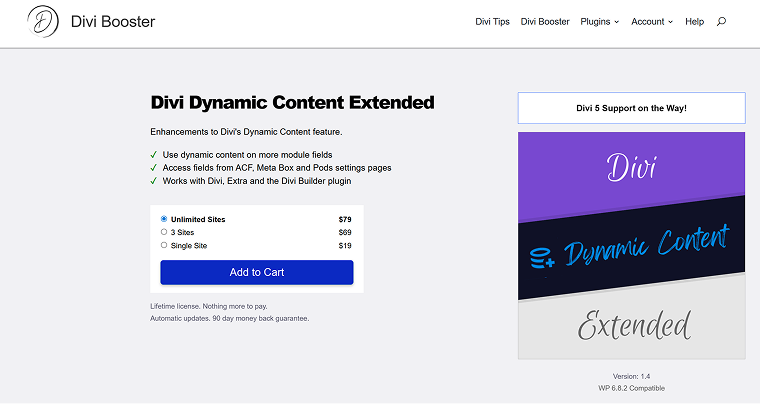
Divi Dynamic Content Extended is a plugin by Divi Booster that augments Divi’s dynamic content capabilities. It does exactly what the name suggests – enables you to use dynamic content options in many more module fields than Divi allows by default, allowing pulling in custom fields (ACF, Meta Box, Pods), options pages, and extra post/user metadata.
Key features:
- adds dynamic content support to fields that are otherwise static in Divi modules: e.g., bar counters (percent), circle/number counters, gallery images, video, etc.;
- enables dynamic data from custom settings pages (Options Pages);
- adds extra dynamic content field types: author website/email, post slug, last updated date, etc.).
Pricing: starting at $19 for one site, lifetime.
Pros:
- expands Divi’s dynamic functionality;
- adds dynamic colors, icons, as well as CSS IDs and class fields to all the modules;
- integrates cleanly with major CPT plugins;
- lifetime license with no recurring fees.
Cons: not detected.
FAQ
It’s the default query WordPress runs to pull posts, pages, or custom post types from the database and display them on the front end. Every archive, search, or blog page relies on this loop.
Divi’s native Blog and Portfolio modules are limited. A loop builder lets you design custom grids or lists and query exactly the content you need, without editing PHP templates.
Yes, most loop builder plugins can query any registered post type, including products, events, or portfolios, and display them in custom layouts.
First of all, look for flexibility above all else – from the way it queries and filters content, letting you pull exactly what you need from the database, to the options it offers for designing how that content appears on the front end. Performance is just as important. If the plugin is poorly coded, it can slow down page loads, create unnecessary database queries, and even cause conflicts with caching or other Divi modules. Look for a well-maintained plugin with clean code, regular updates, and solid reviews so your dynamic layouts stay fast and reliable.
Takeaway
I suppose all Divi users are eagerly awaiting the release of Divi 5, which promises many cool features. One of them is a native loop builder. But even with that on the horizon, real-world projects can’t wait. Clients still need custom grids, portfolios, and product listings today, and Divi’s current tools only go so far. That’s why the right loop builder plugin is still a smart investment, as it gives you the flexibility and control you need now, and it’ll likely stay useful long after Divi 5 arrives.