The JetEngine WP Fusion integration marks a major step forward in WordPress content personalization and customer relationship management. This powerful combo enables website owners to craft dynamic, personalized experiences that adjust to each user based on their CRM data, changing how businesses handle and deliver content to their audiences.
What Is WP Fusion?
It’s an all-in-one WordPress plugin that enables WordPress CRM integration using WP Fusion. It automatically syncs user registration data, profile updates, and custom field information between WordPress and your CRM. This guarantees that your marketing team always has the most up-to-date user information. Overall, WP Fusion can:
- Monitor user actions on your website, such as page visits, course completions, or purchase behaviors, and apply corresponding tags in your CRM. Creating detailed user segments that can be used for targeted marketing campaigns.
- Restrict or grant access to specific content, pages, or entire sections of your website. This functionality transforms your website into a dynamic platform that shows different content to different user segments (as explained in the use case below).
- Trigger automated sequences in your CRM based on WordPress events, creating sophisticated marketing funnels that respond to user behavior in real-time.
- Handle complex custom field mappings, ensuring that due to WordPress CRM integration using WP Fusion, data flows correctly between custom fields and CRM contact fields, maintaining data integrity across platforms.
Crocoblock and WP Fusion partnership
The integration between WP Fusion and JetEngine emerged from a partnership between WP Fusion and Crocoblock. This collaboration was specifically designed to combine WP Fusion’s powerful CRM capabilities with JetEngine’s advanced content management features.
It’s important to note that while both parties collaborated on this integration, primary support for WP Fusion-related features and troubleshooting is handled by the WP Fusion team. Users experiencing integration issues should consult WP Fusion’s documentation and support, as they maintain the code and have a deeper understanding of system interactions.
The integration includes comprehensive access control systems for JetEngine-created post types and advanced query filtering for JetEngine’s Listing Grid widget.
Why this matters to the community
This integration meets a critical WordPress need: creating personalized content without complex development. WordPress site owners can now build advanced membership sites, LMS, and eCommerce platforms.
For devs and agencies, this integration provides a robust toolkit for developing client solutions that combine content management with marketing automation. Protecting entire post types and filtering listing grids based on CRM data enables dynamic, user-specific experiences.
Content Restriction Use Case
Imagine a membership website where you want to control access to content based on your Mailсhimp subscriber segments. Using the WP Fusion and JetEngine integration, you can set up a system that shows or hides content depending on each user’s Mailchimp tags. Let’s see how to build such a system.
Connecting CRM
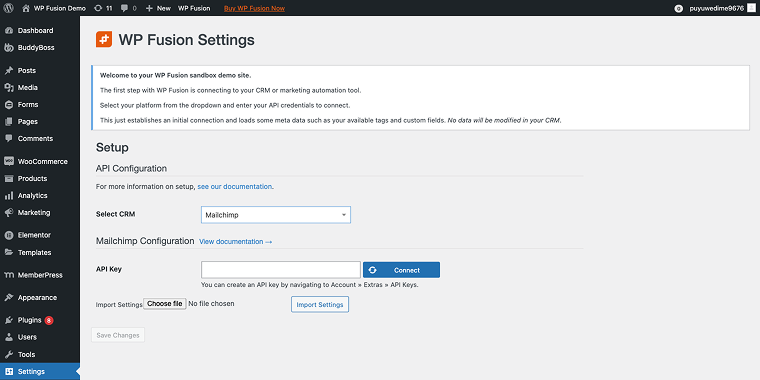
After installing WP Fusion, you’ll be prompted to connect your CRM. Since I’m using Mailchimp, I’ll select it from the Select CRM field, and in the API Key field, I’ll enter my key.
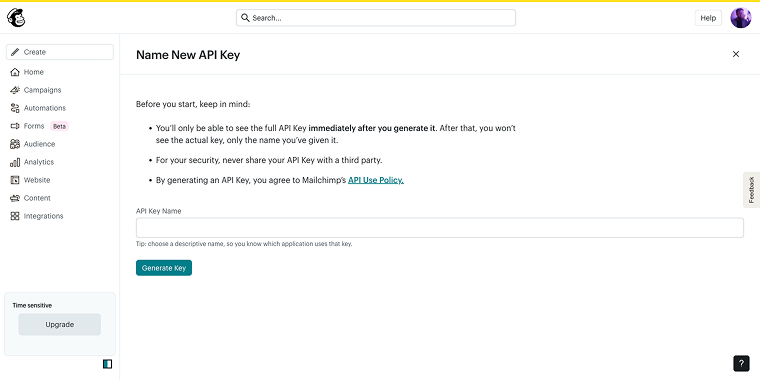
If you’re also using Mailchimp, you can find your API key in the relevant section. Just type “api” into the search bar at the top of the page, and it will guide you on where to go. Click the “Generate Key” button, copy the key, and then return to the WordPress dashboard.
Now that the key is prepared, we can synchronize WP Fusion with Mailchimp by entering the key value into the field.
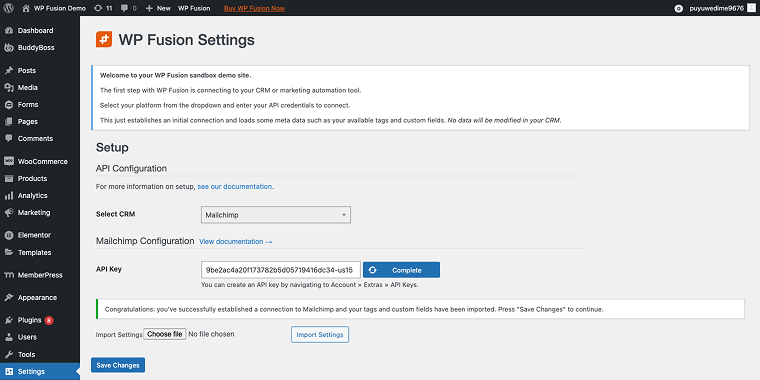
After clicking the “Connect” button, the plugin will import tags and fields from your Mailchimp account’s audience.
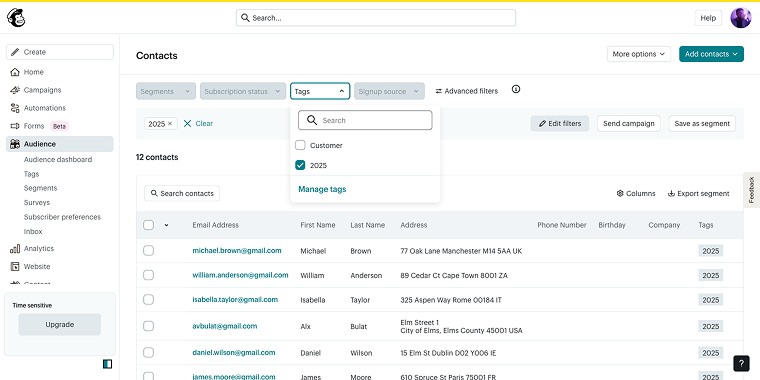
In my Mailchimp account’s Audience section, I have subscribers organized with specific tags, such as “2025” and “Customer,” among others.
Creating and restricting CPTs
Now, based on the available tags and used fields, we can set up the content restriction. Go to WordPress Dashboard > JetEngine > WP Fusion. This allows us to create access rules for each custom post type. For example, only users with the “2025” tag in Mailchimp can access the “2025 Clients” post type.
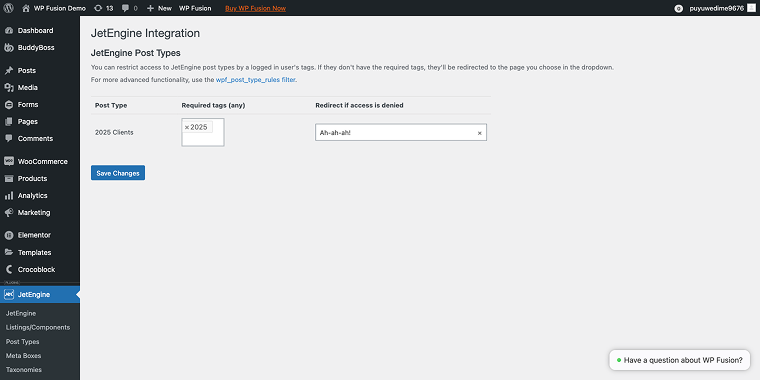
Here’s where the real power is: when a user tries to access content they’re not authorized for based on their Mailchimp tags, they’re automatically redirected to a specific action page.
For example, if someone without the “2025” tag tries to access the CPT, they’re redirected to an upgrade page.
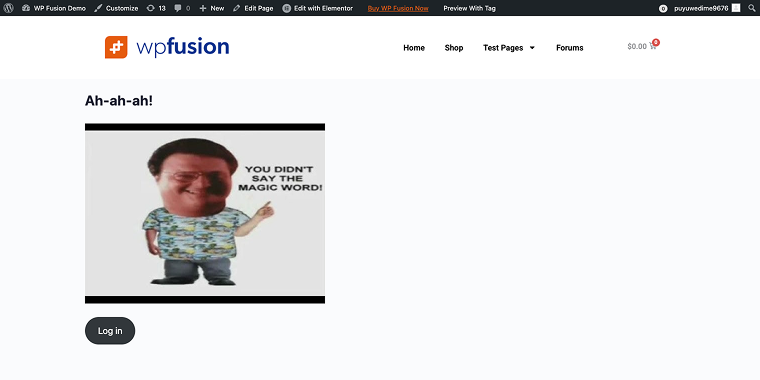
On these redirect pages, users can perform actions that automatically update their Mailchimp tags. They might fill out a form, make a purchase, complete a course, or join a webinar.
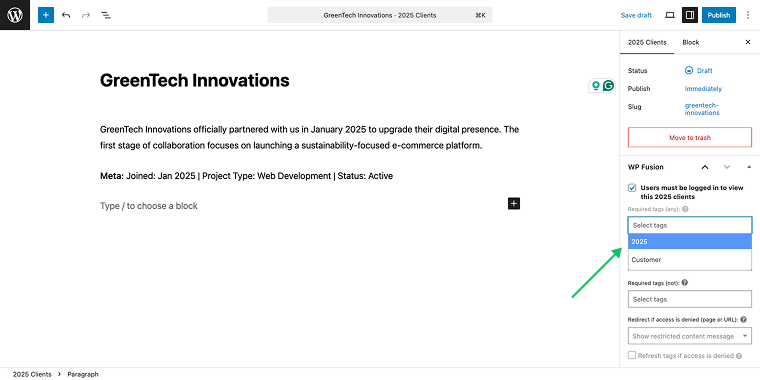
Another way to restrict/grant access is from the single post editor; the sidebar has a WP Fusion section where you add/remove a tag that grants or restricts access to viewing this post.
Restricting JetEngine Listings
What’s even cooler is that you can restrict or grant access to the JetEngine listings using the same rules. To do so, in the Content settings of the Listing Grid widget, you need to go to the Post Query section and enable the switch Filter Queries.
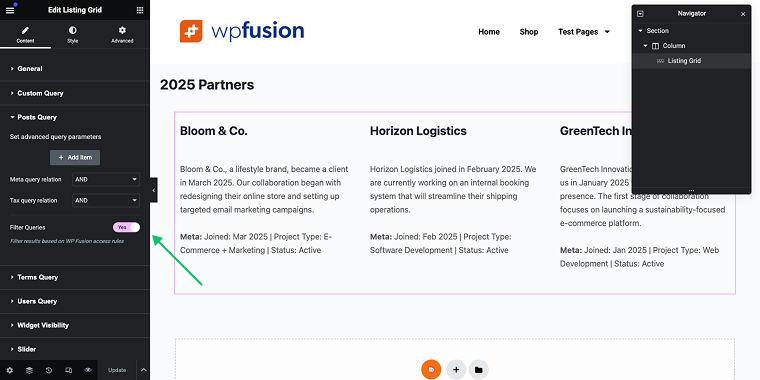
That’s it. This use case demonstrates how the WP Fusion integration transforms a WordPress site into a dynamic platform that personalizes each user’s experience without requiring custom development.
FAQ
Yes, you need both plugins installed and activated. The integration requires WP Fusion to manage CRM connectivity and tagging, while JetEngine provides the custom post types and listing features.
WP Fusion supports over 40 CRM and various email marketing platforms, including ActiveCampaign, HubSpot, Mailchimp, ConvertKit, and many others. The JetEngine integration works with any CRM compatible with WP Fusion.
While JetEngine mainly focuses on Elementor integration, it also works with Gutenberg and Bricks builders.
Final Thoughts
The JetEngine WP Fusion integration advances WordPress content personalization. Combining WP Fusion’s CRM and JetEngine’s content management enables website owners to create highly personalized user experiences without extensive custom development.
For businesses seeking advanced content personalization without incurring high costs, this integration provides a reliable and scalable solution. Whether starting with basic access control or building complex content systems, WP Fusion and JetEngine provide a solid foundation for dynamic WordPress experiences.