Pop-up forms have advanced from simple interruptions to sophisticated engagement tools that can significantly increase your website’s conversion rates. When used effectively, these powerful elements can capture leads, promote offers, gather feedback, and guide users through your sales funnel. The key is choosing the right plugin that provides seamless form integration, intelligent targeting, and user-friendly features.
The success of a pop-up strategy greatly relies on the quality of form integration. Modern users expect smooth, relevant experiences that provide value rather than cause frustration. In this guide, we’ll share the top WordPress pop-up form plugins that can effectively combine pop-up features with form-building tools, helping you create meaningful interactions that turn visitors into engaged customers.
How to Make Use of Pop-Up Form Integration?
The most successful websites strategically use pop-up forms to create targeted experiences that feel natural due to various pop-up trigger events. Let’s examine some common use cases of a pop-up (created with JetPopup) in conjunction with a submit form (created with JetFormBuilder).
Click-to-subscribe newsletter signup
Many websites may include a friendly pop-up that appears when users click on a “Newsletter” button, inviting them to subscribe.
Implementation
For the Tech Uni website, we could create a newsletter subscription form that includes all the required fields. Make sure to fill in the Mailchimp form action’s fields and your account’s API key.

Set up JetPopup with the trigger type “Click,” so that when visitors click on a “Newsletter” button, it triggers a pop-up with a JetFormBuilder form that collects the user’s email.
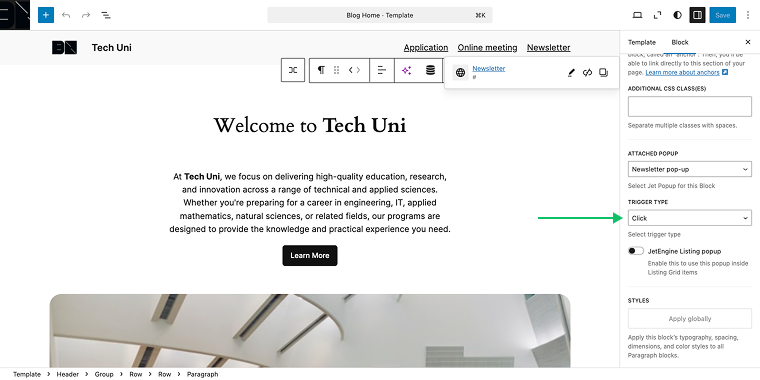
On the front end, the pop-up with the form will appear immediately after clicking the “Newsletter” button.

Scroll-based information request
For Tech Uni, we could create a scroll-triggered inquiry system that sends a PDF brochure with detailed information after collecting the user’s email.
Implementation
Use JetPopup’s “Scroll to Block” trigger to display the pop-up when visitors reach a certain block on a page.

Create a JetFormBuilder form that collects user email addresses and sends out a PDF brochure.

Intent size consultation form
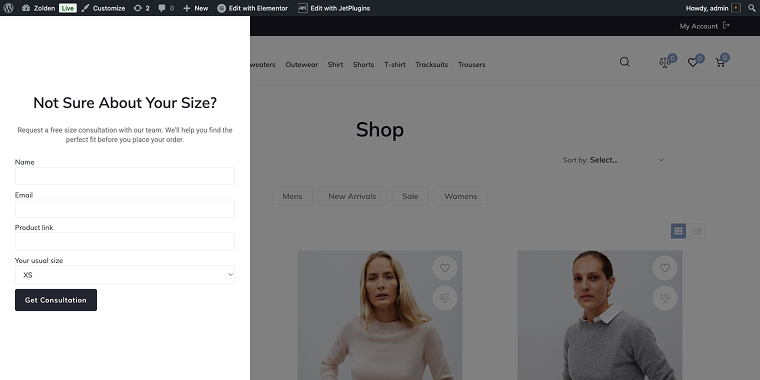
For the fashion eCommerce template, add exit-intent consultation pop-ups that appear when customers are about to leave product pages without making a purchase.
Implementation
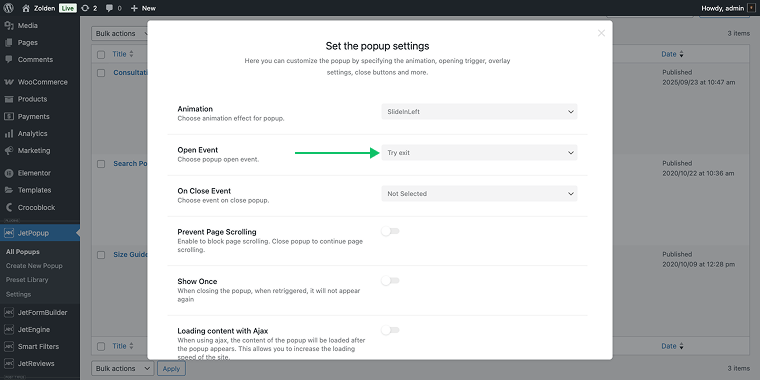
Use JetPopup’s “Try exit” open event to trigger a pop-up when visitors are about to leave the page.
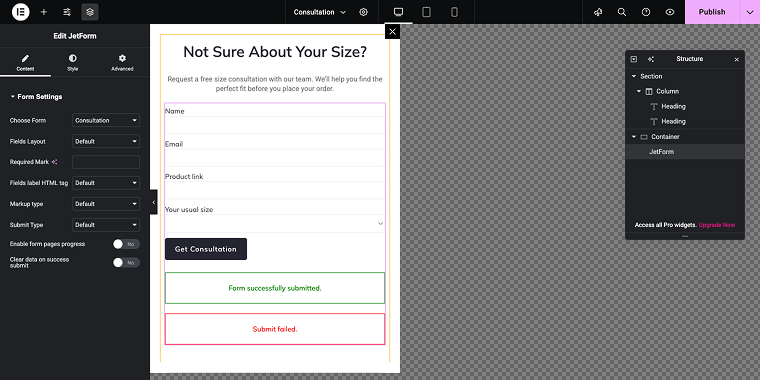
Create a JetFormBuilder form that offers personalized styling consultations or size guidance services. The form can collect basic measurements and contact details, turning potential lost visitors into leads for personal shopping services or follow-up marketing campaigns.
Now, let’s examine the top 7 WordPress pop-up form plugins that will be useful on any of your WordPress projects.
Top 7 WordPress Pop-Up Form Plugins
Popup Maker (Freemium)
🏆 Best for developers and advanced users who need extensive customization and unlimited pop-up creation.
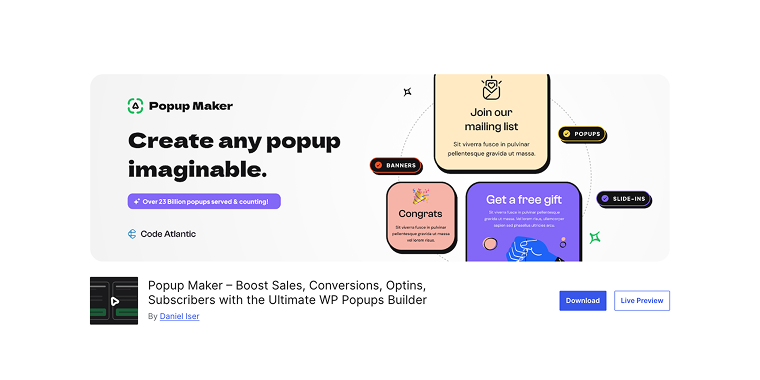
Popup Maker excels in providing unlimited creative freedom for creating pop-ups with submission forms. This plugin is particularly favored by developers and agencies who require extensive customization options and the ability to create multiple pop-ups without restrictions. The plugin’s Block Editor method provides precise control over every detail of pop-up behavior and appearance.
Pricing: free core plugin with premium extensions starting at $59 annually for advanced features.
Key features:
- unlimited pop-up creation with no restrictions;
- lots of targeting conditions and user behavior triggers;
- cookie-based visitor tracking and targeting;
- integration with popular form plugins like Contact Form 7.
Pros:
- Block Editor interface;
- no limits on pop-up creation, even in the free version;
- highly customizable with extensive options;
- strong community support and documentation;
- compatible with most form builder plugins;
- excellent performance optimization.
Cons:
- requires technical knowledge for advanced customization;
- premium features require multiple extension purchases;
- limited pre-built templates compared to competitors;
- setup process can be time-consuming.
JetPopup + JetFormBuilder (Premium + Freemium)
🏆 Best for Elementor and Gutenberg users seeking powerful form-popup integration with dynamic content capabilities.
The combination of JetPopup and JetFormBuilder represents the pinnacle of WordPress pop-up form integration, especially for users working with Elementor or Gutenberg. Further, the form will be added to a JetPopup pop-up, and special visibility conditions will be set (the form will be displayed when a single post is scrolled). This powerful duo offers unmatched flexibility in creating pop-up forms with advanced visibility conditions.
Pricing: JetFormBuilder is free; JetPopup starts at $22 per year, or in an All-Inclusive plan for $199 per year (including other Crocoblock plugins).
Key features:
- Elementor and Block Editor compatibility;
- smart pop-up targeting based on user behavior and scroll position;
- integration with JetEngine for database interactions;
- custom pop-up animations and styling options.
Pros:
- unparalleled integration capabilities within the Crocoblock ecosystem;
- advanced conditional logic and dynamic content support;
- excellent performance with optimized code structure;
- regular updates and feature additions;
- detailed documentation and video tutorials;
- active community support and development;
- cost-effective when using multiple Crocoblock plugins.
Cons:
- learning curve for mastering advanced features;
- documentation can be overwhelming for beginners;
- occasional conflicts with non-Crocoblock themes.
Boxzilla (Freemium)
🏆 Best for performance-focused websites needing lightweight pop-up forms with minimal resource impact.
Boxzilla plugin focuses on essential pop-up functionality while maintaining an extremely small footprint, ensuring your site’s performance remains uncompromised. Boxzilla’s approach emphasizes clean code and efficient execution over extensive feature sets. The pop-up editor is based on the WordPress classic editor, allowing you to add the form’s shortcode and display it anywhere on your website.
Pricing: a free core plugin is available, while the premium version costs $79 annually, offering advanced targeting and styling options.
Key features:
- lightweight with minimal performance impact;
- essential targeting options;
- CSS-based styling with custom design options;
- mobile-optimized responsive design.
Pros:
- great performance with fast loading times;
- good documentation and setup guides;
- compatible with most caching plugins;
- affordable pricing structure;
- regular security updates.
Cons:
- limited advanced features compared to competitors;
- limited integration options with third-party services;
- no A/B testing functionality in the core version;
- minimal animation and transition effects;
- customer support is primarily through forums.
Poper (Freemium)
🏆 Best for creative agencies and designers who need highly customizable pop-up forms with advanced visual effects.

Poper distinguishes itself through advanced visual capabilities and creative freedom, making it particularly appealing to design-focused users who want their pop-ups to make a strong visual impact. This plugin offers extensive animation options, innovative layouts, and sophisticated styling controls, allowing for truly unique pop-up experiences. Even though the plugin has many pre-designed templates, you can choose from a set of basic input fields to gather all kinds of information using Text, Input, Dropdown, Checkbox, Radio fields, and more.
Pricing: a freemium model with basic features available. Premium plans start at $9 per month for advanced animations and styling options.
Key features:
- advanced animation library with custom transition effects;
- creative layout options, including full-screen and sidebar displays;
- social media integration and sharing capabilities;
- advanced typography controls and Google Fonts integration;
- responsive design tools with device-specific customization.
Pros:
- exceptional visual customization capabilities;
- creative animation effects that capture attention;
- professional design templates included;
- good integration with page builders;
- regular feature updates and improvements;
- strong focus on mobile responsiveness;
- active development team.
Cons:
- can impact site performance with heavy animations;
- steep learning curve for advanced features;
- higher resource usage compared to simpler alternatives;
- some effects may not work well on slower devices;
- documentation could be more comprehensive;
- premium features require an ongoing subscription.
Nelio PopUps (Freemium)
🏆 Best for small to medium businesses seeking affordable pop-up forms with good conversion tracking capabilities.
Nelio PopUps offers a balanced approach to pop-up form creation, providing essential features at an affordable price point while maintaining professional quality. This plugin focuses on practical functionality that delivers results without unnecessary complexity, making it particularly suitable for businesses that want effective pop-ups without extensive time investment in setup and optimization. The pop-up editor is built on the Block Editor, which means you use a Shortcode block to display the form anywhere on the website using visibility conditions.
Pricing: there is a free version with basic features. The Pro version is available at $49 (single payment), offering advanced targeting and analytics.
Key features:
- essential targeting options, including page-specific rules;
- integration with popular email marketing services;
- built for Block Editor;
- mobile-responsive design with touch optimization.
Pros:
- intuitive interface suitable for beginners;
- good value for money with reasonable pricing;
- reliable performance across different hosting environments;
- regular updates and security patches;
- good documentation and setup guides;
- compatible with most WordPress themes.
Cons:
- limited advanced customization options;
- fewer template choices compared to larger competitors;
- limited integration options with third-party tools;
- premium features are somewhat limited.
Advanced Popups (Free)
🏆 Best for businesses needing a lightweight, conversion-focused pop-up solution with precise targeting capabilities.

Advanced Popups is a lightweight yet powerful WordPress pop-up plugin designed for maximum conversion, offering essential pop-up functionality without compromising your website’s performance. This plugin strikes an excellent balance between simplicity and effectiveness, focusing on core features that directly impact conversion rates rather than overwhelming users with unnecessary complexity. The plugin offers precise targeting options, allowing you to display pop-ups on specific pages, posts, or custom post types, as well as taxonomy pages, the front page, archives, or search results.
Pricing: the plugin is free, with all core features included; a premium version is not currently available.
Key features:
- multiple pop-up types, including cookie notices;
- precise targeting with custom post type support;
- lightweight, ensuring your site remains fast and responsive;
- basic form integration for lead capture and email collection;
- simple visual editor with live preview functionality.
Pros:
- free with no premium upsells or limitations;
- easy setup process with minimal configuration required;
- compatibility with most WordPress themes and plugins;
- stable performance across hosting environments.
Cons:
- limited advanced features compared to premium alternatives;
- no A/B testing or advanced analytics capabilities;
- basic animation and transition effects are available.
Simple Popup Plugin (Free)
🏆 Best for developers and content creators who need a basic pop-up solution for displaying custom content and media.
Simple Popup Plugin is an interesting solution that allows you to create pop-ups from any page/link on your website, opening up endless possibilities for launching pop-up windows. This plugin focuses on fundamental pop-up functionality, making it ideal for users who need straightforward pop-up creation without any complex customizations. The plugin’s strength lies in its simplicity and flexibility for displaying various types of content, from welcome videos to custom announcements and online forms.
Pricing: a free plugin is available through the WordPress repository; no premium version is offered.
Key features:
- pop-up creation with custom content support;
- shortcode implementation for pop-up integration;
- supports various content types including text, images, and embedded media;
- lightweight with minimal resource usage;
- compatible with most WordPress themes and page builders.
Pros:
- free with no hidden costs or premium upgrades;
- lightweight with minimal impact on site performance;
- simple implementation process requiring no technical expertise;
- good for basic pop-up needs without unnecessary complexity.
Cons:
- very basic feature set;
- no targeting options or user behavior triggers;
- no built-in form integration or lead capture features;
- no analytics or conversion tracking capabilities.
FAQ
When implemented correctly, pop-up forms can improve SEO by increasing user engagement and reducing bounce rates. However, Google penalizes intrusive interstitials that negatively impact the user experience, particularly on mobile devices. Best practices include using exit-intent triggers, timing delays, and making pop-ups easy to dismiss. Focus on providing value through pop-ups, not just interrupting users, and test on mobile to ensure Google’s mobile-friendly guidelines are met.
Optimal pop-up timing depends on your audience and content, but research suggests waiting 15-30 seconds before showing pop-ups. Exit-intent triggers usually outperform time-based ones by targeting users who are about to leave. To prevent overwhelm, limit pop-ups to once per session or use cookies to avoid repeats. Consider progressive engagement with different pop-ups based on user actions.
GDPR compliance for pop-up forms requires transparent data collection and clear user consent. Include privacy policy links, explain data use, and offer checkbox consent, not pre-checked boxes. Ensure easy opt-out and data deletion options are available. While most plugins support GDPR, consulting with legal professionals ensures compliance with all relevant regulations for your business and its audience.
Conclusion
Choosing the right pop-up form plugin can greatly influence your website’s conversion rates and user engagement. The plugins featured in this guide represent the top options available in 2026, each excelling in different areas to address various business needs and technical requirements.
For users seeking the most powerful and integrated solution, the combination of JetPopup and JetFormBuilder offers unmatched capabilities, particularly for users of Elementor and Gutenberg. This pairing provides advanced dynamic content features, sophisticated targeting options, and seamless integration with the broader Crocoblock ecosystem, making it ideal for complex websites that require personalized user experiences.
Simpler solutions, such as WordPress PopUp and Boxzilla, serve businesses that prioritize ease of use and performance over extensive customization. Meanwhile, options like Popup Maker and Poper cater to users who need extensive customization capabilities and creative freedom in their pop-up designs.
For a successful pop-up strategy, you need to pair a top-notch plugin with careful planning. Prioritize offering value, user-friendly design, and testing across various devices. Selecting high-quality plugins can significantly enhance lead generation, engagement, and conversions.