Using the JetThemeCore plugin as a theme builder, you can create WordPress page templates without diving into code and spending too much time. Initially, it worked only with Elementor, but then it got a big update and started supporting the Block Editor. The Crocoblock users were really excited, as you can see in the screenshot below.
But now, starting from the 2.3.0 release, it has a very convenient improvement – the Theme Builder node view. I will talk more about it, as well as all the rest of the functionality this plugin offers.

What Is the JetThemeCore Crocoblock Theme Builder?
If you are looking for a powerful theme builder for WordPress that works both with Elementor and the Block Editor, this plugin and this article are definitely for you.
While dedicated themes, created for particular goals, such as various WooCommerce, news, and others, are not that flexible, as you are limited by what was predesigned for you by theme developers – those created with a WordPress theme builders like JetThemeCore are designed specifically for you needs and according to your design and business logic.
Using JetThemeCore, you can set up an unlimited number of templates for particular conditions that consist of a unique combo of header, body, and footer. You can assign a condition for each of these templates.
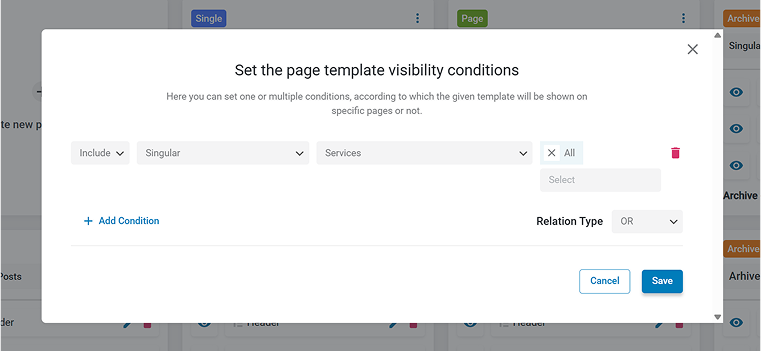
You can apply the template not only to a post type but also to a particular post or page – just select its name in the settings.
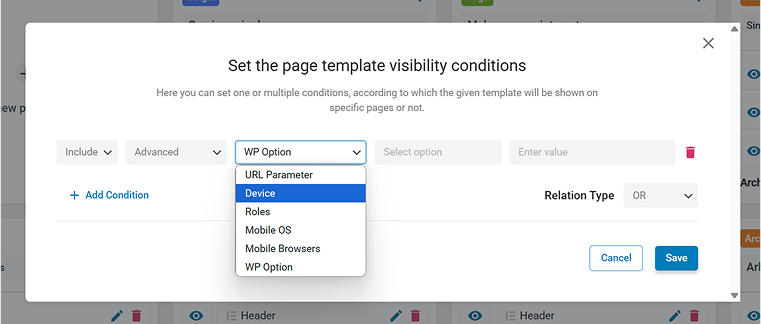
Also, there’s a very useful list in the Advanced set of display conditions, which you can combine with other conditions or use alone:
- URL parameters – for example, for creating custom templates for a custom search page template with the particular word as a key; it’s a great way to display special offers or conditions to customers who are interested in those goods or services.
- Devices – mobile, desktop, or tablet devices.
- Roles – display different templates for various user roles existing on your website.
- Mobile OS – is useful as different mobile operating systems might handle data differently, which is a handy feature.
- Mobile browsers – similar to the previous conditions, mobile browsers might act quite differently, so it’s a great way to fix the issues with a particular browser.
- WP Options – advanced WordPress users will find this option especially useful.
To sum it up, this is what JetThemeCore can do:
- help you to design a single-use layout for particular pages or posts, similarly to a page builder;
- create templates to apply them to the part, or the whole website as a theme builder;
- make custom templates for particular posts, pages, CPTs, and 404 pages as a template builder;
- create specific templates for advanced cases – user roles, devices, URL parameters, and so on;
- edit the site parts you, such as headers and footers.
While Elementor Pro has a similar functionality, Block Editor doesn’t – only in the Full Site Editing, which is very limited now. So, JetThemeCore is a great asset if you create a dynamic site where performance plays a key role, but you don’t want to dive into coding custom PHP templates.
How Does JetThemeCore WordPress Builder Work?
JetThemeCore’s interface can be found on the WordPress Dashboard > Crocoblock, and it has two sections:
- Theme Builder;
- Theme Templates.
Let me walk you through both of them.
Theme Builder
Theme Builder is the main working area, where you can design the structures of the WordPress page templates in a clean and coherent dashboard, using either a Tree view or a Grid view.
You can find the most convenient view for yourself, or use both, as the Grid view is more convenient for designing particular templates and setting up conditions for them, combining header, footers, and body templates into one.
At the same time, the Tree view is great for seeing a big picture – all the templates your website has, whether they inherit a parent or have a dedicated one, and it visualizes the WordPress template hierarchy.
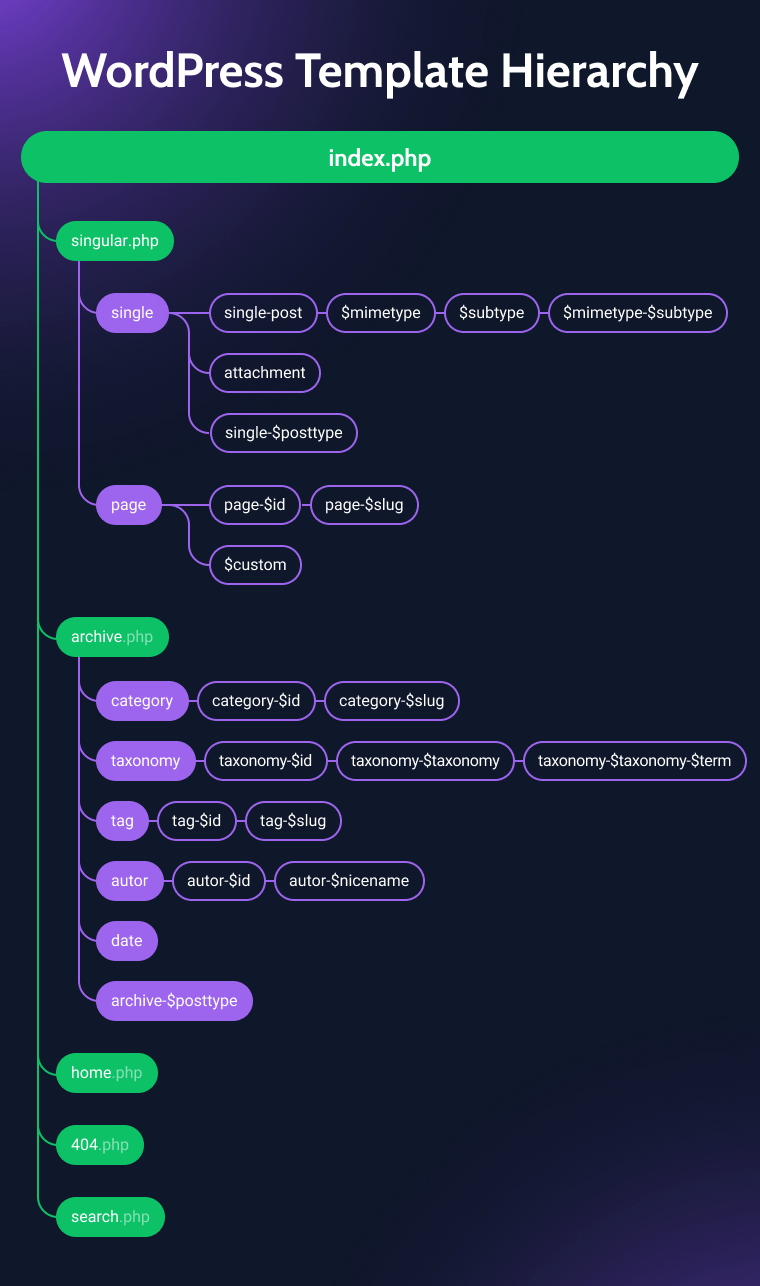
When it comes to WooCommerce, you will find a specific post type – WooCommerce with a convenient list of options, particularly for your eCommerce site. If you combine it with JetWooBuilder, you can easily customize every little detail in your WooCommerce template design.
Theme Templates
If you go to WordPress Dashboard > Crocoblock > Theme Templates section, you will find all the templates you have on your website sorted by tabs, so you can easily find what you want to modify if this view is more convenient for you.
There, you can also import and export such templates.

NOTE
Conditions in Theme Templates and the ones you set while creating the template in Theme Builder are different. Conditions from Theme Builder work with any theme from the Crocoblock Installation Wizard and rerender the page structure completely or partially.
In other words, set up conditions in the Theme Builder section.
Understanding How to Use JetThemeCore
To use JetThemeCore builder, open it in Crocoblock > Theme Builder and select the template you want to modify.
First of all, you might want to create custom headers and footers. If you have only one header and one footer, set the condition to Entire website, and they will be displayed everywhere. But if you want to assign specific headers and footers to specific pages or sections, feel free to set up these conditions – they will rewrite the “Entire website” one.
Let’s say I want to create a template for the default post type. It’s quite straightforward: I should click on this template type either on the Tree view or directly on the Grid view, give it a name, and set up a condition.
Suppose I just want to modify the body (without touching the header and footer). In that case, I should click on the body section and create a new template for a body, name it, select a builder, and create the template using either JetEngine’s Dynamic Tag functionality or Dynamic Field, Dynamic Image, and other dynamic widgets/blocks by JetEngine.
The latter gives you full control over all the settings, so you can fetch any post object or meta field and display it on the front end the way you want. You can also apply Dynamic Visibility for certain sections, if needed.
After saving the template, the chosen post type will be displayed according to this new layout.
You might be wondering why using other plugins, such as JetEngine, is involved here – and the answer is that, as the name suggests, JetEngine works as a core engine of any dynamic website, being one of the most powerful plugins in WordPress community, able to replace a dozen of other premium plugins – you can read about it in this article.
Overall, the Crocoblock suite offers a powerful and interconnected ecosystem of plugins for building websites of any complexity.
Magic Button and predesigned templates
JetThemeCore comes with predesigned page templates (full pages and specific sections). You can access them by clicking on the “Magic button” that is available for Elementor.
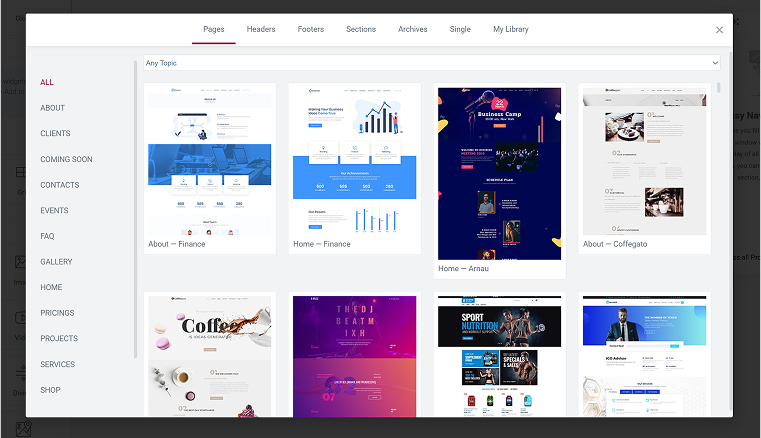
You can also access the templates saved in the Crocoblock > Theme Templates and insert them whenever you want.
JetThemeCore Pricing
The best way to get JetThemeCore is within the All-Inclusive or Lifetime subscription with a 30-day money-back guarantee, as you will get all the powerful plugins included there.
If you want the JetThemeCore alone, the price starts at $43 per month.
FAQ
A theme is a pre-designed layout that controls your site’s look and structure. A theme builder lets you fully customize headers, footers, and templates without coding – even override the theme.
Yes, WordPress still requires a theme to run as themes control not only the way pages look, but many things under the hood. But with a theme builder, you can override almost everything, so the theme becomes just a starting point.
The JetThemeCore plugin works equally well with the Block Editor and Elementor.
Elementor has a theme builder, but only in its Pro version. JetThemeCore is another powerful theme builder for Elementor, and it’s included in the Crocoblock suite (the lifetime plan is available) or can be purchased separately.
Wrapping Up
Building custom templates for default and custom post types, as well as website sections, is quite an enjoyable activity with Crocoblock and its dedicated theme builder plugin called JetThemeCore. It’s definitely time to try it (if you haven’t done it yet), especially after the recent revamp, which made this tool even more convenient and powerful.