If you’re running a service-based store, like a salon, hotel, or consulting business, you’ve probably searched for a way to let customers book directly from your WooCommerce site. The WooCommerce Bookings plugin, developed by the official Woo team, promises to do just that. But is it worth the price? Does it cover all your booking needs, or will you end up needing extra plugins?
In this review, I’ll break down what WooCommerce Bookings does well, where it falls short, and whether it’s the best fit for your business.
What Is WooCommerce Bookings Plugin?

WooCommerce is a powerful and free plugin for WordPress created for building eCommerce sites. The Woo is a team behind this product, which was acquired by Automattic in 2015. However, eCommerce is a very wide niche, and WooCommerce is very universal, so for particular goals, you might need extra plugins to extend the core WooCommerce functionality. The team created a marketplace where such plugins are sold.
You can choose to either buy plugins there or get them from the WordPress plugin directory. The third alternative is through the websites of plugin developers, like Crocoblock.
In general, pricing tags on the WooCommerce marketplace are quite high, and this plugin is not an exception – it costs a whopping $249 per year.
Installation
After activating the plugin, you will see a welcome screen with six templates; they are not that different from each other, but they are helpful for getting used to the interface and finding the necessary settings.
You will be able to change it in the Product Editor, as the new “Template” tab has now been added there, as well as the new product type – Bookable product.

Resources
Also, there, we have a Resource entity added – as the documentation says, it’s meant to “represent additional items needed to fulfill a booking, such as staff members, equipment, or rooms”. You can switch it off if you don’t need it. There, you can add ranges based on weeks, months, etc.
However, I was a bit puzzled that this entity has little to no content fields to add. Well, imagine it’s an equipment or staff member or rooms, as they say, but isn’t the information about them supposed to be on their own pages, and, in addition, especially, if it’s a service? Maybe it’s meant to be shown on the product page, but if it’s intended for staff, equipment, or rooms, how are we supposed to differentiate them clearly, especially when they affect pricing?
There, you can set up a range, whether it’s bookable or not, and its priority. The “bookable” thing is quite simple – “yes” or “no,” but the “priority” one is about different resources presented higher in the list than others.
There’s an available quantity field, described in the tooltip as “quantity for any given time,” but it’s not very intuitive because there’s one quantity field, but multiple ranges can be added. But what if, let’s say, I have 10 cars there, and one will be on a planned service for a week? I guess I will have to change the quantity in real time, which is not very well thought out.

But let’s see, and let’s move on to the next point in the workflow.
Price formation
There are several price types; it’s quite a multi-layered system, and it took me some time to figure it out.
You can set three cost types for the Product itself, plus two per Resource. In addition, you can add the Persons functionality to set a maximum number of persons and whether to multiply the cost per person.
So, the product has:
- Base Cost – a fixed amount added once per booking, regardless of its length or other options.
- Block Cost is charged each time the customer books a time block: for example, if your block is one hour and the customer books three hours, the block cost is multiplied by three. You can set a fixed block (e.g., one booking = one block) or let users select the number of blocks – then this value will make sense. For example, if a customer wants to have two hours of massage, they can book two blocks.
- Display Cost is optional and only affects what’s shown on the product page; it doesn’t impact the actual price and is usually used to show something like “From $25.”
- The Resource tab on the Product data section also has Base Cost and Block Cost for each resource.
- Finally, you can activate the Persons – to book a service for several persons, and set the maximum number of persons per booking, and whether the cost must be multiplied per person. Also, you can create person types – e.g., Adult and Child, and set dedicated Base and Block costs for them.
Buffer period
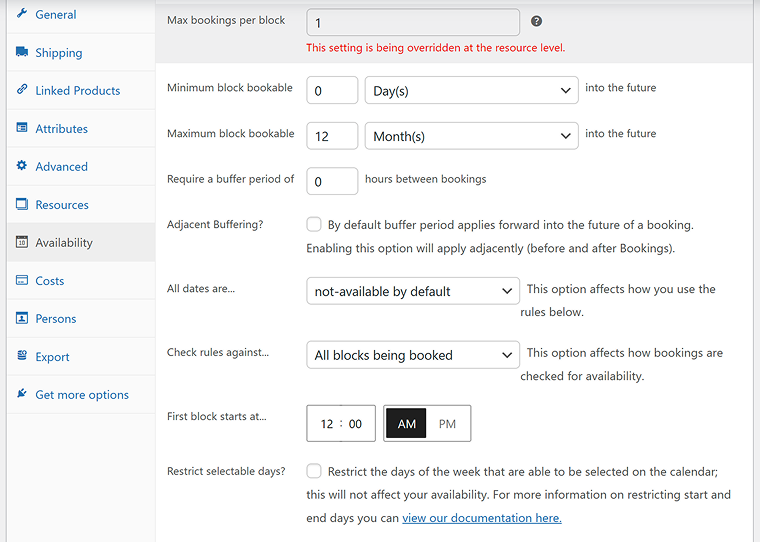
The buffer period can be set up in the product’s Availability tab and is quite flexible.
Notifications, calendars, and cancellations
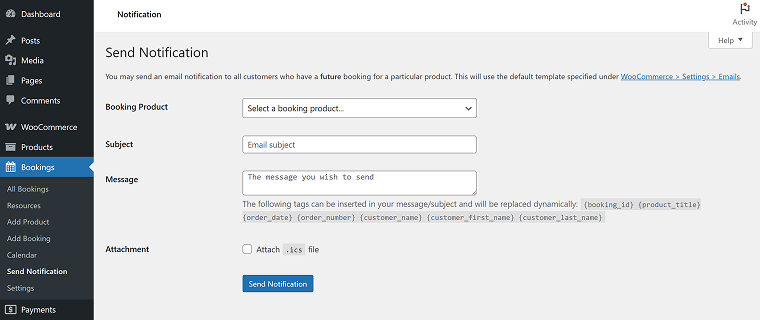
WooCommerce Bookings relies on default WooCommerce emails, which can be set up on WooCommerce > Settings. No dedicated automated workflow is provided by the plugin; you can only send a message manually from the website.
You can view bookings on the dashboard, which are presented as a calendar that can be filtered by Products and Resources. You can choose Month, Day, and Schedule views.
The handy functionality there is that you can connect Google Calendar directly to your website. However, many reviews say it doesn’t work properly.
Regarding cancellation functionality by the user, such settings exist where you can allow users to cancel. However, you need to use an extra extension for WooCommerce cancellation functionality.
Layout customization
The plugin uses the default WooCommerce templates. So, if you want to customize them, you will need to use PHP hooks for WooCommerce and custom CSS.
If you want to use it with Elementor, you will need to buy one more extension that costs $49 per year. Then, you can customize it with Elementor Pro.
WooCommerce Bookings drawbacks
I have to create this section, as only during the testing, I’ve faced a few quite serious glitches and general drawbacks.
Glitchy Persons and Duration functionality
After deactivating the Persons functionality and returning to the “Fixed slots” Booking duration with maximum one hour, I still can select two hours, the interface is not “time slots,” as it’s supposed to be, and I simply can’t book, because it requires me to choose a number of people, while Persons functionality is switched off.
No caching plugins are installed on the website, and multiple attempts at updating the product and reloading the page don’t help.
No built-in customer booking cancellation
By default, WooCommerce Bookings doesn’t allow customers to cancel their own bookings from the front end. While store admins can cancel bookings from the dashboard, customers can only cancel if the site owner manually enables it using custom code or third-party plugins. This limitation is problematic for service-based businesses where flexible cancellation policies are expected.
Limited presentation of resources (staff, rooms, equipment)
WooCommerce Bookings includes a Resources feature, meant for handling things like staff members, rooms, or equipment. However, these resources can’t be described or styled on the front end in a meaningful way, as there are no built-in fields for images, labels, or descriptions. For example, if you’re assigning different hair stylists or therapy rooms, there’s no intuitive way to display who or what is being booked, unless you heavily customize the product page or create dedicated custom post types for them, and then just link the pages at the Product page. It makes it harder to communicate service options clearly to customers, especially when each resource affects pricing.
WooCommerce Bookings Reviews
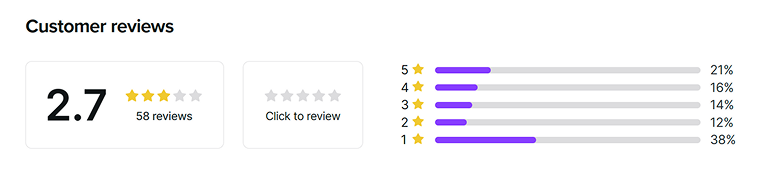
This plugin has a lot of negative reviews – the rating is 2.7 out of 5 stars.
Almost everyone writes that the API doesn’t work. Another problem is that the plugin saves the booking information in the default wp_posts and wp_metadata tables instead of creating a dedicated table in the database. It bloats the database and, if you have many bookings, it can affect the performance.
Another very common complaint is that it’s too difficult to configure, and I can fully confirm this, as many of the settings are not user-friendly.
Users also mention a lot of different bugs that appear here and there.
For the price of $249, it should really deliver much more.
WooCommerce Bookings Alternatives
As you can see, WooCommerce Bookings is not the most flexible solution and is really expensive. If you’re looking for alternatives that are easier to configure or better suited for Elementor-based websites, consider the following:
JetBooking by Crocoblock is a powerful booking plugin that is only $43 and works with Elementor, Bricks, and the Block Editor. It has an intuitive wizard for setting up everything easily and a powerful Workflows feature that allows you to set up custom emails when certain events take place, as well as trigger a webhook. Thus, you can connect any third-party service.
There’s an automated email with cancellation or confirmation links for users, so no extra effort is required.
Finally, you can choose full WooCommerce integration (so the bookings will be visible in the WooCommerce Analytics dashboard and Orders) or just WooCommerce-based checkout. However, you can also manage payments without it using JetFormBuilder’s payment gateways. In addition, you can make great use of its after-submit actions, and use either its free version or add useful paid add-ons.
JetBooking integrates smoothly with JetEngine and supports dynamic content.
JetAppointment has a very similar functionality and the same integration, as well as the same full control over the appointment forms and all the templates. It’s only $19. But, unlike JetBooking, which is for day or night-based bookings, JetAppointment is for time slot-based ones. Read this article to know all the differences.
Other alternatives include Amelia, Bookly, and Simply Schedule Appointments, all of which offer different pricing models, UI experiences, and integrations depending on your business needs.
FAQ
Yes, with the right plugin, you can fully automate appointment scheduling, including time slots, availability, payments, and email notifications.
Yes, most professional booking plugins support payment gateways like PayPal, Stripe, or WooCommerce-integrated payments.
WooCommerce Bookings does not offer native Elementor widgets. For better Elementor integration, JetBooking and JetAppointment by Crocoblock are more suitable options.
Final Verdict
After testing the WooCommerce Bookings plugin, it’s difficult to justify its use in most cases. While it covers the basics of booking functionality, the setup process is complex and unintuitive, especially for non-technical users. It lacks flexibility in customizing layouts, has limited control over cancellation and confirmation settings, and offers only a basic notification system. For businesses needing a more user-friendly, design-flexible, or service-specific solution, alternatives like JetBooking or JetAppointment, or others, may be a much better fit.