Choosing the right booking form can significantly impact your website’s conversion rates. Whether you’re operating a hotel, a tour company, or a service-based business, you need a form that is both functional and visually appealing. That’s where JetFormBuilder stands out as a powerful booking form WordPress solution.
JetFormBuilder provides everything you need to create professional booking experiences without writing a single line of code. Take a look at the booking form template as a perfect example of what’s possible.
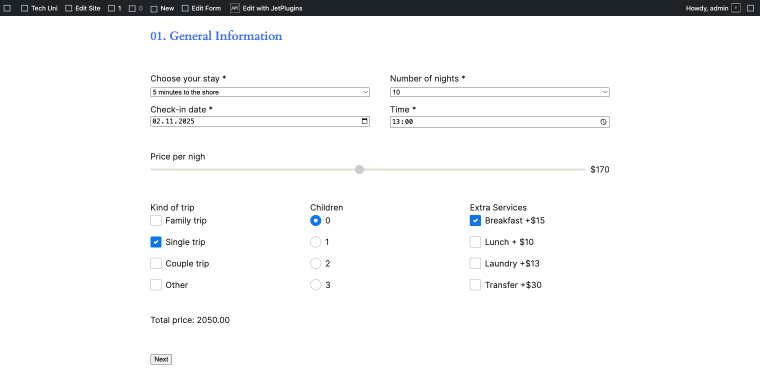
This is a multi-step booking process that guides users through three stages of collecting information.

General Information (a section that contains a set of fields for booking-specific information):
- Select Field — for selecting the type of stay;
- Select Field — for picking the number of nights;
- Date Field — for setting the check-in date;
- Time Field — for setting the check-in time;
- Range Field — for selecting price per night;
- Checkbox Fields — a set of three fields for selecting the type of trip, number of kids, and extra services;
- Calculated Field — for displaying the price of the options chosen in the previous fields.
Personal Information (a section that contains a set of fields to collect guest-specific information):
- Text Fields — a set of three fields for collecting the user’s first and last names and phone number;
- Radio Field — to specify the guests’ gender;
- Textarea Field — to collect some specific guest information;
- Repeater Field — that contains a set of previous fields to add information about the next guest.
Final Information (a section to ):
- Wysiwyg Field — a field where one can add all the information that was not included in the previous sections.
What makes this WordPress booking form stand out is the dynamic pricing slider (the Range Field) that shows costs in real time.
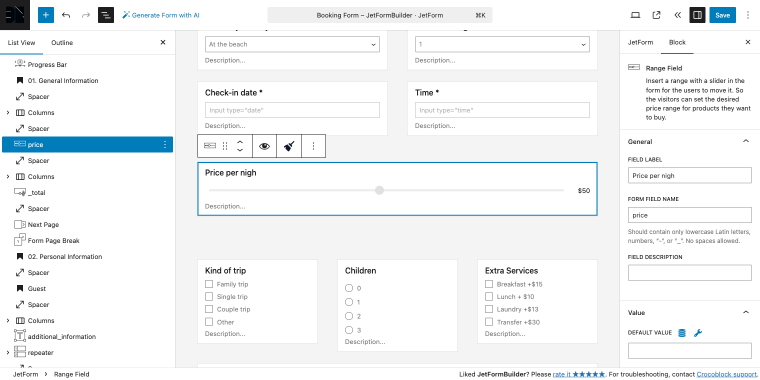
Along with Checkbox Fields for trip type (family, single, or couple) and optional extras such as breakfast, lunch, laundry, and transfer services.
The total price (Calculated Field) updates automatically as selections are made. The formula in this field uses CALCULATED values assigned to each option in the previous fields.
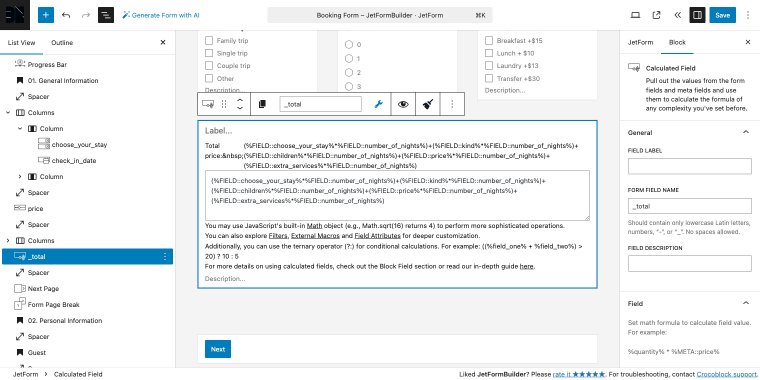
This kind of interactive, user-friendly design is exactly what modern travelers expect, and it’s achievable with the right booking form WordPress plugin.
JetFormBuilder’s strength lies in its beauty and flexibility. You can create everything from simple contact forms to complex, conditional booking systems with calculated fields, file uploads, PDF generation (you can generate tickets or booking applications on the fly without using third-party services), and payment integration. It works seamlessly with popular page builders, making it easy to match your site’s design.
Top 8 Booking and Appointment Form Examples
Now, let’s explore eight real-world websites that demonstrate creative approaches to booking and appointment forms.
Kenridge Residences: sleek slide-out panel

The Kenridge Residences website demonstrates how a booking form plugin can enhance user experience through thoughtful design. When visitors click the “Book Now” button, a sleek panel slides in smoothly from the right side while the background gently fades out, keeping focus on the booking process.
The JetFormBuilder form itself is impeccably organized with check-in and check-out dates positioned at the top, guest count selectors below, and contact information fields arranged in two neat columns. What sets this apart is the dynamic pricing feature that updates automatically as users fill out the form, eliminating any surprises at checkout.
TrueScany: straightforward sidebar booking
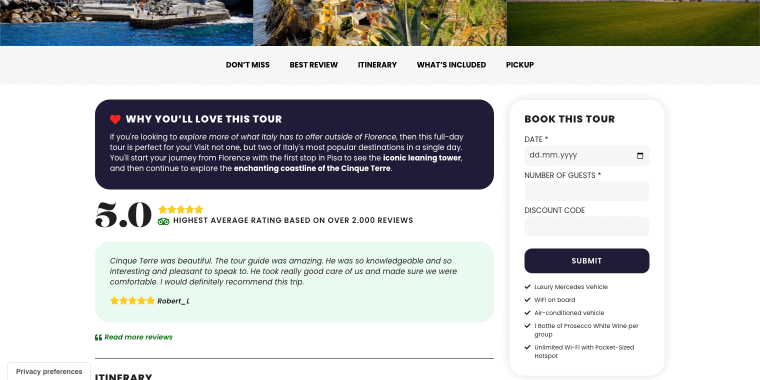
Sometimes simplicity wins, and TrueScany’s approach to their tour booking proves this point. Rather than relying on fancy animations or pop-ups, they’ve placed their JetFormBuilder form directly on the page in a clean sidebar labeled BOOK THIS TOUR. This appointment booking form WordPress plugin takes a no-frills approach that works beautifully.
The form keeps things minimal with just three essential fields: a date picker, a number of guests selector, and an optional discount code field. All elements are styled in light gray to match the overall design aesthetic. A large dark purple “SUBMIT” button sits at the bottom, making the next step crystal clear.
ACRE Project: multi-step artistic approach
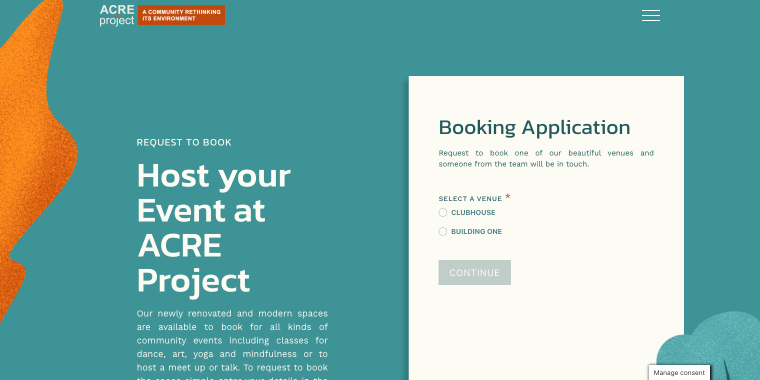
The ACRE Project website brings personality to the booking process with bold, cartoon-style illustrations in orange and red that frame the entire page. Their custom booking form WordPress takes a multi-step approach, breaking down what could be an overwhelming form into digestible chunks.
The process starts super simple: visitors just pick a venue using radio buttons for “CLUBHOUSE” or “BUILDING ONE,” then click the gray “CONTINUE” button. This step-by-step design, powered by JetFormBuilder, makes the experience feel less daunting and more manageable.
Royal Realty Perfect Home: luxury simplicity
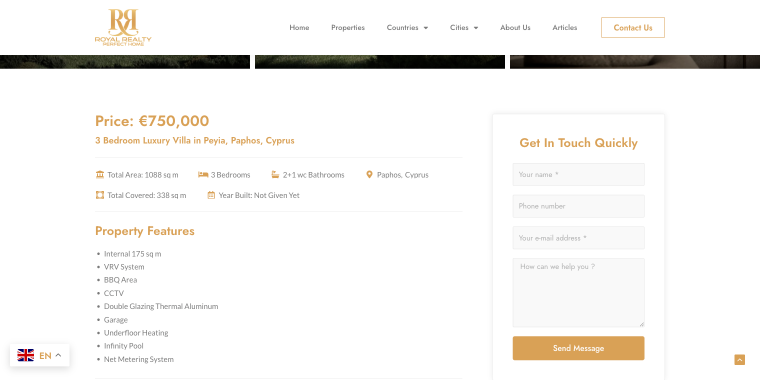
Royal Realty Perfect Home’s website exemplifies how an Elementor booking form can convey luxury through restraint. The gold-and-white color scheme immediately signals premium real estate, while the contact form sits in a subtle box on the right, titled “Get In Touch Quickly,” in the same warm gold tone.
Built with Elementor, this appointment form WordPress solution is refreshingly straightforward with just four simple fields: name, phone number, email, and a message box asking “How can we help you?” There are no animations or slide-outs, just a ready-to-use form that feels professional and uncluttered.
Crown Delta Hotel & Spa: full-screen booking hero
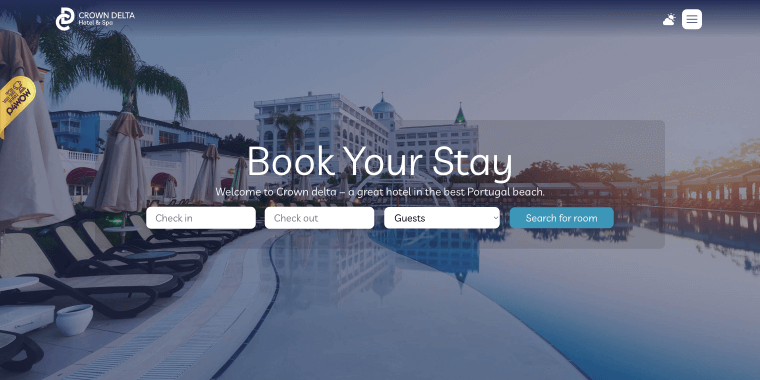
Crown Delta Hotel & Spa makes a bold statement by dedicating its entire homepage to the booking experience. Against a gorgeous backdrop of their poolside area and hotel exterior, they’ve placed a bold Book Your Stay headline front and center with an inviting tagline underneath.
The booking interface uses JetSmartFilters to create a sleek search bar with just the essentials: check-in and check-out date pickers, a dropdown for number of guests, and a bright blue “Search for room” button that pops against the softer background. This booking form Elementor approach feels immersive and focused. Instead of hiding the booking widget in a corner or sidebar, they make it the hero of the page. It’s simple, direct, and gets visitors straight to finding a room without any distractions or unnecessary steps.
MyBlue4you: professional yacht charter form

The MyBlue4You yacht charter website showcases a booking form plugin that means business. Set against a dark navy blue background, the Contact form sits on the right side while a beautiful shot of their Dufour 405 GL yacht fills the left side of the screen.
Built with JetFormBuilder, the form includes standard fields for name, phone, and email at the top, followed by a Dates of interest section featuring side-by-side date pickers for check-in and check-out. The form fields feature clean white backgrounds that stand out beautifully against the dark navy panel. It’s straightforward and professional with no fancy animations or gimmicks, just a solid booking inquiry form that gets the job done while the yacht photography does the selling.
Star Kar: modern slide-out panel
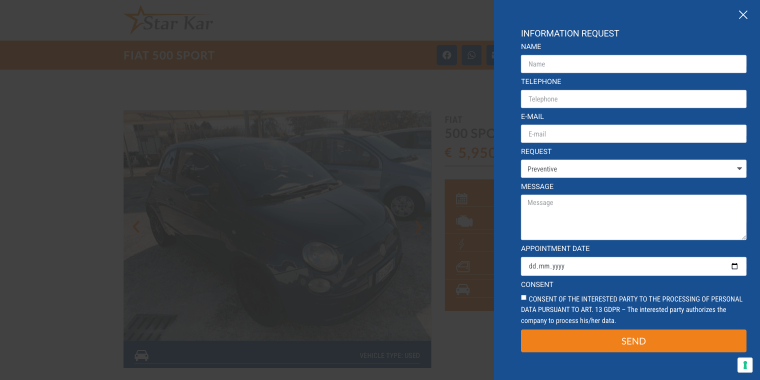
Star Kar’s car rental website features a slick booking form Elementor implementation that slides in from the right when visitors click the blue “PREVENTIVE” button at the top of the page. Built with Elementor Pro, the form appears in a smooth side panel with a deep blue background that dims the main content behind it.
The INFORMATION REQUEST form is well-organized with clean white input fields for name, phone, email, and a dropdown to select your request type (defaulted to “Preventive“). There’s a message box for additional details and a date picker for scheduling appointments. The whole interaction feels modern and polished; the slide-out keeps users on the same page while giving the form its own dedicated space without feeling cramped or cluttered.
Joyryde Electric Bikes: smart filter-based booking

The Joyryde Electric Bikes website uses JetSmartFilters in a clever way to create a booking-form-like experience right on its homepage. Set against a rich green background with the tagline A New Way to Get Around, the filter bar sits in a clean white panel that stretches across the page.
Users can use Select Filters for location and bike type, then pick rental dates with a Date Range Filter for pickup and return. The bright green “Check Available Bikes” button on the right side ties everything together and perfectly matches the site’s eco-friendly vibe. It’s a smart setup; instead of a traditional WordPress booking form, they’re using filters to narrow down available bikes based on user needs, which makes perfect sense for a rental business. It’s functional without being boring, and gets visitors searching for bikes in just a few clicks.
FAQ
JetFormBuilder stands out as one of the most flexible WordPress booking form solutions. It offers multi-step forms, conditional logic, calculated fields, and seamless integration with popular page builders. Unlike simpler contact form plugins, it’s specifically designed to handle complex booking scenarios, with features such as dynamic pricing, date pickers, and guest selection fields.
Yes, you can create booking forms with Elementor using either Elementor Pro’s form widget or by integrating specialized plugins like JetFormBuilder. While Elementor Pro offers basic form functionality, dedicated booking form plugins provide more advanced features such as automatic pricing, availability checking, and booking management.
Dynamic pricing in booking forms typically requires calculated fields that update based on user selections. JetFormBuilder offers this functionality through its calculated fields feature, which lets you create formulas that multiply nights by rates, add extra services, and display real-time totals to users as they fill out the form.
Conclusion
Creating an effective booking or appointment form doesn’t require expensive developers or complicated coding. As these eight examples demonstrate, the right booking form WordPress plugin can help you build professional, conversion-optimized forms that match your brand and delight your customers.
Whether you prefer the sleek slide-out panels of Kenridge Residences and Star Kar, the straightforward sidebar approach of TrueScany, or the full-screen hero style of Crown Delta Hotel & Spa, there’s a booking form design pattern that fits your needs. The key is choosing a flexible solution like JetFormBuilder that lets you create custom booking experiences without limiting your creativity. Start with a booking form template as a foundation, then customize it to match your brand and specific business requirements. Your visitors will appreciate the smooth, professional booking experience, and you’ll enjoy higher conversion rates and fewer abandoned bookings.