File upload functionality is crucial for modern WordPress sites. Whether you’re collecting resumes, gathering customer documents, receiving creative submissions, or processing orders with file attachments, having a reliable WordPress file upload form is essential for smooth communication with your users.
Why File Upload Forms Matter for Your WordPress Site
With file upload forms, your website may transform from a static information source into an interactive platform where users can securely share documents, images, and other files. From job application portals to customer support systems, these forms facilitate smoother workflows and better user experiences. The right plugin can handle everything from Contact Form 7 file attachments to complex multi-file uploads with validation and security features.
File Upload Use Cases with JetFormBuilder
JetFormBuilder Drag and Drop File Upload add-on provides enterprise-level file-handling capabilities that adapt to virtually any business scenario. Let’s explore how this powerful solution can transform your WordPress workflows.
Job application portal
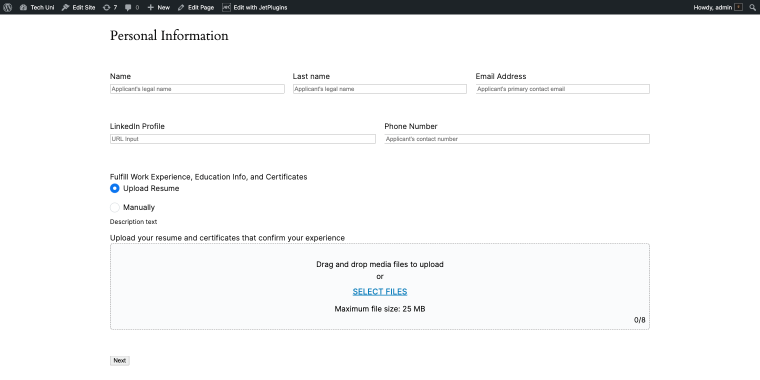
Create a professional recruitment system that enables candidates to upload their CVs, cover letters, and portfolio files.

The add-on’s Media Library integration allows candidates to select from previously uploaded documents, while automated image resizing ensures profile photos meet your requirements. With role-based access control, you can restrict the upload field to logged-in users or specific user groups, ensuring application security.
Customer support ticketing system
Allow customers to attach screenshots, error logs, or documentation when submitting support requests.
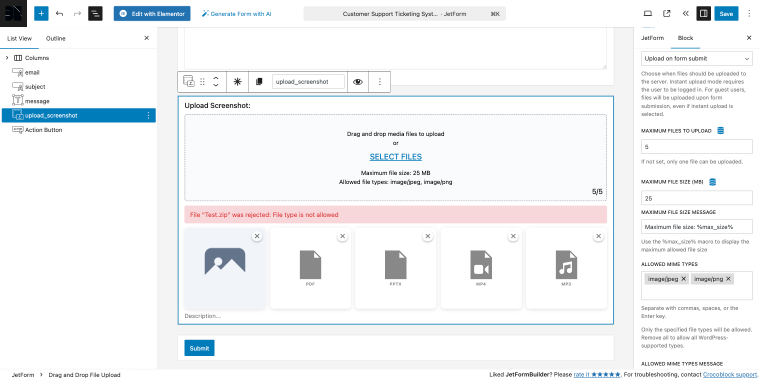
The file preview and reordering feature enables users to verify they have attached the correct files before submitting. Set a file limit to prevent server overload while allowing multiple files to be uploaded per ticket.
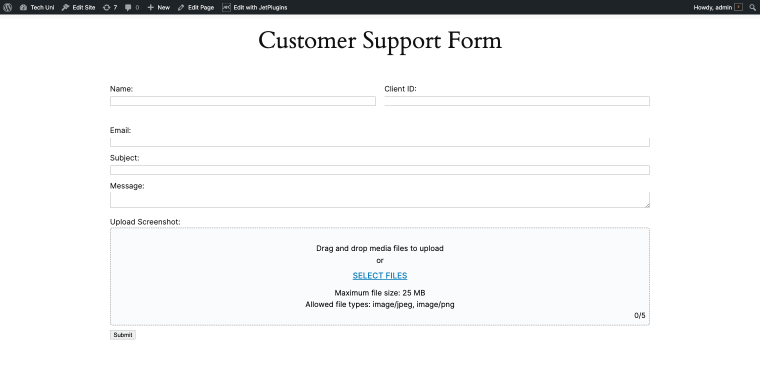
Files can be stored on the server, saved as attachments, and sent to the client as attachments.
Real estate listing submissions
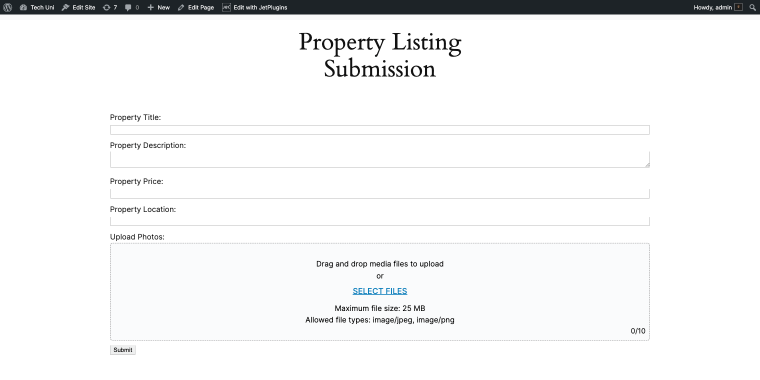
Property owners can upload listing details along with high-quality images.
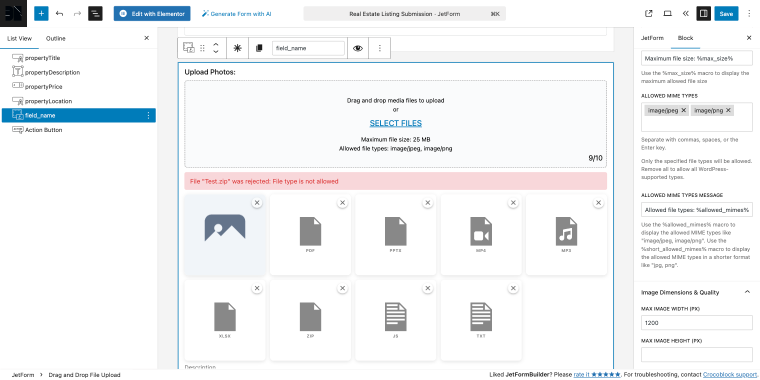
The automatic image dimensions and quality settings ensure all photos meet your site’s display standards without manual effort.
The drag-and-drop interface makes uploading multiple property images easy, while MIME type restrictions prevent the submission of unsuitable file formats.
Top 7 Plugins for File Upload Forms in WordPress
Shared Files – Frontend File Upload Form (Freemium)
🏆 Best for creating comprehensive document libraries with download tracking and lead generation.

The Shared Files plugin provides front-end file upload capabilities, download tracking with detailed statistics, and powerful search functionality. Users can organize files using tags and categories, preview documents in the browser, and even collect contact information before allowing downloads for lead generation purposes. The plugin isolates shared files from the Media Library, creating a dedicated file management system with its own interface and organizational structure.
Pricing: free version with extensive features; Pro ($9.99) and Max ($12.99) versions available.
Key features:
- front-end file upload and management;
- browser-based file preview with lightbox;
- search functionality across all files;
- lead generation via contact info collection;
- file expiration dates;
- guest and logged-in user uploads;
- multiple layout options and shortcodes;
- country and city detection for downloads (Pro).
Pros:
- comprehensive file management ecosystem;
- multiple layout and display options;
- active development with frequent updates;
- works independently of Media Library;
- supports any file type activation.
Cons:
- some premium features are essential for business use;
- requires shortcode knowledge for full customization;
- FTP upload is only available in the Pro version;
- permission restrictions are limited in the free version.
JetFormBuilder – Drag & Drop File Upload Add-on (Premium)
🏆 Best for professional WordPress sites requiring advanced file handling with WordPress Media Library integration.
JetFormBuilder’s Drag and Drop File Upload add-on enhances form-based file collection with enterprise-grade features and seamless WordPress integration. It features an easy-to-use drag-and-drop interface and access to the WordPress Media Library, enabling users to upload new files or select previously uploaded media. The add-on supports both instant and on-submit upload modes, making it versatile for different performance needs and use cases.
Pricing: part of JetFormBuilder Pro subscription ($49/year).
Key features:
- WordPress Media Library integration;
- drag-and-drop file upload interface;
- automated image resizing and quality adjustment;
- file preview and reordering before submission;
- role-based access control for upload fields;
- multiple upload modes (instant or on-submit);
- comprehensive file validation (size, MIME types, limits);
- multiple storage options (attachments, server, URL);
- email attachment support without server storage.
Pros:
- excellent for maintaining consistent image quality;
- flexible storage and output options;
- strong security with access controls;
- works perfectly with other Crocoblock plugins.
Cons:
- requires JetFormBuilder Pro subscription;
- learning curve for maximizing all features.
Forminator Forms – Contact Form Builder (Freemium)
🏆 Best for an all-in-one form solution with payment integration and comprehensive field options.

Forminator is WPMU DEV’s powerful form builder, combining contact forms, payment forms, polls, quizzes, and calculations into a single, comprehensive plugin. The drag-and-drop visual builder makes form creation intuitive, while the extensive field library includes file upload with multi-file support and drag-and-drop functionality.
Pricing: free version with extensive features; Pro version ($18/year).
Key features:
- multi-file upload with drag-and-drop interface;
- over 20 field types, including file upload;
- custom login and registration forms;
- file type and size restrictions;
- front-end post submission support;
- preset and cloud form templates;
- image preview for uploads.
Pros:
- payment processing capabilities;
- third-party integrations (1000+ apps via webhooks);
- great for complex forms with calculations;
- import wizard for Contact Form 7 migration;
- Gutenberg and Classic Editor support.
Cons:
- can be overwhelming for simple contact forms;
- advanced features require the Pro version;
- file upload styling is limited compared to specialized plugins.
Drag and Drop Multiple File Upload for Contact Form 7 (Freemium)
🏆 Best for Contact Form 7 users wanting enhanced multiple file upload capabilities.
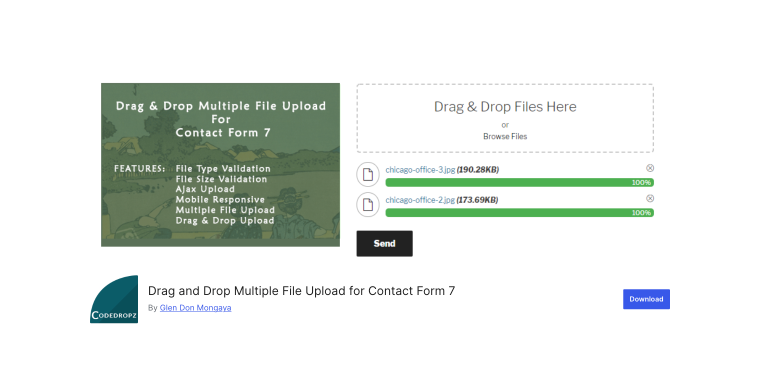
This specialized plugin extends Contact Form 7’s upload functionality with a modern drag-and-drop interface and support for multiple files. The plugin includes file type and size validation, AJAX-based uploading with progress bars, and the ability to preview and delete files before submission. Files can be sent as email attachments or as links, making it flexible for different email server limitations.
Pricing: free version available; Pro version ($34.99/year).
Key features:
- drag-and-drop multiple file upload;
- file type and size validation;
- AJAX uploader with progress bar;
- limit the number of files per upload;
- pre-submission file deletion;
- multiple upload fields per form.
Pros:
- perfect integration with Contact Form 7;
- simple, focused functionality;
- free version for basic features, Pro version with cloud storage;
- easy to implement with existing CF7 forms;
- compatible with popular CF7 add-ons;
- custom theme options (dark/light).
Cons:
- works with Contact Form 7 only;
- free version auto-deletes files after 1 hour;
- limited styling options in the free version;
- no built-in form builder (relies on CF7).
Frontend File Manager Plugin (Freemium)
🏆 Best for organizations needing private, user-specific file storage with robust security.

Frontend File Manager empowers WordPress users to securely upload files to private directories accessible only to them and administrators. Each user receives their own isolated directory, ensuring complete privacy and data protection. The plugin features a modern, responsive interface with smart search capabilities, file metadata support, and detailed file pop-ups.
Pricing: a free core version is available, along with a Pro version ($35/year).
Key features:
- private user directories with admin oversight;
- customizable file type and size restrictions;
- real-time upload progress tracking;
- image thumbnail generation;
- role-based file size quotas;
- email notifications on file upload;
- custom file metadata fields.
Pros:
- excellent security with user-isolated storage;
- flexible metadata system for file organization;
- supports guest uploads without requiring a login;
- regular updates and active development;
- Gutenberg block support.
Cons:
- limited styling customization in the free version;
- directory creation is only available in Pro;
- may require technical knowledge for advanced setup.
File Upload Types by WPForms (Free)
🏆 Best for extending WordPress file type support across all upload scenarios.

The File Upload Types plugin lets you whitelist any file type or MIME type for upload across your entire site. Whether you need to accept SVG files, XML documents, CAD drawings, or custom file extensions, this plugin modifies WordPress’s internal file whitelist. It’s essential for any site using file upload forms with WPForms or Gravity Forms.
Pricing: a completely free plugin.
Key features:
- add any file extension to WordPress;
- support for custom MIME types;
- simple admin interface;
- works with all form plugins;
- sanitization for SVG and HTML files;
- sample file upload for validation;
- no plugin-specific limitations.
Pros:
- completely free with no premium version;
- works with any WordPress form plugin;
- created by the reputable WPForms team;
- regular security updates;
- no configuration complexity.
Cons:
- utility plugin only requires a separate form plugin;
- no built-in scanning, can allow risky file types if misconfigured.
Gravity Forms (Premium)
🏆 Best for enterprise-level form building with professional file upload capabilities and extensive integrations.
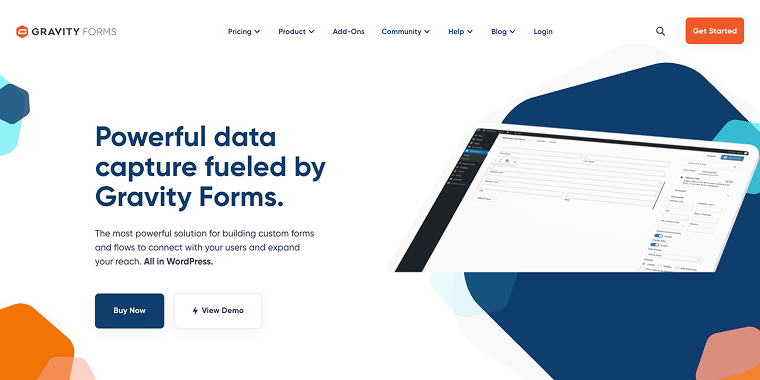
Gravity Forms is the premium standard for WordPress form building, offering sophisticated file upload functionality within a comprehensive form management ecosystem. The visual form editor makes creating complex forms intuitive, while conditional logic allows dynamic form behavior based on user input. File upload fields support documents, photos, and attachments with files saved directly to your server. Beyond basic forms, Gravity Forms excels at payment collection, workflow automation, and integration with business tools. The plugin’s architecture supports everything from simple contact forms to complex multi-page applications with file submissions.
Pricing: three tiers – Basic ($59/year, 1 site), Pro ($159/year, 3 sites), Elite ($259/year, unlimited sites). All annual license prices include add-ons.
Key features:
- visual drag-and-drop form builder;
- payment integration (Stripe, PayPal, Square);
- workflow automation capabilities;
- user registration and login forms;
- 30+ official add-ons included by tier;
- file upload to server storage.
Pros:
- extensive integration ecosystem;
- great conditional logic capabilities;
- regular updates and new features, excellent documentation, and support;
- scales from simple to complex needs.
Cons:
- premium pricing (no free version);
- annual renewal required for updates and support;
- can be overkill for simple file upload needs;
- add-ons distributed across pricing tiers;
- some popular add-ons are exclusive to the Elite tier.
FAQ
Use the built-in file field or the Drag and Drop Multiple File Upload for Contact Form 7 plugin. Add an [mfile] shortcode in the form editor. The plugin supports multiple uploads, progress bars, and file links instead of attachments.
Free plugins handle basic single-file uploads and email delivery. Premium plans include multi-file and drag-and-drop uploads, file size limits, cloud storage, chunked uploads, and enhanced security, as well as regular updates, support, and third-party integrations.
Yes. With Pro or Elite licenses, Gravity Forms integrates with Dropbox via an official add-on and with Google Drive through Zapier or third-party plugins. Files can be uploaded directly to your cloud and stay backed up on your server for easy team access.
Conclusion
The best WordPress file upload form solution depends on your needs, budget, and skill level. For basic Contact Form 7 forms, the dedicated extension (Drag and Drop Multiple File Upload for Contact Form 7) works well. Businesses requiring comprehensive file management can utilize Frontend File Manager or Shared Files.
JetFormBuilder’s Drag and Drop File Upload add-on suits professional sites with advanced image handling, while Forminator offers an all-in-one free solution for forms, payments, and uploads. Gravity Forms remains the top premium choice for enterprise use. Use File Upload Types by WPForms to allow non-standard files. Whatever you choose, enforce file type checks, size limits, and updates to keep your site secure.