A loop builder is the tool you use to create dynamic loops – repeatable content blocks that automatically pull data about products, articles, properties, events, or anything else stored in your database and render each item with the same design. You design one card, define what data should fill it, and the loop repeats it for every matching item.
All three of the big names here – JetEngine, Bricks, and Divi – can build dynamic loops. But the underlying logic is different for each one.
The real question is how much control you get over what the loop pulls and how you reuse that work across a site. This article breaks down where each one fits.
What Is a Loop Builder in WordPress?
A content loop isn’t a WordPress-specific thing, but a general concept used anywhere data is stored in a database: a repeatable structure that iterates over a set of items and outputs each one using the same layout.
In practice, three things happen under the hood: first, data is retrieved from the database based on conditions you define. The loop then walks through each item one by one. And each item is rendered using the same template.
So a loop is made of three parts:
- The query prepares a collection of items – e.g., “give me villas in Indonesia, published this year, sorted by price.”
- The loop structure iterates over that collection until there’s nothing left to show.
- The template defines how each individual item looks.
The loop itself doesn’t decide what data it works with. It only handles the repetition. The query decides the content. And that distinction is the whole game, because it means a loop builder really has two jobs, and a tool can be strong at one and weak at the other:
- A query builder – to define precisely what gets displayed, in what order, with which conditions.
- A template builder – to design how each item is laid out and styled.
Most visual page builders ship a decent template builder part, but a flimsy query builder functionality.
Keep that two-part split in mind, because it’s exactly where these three tools – JetEngine, Bricks, and Divi – diverge.
📌 I didn’t add Elementor to this comparison because its builder is really weak when it comes to querying – you can find a more detailed breakdown of the features here.
Bricks Loop Builder vs Divi Loop Builder: Core Differences
Both Bricks and Divi take the same fundamental approach: the loop lives inside the builder canvas. You enable looping on an element, design the repeated item right there, and configure the query in the same place.
Bricks introduced its Query Loop early. You enable the Query Loop toggle on a layout element – a container, div, block, or section, and also on Slider, Tabs, and Accordion elements, design the card inside it, and set the query.
It can loop posts (any registered public post type), taxonomy terms, users, API data, or repeaters. Because the loop wraps any element and is built on WP_Query, Bricks gives you exceptionally clean control over the output markup, as there are no forced wrappers. Bricks also auto-generates internal loop markers in the HTML that power AJAX pagination, query filters, load more, and infinite scroll, and, since version 1.10, it has added dedicated WooCommerce product query settings. For more advanced needs, Bricks lets developers write a custom PHP query.
Divi added a Loop Builder in Divi 5 in 2026 as a part of a big rewrite. You activate the Loop toggle on almost any element – section, row, column, group, or module – pick a Query Type (posts, terms, users, or even WordPress menus), design the repeated item with Divi modules, and plug in dynamic content tokens like Loop Post Title and Loop Featured Image. It supports custom post types and custom fields, with meta queries, taxonomy filters, ordering, and offset, plus a separate Pagination module.
With the Divi 5 flexbox layout system, it produces genuinely custom card designs, and it’s a comfortable, visual, no-code experience.
The core differences between the two come down to a few things:
| Bricks Loop | Divi 5 Loop | |
| Query targets | Posts, terms, users, repeaters, Woo cart content | Posts, terms, users, menus |
| JetEngine Query Builder as a Loop source | Yes | No |
| Markup control | The cleanest | Tied to the Divi structure, so still too many wrappers |
| Advanced queries | Meta query, taxonomy filters, ordering; native custom PHP query for anything beyond | Meta query, taxonomy filters, ordering, offset, sticky handling |
| Audience | Developer-leaning, performance-first | Designer-friendly, visual-first |
| Maturity | Long-established | Newer, but capable |
The thing they share, and it matters for the next section, is that the query and the template are bound together on the page, and the loop is built where it’s displayed. There’s no central, reusable query library: if you want the same logic on three different pages, you generally rebuild or duplicate it, and queries aren’t shared, reused, or cached as standalone objects.
How to create a query loop in Bricks and Divi
Both follow the same logic – first, you activate the query loop, then set the query, and the layout gets filled with dynamic data.
How to build a Bricks query loop, step by step
- Add a wrapper element. Drop a Container (or a Block, Div, or Section) onto the page. This will become the single repeated item.
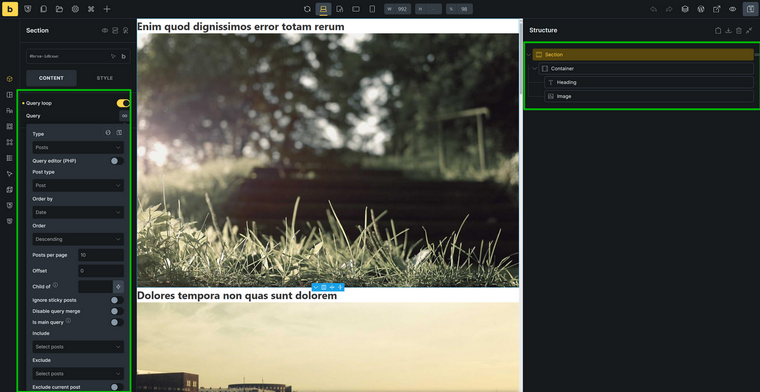
- Enable the loop. With the element selected, switch on Use Query Loop in the left panel. An infinity icon appears, marking the element as the loop.
- Configure the query. Open the query controls and choose what to loop – Posts (any public post type), Terms, Users, Cart content, API, or Repeater (the latter two are configured using custom code). Then set the details: post type, taxonomy, meta query, order by, and posts per page. For advanced cases, you can write a custom PHP query.
- Build the card inside the loop element. Add child elements – image, heading, text, button – inside the loop wrapper. Right now, they’ll show static placeholder data. You can do this on step 1 – it’s up to you.
- Connect dynamic data. Replace the static content with dynamic data tags so each item pulls its own values: featured image on the image element, post title on the heading, excerpt on the text, and so on. Set the button (or the wrapper) link to the post permalink dynamic tag.
- Style and finish. Style the card, set columns, and add pagination, load more, or filters if needed – Bricks’s internal loop markers make those work automatically.
How to build a Divi 5 query loop, step by step
- Build the item layout first. Design one card using Divi elements — typically modules grouped inside a Column, looped within a Row.
- Open the element’s settings and enable Loop. Click the element you want to repeat (Section, Row, Column, Group, or Module), go to the Content tab, expand the Loop section, and toggle Loop Element On.
- Set the Query Type. Choose what to loop — Posts, Terms, Users, or Menus — then pick the Post Type (Posts, a WooCommerce product type, a custom post type, etc.).
- Refine the query. Set Posts Per Page and, as needed, taxonomy filters, meta query, ordering, and offset.
- Make it dynamic. For each part of the card, click the Insert Dynamic Content icon and assign loop fields, e.g., Loop Featured Image, Loop Post Title, excerpt, terms, author, and date. To make the card clickable, go to Content > Link and assign Loop Link via the dynamic content icon.
- Add pagination separately. Place a Pagination module outside the loop container to split results across pages.
In both tools, the query and the template live together on the canvas, so this whole setup belongs to that one element on that one page. That’s the contrast with the next approach.
Where JetEngine Wins
Crocoblock JetEngine loop builder isn’t a single widget you toggle on. It’s a system of three separate, reusable parts, and that architecture is its biggest advantage:
- A Listing Template (the loop template) that you design in the builder you already use: Elementor, Bricks, Divi, or the Block Editor, or in lightweight Twig.
- A Query, built in the standalone Query Builder, that defines exactly what gets fetched.
- The output – a Listing Grid, slider, table, calendar, or map – wherever you want to display the loop and apply a query to it.
Why the JetEngine approach is different in dynamic listings (loops)
First, a vocabulary note that trips up almost everyone coming from Bricks or Divi, and it’s worth stating plainly, because JetEngine’s own naming hides a concept you already know. In JetEngine, a loop template is called a “Listing,” or “Listing Template.”
It’s the exact same idea as a Bricks looped container or a Divi loop element: the design of one repeatable item. The most widely used widget that outputs the finished loop on a page is the Listing Grid, but it can be a dynamic table, calendar, or map.
So whenever JetEngine’s docs or interface say Listing, read the loop template; when they say Listing Grid, read the loop’s output. So, it’s the same universal loop concept, different words.
With that translation in hand, here’s what sets the JetEngine’s loop builder apart: it isn’t a single toggle on an element. It’s a system of three separate, reusable parts.
- A Listing Template – the loop template – designed in the builder you already use (Elementor, Bricks, Divi, or the Block Editor) or in lightweight Twig.
- A query that defines exactly which items the loop pulls.
- The Listing Grid – the output – where you place the loop on a page and apply a query to it.
Because these three are decoupled rather than fused on one element, you get reuse and mix-and-match that the in-canvas approach can’t match. One Listing Template can be paired with many different queries; one query can drive many templates.
Say you build a Top-Rated Books loop that shows reviews with a star rating above three. You’ve already created a loop (listing) template and a query where the review field value must be over thee.
Now, you want to make a similar section with Best Sellers. So you go to Query Builder > Add New, and create one more custom query that only pulls items with the “best seller” custom field of toggle type activated.
Then, you go to your page, add Listing Grid, choose the same loop template you’ve used, but in the Custom Query section, choose the query for Best Sellers you’ve just created.
You can build more or less universal loop templates – e.g., with the Best Seller and Top-Rated badges at the same time – and if the field is empty, it will just not be displayed. Also, you can add the Custom Visibility functionality.
If you want to change your query conditions, you do it once, centrally, in the Query Builder editor, and the data will change in all the pages this query is used – so you don’t have to visit each page and edit it.
Also, if you want to change the loop design, you can do it from one place, and all the instances will change in all the pages where they are used.
This video will show you the full process, as well as explain why the separation into three logical steps or parts is important:
The loop (listing) template is built using dedicated widgets/elements – Dynamic Field, Dynamic Image, Dynamic Link, and others.
Each of these widgets has additional functionality. For example, the Dynamic Field widget does more than print a value: it carries a library of callbacks that transform content on output (rendering an image from an ID, turning an array into a list, formatting a date, trimming text, etc.).
Dynamic Image has a lot of settings for image output and linking.
Dynamic Link has a powerful functionality for passing URL query variables.
If you prefer using the builder’s native widgets, you can do it, as JetEngine adds a dynamic tag. For example, you can use an Icon List widget but get list values and icons dynamically from custom fields.
For the cleanest possible markup, the Twig listing view produces HTML with no extra wrapper divs.
Why is Query Builder a separate tool?
As I’ve already mentioned, a Query Builder query can be applied to any existing loop (listing) template or be a source of such a template. But there’s a confusion I want to address before speaking about the Query Builder tool.
Legacy query settings in Elementor
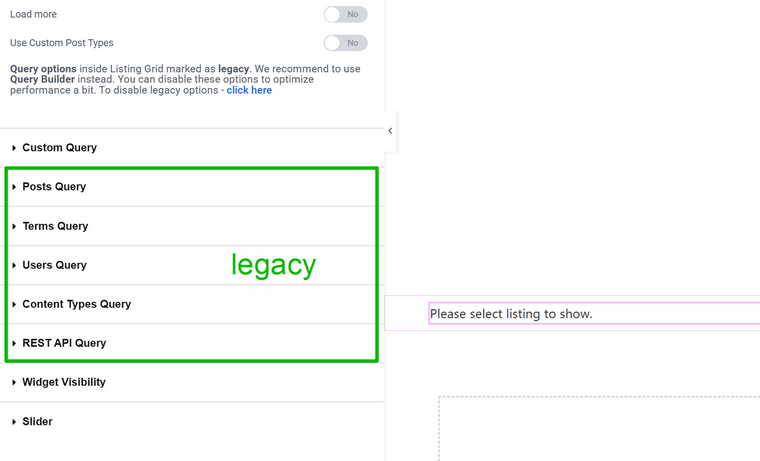
This is the part that puzzles some JetEngine users: when you add a Listing Grid widget, you will see the query settings (if you use Elementor). This is a legacy feature, which is why Bricks and Divi don’t have it – the integration was added later, so it doesn’t have this legacy functionality.
It can’t be fully removed from the interface because there are a lot of websites that rely on those settings, on the front-end side.
Why does Query Builder need a dedicated editor?
The main reason is simple: Query Builder is a very powerful querying tool that can replace complex PHP query code and hectic ways of applying it on the front end with a simple visual interface.
None of the existing builders has this powerful querying tool, so the querying functionality can fit on the front-end editor. In the case of JetEngine, it would either overcomplicate and overload the interface, if put there, or some functionality should be removed.
The second reason why you build a custom query separately is flexibility. You have centralized control over all loops that rely on this query from a single place. Also, you can mix and match it with different loops.
Beyond the standard functionality, Query Builder offers more advanced and creative ways to use it. Watch this video to learn about them:
FAQ
A loop builder is a tool for creating dynamic loops – repeatable content blocks that pull items from your database (posts, products, properties, events) and render each one with the same design. You build a single card once, define which items it should pull, and the loop repeats it automatically. It saves you from building every item by hand and keeps the content in sync with your database.
There’s no single winner, as it depends on the project. Bricks is best for clean markup and developer control, Divi 5 for a visual, designer-friendly workflow, and JetEngine for reusable, deeply filtered loops and outputs like maps, tables, and calendars. JetEngine also runs inside Bricks and Divi, so it’s often not an either/or choice.
Yes. Bricks Query Loop turns almost any element – container, div, block, section, slider, tabs, or accordion – into a loop, then queries posts, terms, users, and more. It’s built on WP_Query, produces very clean markup, and supports a custom PHP query for advanced cases.
Yes. Divi added a native Loop Builder in Divi 5, where you toggle Loop on a section, row, column, group, or module and loop through posts, terms, users, or menus. It supports custom post types, meta queries, taxonomy filters, ordering, and a separate pagination module.
Essentially, yes. What JetEngine calls a “Listing” or “Listing Template” is just its name for a loop template – the design of one repeatable item, the same concept as a Bricks looped container or a Divi loop element. The Listing Grid is simply the widget that outputs that loop on a page.
Yes. JetEngine works on top of Elementor, Bricks, Divi, and the Block Editor (plus Twig), so you can keep your preferred builder for design and use JetEngine as the query and loop layer. Many sites pair Bricks for building with JetEngine for the data.
The query decides what data is pulled from the database – which items, in what order, under which conditions. The loop is the repetition engine that walks through those items and renders each one with the same template. A loop without a query has nothing to repeat, so the two always work together.
All these builders have functionality for working with dynamic content. When it comes to loops, Elementor Pro’s built-in functionality is the most basic. All three builders work with JetEngine, though, so you can use its functionality for dynamic content.
Takeaway
Every loop is the same three parts: a query that decides what data to pull, the loop that repeats it, and a template that styles each item.
Bricks and Divi keep all three on one element on one page; it’s fast and simple for blogs, portfolios, and standard product grids, with Bricks favoring clean markup and Divi a visual workflow.
JetEngine splits them into a reusable Listing Template (its name for a loop template), a separate query, and a Listing Grid output, so one query can drive many pages, and the loop can render as a grid, table, calendar, or map.