Using custom post types (CPT) is natural for any proper CMS, and in WordPress, this functionality was introduced back in 2010, and it was one of the most important events in WordPress history, as it was what turned a blogging platform into a fully-fledged, scalable CMS. Since then, you can add CPTs either programmatically or using plugins.
So, in this article, I will discuss the most common cases for using custom post types on particular website types and how they act within this system.
CPTs in CMSs and Builders
What are custom post types essentially? They are user-defined content structures that store and organize a specific kind of content separately from standard pages or articles, with their own fields, rules, and presentation. Each CPT can have its own permission, workflows, API behavior, taxonomies, and capabilities to extend the whole system.
As I mentioned above, any proper CMS should have this functionality – to be able to organize content in a scalable and reusable way. So, does that mean that popular builders (other than WordPress) have this functionality?
In reality, no, most of the popular builders actually don’t have it. Instead, they offer Collections/Databases – a database-like group of content entries that share the same set of fields and can be displayed dynamically across a website using templates.
| Platform | Real CPTs / content types | Collections / database-style content |
| WordPress | ✅ (using free and premium plugins or code) | |
| Drupal | ✅ | |
| Craft CMS | ✅ | |
| Statamic | ✅ | |
| Directus | ✅ | |
| Strapi | ✅ | |
| Joomla | ⚠️ (via extensions) | |
| Webflow | ❌ | ✅ |
| Framer | ❌ | ✅ |
| Wix | ❌ | ✅ |
| Bubble | ❌ | ✅ |
| Squarespace | ❌ | ⚠️ (limited) |
| Ghost | ❌ | ⚠️ (limited) |
Creating CPT-based sites in WordPress
The process of creating CPTs in WordPress is very straightforward, but what can be really tricky and become the biggest advantage or disadvantage is the data architecture. The second super important part is choosing the right tool for implementing your data scheme.
I’m often surprised, and even overwhelmed by how frequently ACF is mentioned whenever CPTs and custom fields come up. Because of its long history and widespread adoption, it has become the tool many video creators, AI chatbots, and articles recommend first. While ACF is undoubtedly useful and remains a solid choice in many projects, especially when building custom frameworks, it’s not the most efficient and definitely the most feature-rich option available today.
For web designers who are just starting with CPTs, the experience can be challenging. Because after reading introductory materials, they may quickly find themselves navigating PHP documentation, hooks, and suggested custom code to achieve relatively common functionality. Consequently, this creates a steeper learning curve than expected and can make WordPress as an option feel too complicated. As a result, some rookies may gravitate toward simpler SaaS website builders, which often appear easier to get started with, even if they offer significantly less flexibility, system lock-in, a huge price tag, and no scalability in the long run.
Having worked with ACF for many years and experimented with other solutions, I’ve found JetEngine to be a particularly versatile option for projects that rely heavily on CPTs and custom content structures. That’s why the examples throughout this article will use JetEngine’s modules and tools to demonstrate different CPT-related workflows.
💡Also, it’s important to clear up a common misconception often repeated by Google results and AI tools: JetEngine is not a plugin that works only with page builders. It can also be used in custom frameworks, as all field values are accessible in PHP and can be output using its built-in Shortcode Generator (JetEngine > JetEngine > Shortcode Generator tab).
For developers who need additional flexibility, JetEngine also provides documentation, a hook reference, and the tools needed to extend its functionality or build custom add-ons.
JetEngine tools for working with CPTs and custom fields
This is a list of modules JetEngine offers for working with CPTs. All of them are fully visual (no coding involved).
| Feature | JetEngine Capability |
| Custom Post Types (CPTs) | Create and manage CPTs without code. |
| Custom taxonomies | Create custom taxonomies and attach them to any post type. |
| Custom fields | Add text, number, date, media, repeater, switcher, WYSIWYG, map, gallery, and many other field types. |
| Meta boxes | Create field groups for posts, pages, CPTs, taxonomies, users, comments, and options pages. Can be assigned to terms and users as well. |
| Repeater fields | Build repeatable sets of fields without custom code. |
| Relations | Additional connections between CPTs beyond taxonomies. |
| Dynamic content output | Display field values dynamically in templates and post loops (listing templates). |
| Query Builder | Build custom queries without writing WP_Query code or SQL. |
| Custom Content Types (CCTs) | Create database-driven content structures that do not rely on WordPress posts. |
| Dedicated database tables for CPTs | Made for better performance and a clear data structure. |
| Options (Settings) pages | Create global settings pages with custom fields. |
| REST API module | Expose CPTs, fields, and related data through the REST API. A powerful module to work with applications, headless builds, and AI builders. |
| Dynamic visibility | Show or hide content based on field values and any other conditions. |
| Loop (Listing) templates | Create reusable templates for CPT items, taxonomy terms, users, and CCT records. |
| Field value macros | Use dynamic macros to retrieve related and contextual data. |
| Shortcode generator | Generate shortcodes for dynamic field output. |
| Data stores | Save favorites, bookmarks, wishlists, and other user-specific collections. |
| Custom queries and fields for relations | Add fields and query related content without custom PHP. |
| Dynamic data display | Data can be displayed in dynamic calendars, tables, and charts. |
| Maps integration | Display geolocation data from custom fields. |
| Import/export support | Import and export CPTs, fields, and related structures using dedicated integrations for WP All Import/Export and other plugins. |
| Cross-plugin CPT and field support | Supports structures created by ACF, Meta Box, Pods, etc. |
| Builder independence | Works with Elementor, Gutenberg, Bricks, Divi, and custom theme development. |
| Special integrations | Additional functionality is available when combined with JetFormBuilder, JetBooking, JetAppointment, JetSmartFilters, and other Crocoblock plugins. |
| Translation tools support | WPML, Polylang, TranslatePress, and other translation plugins support. |
| Other tools | MCP server, AI Site Structure Builder, Profile Builder. |
8 Common Website Examples Built Using CPTs
It’s not really possible to provide a ready-made structure for a particular type of website that will fit every project perfectly. The same applies to pre-built themes, as they rarely work without some level of customization, unless you adjust to this theme’s limitations.
Instead, the examples below focus on some of the most common website types and illustrate the core concepts behind each one, which you can then adapt to your specific requirements.
⛏️ The most frequently used plugins in these examples are:
JetEngine and JetSmartFilters, JetSearch, JetBooking, JetAppointment, JetFormBuilder, JetThemeCore.
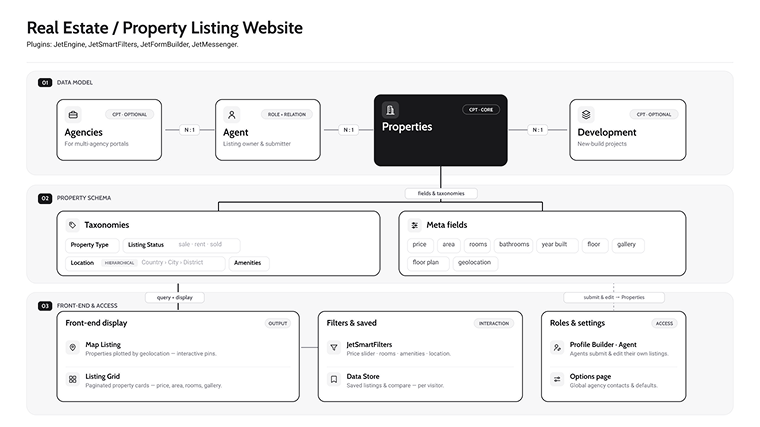
1. Real estate / Property listing website
- CPT: Properties (+ Agencies for multi-agency portals).
- Taxonomies: Property Type, Listing Status (sale/rent/sold), Location (hierarchical: Country > City > District), Amenities.
- Meta fields: price, area, rooms, bathrooms, year built, floor, gallery, floor plan, geolocation.
- Relations: Property and Agent (many-to-one), Agent and Agency, Property and Development.
- Options page: agency contacts.
- Display: Map Listing + Listing Grid + JetSmartFilters (price slider, rooms, amenities, location).
- Data Store for saved/compare.
- Extra user roles: Agent.
- Profile Builder: agents submit and edit listings.
🎓 Additional features and plugins: you can create a full-fledged real estate booking website if you add JetBooking (can be single- or multi-vendor) and JetMessenger.
2. Medical / Doctor directory
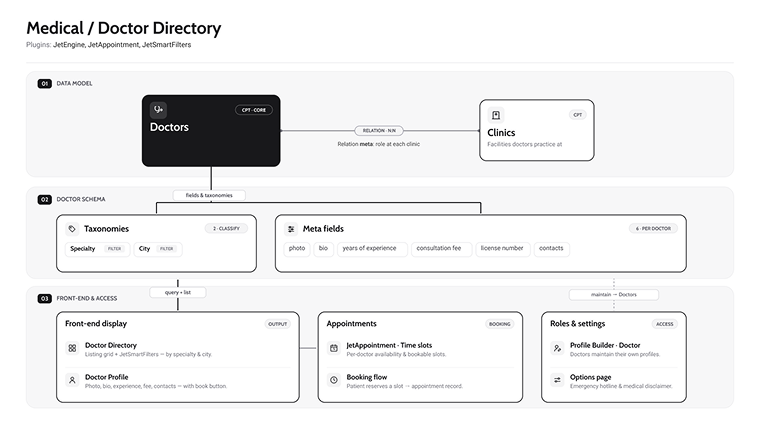
- CPTs: Doctors and Clinics.
- Taxonomies: Specialty, Languages, City.
- Meta fields: photo, bio, years of experience, consultation fee, license number, contacts.
- Relations: Doctor and Clinic (many-to-many). Relation meta field for role at each clinic.
- Options page: emergency hotline, medical disclaimer.
- Appointments: JetAppointment (time slots).
- Profile Builder: doctors maintain profiles.
🎓 Additional features and plugins: JetMessenger to connect potential customers with doctors and keep their messages on the website as well as on their mailboxes.
💡 Check the dedicated dynamic template for Crocoblock All-Inclusive subscribers.
3. Course / Education platform / Online school
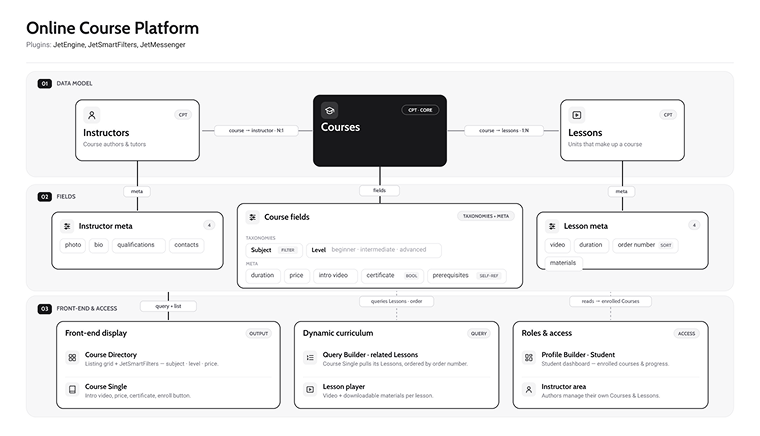
- CPTs: Courses, Lessons, Instructors.
- Taxonomies: Subject, Level (beginner/intermediate/advanced).
- Meta fields:
- for Courses: duration, price, intro video, certificate (bool), prerequisites (checkbox field generated from all other Courses);
- for Instructors: photo, bio, qualifications, contacts;
- for Lessons: video, duration, order number, downloadable materials.
- Relations: Course and Instructor, Course and Lessons (one-to-many).
- Display: Listing Grid + JetSmartFilters (subject, level, price); course single renders the curriculum by querying related Lessons ordered by the order field.
- Profile Builder: student dashboard.
🎓 Note: JetEngine handles catalog + structure + dashboards; pair with a dedicated LMS for quizzes/video-gating.
4. Booking website
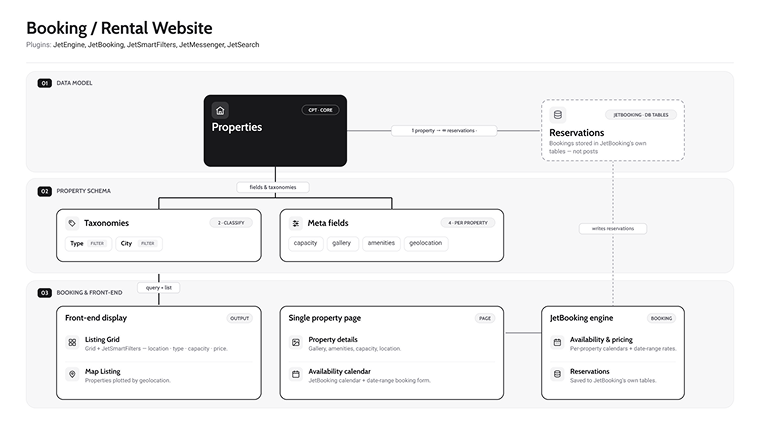
- CPT: Properties.
- Taxonomies: Type, City.
- Meta fields: capacity, gallery, amenities, geolocation.
- Booking engine: JetBooking availability calendars, date-range pricing, reservations (its own tables).
- Display: Listing Grid + JetSmartFilters (location, type, capacity, price) + Map Listing; single page shows JetBooking’s availability calendar.
🎓 Crocoblock Suite is a really powerful solution for booking websites. The good news is that now, JetBooking has become even more powerful: it can work as a standalone plugin, can work with WooCommerce checkout, or add a booking functionality to WooCommerce natively, with much more flexibility than many rivals.
💡 Check these examples and guides on how to build such websites:
- Car reservation system;
- A hotel booking system like Airbnb;
- How to build a booking system with Bricks.
Also, don’t forget to test the newest plugin by Crocoblock – JetMessenger, as it’s a really great asset for any booking site.
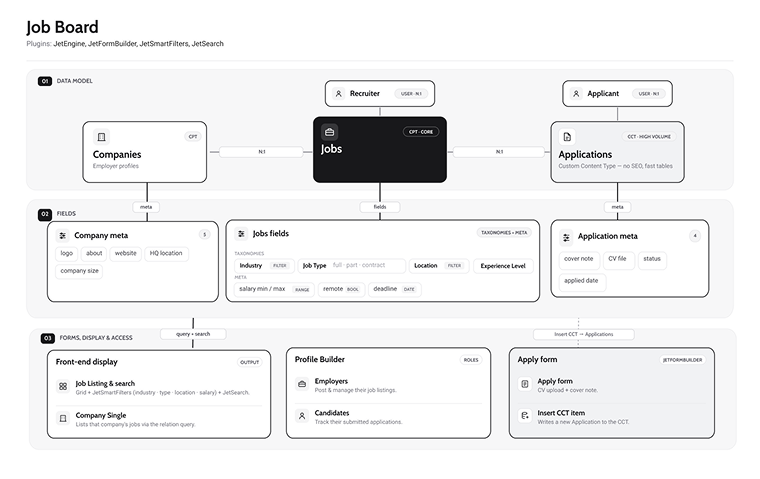
5. Job board
- CPTs: Jobs, Companies.
- CCT: Applications.
- Taxonomies: Industry, Job Type (full/part/contract), Location, Experience Level.
- Meta fields:
- for Jobs: salary min/max (range filter), remote (bool), deadline (date);
- for Companies: logo, about, website, HQ location, company size;
- for Application: cover note, CV file, status, and applied date.
- Relations: Job and Company (many-to-one), Job and Recruiter, Application and Job, Application and User (applicant).
- Forms: JetFormBuilder application form (CV upload) with the “Insert CCT item” action, writes the application.
- Display: Listing Grid + JetSmartFilters (category, job type, location, salary range) + JetSearch for keyword search; company single lists the Company’s jobs via the relation query.
- Profile Builder: employers post/manage jobs; candidates track their applications.
💡 Read a detailed guide on how to build a Job Board website in this article, or use the dedicated dynamic template for Crocoblock All-Inclusive subscribers.
6. Restaurant / Menu system
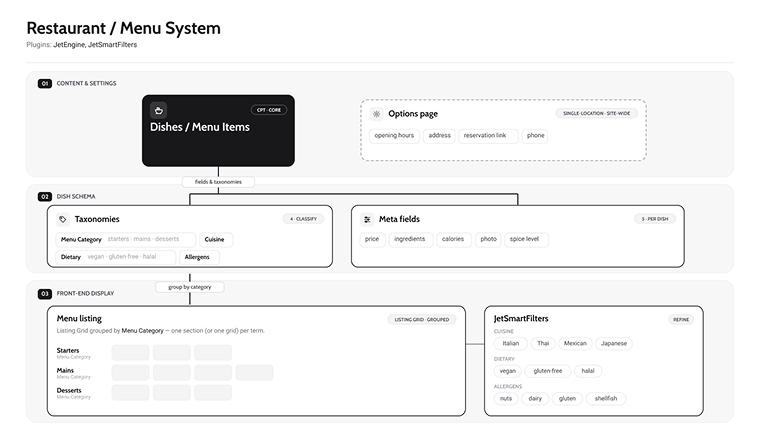
- CPT: Dishes, Menu Items.
- Taxonomies: Menu Category (starters/mains/desserts), Cuisine, Dietary (vegan/gluten-free/halal), Allergens.
- Meta fields: price, ingredients, calories, photo, spice level.
- Options page: opening hours, address, reservation link, phone (single-location sites).
- Display: Listing Grid grouped by Menu Category (or one grid per term) + JetSmartFilters (cuisine, dietary, allergens).
7. Portfolio / Creative agency
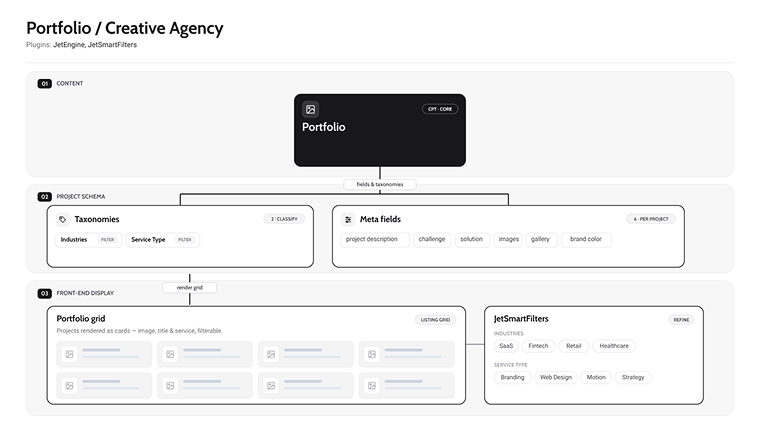
- CPT: Portfolio.
- Taxonomies: Industries, Service Type.
- Meta fields: project description, challenge, solution, images, gallery, brand color (colorpicker, optional).
- Display: Listing Grid + JetSmartFilters (industries, service type).
💡 Read a very detailed guide on building a portfolio website for a marketing agency.
8. Knowledge base / Documentation
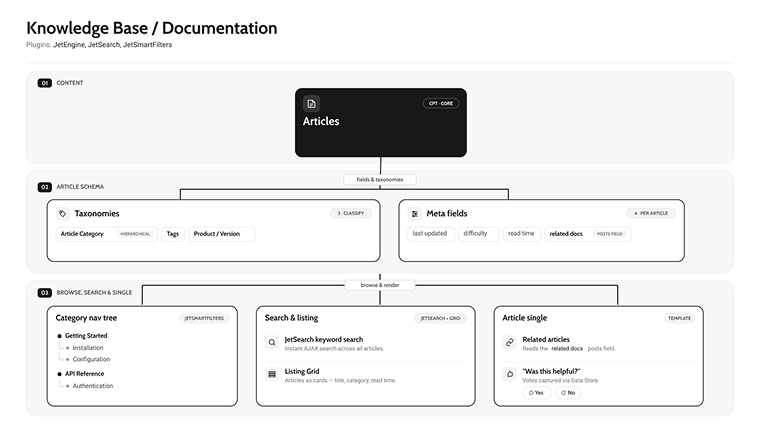
- CPT: Articles.
- Taxonomies: Article Category (hierarchical), Tags, Product/Version.
- Meta fields: last updated, difficulty, read time, related docs.
- Display: Listing Grid + JetSearch for keyword search + JetSmartFilters’ hierarchical taxonomy as a nav tree; in the Single template, the related-articles block reads the related-docs Posts field; “Was this helpful?” via Data Store.
FAQ
A custom post type is a user-defined content structure that stores a specific kind of content, like properties, courses, or doctors, separately from standard posts and pages, with its own fields, taxonomies, and templates.
The most common WordPress CPT examples include real estate listings, doctor directories, online courses, job boards, restaurant menus, portfolios, and knowledge bases. Each store has structured, repeatable data that a normal blog post can’t organize or filter.
You can register them with code, but a plugin is faster and far easier to maintain. A JetEngine custom post type, for instance, is built visually in a few clicks, with custom fields, relations, and queries included out of the box.
A custom post type is the thing (a property, a dish); a taxonomy is how you group and browse those things (location, cuisine, category). Use fields for an item’s own attributes and taxonomies for the buckets people filter by.
There are endless custom post-type website examples: marketplaces, directories, booking sites, LMS platforms, job boards, and documentation hubs. Any time a site shows a filterable collection of structured entries, CPTs are doing the work underneath.
Wrapping Up
In this article, I wanted to show you just common patterns and examples of using custom post types in WordPress, and how flexible and scalable your project can be thanks to them. Also, I showed the tools that you can use to do basically anything with these posts and data stored in their fields in the most efficient way.