Divi 4 wasn’t a bad dynamic WordPress theme. For its time, it was great, and it held up well for various use cases. The limitations showed up when you pushed it to the limit: complex layouts, dynamic content, and third-party integrations.
The root cause was architectural.
Divi 4 stored all page content as WordPress shortcodes, like [et_pb_section] [et_pb_row] [et_pb_column] nested inside each other.
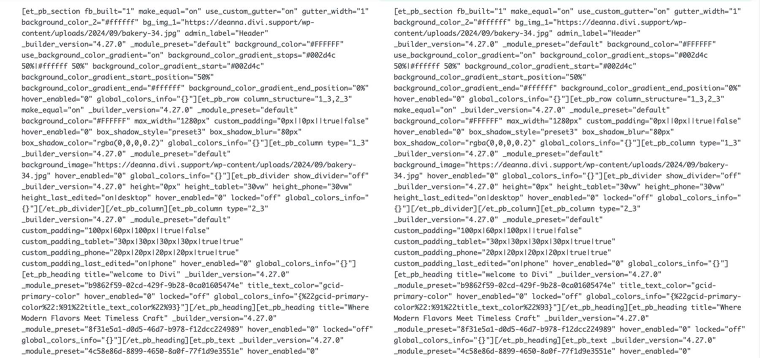
This made sense when it was designed, but shortcode-based storage has a fundamental limitation: the output can be rendered only by the system that understands those shortcodes.
Move the content to a different WordPress builder, and you get raw shortcode strings. Swap themes, and the same thing happens. Your content gets locked inside Divi; the same thing happens with website builders like Wix. If you change your mind and decide to move to WordPress, you’ll have to rebuild your site from the ground up.
For devs building sites that needed to last, or that might need to switch page builders down the road, this was a real constraint, not a theoretical one.
Integration Nightmares
Where things got genuinely complicated was third-party integrations.
Plugins that needed to hook into Divi’s pipeline (rendering dynamic content, registering Custom Post Types (CPTs), or adding filters) had to contend with shortcode limitations, which reduced the full potential of dynamic WordPress plugins like JetPlugins.
Basically, one had to use two systems side by side rather than one integrated stack.
For experienced builders familiar with workarounds, none of this was a dealbreaker. But it set a ceiling on what you could build cleanly, how fast you could build it, and how maintainable the result would be six months later.
What Divi 5 Changed at the Architecture Level
The short version: Divi 5 stopped being a shortcode system and became a block-based one.
| Feature | Divi 4 (Legacy) | Divi 5 (Modern) |
|---|---|---|
| Rendering Engine | PHP-rendered (server-side) | React-powered (client-side) |
| Content Storage | Shortcode-based ([et_pb_section]) | Block-based (structured data) |
| Storage Primitive | WordPress shortcodes | Gutenberg-compatible blocks |
| JavaScript Delivery | Full framework | Modular/On-demand |
| Visual Feedback | Server-dependent lag | Instant UI state updates |
Content is no longer stored as shortcodes. It’s stored as structured data in Gutenberg-like blocks. The result is immediate, with visual feedback in the builder and no lag between the change you made and what you see on the canvas.
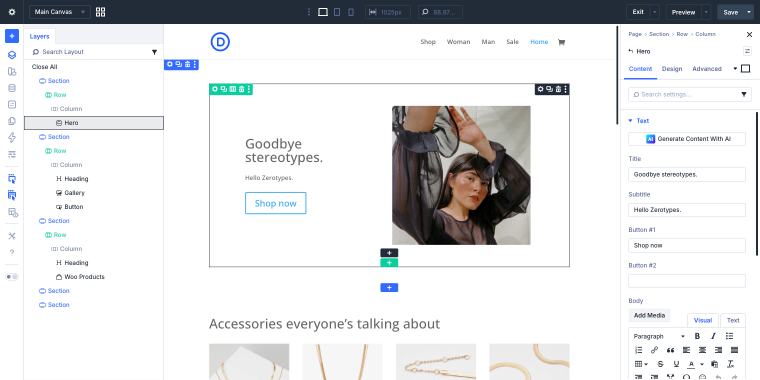
The settings interface was rebuilt to match.
Clicking an element on the canvas opens its settings directly. A Layers panel gives you a hierarchical overview of the full layout, which becomes essential once you’re managing anything beyond a simple page structure.
These changes reflect a different set of assumptions about how a page builder should work, and they’re what made a proper third-party integration possible in a way it wasn’t before.
Compatibility problems
Divi 4 integrations that existed were built for a shortcode pipeline. When Divi 5 replaced that with a block-structured system, those things no longer worked the same way.
Plugins that had deep Divi 4 integrations didn’t automatically carry over; they needed to be rebuilt for the new version.
Please note that this is not a Crocoblock-specific issue. It affected every third-party Divi plugin to some degree. The question for each plugin developer was the same: how much of the integration needed to be rebuilt, and in what order?
How Crocoblock Divi Integration Addon Works
powered by Divi-5 dynamic?
Crocoblock’s answer to the Divi 5 was building a bridge between Divi and the Crocoblock plugin suite, which is the Divi Integration Addon. It’s an installable component that bridges JetEngine and JetSmartFilters into the Divi 5 ecosystem properly.
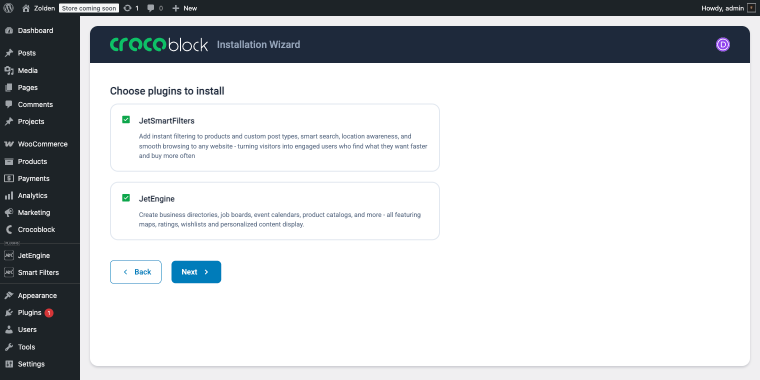
Here’s what “properly” means in practice.
The add-on maps each plugin’s settings to Divi 5 module attributes. Instead of dropping a shortcode into a Divi layout and hoping for the best, JetEngine and JetSmartFilters filter modules appear natively in the Divi Module Library, the same place as any first-party Divi element.
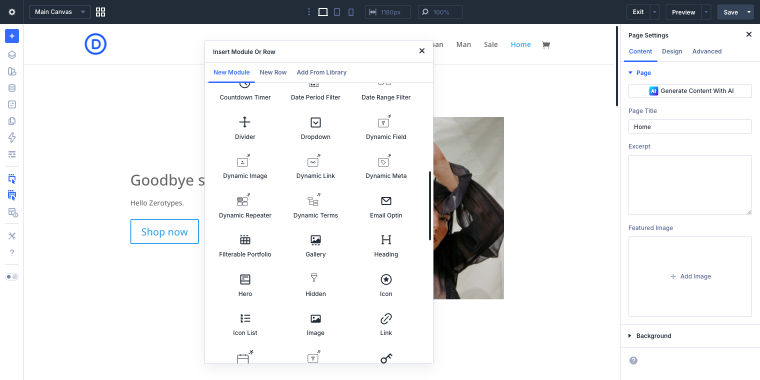
From there, they behave like native Divi 5 modules where Content, Design, and Advanced settings panels work exactly the way they do for any other Divi 5 module. You’re not context-switching between two interfaces or configuring settings outside the builder.
On the output side, the add-on runs content through the original server-side renderers. This matters because JetEngine listings and JetSmartFilters output are purely dynamic; they pull from the database at render time rather than being static content.
The result is that filters and dynamic listings display correctly in the builder and on the front end, without the mismatch that characterized Divi 4 integrations.
If you’ve used either plugin with Elementor or Bricks, the experience is comparable; the plugin feels native to the builder rather than bolted onto it.
Migration Reality
Upgrading a live site from Divi 4 to Divi 5 is not a one-click operation, and if your site runs Crocoblock plugins, there are specific things to understand before you start.
The first thing to know is that Divi 5 doesn’t delete your Divi 4 content on upgrade. It ships with a Backward Compatibility System that detects legacy elements and lazy-loads the Divi 4 framework on a per-page basis when needed.
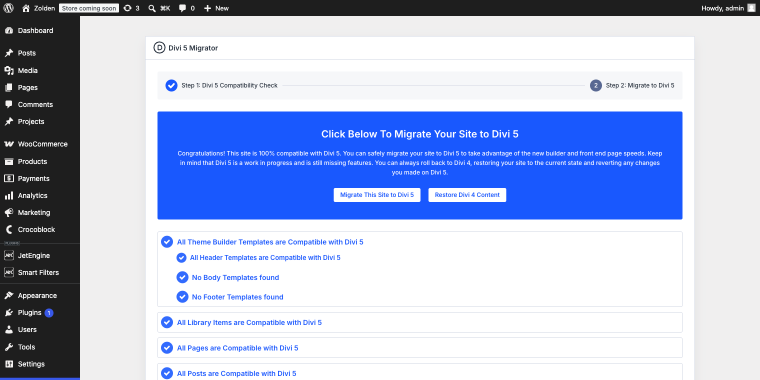
The Migrator tool will check your existing layouts and will not allow them to break immediately.
But the Backward Compatibility System is a transitional mechanism, not a permanent state; pages running in legacy mode don’t benefit from Divi 5’s performance improvements, and the goal should be to migrate them properly over time.
For JetEngine and JetSmartFilters specifically, the Divi Integration Addon changes the migration picture. Once the add-on is installed, those modules are available natively in Divi 5. That means pages using JetEngine listings or JetSmartFilters can be rebuilt in the new architecture without issue; you’re not stuck in legacy mode for those elements.
A practical migration sequence for a Divi 4 + Crocoblock site looks like this:
- Full backup first – database and file system, before anything else.
- Clone to a staging environment – don’t run the upgrade on a live site without testing it first.
- Audit your JetPlugin usage – list which JetPlugins are active and which pages depend on them. This tells you which pages can be migrated cleanly now and which need to wait.
- Run the Divi 5 Migrator – it flags legacy elements with visual indicators, blue checkmarks for native items, and orange warnings for legacy ones.
- Install the Divi Integration Addon – do this after upgrading to Divi 5 to install all the necessary components into the theme files.
- Manual audit of high-traffic pages – automated checks miss things; look at the actual rendered output.
The Divi 5 rollback feature is worth knowing about. If something breaks post-migration, you can restore to the previous state. Use it as a safety net, not a reason to skip staging.
One thing the migration checklist won’t tell you: how long this actually takes depends almost entirely on how many pages you have and how complex the layouts are.
When to upgrade (and should one wait?)
The honest answer depends on what you’re building and what’s already live.
If you’re starting a site from scratch and your dynamic content needs are covered by JetEngine and JetSmartFilters, there’s no reason to build on Divi 4. You get performance improvements, a cleaner architecture, and native integration with both plugins from day one. Building on a legacy foundation when a modern one is available just creates migration work later.
If your live site uses only JetEngine and JetSmartFilters alongside Divi and WordPress, migration is viable now. Follow the staging-first sequence from the previous section, and you’ll be in reasonable shape. If your site has meaningful JetFormBuilder or JetWooBuilder functionality, wait. Running those in the Backward Compatibility System long-term is not a stable production strategy, and rebuilding them before native compatibility exists means doing the work twice.
Divi 5 is still maturing. The Backward Compatibility System handles most legacy content, but edge cases remain, particularly with complex nested layouts and heavily customized third-party modules. If a client site is stable and performing adequately on Divi 4, “Divi 5 is out” is not a reason to migrate it this week.
The practical priority order: new projects first, then existing sites where JetEngine and JetSmartFilters are the primary dynamic layer, then everything else when broader JetPlugin compatibility arrives.
FAQ
The difference is in architecture. Divi 4 uses shortcode-based, server-side PHP rendering, where page layouts are stored as nested shortcodes and processed during page load. Divi 5 replaces this with a block-based architecture powered by React, storing content as structured data. This results in faster builder performance, instant visual feedback, improved scalability, and better support for native third-party integrations like JetEngine and JetSmartFilters.
Yes. JetEngine is fully compatible with Divi 5 via the Divi Integration Addon. Once installed, JetEngine modules appear natively in the Divi Module Library with standard Content, Design, and Advanced settings panels.
Yes. JetSmartFilters has the same native compatibility as JetEngine through the Divi Integration Addon. All filter types are available as native Divi 5 modules.
It’s Crocoblock’s official compatibility layer for Divi 5, enabling native integration for JetEngine and JetSmartFilters. After subscribing to Crocoblok, you can download the add-on in your account.
Conclusion
Divi 5 is a major architectural shift, not a feature release. The move from shortcodes to blocks and from server-side PHP rendering to client-side React changes how every third-party plugin connects to the builder, including Crocoblock.
For users building with JetEngine and JetSmartFilters, the Divi Integration Addon makes that connection native. Modules appear where you’d expect them, settings panels work as they should, and Divi 5 dynamic content renders correctly in both the builder and the front end.
For everything else in the Crocoblock suite, the picture is still taking shape. Divi 5’s Backward Compatibility System keeps existing pages functional, but it’s a bridge, not a destination.
The practical advice is clear: begin new projects on Divi 5 now if JetEngine and JetSmartFilters fulfill your requirements for dynamic content. Hold off on migrating existing sites if you rely on plugins that don’t yet have native Divi 5 support. And when you do migrate, do it in staging first, every time.