Today, in the era of clip-thinking, we are looking for more and more ways to attract readers, engage them, and encourage them to become loyal customers. No matter how good and effective the product is, it still needs a high-quality market presence. Here I am talking not only about bright ads and images but also about well-organized smart text.
Accordion is not a novelty. But what if we make it dynamic rather than static? What are the benefits of the dynamic accordion? How to make it work? In which niches does the dynamic accordion perform best? I will discuss all of this further in this article, so read on to learn another way to add dynamics and flexibility to the modern WordPress site.
What Is a Dynamic Accordion?
Starting from the basics, a static accordion is a UI component that organizes content into collapsible sections. Each section consists of a header and a content panel. When a user interacts with a header, its corresponding panel expands or collapses, revealing or hiding content without navigating away from the page.
Accordions are commonly used to:
- reduce visual clutter;
- group-related information;
- improve content scannability on long pages.
Consequently, a dynamic accordion is an accordion whose sections or content are generated, loaded, or updated programmatically rather than defined in static HTML markup or templates. The accordion structure or its content is typically rendered at runtime using JavaScript, API responses, database queries, or CMS-driven data.
Unlike static accordions, dynamic accordions use automated logic to create, update, and manage accordion items, as well as user interaction and state changes.
Why Use the Dynamic Accordion?
In the contemporary realm of site construction, there are hundreds of ways to display data – why would you use a dynamic accordion? Of course, various approaches can be effective in different setups. Let’s investigate why and how dynamic accordions can be a smart solution.
Dynamic accordions automatically fetch content from anywhere on the website, including Custom Post Types, Custom Content Types, option pages, meta fields, or custom queries, ensuring the layout updates as new data is added without manual edits. Websites that require regular content changes benefit from dynamic accordions, as updates are managed at the data level rather than through manual page edits.
As a website grows, manually maintaining static accordion items becomes inefficient. Dynamic accordions scale effortlessly, making them suitable for large datasets such as directories, catalogs, or knowledge bases. Accordions also help present large amounts of information in a compact layout, allowing users to explore content progressively without overwhelming the page.
Using a single dynamic accordion template ensures a consistent design and structure across multiple pages, even when the underlying content differs. Dynamic accordions can be used inside listing templates, dynamic widgets, or loop structures, making them highly reusable across different sections of a site.
Last but not least, dynamic accordions enhance users’ experience through progressive disclosure. By revealing information only when needed, they help users focus on what matters most and navigate complex content more efficiently.
How to Create a Dynamic Accordion with Crocoblock Tools?
Many plugins and add-ons offer either static accordions or dynamic logic via custom code. Let’s see what can be done with no coding at all. To build a dynamic accordion with Crocoblock, you would need the JetTabs plugin installed and activated. You can also use the JetEngine plugin, with all the powerful features it offers and additional content entities you can build, such as Custom Post Type, option pages, or any meta fields on your site. In this guide, I will use the JetEngine’s CPT.
We will use the JetTabs’ Classic Accordion widget to manage the site’s data and display it dynamically in the tabs. As I mentioned earlier, it can be any kind of information from your site: default and custom fields and posts, CCTs and CPTs, terms’ and users’ data.
If you combine JetTabs with JetEngine, you can display content from anywhere on the website – from any meta field, object field, and even display whole posts in the tabs. For example, you can create a separate CPT for your business FAQs and display the FAQ posts directly on the front end as soon as they are added to the site, without manual editing on the page. In this case, I will fetch the popular jobs in the tabs. I want to display the title of dedicated posts in the dynamic accordion, with additional post data in the roll-up.
Step 1: Fetching content with the custom query
First, the custom query should be created. For that, in the Query Builder, create a Posts Query for the needed CPT. This query defines which posts will be displayed in the accordion: posts from the dedicated taxonomy, posts with specified IDs, or posts with the defined meta field value.
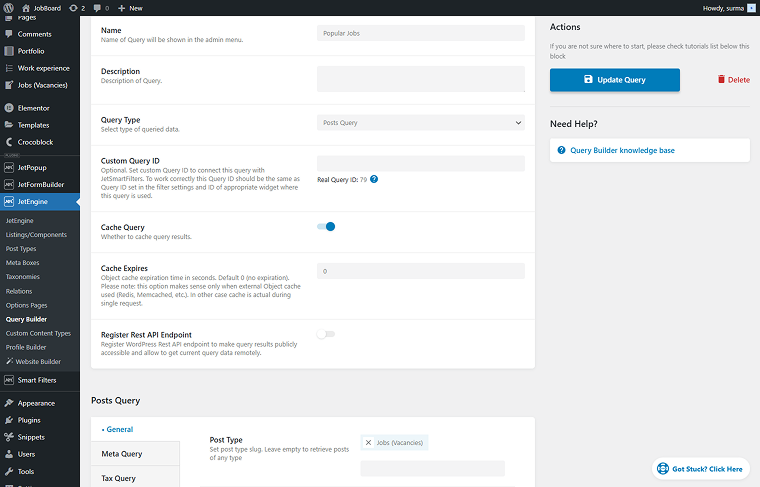
You can specify any settings you need to define what posts should be displayed in the dynamic accordion. In this case, I specify the IDs of the posts I aim to show.
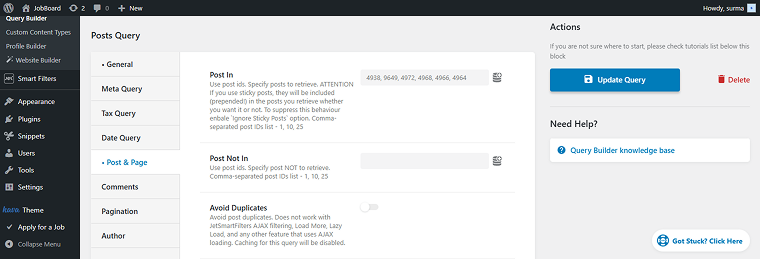
Save the query for now.
Step 2: Displaying dynamic content inside the accordion
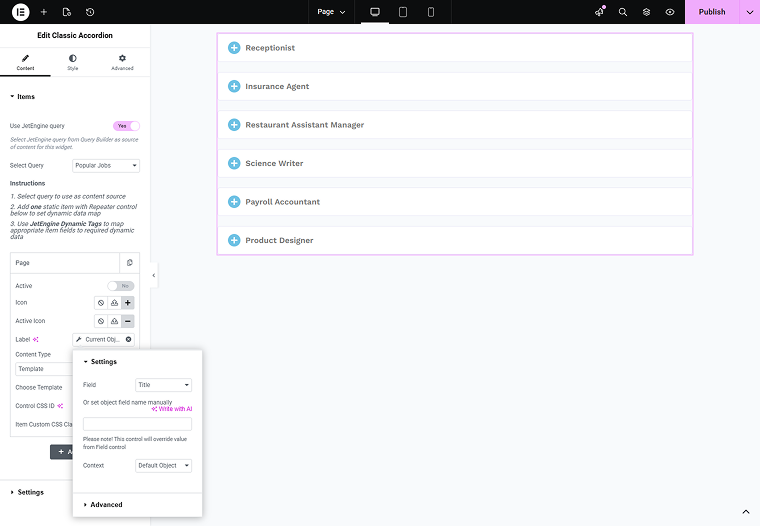
Now, move to the page where you need to display the dynamic accordion. Place the Classic Accordion widget. Enable the Use JetEngine query toggle and in the Select Query field, choose the query you created.
When we use the query as a source, we need to map the fields to a single Item. For the Label, click the “Dynamic Tag” icon, select the “Current Object Field” option to display the required field, and choose the field – for example, I select the “Title” to be shown as a tab label.
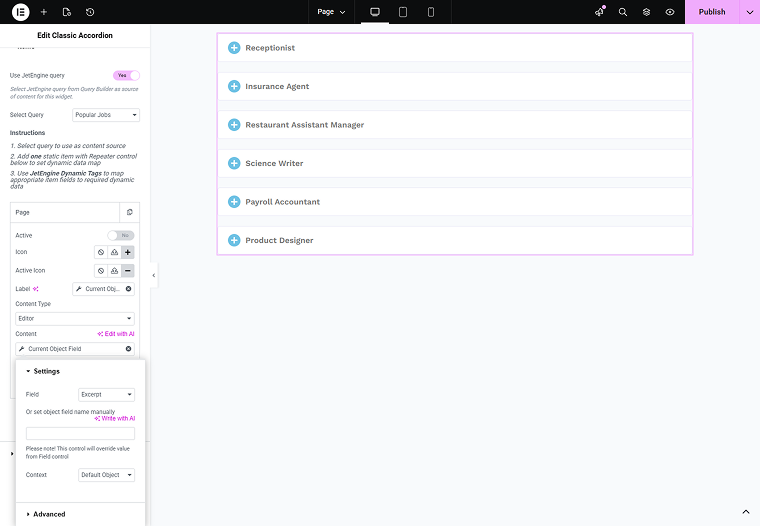
For the Content Type, select the “Editor” option. In the Content section, select the “Current Object Field” and choose the data you want displayed in the tabs; in this case, I chose the “Excerpt” option.
Map only one item, and the rest of the accordion items will be created and populated dynamically.
Publish the changes and check the front-end page.
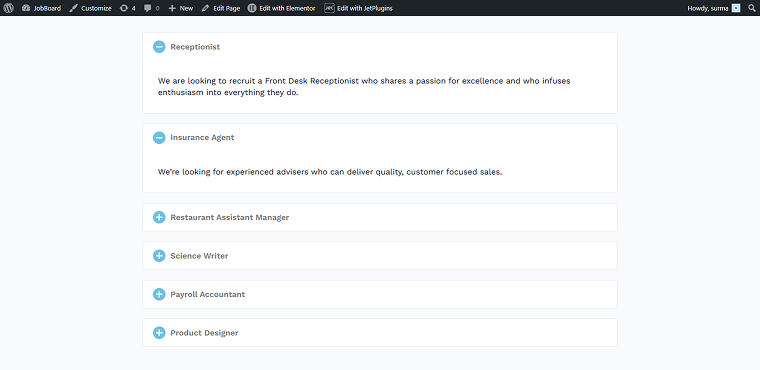
The selected six posts are displayed in a dynamic accordion on the WordPress site. And if I update the query or post content, the accordion content will be automatically updated.
💡 If you are interested in displaying custom templates in the accordion, check our tutorial on how to arrange templates via the Tabs widget. It is not a dynamic way to display data, but it can be useful when you need to display several elements within an accordion tab.
In What Niches Are Dynamic Accordions Useful?
Now, knowing how to build an effective WordPress dynamic accordion and why it might be useful, let’s have a closer look at the specific areas where a dynamic accordion can become a productive solution:
- Knowledge bases and help centers are the most obvious use cases for the dynamic accordion. Dynamic accordions are ideal for displaying FAQs, troubleshooting guides, and database-sourced documentation, making content easy to scale and update.
- On the eCommerce websites, product specifications, shipping details, return policies, and variable product data can be dynamically loaded into accordion panels, keeping product pages clean and structured.
- Directories and listing platforms, such as business directories, property listings, job boards, and service catalogs, benefit from dynamic accordions that expand details for each item.
- Especially useful dynamic accordions can be for educational and e-learning platforms. Course modules, lesson breakdowns, and curriculum structures can be generated dynamically, making it easy to manage and update large educational datasets.
- On the event and conference websites, schedules, speaker bios, session details, and agendas can be organized into dynamic accordion layouts sourced from event data.
- On community and forum websites, topics, threads, or group discussions can be displayed in expandable sections, helping users browse large amounts of user-generated content.
I believe you can successfully integrate a dynamic accordion in almost any specialization, and I hope this list will give you some inspiration or fresh ideas.
FAQ
Yes. When implemented correctly, dynamic accordions can load content progressively (only when a panel is opened) and limit the amount of data rendered initially, which helps optimize page load times on content-heavy pages.
Yes. Content in dynamic accordions can be indexed by search engines, provided it’s rendered in HTML and not loaded purely via client-side scripts. Use descriptive headings and structured data where applicable to maximize SEO benefits.
No. With JetEngine and JetTabs, you can set up dynamic accordions entirely within WordPress using queries, Elementor templates, and dynamic tags – no custom code is required.
Final Thoughts
After reading this article, you know what a WordPress dynamic accordion is and why it is needed on the site. We discussed niches and specific fields where the dynamic accordion can fully demonstrate its potential. And finally, you know how to build a dynamic accordion using the Crocoblock tools, with the dynamic template, and the flexible source.