Since JetSmartFilters 3.7.0, a new Listing Builder has been released. This is a simple constructor Item + Listing + Query, which makes the JetSmartFilters plugin a filter provider and puts the rendering under its control. But what is the point if JetEngine already has the Listing Grid functionality? What’s the difference between them, and which one to choose?
It’s okay if it feels redundant — there are two listing builders, and it might be unclear why they both are needed. In the feedback, we got many questions asking, “Do I need both?” “Which is faster?”, and “They look the same.”, so we decided to clear things up. This article focuses on the key difference between JetEngine Listing Grid and JetSmartFilters Listing Builder. I will also discuss when each approach would show itself in the most efficient way and help you choose the best option for your case. Let’s get started!
Why There Are Two Listing Systems in Crocoblock
To begin with, let’s clarify the “why does this exist?” confusion. Without diving deep into the core functionality of Listing Grid and Listing Builder, here I want to draw your attention to the purpose of each element.
JetEngine offers a universal content engine suitable for complex lists and grids. Listing Grid allows you to use SQL queries, Twig, different sources, WordPress Relations, Components, etc. The main purpose of the Listing Grid is to display complex content loops. Filtration is an additional feature that comes from the JetSmartFilters and is not the key feature of the Listing Grid.
JetSmartFilters’ Listing Builder, in its turn, is aimed to be a part of the filtering system. It was designed as a specialized provider of filters to improve the performance of the filtering process. Listing Builder is a native JetSmartFilters provider, which is a good solution for simpler content to be displayed and filtered.
It might feel like the heavy database and queries are the problem for the JetEngine Listing Grid to be filtered with JetSmartFilters, but the real bottleneck was rendering filtered results, especially with the outer providers. We will talk about the performance in detail further, but for now, it is essential to understand that the JetSmartFilters’ Listing Builder allows us to solve the issue by controlling rendering inside the filtering system. JetSmartFilters can handle that part on its own — it is a big win for performance, simplicity, and independence.
What Is JetSmartFilters Listing Builder?
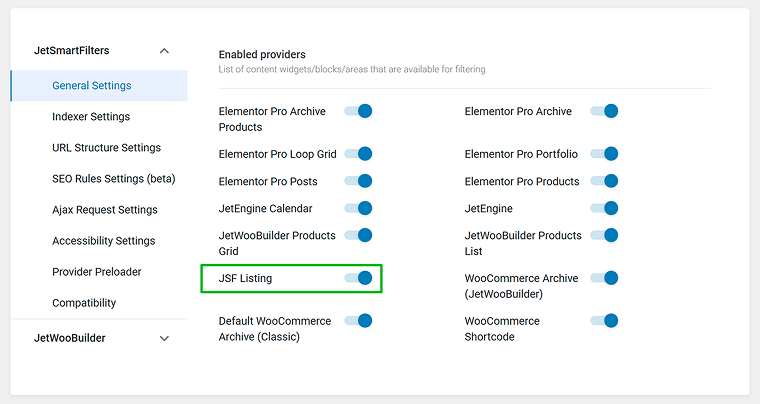
In JetSmartFilters’ versions 3.7+, a new JSF Listing toggle appeared in the General Settings tab.
When the toggle is enabled, the new tab in the Smart Filters section appears — Listing Builder.
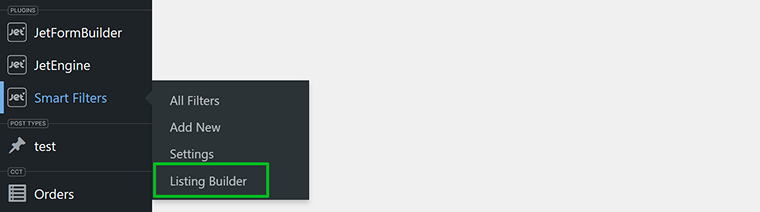
In this section, you can switch between the All Listings and All Items sections.
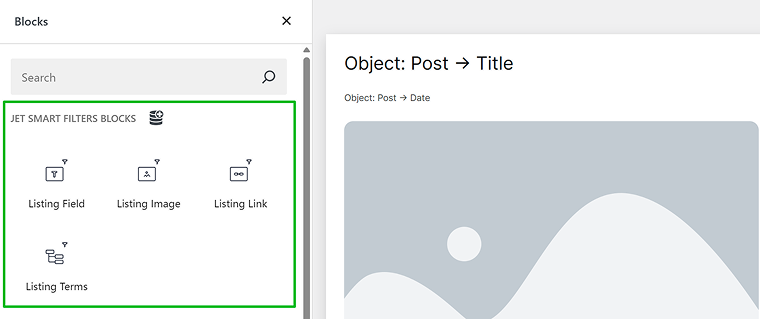
In the All Items tab, you can set the desired Listing item template. Once you click the “Add New Item” button, the Block Editor will be opened and present the following instruments:
- Listing Field is a block responsible for all text content, including objects, such as Title, Date, etc., and custom meta fields.
- Listing Image is a block that can be used for all images in the listing, from thumbnails to images from meta fields. You can make it clickable by enabling the “Is Linked” toggle and selecting a source: permalink, attachment URL, meta field value, or a value from Option Pages.
- Listing Link is a block for all links, from the post permalink to links from meta fields, attachment URLs, or a value from Option Pages.
- Listing Terms is a block to display all kinds of taxonomy terms: categories, tags, WooCommerce variations, etc.
Besides adding blocks and setting up sources, you can also set up the following controls:
- Customize Field Output — allows adding HTML tags for granular styling inside the dynamic field, or additional texts before or after the value;
- Filter Value Before Output — allows changing date format, getting an image by ID, getting dynamic values via another value, using shortcodes, etc.
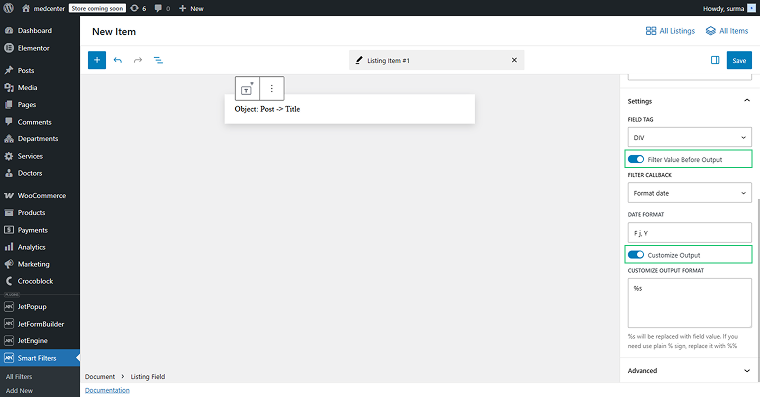
You can also add paragraphs, lists, headings, columns, and containers.
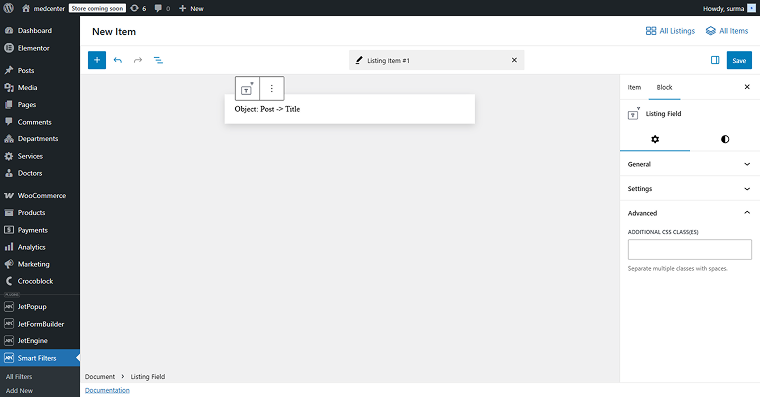
Finally, after you’re done with the settings, switch to the Styling tab and choose colors, typography, margins, paddings, etc. If you want more refined styling, you can add a CSS class in the Advanced section.
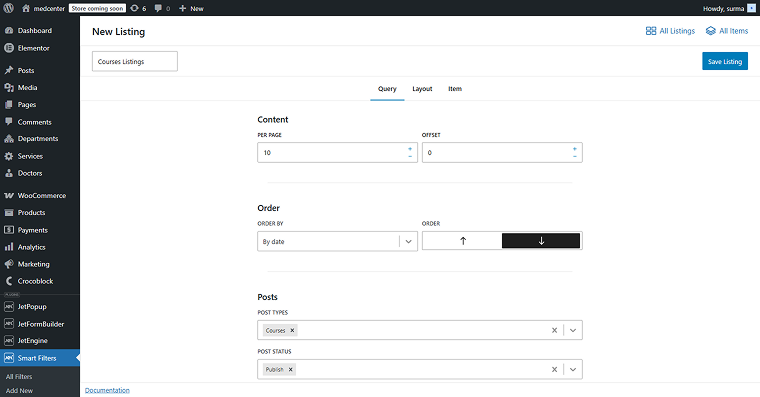
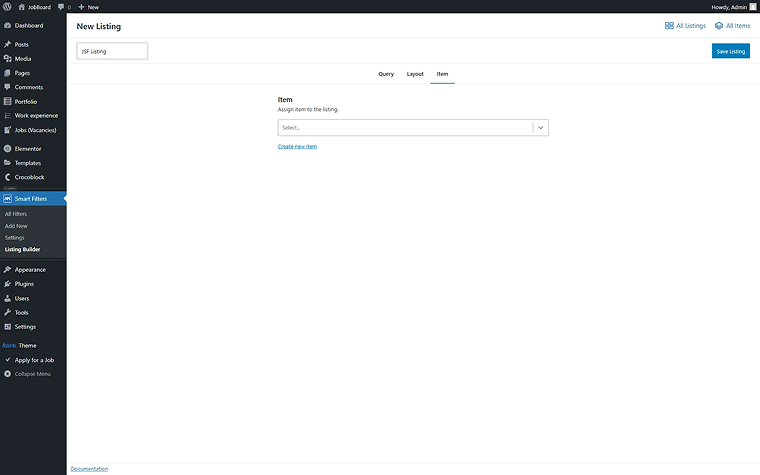
In the All Listings section, you can build the Listing, setting its Layout and Query. It is a minicopy of the Query Builder with a basic grid controller.
When you create a new listing, you have the following sections to set.
In the Query settings, select post types you want to see in your grid, include or exclude some posts by ID, status, taxonomies, or, what is even cooler, by meta field values. And, of course, you can combine all of these selection criteria.
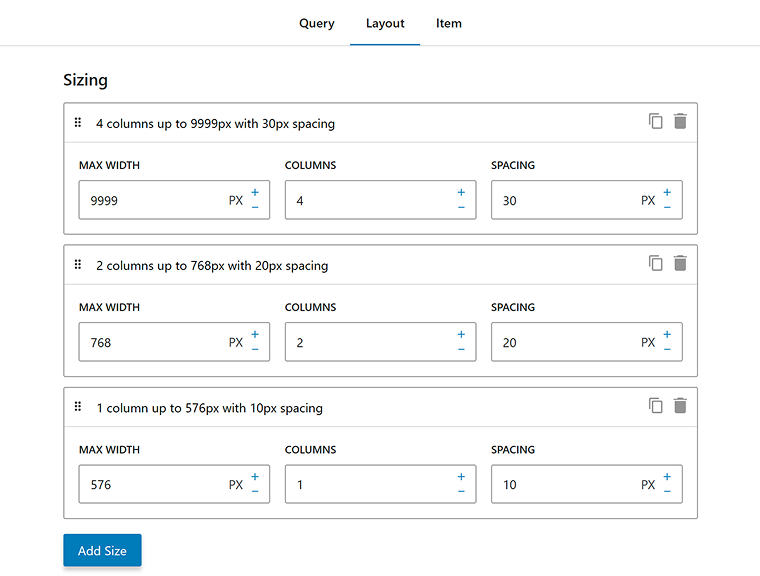
In the Layout section, you’ll find three default options that correspond to common screen sizes – mobile, tablet, and desktop – and you can also add your own custom breakpoints. For each screen size, you can define how many columns to display and adjust the spacing between them.
In the Item section, you can select the needed Item for the Listing.
The ready listing can be displayed on the page with the help of the JSF Listing block/widget/element in Gutenberg, Elementor, or Bricks editor — everything you need to do is drag and drop the block/widget/element to the page and select the needed Listing.
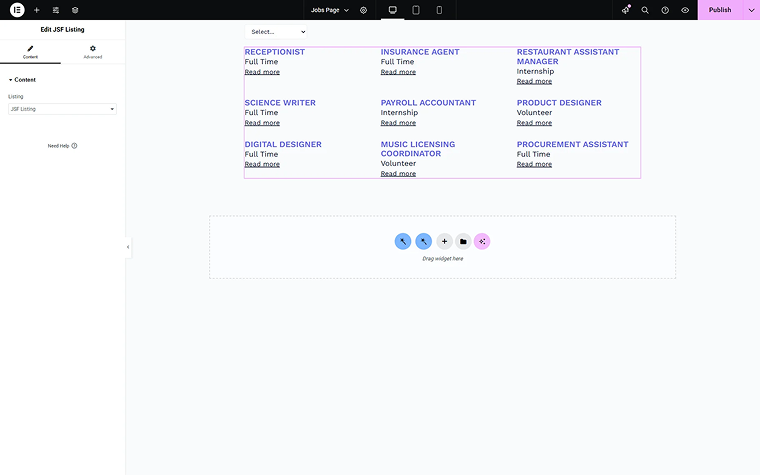
All the styles applied in the Listing Builder are saved in all the editors.
💡 For documentation, check the following links:
- JetSmartFilters Listing Builder Overview
- JSF Listing Builder Blocks Overview
- How to Create Filters with JSF Listing
As you might have noticed, the JSF Listing is simpler by design than the JetEngine’s Listing Grid. Its flexibility is consciously limited in order to optimize for filtering performance.
JetEngine Listing Grid vs. JetSmartFilters Listing Builder: Key Differences
Below, you can see a simple comparison table of the important aspects of the JetSmartFilters Listing Builder and the JetEngine Listing Grid.
| Aspect | JetSmartFilters Listing Builder | JetEngine Listing Grid |
| Purpose | Fast filtering | Dynamic listings (aka content loops) |
| Flexibility | Limited | Very high |
| Performance (filters) | Optimized | Good but heavier |
| Builder | Block-based (inside JetSmartFilters) | Elementor, Bricks, Gutenberg, Divi, Twig |
| Data sources | Any kind of CPT | CPT, CCT, relations, users, SQL |
| Dependencies | Can work with JetSmartFilters only | Requires JetEngine + JetSmartFilters |
In a nutshell, JetEngine’s Listing Grid’s main feature is high flexibility and support of dynamic sources, while filtering is supported by good compatibility with JetSmartFilters. Then again, the JetSmartFilters’ Listing Builder key aspect is a high-speed rendering, as it is especially designed to be a JetSmartFilters provider.
At the same time, it is important to emphasize that there is no automatic conversion from the Listing Grid to the Listing Builder. Moreover, there is no need to rebuild your JetEngine Listing Grid if you are happy with the current state of the performance. We recommend testing the JetSmartFilters Listing Builder only if you have performance issues with the Listing Grid.
When to Use Each?
If you’re unsure which approach to choose, follow this simple decision tree:
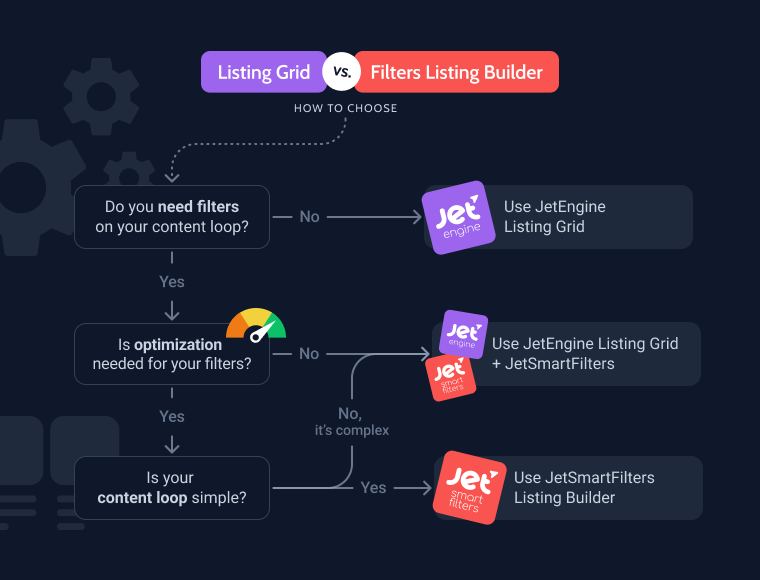
- If you are at the start of building your site and deciding which listing is needed, the first question for you is whether the filters are needed on the site.
- If there are no filters expected, you can use the JetEngine’s Listing Grid or other tools at hand (like Bricks/Elementor loop).
- If you need the filters, we’d recommend paying attention to the performance of the filtering process.
- If the performance is good enough for your site with the JetEngine’s Listing Grid, you can go for it.
- In case you’d like to improve the performance, consider the complexity of the listing grid.
- If the grid is expected to return a fairly simple list of posts, you can select the JetSmartFilters’ Listing Builder option.
- If you use a more complex source, such as a custom query or CCT, we’d recommend sticking with the Listing Grid from JetEngine.
So, in short:
- Need a simple listing to be filtered faster — use JetSmartFilters’ Listing Builder.
- Need high flexibility for your listing — use JetEngine Listing Grid.
Real Use Cases
Now, let’s make it practical and discuss some real-life use cases so you can see and understand the logic and the approach to selecting the right option for your case.
Use case 1: Simple filterable blog
For example, you have a travel blog with articles like “Best places in Italy,” “Top cafes in Paris,” “Weekend trips in Spain,” and so on. You want users to be able to filter the articles by country, travel type (economy/business class), and season.
In this case, you need a simple filtration by taxonomy or meta fields for the standard WordPress posts. There are no complex relations or custom SQL queries. You don’t need the full power of JetEngine in this case.
JetSmartFilters Listing Builder would be a good choice for this setup. We can follow the logic: fewer plugins means simpler setup and leads to better performance.
Use case 2: Complex directory
Here, we can assume you have a tattoo studio booking site with different artists. There are several custom post types, such as Artists, Studios, and Services. There can also be relationships set between the post types: studios to artists, artists to services. Additionally, you can use Custom Content Types for bookings or offers.
Filters can be used for selection and searching for location, price range, availability, style/category, etc.
You may also need dynamic queries, for example, to show artists available next week, or user-specific content, to display only my bookings, for instance.
In this case, it would be a smart decision to combine JetEngine with its Listing Grids, data structure (CPTs, CCTs, relations), and advanced queries with JetSmartFilters for the front-end AJAX filtering. That would allow you to filter through the complicated lists.
Use case 3: Existing project
What if you already have a site working with Listing Grid and filters? You already have:
- a listing built with JetEngine;
- filters working via JetSmartFilters;
- everything loads fast and meets your needs.
If you’re considering switching to the JetSmartFilters Listing Builder because it’s “newer” or “simpler,” you need to take into account the real benefit if your setup is stable. Remember that migration can:
- break layouts;
- require rebuilding queries;
- introduce bugs.
The issue might appear, not because one tool is better or worse than another, but because they have different purposes. So sometimes, it makes no sense to switch from JetEngine Listing Grid to JetSmartFilters Listing Builder.
Performance Explained
Writing this article, I emphasized the high-performance markers as an advantage of the JetSmartFilters Listing Builder. But it does not mean that the JetEngine’s Listing Grid is slow. As I’ve already stated, JetEngine Listing Grid is a universal instrument that covers a great number of cases (Twig, complex templates, relations, components, different providers). Consequently, it has its natural limit of optimization when the system cannot be simplified further without breaking compatibility.
Listing Builder bу JetSmartFilters is simpler and specialized, consciously limited in its flexibility and optimized for fast filter work and a lighter stack. From a technical perspective, JetSmartFilters Listing maintained a minimal render time and moderate memory usage while handling more listings per page than any of the builder-based JetEngine loops. Its filtering operations were also highly responsive, staying well within the fastest range of tested providers.
So JetEngine’s Listing Grid is not replaced by Listing Builder. As mentioned earlier, Listing Grid is still the main content constructor. New Listing Builder functionality does not rewrite the already existing set — it creates a space for new sets. JetSmartFilters Listing Builder is a faster solution, specifically for filtering requests. So, as I stated before, there is no need to switch from the Listing Grid to Listing Builder, but it is essential to clearly understand your site requirements.
The difference between JetEngine Listing Grid and JetSmartFilters Listing Builder is small in simple cases but grows with the site’s complexity and filtering frequency.
FAQ
No, it’s optional. It is recommended to test the JetSmartFilters Listing Builder when:
– your listing is fairly simple (post type source);
– you are not completely satisfied with the current performance state.
There is no need to switch from JetEngine Listing Grid to JetSmartFilters Listing Builder if you are happy with the current performance.
Looks similar, but purpose and architecture differ. JetEngine’s Listing Grid is a universal content constructor that offers high flexibility. JetSmartFilters’ Listing Builder provides a simpler, filtering-focused tool, optimized for low-time rendering and high performance.
Yes, for simple CPT-based listings, JetSmartFilters Listing Builder is enough. It keeps all the settings alone, which means that fewer settings are needed, making the setup easier, lighter, and faster.
Yes, but it works for filtering cases only. For everything else, the logic will not apply.
Conclusion
In conclusion, let me remind you that Crocoblock is a multi-tool ecosystem — not every feature is meant for every project, and it is okay. To sum up:
- JetEngine is still the core listing tool. Use it when you need the power of flexibility and complex sources.
- JetSmartFilters Listing Builder is a performance-focused alternative. It’s worth switching to it when you need to optimize a simple filtering process.
Sometimes you can use both, or there is no need to switch to the JetSmartFilters Listing Builder at all. Remember to make your choice based on:
- setup complexity;
- performance needs;
- project scope.