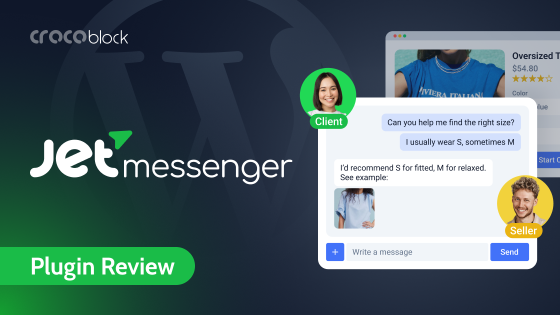
JetMessenger is a new plugin by Crocoblock for context-aware direct on-site messages between registered users. Of course, it works in membership, booking, single- and multi-vendor sites. But one of its biggest advantages is for WooCommerce stores and marketplaces, thanks to dedicated features for conversations tied to specific products and entire orders.
So, in this article, I will concentrate on ways JetMessenger can improve conversion and user experience on WooCommerce sites, and which problems it can address.
Why Is Context the Core Feature of JetMessenger?
JetMessenger is a plugin that doesn’t need third-party services and is fully located on your website, which gives you full control, GDPR compliance, and helps you save money. But the number one specialty of this plugin is context, which is the cornerstone of this tool.
I want to emphasize it because it’s the part most WordPress messenger plugins or third-party tools miss, and once you see why it matters, you can’t unsee it.
Imagine you’re running a multi-vendor marketplace. A buyer places an order containing two products from two different vendors. Three days later, the buyer needs to ask, where’s their shipment. So, in a generic messaging system – e.g., “Leave us a message” one, the buyer has to:
- remember which vendor sold which item,
- find that vendor’s profile, start a conversation,
- and explain which order they’re asking about.
The vendor receives a message with no context and has to ask which order they are talking about. Now, multiply that across hundreds of transactions, and the friction is real.
However, according to Hiver, 41% of eCommerce customers prefer chat support and fast responses – not boring email chains.
In JetMessenger, you can create a chat with each vendor and have all the related information, including the order number and all the details, automatically.
The vendors can’t see each other’s threads (this is enforced at the API level, not just hidden in the UI). The buyer sees both threads in their inbox with the order number visible as metadata under each. When they click into the Vendor A thread, both parties already know what they’re talking about.
The first message is auto-generated with the order details and the buyer’s name.
That’s the difference between a messaging plugin and a messaging system designed for actual eCommerce.
The technical mechanism behind this is something called context_hash – a unique fingerprint generated from the context type, context ID, and participants. It’s the reason why clicking “Start Chat” five times on the same product page doesn’t create five duplicate chats: the system recognizes the combination and returns the existing thread. It’s also how the plugin keeps conversations findable later.
Where JetMessenger Fits in eCommerce
JetMessenger definitely isn’t built for everyone with a contact form. It’s, first of all, built for sites where conversations are tied to something specific, e.g., an order, a product, a listing, and where keeping that connection intact actually changes the outcome. In eCommerce, that’s most situations.
This is my take on the most frequent use cases for JetMessenger:
- WooCommerce store owners who are tired of order questions scattered across email, contact forms, and social DMs. JetMessenger pulls those conversations onto the site and attaches them to the order they’re about, so nothing gets answered out of context.
- Vendors and marketplace sellers who need to talk to buyers without exposing personal email addresses or juggling threads from a dozen different products. Each chat arrives with the order details already attached, so there’s no “which item are you asking about?” round-trip.
- Customer support teams who want order questions to live in one findable place instead of a ticket queue disconnected from the purchase. Shop Managers can step into any order chat to mediate a dispute, which makes resolution faster and less he-said-she-said.
In this case, you don’t need the “post author” context; you can just specify one email address, and that’s it. - High-consideration and made-to-order sellers – e.g., furniture, custom builds, jewelry, print-on-demand, B2B equipment. When buyers have questions before they commit, the product page’s “Ask about this product” button turns a moment of hesitation into a conversation instead of a closed tab. And when an order needs a back-and-forth (e.g., “can you make the color blue instead?”), this spec stays attached to the right purchase.
- Catalog and quote-request stores where prices are hidden by design – e.g., wholesale, trade-only, B2B. Buyers can ask about pricing or availability right from the listing, and the conversation lands in their account instead of a generic inbox.
- Buyers who just want to know where their package is, clarify a shipping detail, or ask a pre-purchase question and get an answer without leaving the store they are already in.
Long story short, everyone here benefits from messages that know what they’re about. Pre-sale or post-sale, marketplace or single shop, the conversation stays bound to the product or order it concerns, which is the whole point of the plugin, and why these are the people it serves best.
Other use cases
With all being said, JetMessenger is not just a WooCommerce add-on – it offers direct chats between users and post-related chat functionality, which means that you can use it not only for WooCommerce marketplaces or traditional shops but also for booking websites. For example, JetMessenger is a must-have asset for multi-vendor booking sites created with JetBooking.
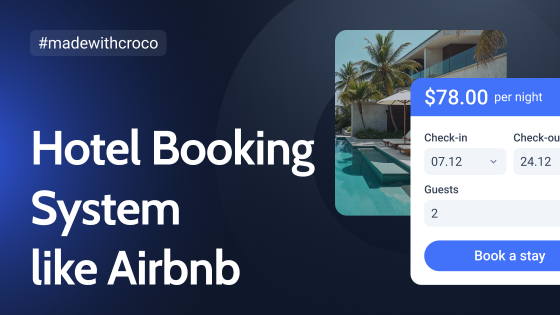
Imagine you build an Airbnb-like site. Such a messaging system is a great asset, so a host and a guest can discuss all the details right on the website.
The same story with membership and educational sites of all kinds.
Instead of the WooCommerce endpoint or a particular page, you can select an account page built with JetEngine’s Profile Builder as a home for messages or even combine it with dedicated pages. For example, you can have separate pages for chats but still add all the chats to the user profile subpage – just to have an archive of all of them – using the builder’s widget/block/element for Elementor/Gutenberg/Bricks.
And, of course, directory sites really need such a chat system. There, you can put a “Message this provider” button inside a JetEngine listing (loop) template, and every listing on your site automatically becomes a conversation entry point with the listing itself attached as context.
Using JetMessenger in WooCommerce
The setup process of the plugin is very simple. After the installation, run the wizard, and it will guide you through all the steps. You can re-run it later, if needed.
First, you select which chats you want to enable, and choose among these (you can check all of them):
- Direct messaging;
- Post messaging (adds a post context, for non-WooCommerce posts);
- WooCommerce order messaging (a chat about the whole order);
- WooCommerce product messaging (a chat about particular products).
On the next step, you choose the URL for each chat type – it should be either a dedicated page or a URL within a WooCommerce endpoint.
I chose WooCommerce endpoints to be home for my chats, as it’s the most logical location for eCommerce customers, so they will be able to find their chats in the usual location – their account.
In the demo video above, I used the default WooCommerce template design and chose to place buttons automatically, which is why the buttons don’t look generic. However, if you choose manual placement and combine it with JetWooBuilder, you will have full control over your layouts.
When a user clicks the chat button, they are being redirected to the profile page (if the WooCommerce endpoint is chosen) and can chat with an admin (if they were selected as a recipient) or a post author, which is perfect for multi-vendor marketplaces.
The messages appear almost instantly, providing a near-real-time chat experience.
NOTE
Note that you can’t message yourself; in this case, the “Start Chat” button will not be active. So, I recommend a plugin that allows switching between users, like WP User Switcher. Thus, you can easily switch between users and test the workflow.
Chat is possible only between two registered users.
Email notifications
When a user sends a message, the Admin will get an email notification (make sure the notification switcher is on in Crocoblock > Messenger). The email body has a link to a chat, so you can easily switch to it.
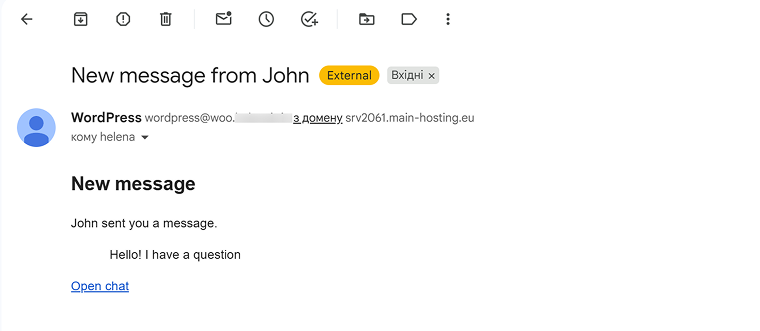
Both parties will get email notifications once a new message has been sent – unless they are switched off in Crocoblock > Messenger.
If you want to edit an email template, you can do it using HTML and CSS in the Messenger settings.
Email notifications can go to Spam, as any other emails that use a default WordPress PHP mail() function. To improve deliverability and avoid hosting limits on outgoing emails, I strongly recommend using an SMTP service.
In this example, I used a chat tied to a product. In the same way, you can use WooCommerce order messaging functionality – there, the first message automatically shows the order summary, and you can continue the discussion in chat as usual.
JetMessenger integration with JetFormBuilder
JetFormBuilder got a new post-submit action called Edit JetMessenger: Create or Reuse Chat, using which you can start or continue a chat using a form.
Pay attention that the user doesn’t get redirected to a chat page in this case. It’s a way to start a conversation, which then can be found in the user’s Account. It’s perfect for catalog websites where users can’t see a price but need to ask about it, or have more personalized conversations.
Both users get email notifications, as usual. But you can add more post-submit actions to a form: add a message to CRM or include it in another automation using JetFormBuilder’s webhook functionality.
💡 If you want to keep a context, use Hidden fields to fetch the post ID and author_id (you can select them from the Hidden field dropdown). Then, include these field names wrapped in “%” to use as a macro. Also, add the initial message text.
In the action settings, pay attention to the toggles (“Send initial message when reusing existing chat” and others) that define whether the initial message is delivered if you already have an existing chat with the same user.
New Dynamic Visibility rules for JetEngine
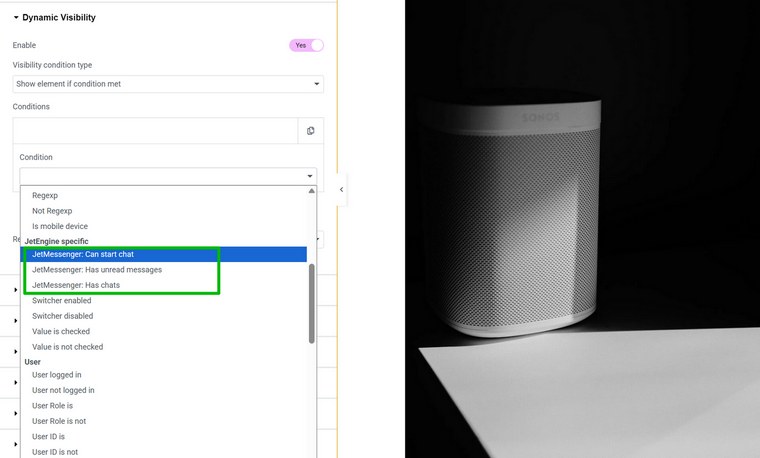
JetEngine also got some updates with the JetMessenger plugin release – new visibility rules for Dynamic Visibility.
Using them, you can not only show or hide certain blocks and buttons from unregistered or other user groups but also set up more advanced layouts – e.g., to notify users about new messages on different pages.
WooCommerce Integration for Marketplaces Compared
WooCommerce is where JetMessenger shows its hand most clearly, and the multi-vendor case is where it earns its keep. But first, the context: there’s a real competitive question to answer here, because Dokan, WCFM, and WC Vendors all already have chat functionality, but it’s a different one under the hood. So, what does JetMessenger offer that they don’t?
The short answer is: native, self-hosted, WordPress-data-model-aware messaging instead of a paid third-party SaaS integration. Here’s the comparison in concrete terms.
| Aspect | Dokan / WCFM / WC Vendors chat | JetMessenger |
| Where messages are stored | TalkJS servers (or Firebase, for older WCFM setups) | Your WordPress database |
| Per-user cost | Scales with TalkJS pricing (MAU-based) | Flat plugin license, unlimited users |
| External account required | Yes (TalkJS account with API keys) | No |
| WordPress data integration | The chat tool knows users and conversations, but doesn’t natively know your data model | Conversations are bound to WooCommerce orders, products, and any WordPress object |
| GDPR data control | Data is processed by a third party, and you need a DPA with TalkJS | Data never leaves your server |
| Builder integration | Pop-up widget bolted onto pages | Native Elementor / Bricks / Gutenberg widgets that style with your design system |
| Customization beyond the chat UI | Limited by what TalkJS exposes | Full WordPress hook, filter, or template access |
For some projects, the TalkJS approach is genuinely fine. If you’re running a small marketplace with a low number of users and you don’t care where the data lives, it works. For everyone else – anyone with GDPR concerns, serving regulated industries, or whose marketplace is large enough that TalkJS pricing starts to bite, who wants the chat to be part of their WordPress data model rather than alongside it – JetMessenger is a different proposition entirely.
Security in JetMessenger
When it comes to forms or chats, security is extremely important because wherever users can submit data is a potential risk point. This is a breakdown of how JetMessenger deals with security aspects and GDPR.
| Security aspect | What JetMessenger does about it |
| Object references / IDs | Public IDs are opaque, not sequential – every chat, message, and user is referenced by a signed token (HMAC-SHA256). Changing one character gets the request rejected, and tokens are bound to the site, so a valid token from one multisite blog is useless on another. Closes the most common WordPress IDOR hole. |
| Authorization checks | Permissions are re-checked on every write, sending, marking as read, attaching a file, not just when the chat loads. Lose vendor status on an order, and you instantly lose the ability to post in that order’s chat, not just to view it. |
| Media file protection | Uploads never enter the Media Library. They land in a hashed folder protected by .htaccess and robots.txt, served through an authorized route – so opening the file URL logged-out (or as anyone outside the chat) returns a 403. |
| XSS protection | Nothing a user types is trusted as code. The server strips scripts, hidden event handlers, and sketchy links before anything reaches the browser; safe formatting like bold and italics gets through, executable code never does. |
| Rate limiting | Crossing a configurable threshold triggers a polite 429 (“too many requests”), stopping message-spamming bots, token brute-force scripts, and clients stuck in a loop. |
| GDPR compliance | Plugs into WordPress’s native Personal Data Exporter and Eraser tools. A retention cron cleans up orphaned attachment files (not just database rows) and logs deletions without leaking message content into the audit log. |
FAQ
JetMessenger is a WordPress plugin by Crocoblock for private, on-site messaging between registered users. It is self-hosted, so all chat data stays in your own WordPress database. Its standout feature is context, meaning every conversation is tied to a specific order, product, listing, or post.
JetMessenger is a Premium Crocoblock plugin sold under a yearly license if purchased separately or as a part of a Crocoblock subscription that has a lifetime offer, with single-project and unlimited-project options. JetMessenger has no per-user fee, so the cost stays flat no matter how many people chat.
Yes, WooCommerce support is one of its core strengths. It can create a separate chat per vendor on multi-vendor orders, and has functionality to use the context of a dedicated product and a full order. Chats can live inside the customer’s WooCommerce account or on dedicated pages.
Those tools route messages through a third-party service like TalkJS, which means an external account, MAU-based pricing, and customer data leaving your server. JetMessenger stores everything in your WordPress database with a flat license fee.
Yes. Because data never leaves your server, you avoid the third-party data-processing agreements that SaaS chat tools require. JetMessenger also plugs into WordPress’s native Personal Data Exporter and Eraser tools. A retention cron cleans up old attachment files, not just database rows.
Chat works only between two registered users, so guests cannot start conversations. On WooCommerce, a guest checkout still completes normally; it simply does not create a chat. This keeps the system private and tied to real user accounts.
Messages appear almost instantly, giving a near-real-time experience without any external chat service. Both participants also receive email notifications when a new message arrives, unless those are switched off in settings. For better email deliverability, an SMTP service is recommended.
It offers native widgets and blocks for Elementor, Block Editor, and Bricks, so the chat styles with your existing design system. It also integrates with JetEngine, JetFormBuilder, and JetWooBuilder for dynamic visibility, form-triggered chats, and custom layouts.
Takeaway
WooCommerce powers around six million active stores, and most of these stores use either no chat, chats without much context, or third-party solutions. JetMessenger is here to give them a fourth option: native, self-hosted messaging that already knows what every conversation is about. It keeps order questions on your site, tied to the right purchase, without monthly per-user fees or sending customer data to someone else’s servers. If context is what your support has been missing, this is the plugin built around it.