When it comes to improving search functionality on WordPress websites, especially those built with Crocoblock tools, two plugins often come into the spotlight: JetSearch and JetSmartFilters Search Filter. At first glance, they may seem similar—both provide enhanced search capabilities beyond the default WordPress search. However, they are built for different purposes and use cases.
In this article, we’ll explore the core differences between JetSearch and the search filter from JetSmartFilters, how each of them works, and when to use one over the other. Let’s start!
What’s Going On Behind the Scenes
JetSearch—site-wide search tool
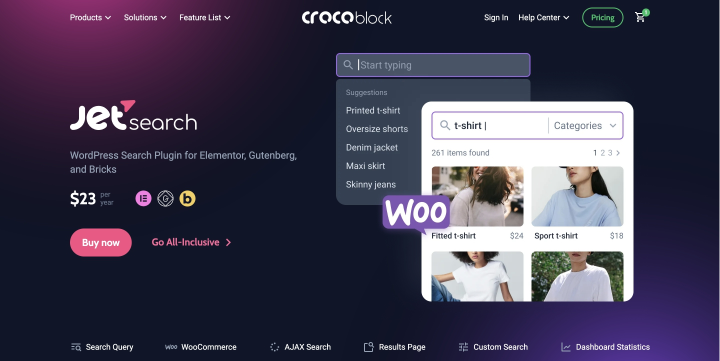
JetSearch is a powerful AJAX-based search plugin from Crocoblock that lets you add fast, live search functionality to your WordPress site. It can search across the entire database—including posts, pages, custom post types, WooCommerce products, and more—and delivers results instantly without page reloads.
JetSearch is designed to work independently from any specific loop. It operates as a universal search bar that can return results from anywhere on the site, making it perfect for global search functionality.

This flexibility comes with a rich set of configuration options. You can customize what content types are searchable, exclude specific categories or tags, as well as meta fields, and even define custom search result templates and suggestions.
JetSmartFilters Search Filter: targeted filtering within a loop

JetSmartFilters is a filtering plugin by Crocoblock. It allows you to add advanced filters to any listing built with JetPlugins or WooCommerce.
The search filter from JetSmartFilters works within the context of a specific loop. It doesn’t search the entire site, but instead filters content that is already being displayed—like WooCommerce products, real estate listings, or blog posts.
You can set up JetSmartFilters Search Filter, so it will perform a search only within a particular container from the current page: just specify the ID of that container in the Query ID field and select a provider (e.g., JetEngine Listing template, Elementor Pro and Bricks loops, a WooCommerce shortcode, etc.). For instance, if you have a WooCommerce archive and a JetEngine listing side by side, the search filter can be configured to affect one or both by setting the correct Query ID.
Moreover, it participates in faceted search, meaning it works alongside other JetSmartFilters’ filters like checkboxes, range sliders, and dropdowns. All filters “talk” to each other and refine the results in real-time.
Search Suggestions: JetSearch vs. JetSmartFilters
One of JetSearch’s standout features is its search suggestions functionality. As users begin typing, JetSearch can display live suggestions based on:
- previous user searches;
- custom keywords set by the site admin;
- relevant matches from the database.

This feature not only improves user experience by helping visitors find what they’re looking for faster, but it also allows you to strategically guide users toward specific content or products.
💡 It’s a subtle but powerful way to increase conversions and user engagement. You can learn more about this use case in this detailed article.
In contrast, the JetSmartFilters Search Filter does not offer any kind of search suggestion feature. Its role is strictly to filter the current page’s content based on the user’s input.
While it’s great for narrowing down visible content, it doesn’t direct the user’s search journey with smart suggestions.
Search Areas and Customization Options
JetSearch: full control over search
JetSearch offers extensive control over where the search applies and how results are displayed. You can configure:
- what content types to include (posts, pages, CPTs);
- which taxonomies or categories to include or exclude;
- whether to search in titles, content, excerpts, meta fields, etc.;
- the appearance of the live search results dropdown;
- the layout and content of the dedicated search results page.
JetSearch works perfectly with Elementor, Bricks, and Block Editor (Gutenberg). You have full control over the search form settings using these page builders. Most of the settings can be found directly on the page builder.
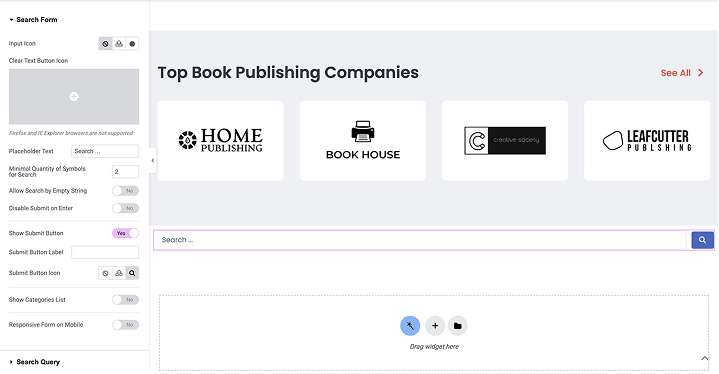
You can even design the search results page using JetThemeCore’s Archive template functionality by selecting the Search Results type. It allows you to manage how results are presented, whether as a custom layout, JetEngine’s listing grid, or a styled list.
Additionally, JetSearch supports AJAX, hybrid, or non-AJAX modes, giving developers flexibility based on performance or design needs.
JetSearch is ideal if you want granular control over the search logic and result display, and need to optimize search behavior across various site sections.
JetSmartFilters: targeted configuration within listings
JetSmartFilters Search Filter works very differently. Rather than scanning the entire site, it filters specific listing data. You set:
- the Query ID to define which Listing Grid(s) it connects to;
- the Provider (e.g., WooCommerce or JetEngine listing).
This makes JetSmartFilters highly effective when used with dynamic data, like product attributes and custom fields, especially when filters need to work together.

While JetSmartFilters doesn’t offer a dedicated search page or global settings, its strength lies in precise targeting and seamless integration with other filters on the same page.
In short, JetSearch is about breadth, customization, and a site-wide search; JetSmartFilters is about depth within a defined context.
Search Results Display Options
JetSearch: highly customizable display
JetSearch offers two types of result displays.
Live AJAX results, which are shown in real time under the search bar as users type. You can customize:
- what elements appear (titles, thumbnails, meta, etc.);
- how many results to show;
- layout styles, icons, colors, and fonts.
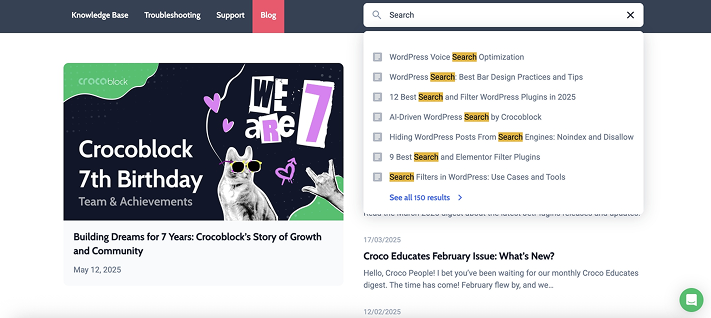
Full search results page. If the user clicks “See All Results,” they are taken to a dedicated results page. This is a customizable Archive template (with Search Results type), built using JetThemeCore, Elementor, or Bricks. You can design it using:
- JetEngine’s dynamic listings;
- filters;
- custom layouts;
- conditional logic.
JetSearch allows you to match the search experience to your site’s branding and user goals.
JetSmartFilters: minimalist, filter-centric display
JetSmartFilters’ Search Filter is not a standalone search results engine. It filters what’s already shown on the current page. That means:
- no separate search results page;
- no dynamic AJAX suggestion dropdown;
- no full-page search template.
Instead, results are instantly filtered within the existing layout based on user input. It’s simple and effective for specific use cases—especially when combined with other filters (like category or price).
You can still customize the appearance of the input field (icons, placeholder text, font size, etc.), but not the layout of filtered results.
AJAX Support: Real-Time Interaction in Both Tools
Both JetSearch and JetSmartFilters Search Filter support AJAX, enabling real-time results and a smoother user experience without full page reloads.
JetSearch offers a powerful AJAX search experience where results appear instantly as users type in the search field. This immediate feedback makes it easy to find content quickly. You can also disable AJAX entirely or use a hybrid setup, which shows live suggestions first and then redirects to a custom search results page when the user clicks “See All Results.” This flexibility is especially valuable for large sites with a lot of content or WooCommerce products, where users might want to dig deeper into their search.
JetSmartFilters Search Filter, on the other hand, also uses AJAX but in a more targeted way. It updates only the content inside a specific Listing Grid on the page. When a user enters a search term or adjusts any filter, the content updates dynamically without refreshing the entire page.
Use Case and Ideal Applications: Choosing the Right Tool for Your Needs
Both JetSearch and JetSmartFilters Search Filter have their unique strengths, and choosing between them depends largely on the specific needs of your website and user experience goals.
JetSearch is the ideal choice for websites with a wide range of content types. It’s perfect for large websites, blogs, or eCommerce websites where users need to search for various types of content. It’s also great for websites that want to implement broad search capabilities, allowing users to search across categories, post types, and custom fields, all within one powerful plugin.
JetSmartFilters Search Filter, on the other hand, is best suited for sites that require more targeted and context-specific search capabilities. If you’re running an online store with product grids or a listing-based site, JetSmartFilters’ Search Filter is excellent for fine-tuning the search experience within specific sections of the site.
FAQ
The primary difference is their scope and functionality. JetSearch is a full-site search plugin, offering customizable search options across all content types on your website. It provides broad search capabilities, intelligent suggestions, and highly customizable result pages. JetSmartFilters Search Filter, on the other hand, is designed to work within specific sections of your site, like product grids or JetEngine’s listings, offering refined filtering based on specific criteria like categories or custom fields.
Yes, both plugins can complement one another. JetSearch is great for global search across your site, while JetSmartFilters Search Filter can refine results within specific pages or sections.
Yes, JetSearch offers extensive customization options for search result pages, allowing you to design unique templates that match your brand. JetSmartFilters Search Filter, while more streamlined, allows you to customize the appearance of filters, including icons, colors, and fonts.
Conclusion
JetSearch is ideal for websites needing a broad, customizable search across the entire site. It offers advanced features like search suggestions, customizable result pages, and the ability to search all categories and content types. It’s perfect for a comprehensive search experience.
JetSmartFilters Search Filter, on the other hand, is better for filtering within specific listings, like product grids.
Both plugins serve different purposes. For the best results, you might want to consider using both, as it can improve the search experience tremendously.