I’m Dimitris Vayenas, founder and principal consultant at Oxford Metadata in the UK. With 45 years of experience in computing and 30 years building Internet applications since my first web project in 1995, I prefer hands-on development over management. Oxford Metadata specializes in ML-driven static code analysis of multimillion-line codebases, visualized with GraphDBs like Neo4j and OrientDB, powering high-performance, secure enterprise applications across finance, defense, and healthcare.
One of our recent projects involved a comprehensive overhaul of fthinorevma.gr using JetEngine and Elementor. By optimizing the dynamic table implementation, I reduced the page render time from approximately 12 seconds to under 1(!) second, significantly enhancing both user experience and organic search performance in a highly competitive energy market.
Advanced Caching Strategy for JetEngine
Fueled by Crocoblock’s Ukrainian engineering spirit, your JetEngine tables have become a lightning-fast racecar – every click now earns you a victory lap! 🚀
I’ll never forget the first time I stumbled upon Crocoblock’s suite of tools – back then, their dynamic tables felt like magic. It’s worth remembering that Crocoblock is a Ukrainian company, and over the past few years, the war has taken an enormous toll on everyone there, from the families in Kyiv to the talented software engineers in Lviv working around the clock under unimaginable pressure.
So when I recently hit the wall of “partial incompatibility” between their tables and Elementor’s native template caching (still in beta), I could almost hear the weary sigh of their small but mighty dev team.
Rather than wait for them to juggle the demands of wartime and every feature request, I decided to shoulder the burden myself: pre-generate and cache the full table, so their brilliant engineers can focus on what they do best – building great tools – while our front ends stay lightning fast.
If you’re using JetEngine’s Dynamic Tables or Elementor templates filled with thousands of rows, you’ve probably felt the pain of agonizingly slow page loads. On one of my client sites, a single JetEngine table would take over 15 seconds to render, and tank our Core Web Vitals, Google PageSpeed scores, and user experience.
But by swapping real-time rendering for a pre-generated static HTML file, we slashed that render time to under 1 second, every single visit. Here’s how, complete with GTmetrix before/after, code snippets, and even filtering strategies to consider.
The Problem: Thousands of Elements on Load
When your dynamic table outputs hundreds of rows, each containing images, nested Elementor widgets, and filter <select> elements, the DOM rapidly balloons:
- 7,000+ elements on initial load;
- hundreds of CSS/JS files are enqueued by JetEngine, JetSmartFilters, JetFormBuilder, JetPopup, Slick, and Elementor;
- a “hero” page load time of 15+ seconds, as measured by GTmetrix;
- poor Core Web Vitals scores, especially in Google PageSpeed Insights.
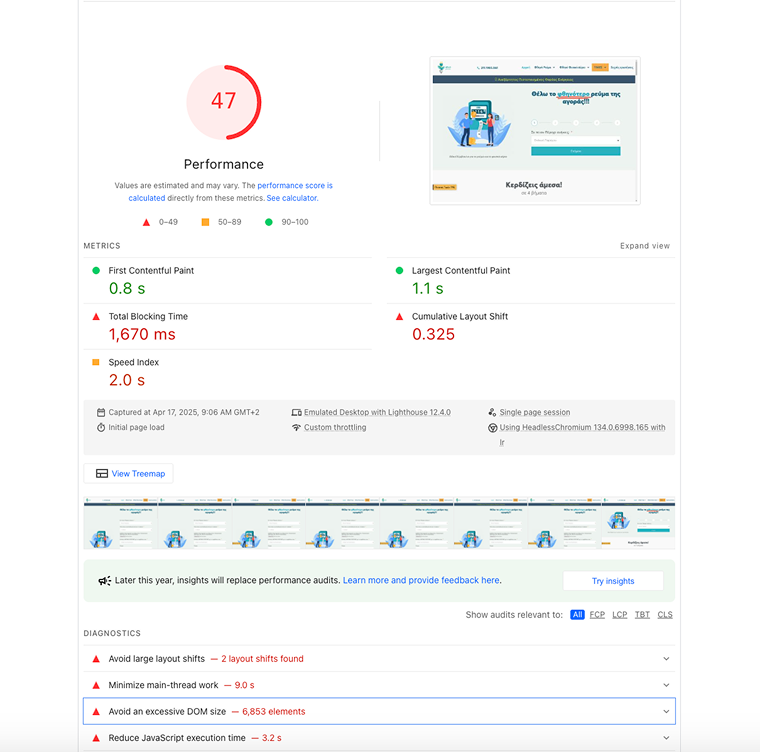
Imagine trying to pass Google’s Core Web Vitals when your page needs to mount thousands of DOM nodes and initialize dozens of JavaScript widgets – every single time a user visits.
The Solution: Lazy-Load a Static HTML Snapshot
Instead of generating the table on every page load, we:
- generate the full HTML once, either via a cron job or a manual “Regenerate” button;
- write the output to a static file (e.g., assets/html/table-data-oikiako.html);
- lazy-load that file on the front end via AJAX when the user scrolls down to the table container;
- re-initialize only the necessary JavaScript/CSS for Elementor, JetEngine, and (optionally) filters like JetSmartFilters.
The result?
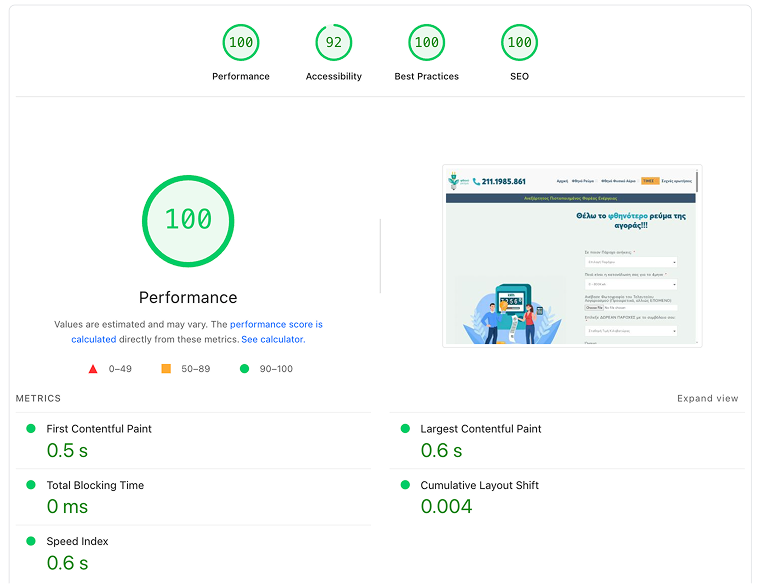
- initial render time drops to under 0.5 seconds;
- Core Web Vitals pass;
- PageSpeed score improves from the low 20s to 100.
Performance reports:
How It Works: Code Walk-Through
1. The shortcode to prevent overloading the DOM
We hook into WP-Cron or trigger manually via a “Regenerate” button to run Elementor/JetEngine once, capture its HTML, and save it to a static file:
function oikiako_lazy_table_generate_html() {
    // Run the JetEngine shortcode to get your table’s full HTML
    $html = do_shortcode('[jet_engine_dynamic_table id="28" query_id="27"]');
    // Save it as a static file
    $path = get_stylesheet_directory() . '/assets/html/table-data-oikiako.html';
    wp_mkdir_p(dirname($path));
    return false !== file_put_contents($path, $html);
}
2. The lazy-loader shortcode
In your theme’s functions.php, we register a simple shortcode that outputs a placeholder <div>:
function lazy_table_shortcode() {
    return '<div id="lazy-table-container" style="min-height:200px;">Loading…</div>';
}
add_shortcode('lazy_table', 'lazy_table_shortcode');
Then enqueue a small JavaScript file to fetch the pre-built HTML via AJAX only when the user scrolls near the container:
// File: assets/js/lazy-table-oikiako.js
jQuery(function($) {
    var container = $('#lazy-table-container');

    if (!window.IntersectionObserver) {
        loadTable();
    } else {
        new IntersectionObserver(function(entries, observer) {
            entries.forEach(function(entry) {
                if (entry.isIntersecting) {
                    observer.unobserve(entry.target);
                    loadTable();
                }
            });
        }, {
            rootMargin: '200px'
        }).observe(container[0]);
    }

    function loadTable() {
        $.get('/wp-content/themes/hello-theme-child-master/assets/html/table-data-oikiako.html')
            .done(function(html) {
                container.html(html);
            })
            .fail(function() {
                container.text('Failed to load table');
            });
    }
});
Because we only fetch HTML, no heavy Elementor or JetEngine rendering happens per visit.
3. Generating static HTML from an Elementor template
If your table is built inside an Elementor template (ID 19926), you can render it once, strip unnecessary metadata, and write it to a static HTML file.
PHP generator function (runs manually or via cron)
Add this to your functions.php or a custom plugin:
function regenerate_elementor_table_html() {
    // Disable Elementor editor-specific output
    add_filter('elementor/utils/is_user_can_edit', '__return_false');

    // Get the full HTML output of the Elementor template
    $html = \Elementor\Plugin::instance()
        ->frontend
        ->get_builder_content_for_display(19926, true);

    // Strip out edit buttons and data attributes
    $html = preg_replace('/data-elementor-edit-url="[^"]*"/', '', $html);
    $html = preg_replace('/<span class="edit-button".*?<\/span>/is', '', $html);

    // Define output path
    $path = get_stylesheet_directory() . '/assets/html/elementor-table-data-oikiako.html';
    wp_mkdir_p(dirname($path));

    // Write to static file
    return file_put_contents($path, $html) !== false;
}
This avoids regenerating on each visit, significantly reducing load.
Create a regenerate button in WordPress admin
Add this to your functions.php to insert a submenu under Tools > Regenerate Elementor Table:
// Add submenu under Tools
add_action('admin_menu', function () {
    add_submenu_page(
        'tools.php',
        'Regenerate Elementor Table',
        'Regenerate Elementor Table',
        'manage_options',
        'regenerate-elementor-table',
        'regenerate_elementor_table_admin_page'
    );
});
Then define the callback:
// Callback to render the admin page and handle regeneration
function regenerate_elementor_table_admin_page() {
    if (
        isset($_POST['regenerate_nonce']) &&
        wp_verify_nonce($_POST['regenerate_nonce'], 'regenerate_action')
    ) {
        $ok = regenerate_elementor_table_html();
        if ($ok) {
            echo '<div class="notice notice-success"><p>✅ Static HTML rebuilt.</p></div>';
        } else {
            echo '<div class="notice notice-error"><p>❌ Could not write HTML file.</p></div>';
        }
    }
    ?>
    <div class="wrap">
        <h1>Regenerate Elementor Table HTML</h1>
        <p>This will render <code>[elementor-template id="19926"]</code> and overwrite the static file at:</p>
        <code><?php echo esc_html(get_stylesheet_directory() . '/assets/html/elementor-table-data-oikiako.html'); ?></code>
        <form method="post" style="margin-top:1em;">
            <?php wp_nonce_field('regenerate_action', 'regenerate_nonce'); ?>
            <input type="submit" class="button button-primary" value="Rebuild Now">
        </form>
    </div>
    <?php
}
4. Caching the table render for instant load
On my development machine, generating the full HTML table from the Elementor template takes about 12 seconds. This delay is due to the processing of PHP, inline CSS, and other dynamic output generated by Elementor.
Previously, this heavy rendering process happened on every page visit, leading to long load times.
Now, we’ve shifted to a zero-cost cache model:
- The static HTML file is generated once, either manually (via the Tools menu) or on a scheduled cron job.
- Front-end visitors never trigger the rendering – they load a lightweight, prebuilt HTML file instantly.
📺 Here’s a short video showing the difference in render time.
One Challenge: JetSmartFilters Dropdowns Filtering Static Tables
Some clients still expect JetSmartFilters dropdowns to dynamically filter static HTML tables, something not natively supported due to the lack of an AJAX provider. To work around this limitation, a reliable solution involves integrating the DataTables plugin and synchronizing it with JetSmartFilters.
Here’s how to approach it:
1. Use DataTables to enable filtering:
- Pre-enqueue DataTables CSS and JS assets when the static table is lazy-loaded.
- Ensure your <table> element has a consistent, unique ID (e.g., my-filterable-table).
Wire each JetSmartFilters <select name=”…”> to a corresponding DataTables column search.
;(function($){
'use strict';
var CONTAINER_ID = 'lazy-elementor-table-container';
var DATA_URL = '/wp-content/themes/hello-theme-child-master/assets/html/table.html'; // Example filename
var dataTables = [];
var filtersBound = false;
// Wire the dropdowns to filter all DataTables
function initFilters(){
if (filtersBound) return;
filtersBound = true;
$(document).on('change', '.jet-filter select', function(){
var name = this.name;
var label = $('option:selected', this).data('label') || $('option:selected', this).text();
var col;
if (name === 'paroxos-oikiako') {
col = 0; // provider
} else if (name === 'month_year') {
col = 1; // month
} else if (name === 'eidos-timilogiou') {
col = 3; // invoice type
} else {
return;
}
console.log('Applying filter to col', col, '→', label);
dataTables.forEach(function(table){
table
.column(col)
.search(label, false, true)
.draw();
});
});
}
// Fetch the static HTML and initialize all tables inside it
function fetchAndInit($container){
$container.html('<p>Loading table…</p>');
$.ajax({
url: DATA_URL,
dataType: 'html',
cache: true
})
.done(function(html){
$container.html(html);
if (!$.fn.DataTable) {
console.error('DataTables not loaded');
return;
}
dataTables = []; // Clear old instances
$container.find('table.jet-dynamic-table').each(function(i){
var $tbl = $(this);
if (!$tbl.attr('id')) {
$tbl.attr('id', 'my-filterable-table-' + i);
}
var dt = $tbl.DataTable({
ordering: false,
paging: false,
columnDefs: [
{
targets: 0, // Provider images → alt or filename
render: function(data, type){
if (type === 'filter') {
var $tmp = $('').html(data);
var img = $tmp.find('img');
if (img.length) {
var alt = img.attr('alt') || '';
if (alt.trim()) return alt.trim();
var src = img.attr('src') || '';
var name = src.split('/').pop().split('.')[0];
return name.replace(/[-_]/g, ' ');
}
return $tmp.text().trim();
}
return data;
}
},
{
targets: [1, 3], // Strip HTML for month & invoice-type
render: function(data, type){
return (type === 'filter')
? $('').html(data).text().trim()
: data;
}
}
]
});
dataTables.push(dt);
});
initFilters(); // Only bound once
})
.fail(function(xhr){
console.error('Error loading table:', xhr.statusText);
$container.html('<p style="color:red;">Could not load table.</p>');
});
}
function init(){
var el = document.getElementById(CONTAINER_ID);
if (!el) return;
var $container = $(el);
if ('IntersectionObserver' in window) {
var obs = new IntersectionObserver(function(entries){
entries.forEach(function(e){
if (e.isIntersecting) {
obs.unobserve(el);
fetchAndInit($container);
}
});
}, { rootMargin: '200px' });
obs.observe(el);
} else {
fetchAndInit($container);
}
}
$(document).ready(init);
})(jQuery);
Here is the enqueuing code:
<?php
function oikiako_enqueue_assets() {
if ( is_admin() ) {
return;
}
global $post;
$content = $post->post_content ?? '';
// Bail unless we have one of our lazy shortcodes
if ( ! ( has_shortcode( $content, 'lazy_table' ) || has_shortcode( $content ) ) ) {
return;
}
// 1) Elementor core
if ( class_exists( '\Elementor\Plugin' ) ) {
\Elementor\Plugin::instance()->frontend->enqueue_styles();
\Elementor\Plugin::instance()->frontend->enqueue_scripts();
}
// 2) JetEngine Dynamic Tables
if ( function_exists( 'jet_engine' ) && isset( jet_engine()->dynamic_tables ) ) {
jet_engine()->dynamic_tables->enqueue_assets();
}
// 3) JetSmartFilters
if ( function_exists( 'jet_smart_filters' ) ) {
$jsf = jet_smart_filters();
if ( isset( $jsf->frontend ) && method_exists( $jsf->frontend, 'enqueue_assets' ) ) {
$jsf->frontend->enqueue_assets();
}
}
// 4) JetFormBuilder
if ( class_exists( 'Jet_Form_Builder' ) ) {
if ( method_exists( 'Jet_Form_Builder\Frontend', 'enqueue_assets' ) ) {
\Jet_Form_Builder\Frontend::enqueue_assets();
} else {
// fallback for older versions
$jfb_url = defined( 'JET_FORM_BUILDER_URL' ) ? JET_FORM_BUILDER_URL : '';
$jfb_version = defined( 'JET_FORM_BUILDER_VERSION' ) ? JET_FORM_BUILDER_VERSION : '';
wp_enqueue_style( 'jet-form-builder-select', $jfb_url . 'modules/select/style.css', [], $jfb_version );
wp_enqueue_style( 'jet-form-builder-checkbox', $jfb_url . 'modules/checkbox/style.css', [], $jfb_version );
wp_enqueue_style( 'jet-form-builder-radio', $jfb_url . 'modules/radio/style.css', [], $jfb_version );
wp_enqueue_style( 'jet-form-builder-choices', $jfb_url . 'modules/choices/style.css', [], $jfb_version );
wp_enqueue_style( 'jet-form-builder-wysiwyg', $jfb_url . 'modules/wysiwyg/style.css', [], $jfb_version );
wp_enqueue_style( 'jet-form-builder-switcher', $jfb_url . 'modules/switcher/style.css', [], $jfb_version );
wp_enqueue_script( 'jet-form-builder-main', $jfb_url . 'assets/build/frontend.js', [ 'jquery' ], $jfb_version, true );
}
}
// 5) JetPopup
if ( function_exists( 'jet_popup' ) ) {
$jp = jet_popup();
if ( isset( $jp->frontend ) && method_exists( $jp->frontend, 'enqueue_assets' ) ) {
$jp->frontend->enqueue_assets();
} else {
$base = method_exists( $jp, 'plugin_url' ) ? $jp->plugin_url() : '';
$ver = method_exists( $jp, 'get_version' ) ? $jp->get_version() : '';
wp_enqueue_style( 'jet-popup-frontend', $base . 'assets/css/jet-popup-frontend.css', [], $ver );
wp_enqueue_script( 'jet-anime-js', $base . 'assets/js/lib/anime.min.js', [], $ver, true );
wp_enqueue_script( 'jet-popup-frontend', $base . 'assets/js/jet-popup-frontend.js', [ 'jquery', 'jet-anime-js' ], $ver, true );
}
}
// 6) Slick (for JetEngine carousels)
if ( function_exists( 'jet_engine' ) && method_exists( jet_engine(), 'plugin_url' ) ) {
wp_enqueue_script(
'jet-engine-slick',
jet_engine()->plugin_url( 'assets/lib/slick/slick.min.js' ),
[ 'jquery' ],
'1.8.1',
true
);
}
// 7) DataTables (v1.13.4) — CSS + JS
wp_enqueue_style(
'datatables-css',
'https://cdn.datatables.net/1.13.4/css/jquery.dataTables.min.css',
[],
'1.13.4'
);
wp_enqueue_script(
'datatables-js',
'https://cdn.datatables.net/1.13.4/js/jquery.dataTables.min.js',
[ 'jquery' ],
'1.13.4',
true
);
// 9) Your lazy loader for the static HTML
wp_enqueue_script(
'elementor-lazy-oikiako',
get_stylesheet_directory_uri() . '/assets/js/elementor-lazy-oikiako-100.js',
[ 'jquery', 'datatables-js' ],
filemtime( get_stylesheet_directory() . '/assets/js/elementor-lazy-oikiako-100.js' ),
true
);
}
add_action( 'wp_enqueue_scripts', 'oikiako_enqueue_assets', 20 );
2. JetSmartFilters “Query Loop Provider” (remains in dev)
For experimental setups:
- Install the plugin manually from the Crocoblock GitHub or plugin repository.
After injecting your static HTML, initialize JetSmartFilters using JetSmartFilterSettings and then call JetSmartFilters.init().
NOTE
In our testing, this approach has not yet worked reliably. If you have successfully implemented it, feel free to share your experience in the comments.
3. Basic jQuery-based filtering (no libraries)
Plain jQuery hide/show by cell data – less powerful, but no new library.
Why This Matters for Core Web Vitals
Optimizing your static tables through pre-rendering and lazy-loading significantly improves key performance metrics measured by Google’s Core Web Vitals. Here’s how:
Reduced DOM element count
- Before: a fully rendered table can add 30,000+ DOM elements on page load.
- After: by lazy-loading, the initial load includes just ~300 elements (theme + lightweight AJAX loader).
Improved LCP, TTI, and FID
- Largest Contentful Paint (LCP): moves from the massive table to a faster-loading element like your hero section or header (typically under 0.5s).
- Time to Interactive (TTI) and First Input Delay (FID): reduced due to minimal JS and render-blocking assets.
Minimized requests
Instead of loading dozens of heavy JetEngine, Elementor, and JetFormBuilder assets, you deliver a cached HTML file with only essential CSS/JS.
You hit Core Web Vitals targets
Metric Desktop Mobile LCP < 0.4s < 2s FID < 0.4s < 1.5s CLS < 0 < 0
This method consistently delivers near-perfect scores in Lighthouse and GTmetrix.
Two Ways to Use It
Shortcode only (no Elementor required)
- Use the [lazy_table] shortcode.
- Include the accompanying lazy-table-oikiako.js script.
- Embed anywhere in your site – lightweight and flexible.
Elementor template snapshot
- Use regenerate_elementor_table_html() to generate a static snapshot from a saved Elementor template (e.g., ID 19926).
- Embed the snapshot using [lazy_elementor_table].
Both methods achieve the same performance benefits. The Elementor method simply allows you to keep your visual design workflow.
Conclusion
By decoupling heavy table rendering from every page load and instead lazy-loading a static snapshot, you dramatically improve performance. Rendering time drops from 15 seconds to under 1 second, while overall DOM size and resource consumption are significantly reduced.
This approach helps you meet Core Web Vitals benchmarks with ease, achieving LCP under 2 seconds, minimal FID, and no layout shifts. In practice, it results in PageSpeed and Lighthouse scores above 98 on desktop and over 90 on mobile.
The HTML generation can be automated monthly via a cron job, reducing server load and contributing to a more sustainable setup.
If you’re a Crocoblock power user managing large, data-heavy tables, this pattern offers a major performance boost without sacrificing filtering functionality, design control, or the flexibility of your Elementor layouts.
Was this article helpful?YesNo 
 Discover the powerful Tables Builder for custom table creation Explore now