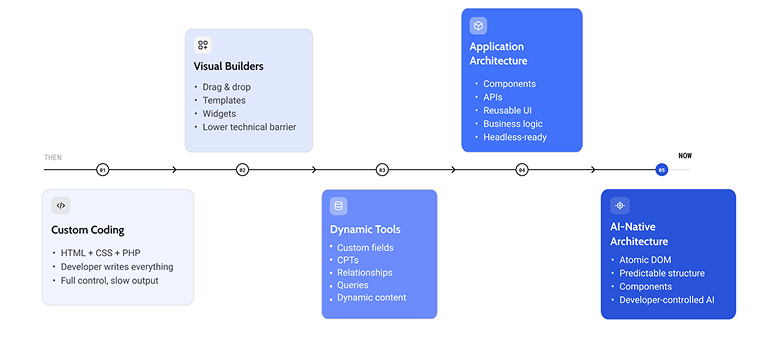
When WordPress and other CMSs first appeared, you had to know some coding basics and be quite professional in HTML and CSS.
Then came the era of visual page builders. For more than a decade, WordPress page builders have focused on making website creation more visual. Drag-and-drop editing, responsive controls, template libraries, and reusable elements have dramatically lowered the barrier to building professional websites.
That model has been remarkably successful. Today’s builders can create virtually any type of website, from simple landing pages to complex WooCommerce stores.
However, in the beginning of the website builder era, sites were rather static – and then came tools for dynamic content, like JetEngine and ACF. That changed a lot, showing that sites should no longer be a collection of static pages, but move towards an application architecture, powered by dynamic content, APIs, reusable components, personalized interfaces, and now AI-assisted development.
Finally, those changes expose limitations that traditional page builders were never designed to solve.
As a result, CrocoBuilder approaches the problem from a different direction. Rather than treating AI as another feature layered on top of an existing visual editor, it rethinks how front-end architecture, components, and AI should work together from the ground up.
What is CrocoBuilder? CrocoBuilder is a visual website builder for WordPress where every page is a tree of reusable components – an Atomic DOM – that both you and AI can edit, visually or in code. AI assembles interfaces from your components and your design system; you keep full manual control over the result. It’s built for people who want AI speed without giving up developer-grade precision.
Where Traditional WordPress Page Builders Hit a Complexity Ceiling
The first generation of drag-and-drop WordPress solved an important problem: they gave non-developers visual control over layouts. That’s why designers could build simple websites; it was a predecessor of today’s vibe coding – and it felt similar to what we have now.
Over time, however, they accumulated new responsibilities. They became responsible for responsive design, styling systems, animations, dynamic content, global templates, eCommerce, forms, pop-ups, conditional visibility, and dozens of other capabilities.
Most of these features were added incrementally – bolted onto an architecture that was never designed to hold them. As a result, many builders now generate increasingly complex front-end structures behind relatively simple interfaces.
The visual experience remains intuitive, but underneath it often means:
- deeply nested wrapper elements;
- duplicated structural markup;
- presentation tightly coupled with editor implementation;
- components that are difficult to reuse outside the builder ecosystem.
For many years, these compromises were acceptable, and they still are just because they do the job. And, probably, we would go on for many more years like this if AI hadn’t arrived. It changed a lot in the whole paradigm of WordPress page builders.
HTML DOM tree vs. component tree
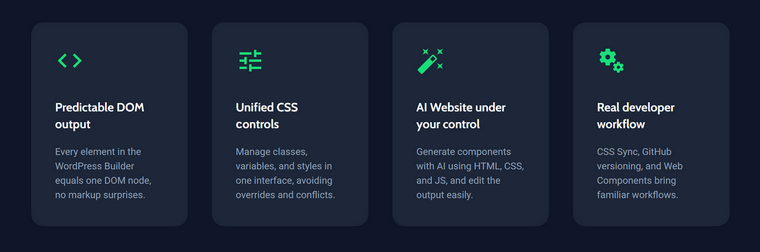
The main reason is that AI doesn’t interact with the visual editor the way humans do. It interacts with the underlying architecture, and it wants to see nodes and components it can operate on, not an endless field of anonymous <div> wrappers.
Here is a simple example of what I’m talking about. Let’s take the simplest product card with a title, a price, and a button.
Builder-oriented DOM:
<div>
    <div>
        <div>
            <div>
                <div>
                    <h3>Running Shoes</h3>
                </div>
            </div>
            <div>
                <div>
                    <p>$129</p>
                </div>
            </div>
            <div>
                <div>
                    <button>Add to Cart</button>
                </div>
            </div>
        </div>
    </div>
</div>
Component-oriented structure:
<ProductCard>
    <ProductTitle>
        Running Shoes
    </ProductTitle>
    <ProductPrice>
        $129
    </ProductPrice>
    <AddToCartButton />
</ProductCard>
A human looking at the visual editor sees the same product card in both cases, but AI doesn’t. In the first case, it sees 11 anonymous boxes and has to guess what they mean. In the second, it sees exactly three things it can reliably find, modify, duplicate, and restyle.
Modern component-oriented builders introduce another layer between the editor and the browser: an internal component tree. So, instead of manipulating HTML directly, they work with structured nodes representing components, their properties, relationships, and data bindings. A rendering engine then translates that tree into the final HTML delivered to the browser.
This means HTML is no longer the source of truth, but the output of a rendering process. The underlying component tree becomes the canonical representation of the interface, which can be edited visually, modified programmatically, or interpreted by AI before any HTML is generated.
The cleaner and more predictable this architecture is, the more capable AI becomes.
“But why should builders adjust to AI at all?”
At this point, you might fairly raise two objections, so let’s take them one at a time.
Objection 1: “Why can’t existing builders just create a solid API, so AI would understand their widgets as components?”
Because a solid API needs a solid structure behind it. An API is an interface – it requires strict, unified rules for every element underneath. Now imagine a mature builder like Elementor with a decade of accumulated widgets, each carrying years of incremental DOM changes, trying to compress all of that into one unified element model.
This isn’t a criticism of any particular product, but a structural constraint of the entire first generation of page builders. Every established builder is obliged to maintain backward compatibility: millions of live client sites must keep working after every update. Rewriting the foundation would break them. So can we realistically expect a radical architectural shift from tools that carry that responsibility? Realistically, no – and that’s not a failure on their part. It’s simply why a new architecture has to start from a clean slate.
Objection 2: “AI-generated pages are glitchy anyway, so it’s faster to build manually. Why adjust to AI at all?”
Fair – and honestly, many people will stick with what they’re used to, no matter what. But here’s the detail that matters more than personal preference: before HTML ever reaches the browser, modern builders already construct an internal tree of objects representing components and their relationships. Once that tree exists, manipulating it directly, whether by a human, a script, or an AI, is simply the shortest path from intention to working interface. And it’s also the shortest way to build universal applications, not just websites.
In other words: the architecture isn’t being adjusted for AI. AI just happens to be the first user that punishes bad architecture immediately.
Why Does CrocoBuilder Have an Atomic DOM Architecture?
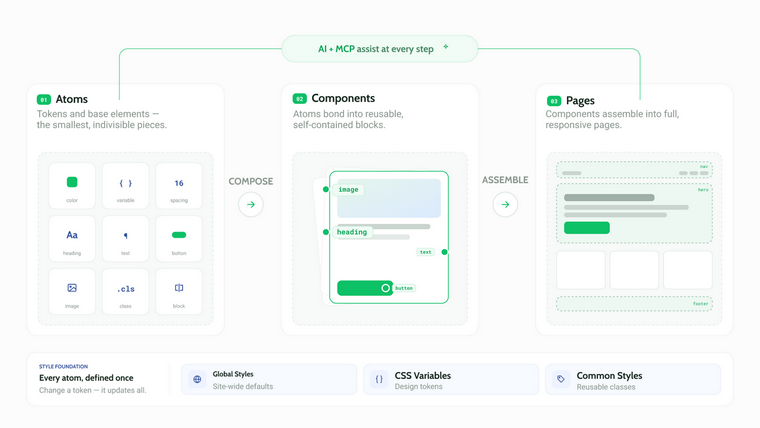
So, following the timeline from the beginning of this article, we can see that visual page builders do a great job when it comes to fast and easy page building. In conjunction with dynamic tools like JetEngine for more complex projects or ACF for simpler ones, you can get really good results.
But evolution doesn’t stop, and gradually, the atomic approach won.
The concept of atomic design was introduced in 2013, inspired by chemistry, and became a foundation for design systems. The idea is to start from the smallest elements that build bigger ones.
The methodology defines five levels:
- Atoms – basic UI elements such as buttons, headings, icons, inputs, or images.
- Molecules – small groups of atoms working together to perform a single function, such as a search field with a button or a product card.
- Organisms – larger, self-contained interface sections composed of multiple molecules, such as headers, pricing tables, or testimonial sections.
- Templates – page layouts assembled from reusable organisms.
- Pages – complete pages populated with real content.
However, the real value of the atomic approach isn’t this hierarchy itself. The difference lies in making components the foundation of the entire architecture rather than an optional convenience.
This is what we call the Atomic DOM: in CrocoBuilder, the interface is a tree of interconnected components. Pages are compositions of reusable nodes, and a rendering engine transforms that component tree into the final HTML delivered to the browser. There is no “widget mode” underneath, no legacy markup layer – components all the way down.
How is this different from Bricks or JetEngine’s Components?
A fair question, because on the surface, several modern tools already offer reusable components, global styling, and component instances — Bricks and JetEngine’s Components among them, and both do it well.
The distinction is philosophical, and it matters most for AI:
- In component-friendly builders, components are a feature: a very useful layer you can opt into, sitting on top of an element/widget system that still exists underneath. Some parts of your site live inside components; others don’t.
- In CrocoBuilder, components are the substrate: there is nothing under them to fall back to. Everything, from a single button to a full page template, is a node in the same tree, described by the same rules, exposed through the same structure.
For a human clicking around a visual editor, this difference is almost invisible. For AI, it’s the difference between operating in a system where some things are predictable and a system where everything is. And, as a bonus for developers: CrocoBuilder components can be registered as native Web Components and used outside the builder entirely, which is hard to offer when components are a layer rather than the foundation.
Why did the atomic approach become popular?
But why is this approach so important and increasingly popular? It’s driven by the increasing complexity of modern websites and the need for more efficient development workflows.
Here are some advantages of the atomic approach:
- Consistency. Since the same components are reused throughout the site, design remains uniform. Updating a button, card, or navigation component automatically applies the change everywhere it is used.
- Reusability. Developers and designers build a component once and reuse it across dozens or even hundreds of pages, significantly reducing repetitive work.
- Scalability. As projects grow, managing a library of components is far easier than maintaining hundreds of unique page layouts. Large websites become more predictable and easier to maintain.
- Faster development. Teams spend less time recreating common interface elements and more time building new functionality.
- Easier collaboration. Designers, developers, and content editors all work with the same set of predefined components, reducing inconsistencies and simplifying handoffs.
- Better maintenance. Fixes and improvements can be made in a single place instead of being repeated across multiple pages.
Why does this approach matter today?
With all the advantages mentioned above, the atomic approach has become even more valuable with the rise of AI-assisted development. AI tools generate more reliable and maintainable websites when they work with predefined components rather than producing entirely new layouts for every request. Thus, AI doesn’t invent a page from scratch, but can assemble existing building blocks according to established design rules, producing results that are both consistent and easier for developers to maintain.
This shift is one of the reasons why website builders increasingly focus on component systems instead of standalone widgets or page templates.
Why AI-Generated Website Pages Need Developer Control
It’s trendy to talk about AI WordPress websites and how easily and quickly they can be generated. Fair enough if you’re building a generic landing page and you’re a small business owner who wants to save money on a designer, marketer, branding, and simply sell a batch of, let’s say, white-labeled kids’ toys from Alibaba. It’s similar to how people used to buy a ready-made niche WordPress theme without caring whether it reflected their brand identity.
However, if the goal is a bit more long-term, what AI generates won’t be enough. You’ll want to align it with your brand, create a proper UX, and leave room for future scaling.
So this is what the typical “AI website” process actually looks like:
- You: “Build me a landing page for a fitness studio. Modern, energetic, here are three references.”
- AI: generates a page.
- You: “Nice, but make the hero section shorter and change the green to our brand green, #2FA84F.”
- AI: changes the green… and also the font, for some reason.
- You: “The font was fine! Put it back. And the pricing cards are misaligned on mobile.”
- AI: fixes mobile, breaks desktop.
- You: “Okay. Desktop is broken now.”
- AI: fixes desktop; the green is a different green again.
- You: …
…and this loop can go on for hours. Most likely, you’ll end up quite frustrated, because changing icons, fonts, alignment, colors, and even the overall structure manually is often much faster and easier than prompting your way there.
The data backs this feeling up. In the 2025 Stack Overflow Developer Survey, the single biggest frustration with AI tools, cited by 66% of developers, was dealing with “AI solutions that are almost right, but not quite.” The second biggest, at 45%, was “debugging AI-generated code takes more time than it saves.”
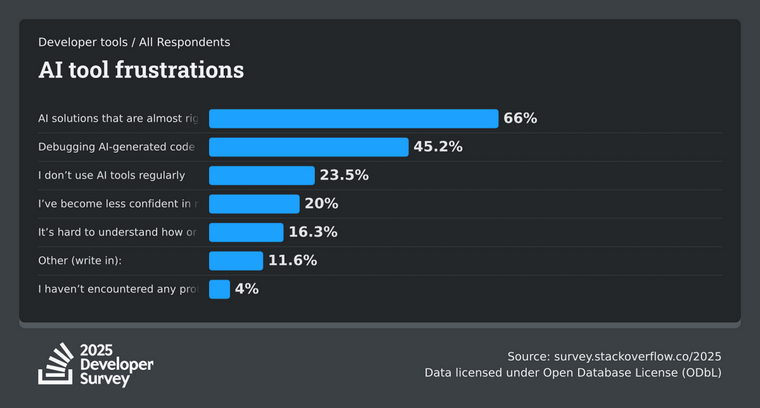
“Almost right, but not quite” is exactly the problem. Yes, AI has done the job – created a basis for you, which is cool even for professional designers who occasionally face a creative block. But after that, you should have full control over your site.
🎉 That’s why the future doesn’t belong to AI page builders. It belongs to page builders that let AI generate, and developers take over.
This way, you get AI’s speed without giving up the precision and control of manual design. Because real projects evolve, new requirements appear, so business logic and components can change.
Consequently, integrations expand, and even if AI-generated layouts are good enough without tweaking them, they become living systems that require continuous refinement.
And, as I’ve already mentioned, an efficient WordPress AI builder should operate inside predictable systems – which is exactly what the Atomic DOM provides.
What CrocoBuilder Workflow Looks Like
Let’s make the “AI generates, and the developer takes over” idea concrete. Say you’re building a site for a SaaS product and you need a pricing section.
Step 1. You ask. Inside CrocoBuilder, you tell the AI Assistant: “Add a three-tier pricing table with a highlighted middle plan and a monthly/yearly toggle.”
Step 2. AI assembles, not invents. Instead of hallucinating a brand-new layout with random colors and its own idea of a button, the AI builds the section from your existing design system: your global classes, your CSS variables, your typography, your already-defined Button and Card components. The result lands on the page already looking like your site. And if your pricing plans live in a custom post type, you don’t hardcode them: the built-in Query Builder (the same as JetEngine has) lets you visually set up a WordPress query loop that pulls the plans into the table automatically – no WP_Query code required.
Step 3. You take over. The pricing table isn’t a frozen blob of AI-generated HTML, but a normal branch of your component tree. For example, you want the middle card 8px wider – just type it. Want the toggle to behave differently? Open the code, and, thanks to two-way sync, your change instantly appears in the visual editor, and vice versa. So, no extra prompting needed.
Step 4. It stays maintainable. A year later, when your brand color changes, you update one variable, and the AI-generated pricing table updates with everything else, because it was never something called “AI code” in the first place, but just components.
That’s the whole philosophy in one workflow: AI does the boring 80% in seconds, and you do the meaningful 20% with full, deterministic control.
CrocoBuilder: Atomic DOM Architecture, Native AI Integration, and Unique Features
1. Architecture: the Atomic DOM
- Native web components. Take your designs outside the builder. Register any created component as a native Web Component to use it in the default WordPress editor or anywhere else on your site, retaining all of its customizable properties.
- Visual Query Builder. Query any data visually: posts, custom post types, users, taxonomies, or terms, the same way you would with JetEngine’s Query Builder. It works as a visual WordPress query generator: build a query loop without touching WP_Query, then bind the results to your components to power dynamic listings, grids, and archives. Combined with the Atomic DOM, this means dynamic data isn’t a separate “widget mode,” but flows through the same component tree as everything else.
- Advanced component properties. Turn components into versatile containers for other elements, giving you the power to create highly complex layouts with ease.
- Visual site structure UI. Understand your site’s architecture at a glance. A unique visual tree interface shows you exactly where your templates are applied, how pages connect, and what needs to be configured next.
- Top-tier performance and speed. Built for speed from day one: fast rendering times and high Google PageSpeed scores out of the box, with zero additional optimization required, plus built-in performance monitoring to keep it that way.
2. Design system and developer control
- Design system first (classes and variables). More than a drag-and-drop tool, CrocoBuilder acts as a complete design system. Manage global CSS classes and variables visually, keeping your entire project unified, on-brand, and easy to update.
- Two-way styling synchronization. Whether you prefer visual controls or writing code, you never have to choose. Visual changes instantly update the underlying code, and code changes immediately reflect in the visual interface.
- Unified common styles. Move beyond rigid style presets: create and apply your own global styles anywhere on your site, keeping your design system cohesive and speeding up work on large websites.
- Flexible “link as a container.” Restrictions on clickable elements are removed: build complex buttons with icons or wrap entire sections in a clickable link without juggling confusing settings.
- Seamless WordPress fonts integration. Direct integration with the native WordPress fonts manager, the exact same font library across the standard WordPress editor and the builder.
- Complete responsive control. Dedicated responsive controls and state management make adjusting layouts for mobile, tablet, and desktop completely streamlined.
- Built-in interactivity and visual effects. Interactive tabs, dynamic sliders, and complex visual effects through an intuitive visual interface, no custom coding required.
3. Native AI integration
- AI-powered smart components. A context-aware WordPress AI assistant is built into the builder itself. Instead of hunting through addons for a specific layout (like a pricing table), simply ask the AI to build it. It generates the component using your existing design system, colors, and fonts, ready to use instantly.
- AI for every editor and every level. The AI Assistant is available across the Component Builder, the Page Builder, and all style managers. It can also help you write HTML, CSS, and JavaScript directly when you need more control over element behavior, so it’s equally useful whether you prompt everything or code everything.
FAQ
Yes. AI can generate layouts, pages, and even full sites, but the results typically need human refinement to match your brand, UX, and long-term goals. That’s why the most practical approach is an AI WordPress builder that generates from your design system and then hands you full manual control.
A visual page builder is a tool that lets you create and edit WordPress pages through a drag-and-drop interface instead of writing code. Modern visual builders like CrocoBuilder go further by treating every element as a reusable component rather than static markup.
They can, because many builders generate deeply nested wrapper markup and load heavy assets. Builders with clean, component-based output, where HTML is rendered from a structured component tree, avoid this problem and score high on Google PageSpeed out of the box.
A query loop is a mechanism that fetches content (posts, products, custom post types) from the database and displays each item using a repeating template. With a visual Query Builder, you can configure a WordPress query loop without writing any WP_Query code.
CrocoBuilder is built on an Atomic DOM: components aren’t a feature added on top of a widget system, but the foundation of the entire architecture. This makes the output predictable for both developers and AI, which can assemble new sections directly from your existing components and design system. Also, it makes it extremely lightweight.
Conclusion
WordPress is entering a new era. The question is no longer whether AI can build a website, but the real question is what happens after that and whether you can build big, extensible, dynamic systems that can be easily modified. So, it isn’t a prompt-engineering challenge, but an architectural one.
Traditional page builders transformed WordPress by making website creation visual. CrocoBuilder is built around a different idea: the next generation of builders will be defined by structure. Its Atomic DOM treats every part of a page as a predictable, reusable component that designers can edit visually, developers can customize in code, and AI can assemble when needed – all within the same unified system.