Probably every hosting provider or any type of no-code platform offers some kind of AI builder, and it seems like site building has never been easier. Well, when the first premade templates and themes for all kinds of industries appeared, many thought the same, but as time goes by, humans are still involved. But AI can definitely save us a lot of time.
So, let’s dig into the topic of AI website builders created specifically for WordPress.
AI WordPress Builders: Pros and Cons
Let’s be honest: AI builders are not magic, but they’re getting impressively close to solving a lot of common web-building headaches. But there are definitely downsides to it. That’s why here is my take on the pros and cons of AI WordPress Builders.
WordPress AI builders pros
One of the biggest advantages is speed. You can go from a blank page to a functional website in minutes.
These tools handle layouts, generate content, and even suggest design tweaks without you lifting a finger. For small businesses, freelancers, or even anyone without technical skills, that’s a game-changer.
They’re also incredibly easy to use. Most of them work like guided wizards: you answer a few questions about your business, and the builder takes it from there. You don’t need to touch code or even think too much about design principles.
And with built-in SEO tools and mobile responsiveness, a lot of the basics are taken care of automatically.
But of course, there are trade-offs.
WordPress AI builders cons
While AI can get you started quickly, the results often look and feel generic. If you want something truly unique or tailored to a specific brand identity, you’ll likely hit a wall. Most builders give you limited control beyond the initial setup, and making custom changes can feel clunky or even impossible without additional plugins or manual tweaks.
Then there’s scalability. These tools are great for simple sites, but if your business grows and your needs become more complex, like adding custom features or integrations, you may outgrow the builder faster than expected.
Performance can also be a concern. Some AI builders generate bloated code behind the scenes, which can affect your site speed and SEO. And while many tools start out cheap or free, unlocking premium features often means climbing into higher-priced tiers you didn’t plan for.
To boil it down:
- Are they worth it? For quick projects, MVPs, or small websites: yes.
- For long-term, high-performing, custom-built platforms: not quite yet.
Why a Website Structure Is So Important, and Why It’s a Weak Point of AI Builders
While customers will definitely pay attention to design, functionality, even performance, and SEO optimization, they almost never consider or even discuss the structure or, at least, the logic of a website structure: what content types will be created, how they will be interrelated, etc. It’s critical when it comes to retrieving certain content dynamically – e.g., display products and services on a page based on certain criteria. Typically, it ends up with remaking that website when the company realizes that the previous functionality is really narrowed down to only the basics, but they want to introduce something new.
If you plan to enhance your website and add new features in the future, having the right structure from the start is crucial. A well-known example of how difficult it can be to change this foundation later is the WooCommerce plugin, which has spent years working to move product data from the legacy wp_posts and wp_postmeta tables to a more optimized database structure. You can find a useful checklist on optimizing data structure for a WordPress website in this article.
This challenge becomes even more apparent when using AI-powered website builders. These tools tend to focus heavily on visual layout and the speed of the website creation, often at the expense of solid structural planning. While they’re great at generating pages and filler content quickly, they rarely consider long-term content relationships or custom data handling. You might get a decent-looking site in minutes, but what’s happening under the hood is often rigid and inflexible.
Most AI builders don’t ask what types of content your site will need, how those types will relate to one another, or whether you’ll need things like custom taxonomies, dynamic filters, or future API integrations. As a result, the site may not scale well, or worse, it may need to be rebuilt when your needs grow beyond basic pages and blog posts.
In the WordPress ecosystem, the real strength lies in how you structure your content – using custom post types, custom fields, and dynamic queries to make your site flexible and future-proof. But if you skip that planning step and rely purely on what the AI gives you, you might end up boxed in later. Even if you’re using AI to get started (which is totally fine), it’s still worth sitting down to map out what kinds of content your site really needs and how everything should connect. Or at the very least, talk to someone who can help you figure that part out early on.
AI-Powered WordPress Website Builders Worth Attention
Let’s talk about the builders that can help you speed up the website creation process.
10Web WordPress AI Builder
🏆 Best for very beginners.

10Web offers a handy solution for creating websites in no time with the help of AI to generate WordPress sites based on a short description and a few key inputs. It quickly delivers a clean layout, placeholder content, and essential pages that seem perfect for small businesses or freelancers who need to get online fast.
Key features:
- based on Elementor (free version);
- can support custom post types and custom fields (powered by free CPT UI and ACF plugins);
- thanks to 10Web’s plugins, most of which are being AI-powered, it offers SEO optimization for the pages;
- it also offers a managed hosting service and a free domain (under $30 cost).
Pricing: starting at $120 a year or from $20 if paid monthly.
💭 Thoughts about the 10Web AI WordPress website builder:
It seems like it fully relies on Elementor and its functionality, including AI. However, you get limited credits for using the AI content creator on lower plans, but there are unlimited AI image generators for all plans. You get the functionality of free Elementor, not the Pro version. However, they have their own theme builder and widgets that work like analogues to Elementor Pro widgets, but the number is more limited.
With all that said, 10Web AI site builder gives a feeling of an Elementor reseller with extra features included. Regarding the price point, compared to what Elementor and its tools offer, it depends on the goals, as always: if you need, let’s say, unlimited AI-generated images and a no-headache, simple website, then, probably, it would be your best choice. But if you want to create something with a bit of personalized touch, you can simply use Elementor free in combination with one of its dozens (and often free) and powerful design add-ons, most of which have hundreds of premade layouts, powerful widgets, and other perks.
Elementor AI Website Builder
🏆 Best for devoted Elementor fans.

Elementor AI for WordPress is rather a set of tools that you can use separately and on demand than a builder that creates everything for you, and it’s even marketed as AI Tools, not AI Builder. However, there’s an AI website planner that generates a sitemap and wireframes for you, and the style guide functionality will be added soon.
Key features:
- site planner that exports the sitemap and wireframes as Elementor Kit and is available in your Elementor account;
- AI Copilot to predict future page sections;
- AI Context to learn about your tone of voice, and improve existing or create new texts;
- AI Image Generator to not only create new images, but also extend, enhance, remove backgrounds, or restyle the existing images;
- AI Code Generator for HTML and CSS.
Pricing: starts at $49 per year (for 25,000 credits; one text or code prompt equals one credit, one image or container is 33 and 40 credits, respectively).
💭 Thoughts about the Elementor AI tools:
Elementor AI is useful not only for creating new sites from scratch but also for streamlining the work with existing projects. Personally, I like their tool for images, removing objects or extending images – the tool works really well. And the good thing is that the number of credits included, even in the cheapest plan, may be quite enough for one year, as it includes 725 image prompts.
However, in most cases, you will need Elementor Pro, as the AI site planner relies on premium widgets, and you will have to replace them with something else if you are not a Pro subscriber. Also, hosting, caching, and SEO optimization must be handled separately.
Crocoblock AI Tools for Dynamic Websites
🏆 Best for Crocoblock users who want to build complex websites faster.
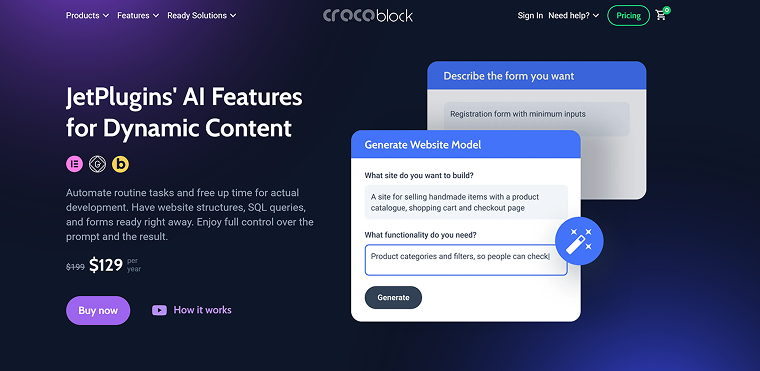
Crocoblock AI features are about the tools for three plugins so far: first of all, tools for JetEngine, one of the most powerful plugins for highly dynamic websites on the market, JetFormBuilder, and JetSmartFilters. Similarly to Elementor AI, it’s not one solid builder, either, but rather a set of tools that can save you a lot of time and help with complex tasks.
Key features:
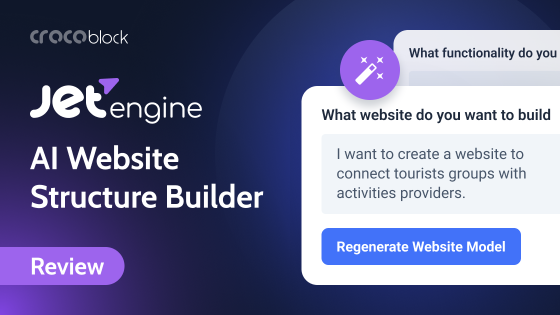
- AI Website Structure Builder by JetEngine to create a visual structure, with corresponding custom post types, custom content types, meta fields, forms, relations, and filters for JetSmartFilters, plus a dashboard giving you fast access to all of the dynamic features you have;
- AI SQL Query Assistant by JetEngine for creating even the most complex queries in the Query Builder that involve direct database querying;
- JetFormBuilder form generator.
Pricing: the best way is to buy a Crocoblock subscription with 20+ plugins, over 40 free add-ons, 14 dynamic premade websites (templates), and much more, starting at $199 per year. But if you don’t need all of that, you can purchase JetEngine, which has most of the AI features for $43 per site or $88 for Unlimited. The same price is for JetSmartFilters, and JetFormBuilder is a free plugin with premium add-ons.
Lifetime packages are also available.
💭 Thoughts about the Crocoblock AI tools:
Crocoblock AI tools aren’t your typical AI website builder – they’re practical assets designed to support two key goals: saving time and assisting beginners with features that usually come with a learning curve. The standout feature is the AI Website Structure Builder, a unique tool that, unlike most AI builders that are focused mainly on visuals, lays down an efficient foundation for building highly dynamic websites.
If you are a fan of, let’s say, Elementor, 10Web, or even other AI builders that use Elementor (free or Pro), native Block Editor, Bricks, or (in a near future) Divi, you can combine the power of their AI tools with Crocoblock plugins and their tools that work on another level, not being competitors to visual builders.
However, JetEngine has a learning curve, and if you are a beginner, it’s better to read some articles and watch a course to understand why this plugin can be helpful for you.
Divi AI Builder
🏆 Best for devoted Divi fans.

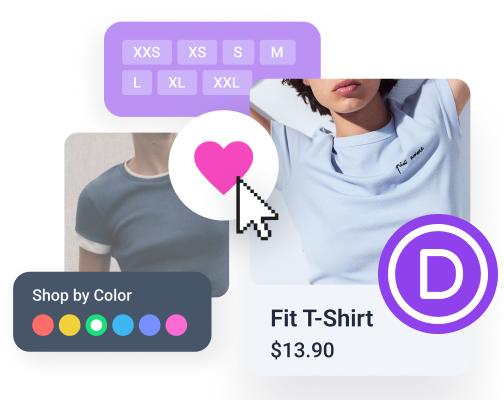
Divi is one of the oldest WordPress visual builders on the market; it has its own ecosystem and devoted fans, so it’s no wonder that the developers created the Divi AI Builder. It covers the full circle of website creation, from website structure to image and code generation.
Key features:
- AI website and page generator with font and style customizer;
- Divi Image AI: expanding, editing, enhancing, and image generation based on reference images;
- AI Code AI for HTML and CSS;
- Divi Text AI to generate new and modify existing content.
Pricing: AI tools are included in the Divi subscription, and there is no limit on credits; the price starts at $277 per year for the Divi Builder Pro package or at $193 if you already have a Divi subscription.
💭 Thoughts about the Divi AI tools:
Divi is a cool builder for website designers looking to create attractive landing pages, corporate sites, and other projects that aren’t overloaded with complex functionality or highly dynamic features. That’s why Divi AI tools are a great asset for users who prefer an all-in-one solution, without constantly switching between different tools to generate images, code, text, and more. It’s great that they don’t have limits for AI usage.
However, it may be quite pricy, but you pay not only for AI but for Divi Cloud (it’s not a hosting, it’s a cloud for storing your assets), priority support, and additional bundles.
powered by Divi-5 dynamic?
WordPress.com AI Builder
🏆 Best for simple sites and newbies.
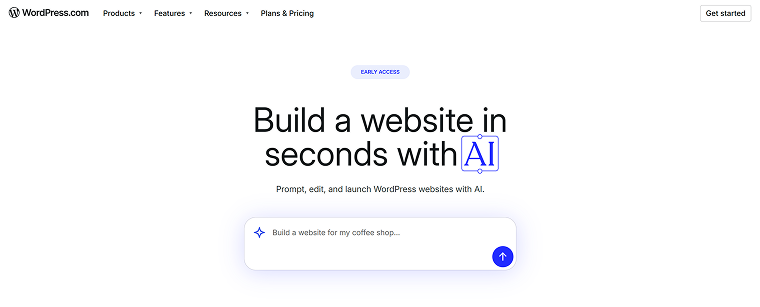
WordPress.com is very different from WordPress.org (self-hosted websites). While WordPress.org gives users full control over hosting, plugins, themes, and site structure, WordPress.com is a managed platform that simplifies much of the technical side. Users don’t need to worry about server maintenance, security updates, or performance optimization – it’s all handled for them. However, this convenience comes with certain limitations, especially on lower-tier plans, such as restricted plugin access and less flexibility in customizing core features.
Their top-tier plans are working with huge clients, providing them full support and site management – at this level, the pricing is quite reasonable. But when it comes to lower plans, it can be a bit pricy for what you get. So, I can assume they wanted to attract users with their AI builder.
Key features:
- AI website builder with design and content;
- hosting and a free domain name for one year;
- speed optimization;
- limited control over plugins and quite a good choice of themes;
- they use a native Block Editor.
Pricing: starting at $96 a year.
💭 Thoughts about the WordPress.com AI builder:
I think this tool is quite a cool asset for very beginners or those who want a little website for their business, as you don’t have to wrap your head around all the technical details and deal with hosting, domain registration, security, speed, and other details. You just pay once a year, and then get things done for you, all in one.
Will you have complete control over every little detail? Well, you can modify the content, but the control over plugins and overall functionality, including plugins, is available only on higher, quite expensive plans.
FAQ
An AI website builder uses artificial intelligence to help create WordPress sites quickly by generating layouts, content, and basic design based on user input. It’s ideal for users without coding or design experience.
Most AI builders include basic SEO optimization, like meta tags and mobile responsiveness. However, for advanced SEO strategies, manual fine-tuning is still necessary.
Yes, many AI builders support WooCommerce and can generate product pages, but complex eCommerce features might require manual setup or additional plugins.
No coding skills are needed to get started. These tools are built for beginners, though some custom features may require light coding or plugin use later.
They’re great for launching fast, but if your site grows and requires complex functionality, you might need to move beyond what the AI builder alone can offer.
Wrapping Up
AI WordPress website builders are changing how we approach website creation, offering speed, simplicity, and a helping hand for non-technical users. They shine when it comes to launching small to medium sites quickly, especially for startups or clients with tight budgets.
But like any tool, they come with trade-offs. If you’re planning long-term growth, need custom functionality, or care deeply about site performance, you’ll still need a solid foundation and human input to get it right. AI can get you 60% of the way; how far you take it depends on your goals.