Even if the Divi 5 performance seems to be much better than the Divi 4, it still needs performance tools and activities to improve it.
One of the most effective ways to improve Divi performance is by using caching and optimization plugins. These tools reduce server load, store optimized versions of pages, and deliver content faster to visitors.
I’ll discuss the built-in tools for boosting performance and the caching plugins to help you with delivering fast websites.
powered by Divi-5 dynamic?
Performance Settings in Divi 5
Divi 5 offers fewer performance settings than Divi 4, and I think the reason is the revamped framework, which doesn’t need that many.
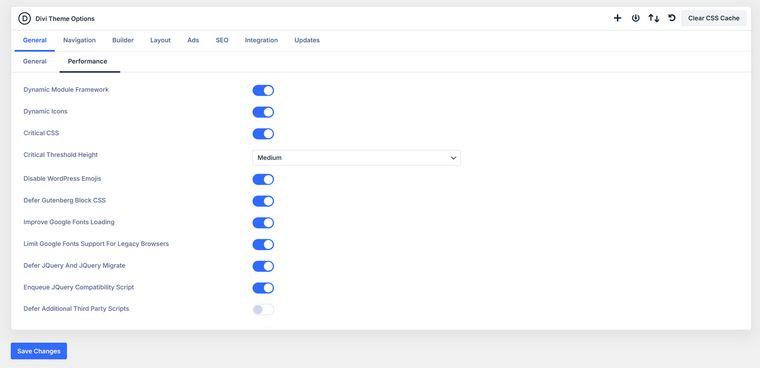
Here we have pretty standard settings:
- Dynamic Module Framework – loads Divi modules only when they are actually used on a page instead of loading the entire module framework globally. Keep it enabled, as it reduces unnecessary CSS and JavaScript.
- Dynamic Icons – loads only the icon sets actually used on the page rather than the entire icon library. Keep it enabled, as it reduces CSS size and improves loading speed.
- Critical CSS – generates and loads critical CSS needed for above-the-fold content first, while the rest loads later. Keep it enabled to improve perceived page loading speed.
- Critical Threshold Height – defines how much of the page is considered above-the-fold when generating critical CSS. Medium works well for most websites; adjust only if important content appears late.
- Disable WordPress Emojis – removes the default WordPress emoji scripts and styles from the front end. Enable it unless your site relies on emojis, since it removes unnecessary assets.
- Defer Gutenberg Block CSS – loads Gutenberg block styles only when a page actually contains blocks instead of loading them globally. Keep it enabled, especially if you do not use the block editor often.
- Improve Google Fonts Loading – optimizes how Google Fonts are requested so they load more efficiently and reduce render-blocking. Keep it enabled to improve font loading performance.
- Limit Google Fonts Support for Legacy Browsers – removes additional font formats used only by very old browsers. Enable it unless you must support outdated browsers; it reduces font file size.
- Defer jQuery and jQuery Migrate – delays loading jQuery scripts until after the main page content loads. Enable it carefully and test your site, because some plugins depend on early jQuery execution.
- Enqueue jQuery Compatibility Script – adds a small compatibility script to prevent issues when jQuery is deferred. Enable it if you notice script conflicts after deferring jQuery.
- Defer Additional Third Party Scripts – attempts to delay loading external scripts such as analytics or tracking tools. Use cautiously and test, as some third-party scripts may require early loading.
Unfortunately, it doesn’t support exceptions, which is important for the Defer functionality and critical CSS generation. Which means that you will definitely need caching plugins unless you just have a landing page.
Why Is Caching Important for Divi 5?
Divi websites often contain many visual elements, layouts, and scripts. While this flexibility makes design easier, it also means pages require more processing before they are displayed. Without optimization, the server has to rebuild the same page again and again for every visitor.
Caching solves this problem by saving a ready-to-deliver version of a page. Instead of generating the page from scratch each time, the server can quickly send the stored version to the visitor.
Caching typically works at two levels:
- Browser caching.
Certain files, such as images, CSS, and JavaScript, are stored directly in the visitor’s browser. When the user returns to the site, those files do not need to be downloaded again. - Server caching.
The server stores a processed version of the page, usually as static HTML. When another visitor requests that page, WordPress does not need to run the full set of PHP scripts and database queries.
Normally, WordPress builds each page dynamically by querying the database and assembling content through PHP. With caching enabled, the system saves the generated result and delivers it much faster the next time the page is requested.
For Divi websites, this can make a noticeable difference because pages often contain multiple modules, styles, and scripts that would otherwise need to be processed repeatedly.
Caching helps improve a website in several ways:
- pages load faster for visitors;
- the server handles fewer database requests;
- bandwidth usage is reduced;
- search engines favor faster websites;
- the site remains stable during traffic spikes;
- overall server load decreases.
Top 4 Caching Plugins for Divi
WP Rocket
🏆 Best for shared hosting plans and mid-sized websites.

WP Rocket is one of the most popular premium performance plugins for WordPress. It combines caching with several advanced optimization features and works very well with Divi websites.
Key features:
WP Rocket activates page caching automatically after installation. It also includes features that improve how CSS, JavaScript, and media files are loaded. Key optimization tools include page caching, preloading, Lazy Load, delayed JavaScript execution, GZIP compression, CSS, and JS minification – a pretty standard package. Also has an image integration tool that works really efficiently, and a CDN service.
Pricing: starts at about $59/year for one website.
Pros:
- very easy to configure;
- powerful optimization features;
- stable performance improvements.
Cons:
- limited control over some advanced cache delivery methods;
- fully premium solution.
Autoptimize
🏆 Best for adding extra performance optimization.

Autoptimize focuses on optimizing scripts, styles, and HTML output rather than full page caching. Because of that, it is often used together with another caching plugin.
Key features:
It can optimize HTML, CSS, JavaScript, remove WordPress emojis, optimize Google Fonts loading, and improve image delivery. Also works with image formats and CDN. One more advantage is database cleanup and performance analysis.
Pricing: free; the Pro version is $89 yearly.
Pros:
- excellent additional plugin for caching tools;
- improves code efficiency significantly.
Cons
- cache must sometimes be cleared manually;
- dynamic scripts can create additional cached files.
WP Fastest Cache
🏆 Best for resource-heavy websites.
WP Fastest Cache is a straightforward caching plugin that focuses on simplicity and reliability. It’s quite a popular solution because of its efficiency with a lot of settings.
The plugin generates static HTML files from dynamic WordPress pages. This reduces server processing time and speeds up page delivery.
It uses rewrite rules inside the .htaccess file to bypass PHP when serving cached pages, which is one of the most efficient caching approaches. The plugin has quite a long list of tools and features, such as page caching, HTML and CSS minification, GZIP compression, CSS and JS combination, LazyLoad, database cleanup, and more.
Pricing: free version available, Premium starts at $49 a year.
Pros:
- simple interface;
- reliable caching performance;
- good free version.
Cons: fewer advanced optimization tools compared to some other plugins.
LiteSpeed Cache
🏆 Best for websites working on LiteSpeed servers.
LiteSpeed Cache is a free all-in-one performance plugin designed to work with LiteSpeed servers.
Key features:
The plugin combines caching with multiple optimization features, including database cleanup and image compression. It supports automatic page caching, object caching, private caching for logged-in users, REST API caching, and mobile detection. Certainly, it supports CSS, JS, and HTML minification, file combination, has CDN integration, and an image optimization service.
It has a nice, easy-to-use interface.
Pricing: free.
Pros:
- powerful free feature set;
- broad compatibility with WordPress plugins.
Cons: sometimes, it doesn’t deliver really good results even on the LiteSpeed server infrastructure.
FAQ
Yes. Even though Divi 5 improved performance compared to Divi 4, Divi pages still include many modules, scripts, and styles. A caching plugin stores ready-to-serve versions of pages so the server doesn’t need to rebuild them for every visitor. This significantly reduces load time and server processing.
There is no single “best” plugin for every site. WP Rocket is often recommended for simplicity and strong performance out of the box. Other good options include LiteSpeed Cache (for LiteSpeed servers) and WP Fastest Cache for straightforward setups.
Yes. Divi includes several performance settings such as Dynamic Module Framework, Critical CSS generation, and optimized Google Fonts loading. These options help reduce unnecessary scripts and improve rendering speed. However, they usually work best when combined with proper caching.
Page caching stores a static HTML version of a page after it is generated once. When another visitor loads the same page, the server sends the stored version instead of running PHP scripts and database queries again. This dramatically speeds up page delivery.
Caching reduces the amount of work the server must perform for each page request. Instead of dynamically generating pages every time, the server delivers prebuilt files. This results in faster loading times, lower server load, and better performance during traffic spikes.
Sometimes it can mess it up. Highly dynamic content, such as logged-in user data, shopping carts, or personalized elements, may need special cache rules or exclusions. However, most caching plugins allow you to exclude certain pages or scripts from caching.
Takeaway
Divi makes building beautiful websites quite easy, but design flexibility often comes with extra scripts and heavier pages. Divi 5 has already improved a lot under the hood, yet caching and optimization plugins are still essential if you want truly fast websites.
The good news is that you don’t need a complicated setup. Enable Divi’s built-in performance settings, add a reliable caching plugin, and your site will already be significantly faster. For most projects, that simple combination is enough to keep pages loading quickly and visitors happy.