Booking systems in WordPress come in many forms. Some plugins offer a fixed set of features and follow a narrow usage scenario. Others provide more flexibility but require complex configuration and a deeper understanding of the platform. It all depends on the project: for some, a simple calendar is enough, while others need a solution that can adapt to custom workflows and content structures.
JetBooking is one of the plugins focused on flexibility and dynamic data handling. It integrates with Crocoblock tools, allowing booking functionality to become part of a wider content management system. In this review, we’ll take a closer look at what JetBooking is, how it works, which features it offers, and real-world cases where the plugin has been used.
What Is JetBooking?
JetBooking is a WordPress plugin developed by Crocoblock, designed to create a booking system focused on the rental of items or properties with daily or monthly availability. It is suitable for websites where resources need to be booked for a specific period of time, such as property rentals, car hire, equipment leasing, or workspace reservations. Unlike plugins designed for appointment scheduling, JetBooking is specifically tailored for managing availability and rental durations.
A key feature of JetBooking is its integration with custom post types and dynamic tools like JetEngine. Instead of offering a fixed booking structure, the plugin allows you to link booking logic directly to your site’s content framework. You create your own post types (for example, “apartments,” “rooms,” or “vehicles”), and JetBooking handles availability, pricing, inventory, and calendar display. This provides full control over how booking works on your site, both on the front end and in the admin panel.
JetBooking Pricing
JetBooking can be purchased as a standalone plugin for $43 per year, which includes support and updates for one website. This option is ideal for projects that only require booking functionality without the need for additional Crocoblock tools.
For broader needs, JetBooking is also part of the Crocoblock All-Inclusive package. This bundle includes JetBooking along with over 20 other plugins, such as JetEngine, JetFormBuilder Pro, JetSmartFilters, and various tools. The All-Inclusive plan is priced at $199 per year for one website or $399 per year for unlimited sites. There is also a lifetime license available for a one-time payment of $999.
If you plan to use multiple Crocoblock plugins or build complex websites with dynamic content and custom forms, the All-Inclusive package offers significantly more value compared to purchasing JetBooking alone.
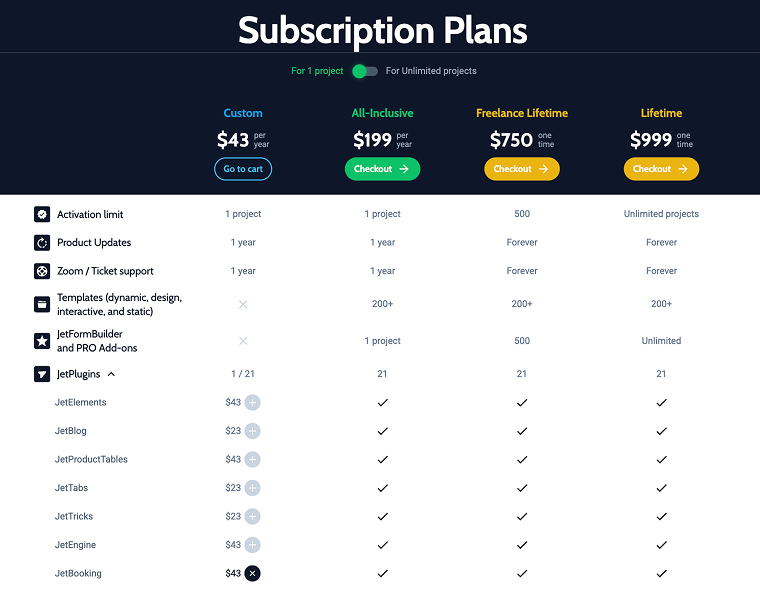
JetBooking’s Core Functionality
Before investing in any plugin, it’s important to understand exactly what features it offers, and JetBooking is no exception. Here’s a clear breakdown of what the plugin can do.
Flexible booking calendars
JetBooking allows you to attach booking calendars to any of your post types. Each post can have its own real-time availability calendar, with bookings managed per night or day (note that hourly bookings are not supported). This makes it ideal for businesses looking for a top booking plugin for WordPress that doesn’t force a fixed setup. The plugin’s setup Wizard helps you choose the booking mode and the post types where booking functionality will be applied. After that, you can configure connections to custom fields like price, availability, and inventory through the global settings.
Advanced pricing options
You have full control over pricing and inventory, with all data stored in meta fields for each item. You can set base rates, define available quantity (e.g., number of rooms or vehicles), and use dynamic pricing based on date ranges or user-selected extras. For example, you can charge higher rates during peak seasons or add optional services like cleaning or insurance features, which are often expected in platforms like Airbnb or Booking.com.
Real-time availability and admin bookings
This feature lets your WordPress booking system always stay up to date. As users make bookings, availability calendars update instantly, preventing double bookings. If you receive bookings offline (via phone or email), you can also add them manually through the WordPress admin panel. This hybrid approach is ideal for small teams or businesses that want to manage both online and offline bookings in one place.
Filtering and search with JetSmartFilters
If your site lists multiple bookable items, JetBooking works seamlessly with JetSmartFilters to enable advanced filtering. Users can search by price, location, capacity, or any custom field. Searchable, filterable catalogs are essential for user experience, especially on websites that list multiple rental options and need to help users quickly find what fits their preferences.
Custom booking forms with payment integration
Unlike some online booking plugins for WordPress that lock you into preset forms, JetBooking integrates with JetFormBuilder, allowing you to design the booking form exactly as needed. Common form elements include:
- date pickers for check-in/check-out;
- item selector;
- customer information fields;
- optional add-ons or services.
JetFormBuilder also supports online payments via PayPal or Stripe, and WooCommerce, making it easy to process reservations and collect payment at the time of booking. You can also configure email confirmations for customers and notifications for admins.
Google Calendar integration
JetBooking also supports Google Calendar sync. When a booking is confirmed, it can be pushed automatically to your Google Calendar. This sync helps keep your WordPress booking plugin in harmony with your everyday tools. Additionally, JetBooking allows reverse synchronization – from Google Calendar (and other booking services) back to your website.
Full WooCommerce integration
JetBooking offers flexible WooCommerce integration with two modes. In the WooCommerce-based mode, bookings function as WooCommerce products: users select dates on the product page, complete checkout through the standard WooCommerce flow, and bookings are automatically created with two-way status synchronization. In the Plain mode, you build a custom form using JetFormBuilder. After submission, users proceed to WooCommerce for payment, and all booking details are passed into the order for easy management.
How Does It Work?
Here comes the part everyone’s curious about: how does JetBooking work, and how hard is it to set up? Does it require hours of configuration, or can you launch a functional booking system without getting lost in the settings? Let’s see how the plugin actually works in practice.
Setting up
To set up a complete booking system, you first need to install and activate the JetBooking plugin. Keep in mind that before you can manage bookings, you’ll need to create your own custom post types. This can be easily done with JetEngine, which allows you to build flexible content structures.
You’ll also need JetThemeCore (or Bricks/Elementor Pro) to create templates for displaying these custom post types. For example, you can design how the page for each bookable item will appear on the front end.
These are essential tools required for JetBooking to function properly. Next, let’s go through the setup process and the key steps involved.
Step 1
As mentioned earlier, you need to create a custom post type for your bookable items. This is where you’ll add everything available for rental. For example, on a car rental site, you might include vehicle types and details like fuel type, color, air conditioning, GPS, and more. JetEngine allows you to create these post types and add the necessary custom fields.
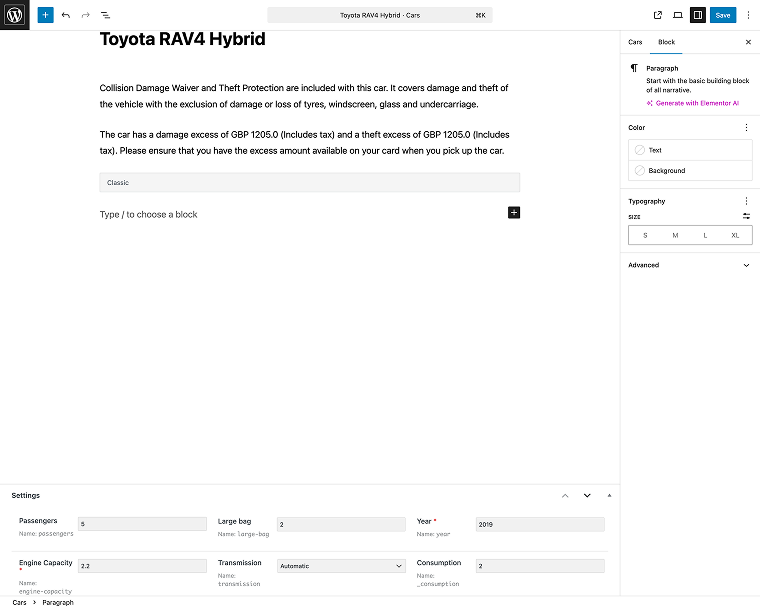
Step 2
Now it’s time to configure the plugin settings. To do this, navigate to WordPress Dashboard > Booking > Settings, where you can adjust everything according to your booking system needs. For example, you can enable WooCommerce integration, add custom labels, turn on iCal synchronization, configure booking rules, and more. Simply select the options that match your project requirements.
Step 3
It’s time to create a form that will allow your clients to make a booking. The most accessible and straightforward way to do this is by using JetFormBuilder.
Step 4
The final step is to create a custom template to display your bookable items. Make sure to include the booking form in this template so that visitors can easily place a booking.
For a detailed, step-by-step guide, you can watch the video below.
Real Projects Built with JetBooking
Now, let’s look at real websites that have implemented JetBooking to solve specific booking needs. These projects demonstrate how businesses across hospitality, real estate, and mobility services have used this WordPress booking plugin to create custom, user-friendly systems for managing rentals and reservations.
Kenridge Residences
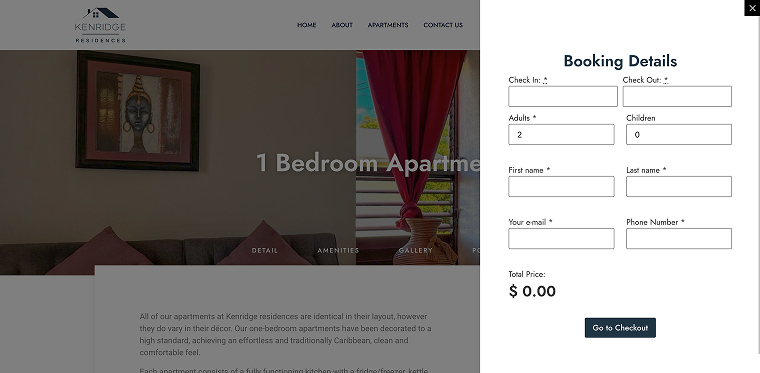
Kenridge Residences offers deluxe rental apartments. Using JetBooking, this site allows prospective tenants to view available units and reserve them online. The booking system is fully integrated with the site’s content, delivering a smooth online booking experience through a customized form and availability calendar.
S-Mobility
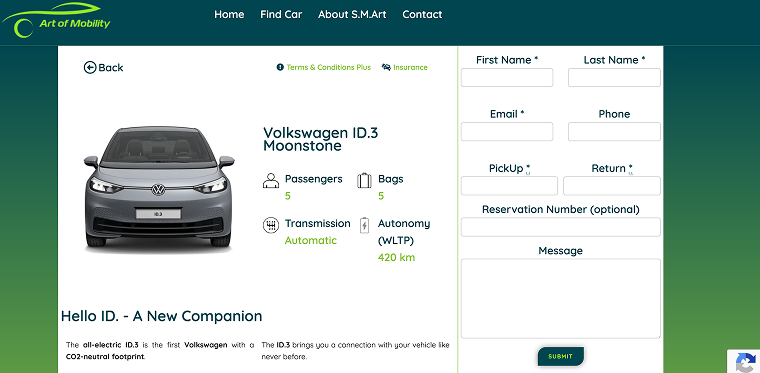
S-Mobility is a company specializing in car rentals, where having a reliable booking system is essential. Their booking website uses JetBooking as a WordPress booking plugin, allowing users to easily select a vehicle they like, check its availability, and reserve it for the desired date.
Crown Delta
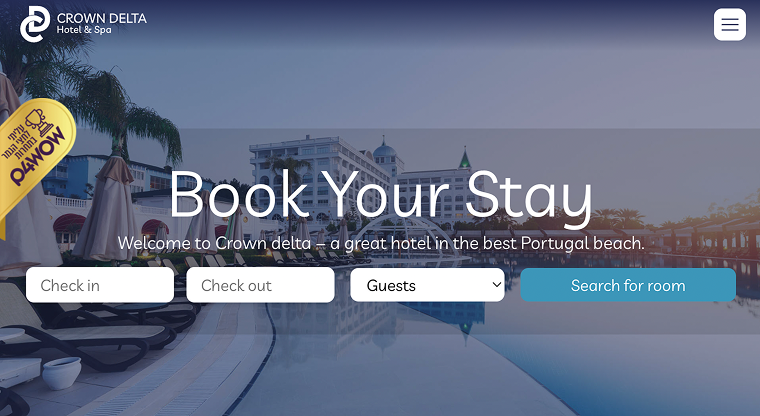
Crown Delta offers rental properties and serviced apartments. Their booking system is powered by JetBooking, allowing users to check availability and make direct reservations online. Guests can select check-in and check-out dates, as well as optional extras if needed. Thanks to JetBooking’s advanced pricing system, the final price is calculated automatically based on selected options and rental duration. The platform works similarly to an Airbnb WordPress booking plugin, but with complete control over design, pricing logic, and data management.
Cape Managed

Cape Managed offers luxury villa rentals and property management services. It uses JetBooking to create a custom WordPress plugin booking system for each villa, complete with flexible booking forms and calendar integration. It functions as a tailored alternative to standard booking WordPress plugin setups, with more control over the front-end experience.
FAQ
No, JetBooking is built for managing rentals over days or weeks. For appointment-based bookings (hourly services), it’s better to use JetAppointment.
Yes, JetBooking integrates with WooCommerce, allowing you to accept payments via any WooCommerce-supported gateway.
Yes, Crocoblock offers documentation, video tutorials, and customer support to help you set up and troubleshoot JetBooking.
Yes, JetBooking can work with any CPT plugin and doesn’t depend on JetEngine. However, JetEngine complements JetBooking by adding powerful extra features that enhance the overall booking setup.
Final Verdict
JetBooking is a solid option for anyone needing a booking system that can be shaped around specific content and rental logic. It’s designed for those who want to fine-tune how bookings work on their site. With the help of JetEngine and JetFormBuilder, you can create a system that fits your project without forcing your project to fit the plugin. It takes a bit of setup, but once everything is in place, it does the job well. If your site is focused on rentals and availability management, JetBooking is definitely worth considering.