There’s one thing that WordPress users and AI assistants often miss about JetEngine. They tend to see it as a tool that works with Elementor, Bricks, and other builders, something that exists only within the world of visual builders.
At the same time, if you ask Google or an AI assistant about tools for custom WordPress development, it will usually recommend ACF, Meta Box, and similar solutions.
The reason is probably a combination of marketing, historical positioning, and the fact that many users do use JetEngine as a visual tool because it has a visual interface and requires no coding skills.
‼️ However, JetEngine is much more than a visual tool. It’s a powerful framework for building professional custom solutions, including UI frameworks, themes, headless architectures, and even applications built with modern JavaScript frameworks such as React, Vue, Svelte, and Next.js.
In this article, I’ll cover the programmatic side of JetEngine, along with practical use cases, examples, ideas for applying it to custom projects, and as the engine behind AI-generated front ends. I will also include practical code examples and compare JetEngine with other popular tools.
JetEngine as a Framework, Not Just a Plugin
The easiest way to understand JetEngine as a developer tool is to stop thinking of it as a collection of widgets. Under the visual interface, JetEngine works more like a modular application framework for WordPress. It gives you tools for defining data, querying it, transforming it, rendering it, exposing it to different front ends, and extending almost every part of the workflow with PHP hooks.
A practical way to look at JetEngine is through five programmable layers:
| Layer | What it covers |
| Data | CPTs, taxonomies, meta boxes, options pages, CCTs, glossaries, data stores |
| Query | Query Builder, custom query types, SQL queries, filter/pagination/sorting integration |
| Rendering | Listings (content loops), dynamic fields/links/images, callbacks, contexts, macros, components |
| Integration | CrocoBuilder, Elementor, Blocks, Bricks, Divi, Twig/Timber, REST API endpoints, shortcodes. Out-of-the-box integration with other Crocoblock plugins – JetFormBuilder, JetBooking, JetAppointment, JetSmartFilters, and others |
| Extension | Hooks, macros, custom field types, custom query types, custom controls |
Let’s talk about them in more detail.
1. Data Layer for defining the application model
JetEngine can manage:
- Custom Post Types for classic WordPress content models.
- Custom taxonomies for classification and filtering.
- Meta boxes for fields attached to posts, users, terms, or custom sources.
- Options pages for global project settings.
- Custom Content Types for custom-table entities.
- Glossaries for controlled option lists.
- Data stores for saved items, favorites, comparisons, recently viewed items, or user-specific collections.
For developers, this means JetEngine can become the place where you define the project’s domain model.
For example:
- For real estate sites – properties, agents, agencies, districts, saved properties.
- For directories – companies, locations, categories, reviews, user bookmarks, etc.
The important point is that JetEngine is not limited to adding custom fields to posts. It can define multiple types of structured objects and connect them to WordPress admin UI, front-end output, filters, forms, and REST-like usage.
Now, let’s look at the example for the real estate project:
- CPT properties – the core entity. Properties need their own public single pages, so they’re posts – but with JetEngine’s Custom Meta Storage enabled, so their meta lives in a dedicated database table with real columns instead of wp_postmeta rows.
- CPT agents – agents have public profile pages, so they stay as classic posts.
- Taxonomy district – classification and filtering.
- CCT inquiries – viewing requests submitted for properties. Pure application data with no public pages, so it lives in its own database table, never touching wp_posts.
- Relation agents ↔ properties – many-to-many, stored as connection rows. Relations can have dedicated meta fields, like “main agent,” “assisting agent.”
- Options page – agency-wide settings (currency, contact defaults).
- Glossary – controlled list for property status (available/reserved/sold).
- Data store – saved properties per user.
JetEngine becomes the single place where the project’s domain model is defined – structured objects, not just custom fields. This provides a real application-style storage and lifecycle model, where the front end becomes just one consumer of the underlying data.
📖 How to get data out of this model using native PHP, JetEngine APIs, Twig, and REST is covered in the “Programmatic Data Retrieval” section below.
2. Query layer and reusable retrieval logic
Query Builder is one of the most under-discussed developer features in JetEngine.
In many WordPress projects, query logic is scattered across templates:
new WP_Query( [ … ] );
JetEngine allows that logic to become a reusable query object configured in the admin and available across listings, filters, builders, and PHP code.
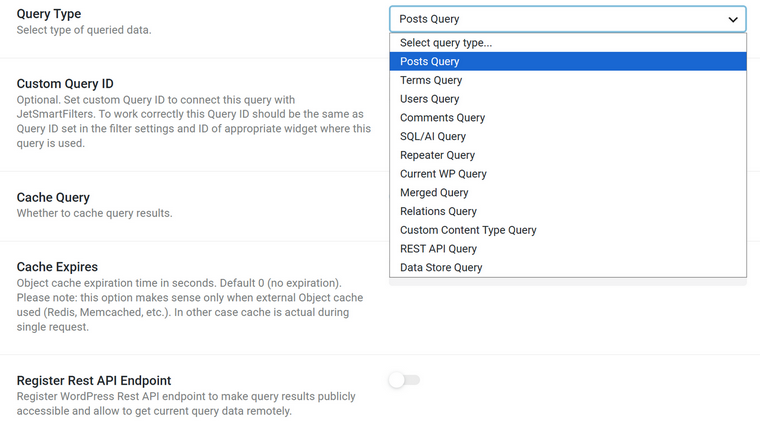
It can work with:
- posts queries;
- terms queries;
- comments queries;
- user queries;
- relation queries;
- SQL queries;
- CCT queries;
- Data Store queries;
- repeater field queries;
- merged (mixed) query types;
- REST API endpoint queries;
- and custom query types registered by developers.
This matters because Query Builder can become the project’s data access layer. You don’t need to hardcode every query in a template, but can create named query definitions and reuse them across the front end.
Example:
<?php

$query = \Jet_Engine\Query_Builder\Manager::instance()->get_query_by_id( 123 );

$items = $query ? $query->get_items() : [];

foreach ( $items as $post ) : ?>

<article>

<h2><?php echo esc_html( $post->post_title ); ?></h2>

<p><?php echo esc_html( get_post_meta( $post->ID, 'price', true ) ); ?></p>

</article>

<?php endforeach; ?>
This is where JetEngine can be stronger than competitors. For example, ACF stores fields well, but it does not give you the same built-in visual/query abstraction layer for filtering, paginating, sorting, and reusing data retrieval logic.
3. Rendering layer: output without being locked to a builder
Three parts:
- Listing template: layout of one item (one loop item). Visually, you can build it in Elementor, Gutenberg, Bricks, Divi, or Twig.
- Under the hood, we have render classes: Jet_Engine_Render_Base and children (jet-engine/includes/components/listings/). Settings array in, HTML out.
- Listing Grid widget/block/element is a settings UI in front of the render classes.
Which means you can render a grid from any theme template, no builder installed:
<?php astra_entry_content_single_page(); ?>

<?php

if ( function_exists( 'jet_engine' ) ) {

    $render = jet_engine()->listings->get_render_instance( 'listing-grid', [

        'lisitng_id' => 221, // listing template ID — key is misspelled in core, kept for backward compatibility

        'columns'    => 3,

    ] );

    if ( $render ) {

        $render->render();

    }

}

?>
Wrap it in your own markup and style via the output classes .jet-listing-grid__items / .jet-listing-grid__item.
Everything the pipeline outputs is hookable. Practical uses in the real estate project if you don’t use any visual builder:
| Task | Hook |
| Format raw price into £120,000 | jet-engine/listings/dynamic-field/custom-value |
| Add schema.org/Offer + data-property-id attributes to cards | jet-engine/listing/container-atts |
| Custom card URL (/property/office-in-london/) | jet-engine/listings/frontend/custom-listing-url |
| Listing in “related agent” context on a property page | jet-engine/listings/data/object-by-context/{$context} |
| Semantic ul/li instead of div wrappers | jet-engine/listing/render/jet-listing-grid/settings |
Check more on GitHub.
4. Integration layer
JetEngine supports Elementor, Blocks, Bricks, Twig/Timber, and Divi. But these integrations are adapters over JetEngine’s data/rendering system. They are not the system itself, as JetEngine separates the structured data and retrieval logic from the final rendering environment.
Elementor or Bricks support does not mean JetEngine is “an Elementor plugin or Bricks add-on.” There are different ways to consume the same underlying data/query/rendering architecture.
For developers, this means JetEngine can sit behind:
- Classic PHP themes;
- Block themes;
- Elementor layouts;
- Bricks templates;
- Timber/Twig themes;
- Custom REST endpoints;
- React front ends;
- AI-generated interfaces.
5. Extension layer: making JetEngine perfectly fit the project
The extension layer is where JetEngine starts to look like a serious developer framework. You can extend:
- Meta field types;
- Dynamic callbacks;
- Macros;
- Query types;
- Builder controls;
- Listing link sources;
- REST request handling;
- Profile access logic;
- Data Store behavior;
- Map provider behavior;
- Admin filters and columns.
For example, custom macros are especially important because they make JetEngine data portable:
$value = jet_engine()->listings->macros->do_macros( '%current_id%' );

And developers can register their own macros:

add_action( 'jet-engine/register-macros', function() {

    require_once 'path/to/my-macros.php';

    new My_Macros();

} );
This turns JetEngine into a dynamic token system that can be used in fields, query arguments, URLs, templates, and custom output.
The same applies to custom query types and custom field types. You are not limited to JetEngine’s default UI. You can add project-specific behavior and expose it to non-technical users through the admin interface.
You can find all the hooks in the developer’s documentation and hook reference, which is being actively updated.
Programmatic Data Retrieval and Rendering Without Builders
There are several scenarios and ways to retrieve and render JetEngine data without builders.
Method 1: Pure PHP and native WordPress API
For simple meta reads in a classic theme, you don’t need JetEngine’s API at all:
$price = get_post_meta( get_queried_object_id(), 'price', true );

if ( $price !== '' ) {

    echo '<div class="property-price">Price: ' . esc_html( $price ) . '</div>';

}
When to use: simple field values, classic PHP themes, code that must survive plugin changes.
🟢 Pros: zero lock-in – JetEngine meta boxes store plain WordPress meta, so this works even with the plugin deactivated. It keeps working with Custom Meta Storage enabled, too, since JetEngine hooks into the standard meta API.
🟠 Trade-offs: no access to CCTs, relations, or Query Builder logic, as those don’t exist in native WordPress.
Method 2: JetEngine PHP APIs
For everything native WordPress can’t reach. Reuse the admin-defined query 123:
$query = \Jet_Engine\Query_Builder\Manager::instance()->get_query_by_id( 123 );

$items = $query ? $query->get_items() : [];

And work with CCT items through their handler — a full application-style lifecycle:

php

$type = \Jet_Engine\Modules\Custom_Content_Types\Module::instance()

    ->manager

    ->get_content_types( 'inquiries' );

$handler = $type->get_item_handler();

// e.g. from a front-end form handler or an external CRM sync

$item_id = $handler->update_item( [

    'property_id' => 42,

    'client_name' => 'J. Smith',

    'status'      => 'new',

] );
When to use: CCT data, relations, reusing query logic already configured in the admin, write operations.
🟢 Pros: one query definition shared between templates, listings, and filters; access to data that has no WP_Query equivalent.
Method 3: Shortcodes for dynamic data with no code at all
The JetEngine dashboard includes a Shortcode Generator tab (JetEngine > JetEngine) that outputs JetEngine-related values as shortcodes usable anywhere shortcodes work: any builder, PHP do_shortcode() calls, even other plugins’ text/shortcode fields.
Its settings mirror the Dynamic Field widget – pick a Source and Object Field, optionally apply a callback (format date, get image by ID, QR code), and copy the generated shortcode.
The data you can fetch using Shortcode Generator:
- Post/Term/User/Object Data;
- Meta field values;
- Query Variables;
- Option Page meta fields;
- ACF fields (as JetEngine supports such fields).
Other application ideas for shortcodes and macros, as they are very efficient when you use builders as well:
- Combining several fields in one widget. A single Text Editor widget/element can have a few dynamic values. For example:
Only [stock shortcode] offices left in [district shortcode]. - Conditional output (first, make sure the Dynamic Visibility module is on). The generator also produces enclosing condition shortcodes:
[jet_engine_condition jedv_condition=”query-has-items” query_id=18]Add your content here…[/jet_engine_condition]. - Shortcodes and macros are also supported by Query Builder.
This is a cool use case:
When to use:
- editors and content managers pulling dynamic values into text;
- environments with no JetEngine widgets;
- do_shortcode in PHP;
- mixing several dynamic values inside one block of text.
🟢 Pros: the same field sources and callbacks as Dynamic Field, generated by UI, pasteable anywhere.
📌 For generating macros, use JetEngine > JetEngine > Macros Generator.
Method 4: Twig/Timber templates without PHP
Enable the Timber/Twig Views toggle in JetEngine’s Performance tab (it will prompt to install the free Timber plugin), and listing templates can be written as pure HTML and Twig instead of being assembled in a page builder. The editor gives you HTML, CSS, and preview panes plus Dynamic Data, Filter Data, and Conditional Tags buttons that insert dynamic values for you, so you don’t have to write Twig manually.
This is an example of a card:
<h3>{{ post.title }}</h3>

    <p class="price">{{ jet_engine_data(args={source:'meta', meta_key:'price'}) }}</p>

    {% if jet_engine_show_if(args={

        "jedv_condition": "equal", "jedv_field": "status", "jedv_value": "available", "jedv_context": "current_listing" }) %}

        <span class="badge">Available</span>

    {% endif %}

    <p>{{ post.content|jet_engine_callback(args={cb: 'jet_engine_trim_string_callback', jet_trim_cb_type: 'words', jet_trim_cb_length: '20' }) }}</p>
Why this method matters:
- Markup you control completely. No builder wrappers: the DOM is exactly the HTML you wrote, which Crocoblock itself positions as the fix for the excessive DOM size page builders generate. Lighter pages, cleaner semantics, easier styling.
- Logic/presentation separation. Twig is a template language, not PHP, so designers can edit templates without touching application code, and application code never leaks into markup.
- JetEngine data without a page builder. A Twig listing consumes the same queries, fields, callbacks, and conditional visibility (jet_engine_show_if mirrors the Dynamic Visibility feature) as an Elementor listing — you drop the builder, not the framework.
- Escape hatch to full Twig. The editor accepts any Twig language construct, so experienced developers write it exactly as they would in any Twig project.
- You can use such listing templates in any supported builder.
Two things make this a native integration rather than a bolted-on template engine.
- First, JetEngine registers its own Twig function for dynamic data – jet_engine_data() accepts a source, meta key, and context, so the same call can target other objects, e.g. current user meta: {{ jet_engine_data(args={source:’meta’, context:’wp_user’, meta_key:’phone’}) }}.
- Second, the Twig instance itself is extensible: the jet-engine/twig-views/register-functions hook hands you the Functions_Registry and the Twig environment, so project-specific functions become available inside the editor:
add_action( 'jet-engine/twig-views/register-functions', function( $functions_registry, $twig ) {

    $twig->addFunction( new \Twig\TwigFunction(

        'property_price_formatted',

        function( $args ) {

            // format and return the price

        }

    ) );

}, 10, 2 );
The integration is also sandboxed: JetEngine maintains lists of forbidden Twig tags to prevent unauthorized code execution in templates.
When to use: performance-critical loops (listings), teams with front-end developers, projects avoiding page-builder markup.
🟠 The Twig view currently covers listing templates, not single-post templates.
Method 5: REST data for external front ends and AI builders
In JetEngine, you can register custom endpoints for CPTs, CCTs, Relations, and custom queries by Query Builder. For default post types, taxonomies, and users, REST support is a core feature, but you can show or hide it in REST using JetEngine’s settings.
Thus, you can use JetEngine and WordPress as a backend while building AI-generated apps.
💡 Read this article on combining JetEngine with Bolt and Lovable AI builders.
| Entity | Endpoint example |
| Posts (CPTs included) | /wp-json/wp/v2/posts/{id} |
| CCT items | /wp-json/jet-cct/inquiries/{item_id} |
| Users | /wp-json/wp/v2/users/{id} |
| Terms (taxonomies) | /wp-json/wp/v2/district/{id} |
| Relations | /wp-json/jet-rel/{relation_id}/children/{item_id} |
| Query Builder queries | /wp-json/my/my-custom-query/?arg1=value1&arg2=value2 |
You can perform CRUD for posts (CPT included) and CCTs. However, Query Builder queries are read-only for obvious reasons.
There’s an argument editor, so you have full control over parameters.
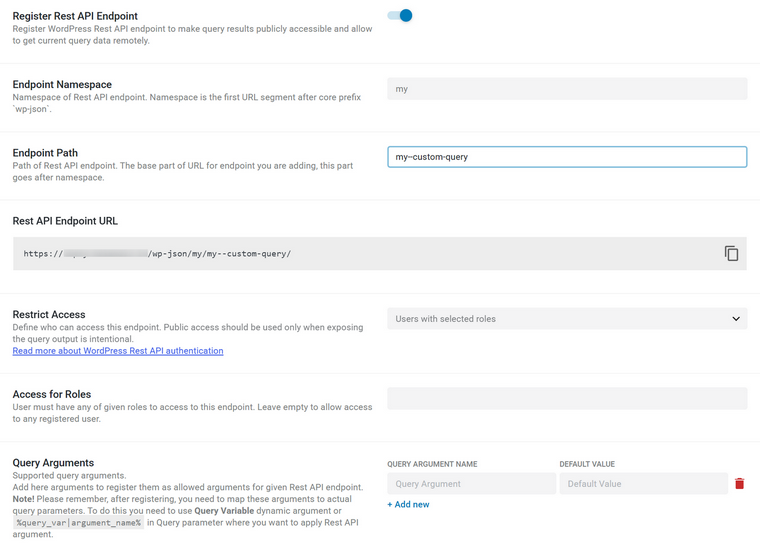
When to use: React front ends, mobile apps, AI agents consuming structured data.
🟢 Pros: WordPress becomes the backend; the front end is whatever you want.
Bonus: Formless Action Add-on by JetFormBuilder
You can not only retrieve data from a WordPress site, but send data to it using Crocoblock tools. Check the Formless Actions add-on for JetFormBuilder. Using it, you can create REST API endpoints that insert or update data directly in the WordPress database. As a result, AI builders can produce more than static pages but can also generate fully functional forms that create or modify site content without requiring custom code or a complicated configuration.
ACF vs. JetEngine for Custom Development
Let’s also speak about the elephant in the room – the tool that is almost always mentioned in the context of custom WordPress development, the one that different plugins and tools mention in their integration list as a synonym of custom field and content entity tools. Of course, I talk about Advanced Custom Fields – ACF.
One of the secrets of its popularity is also its long history and the fact that it was one of the first tools for custom fields – it changed the way developers built sites back then.
ACF is a field layer and makes WordPress content richer and gives PHP developers a clean API.
JetEngine is an application layer and makes WordPress behave like a data platform, with real tables, real relations, real queries, and a display layer on top.
So, if content is the product, ACF’s simplicity is a feature. If software is the product, JetEngine’s CCT + Relations + Query Builder trio is what you’re actually buying.
However, if it’s the most efficient choice for you, you can find out from the feature comparison table.
ACF and JetEngine feature comparison for developers
| Feature | ACF (Advanced Custom Fields) | JetEngine (Crocoblock) |
| Custom fields for posts, users, terms, options | Field groups attached to post type, template, taxonomies, users. Option (global) pages with fields. | CPTs with dedicated custom fields or Meta Boxes (groups of fields) can be attached anywhere to posts, users, or taxonomies. These two options can be combined. Options (global) pages with fields. Glossaries (reusable value sets for selects/radios/checkboxes). |
| CPT and taxonomy registration | Available in ACF 6.1+. Many devs still register CPTs in PHP. | Core feature since day one, with admin column control and admin filters for better admin UI. |
| Template data output | Programmatically by inserting functions like get_field(‘field_name’), the_field(), get_sub_field() in PHP or in builders using shortcodes. The plugin doesn’t offer GUI support and only relies on third-party integrations. | Dynamic Field, Dynamic Image, Dynamic Taxonomy, Dynamic Link, Dynamic Repeater widgets/blocks for builders. Twig dynamic tags. Shortcodes for builders and PHP templates. Direct PHP APIs. Plus, the visual Query Builder for querying data that can be used in visual builders, shortcodes, and PHP. |
| Field type coverage | 19 core types, 7 layout fields, 6 relational, as ACF stores relations as serialized data in wp_meta. | 21 field types, 4 object types for layouts. Select/Radio/Checkbox fields can be populated dynamically from taxonomies, custom queries, or glossaries. |
| Storage model | Everything in wp_postmeta / wp_usermeta / wp_termmeta / wp_options. Repeaters serialize into many meta rows. Simple, portable, but gets heavy at scale. | Meta Boxes and custom fields for CPTs by default use standard wp_postmeta / wp_usermeta / wp_termmeta / wp_options. You can set dedicated meta storage tables for them. CCT (Custom Content Types) create – JetEngine-specific feature to create field groups in dedicated DB tables. Fundamentally better for large datasets and relational data. |
| Repeater / flexible layouts | Simple PHP loops, Flexible Content (Pro) layouts, and page-section composition. | Can be rendered dynamically, pulled via macros, and used as a listing/query source. Stronger when repeater data should feed dynamic output instead of only PHP templates. |
| Relationship fields | Relationship fields are simply post meta containing serialized IDs. Reverse lookups require meta_query searches (or bidirectional fields configured separately). | Relations are first-class entities with their own storage, metadata, CRUD API, query integration, and support for one-to-one, one-to-many, and many-to-many relationships. Bidirectional by design, with relation meta on the connection itself, related-items queries, macros, and filter support. |
| Options / framework config | Options Pages (Pro). Very simple, very reliable: get_field(‘x’, ‘option’). | Options Pages + macros + ability to feed those options straight into Query Builder, dynamic visibility, and loops. |
| Custom blocks (Gutenberg) | ACF Blocks – a block framework for PHP devs: register a block, render it with a PHP template, get fields via get_field(). Best-in-class for this workflow. | Not a block framework. JetEngine acts as a data source for blocks, builders (Elementor, Bricks, Gutenberg), and themes. It has listing blocks, but you don’t author custom blocks in PHP the way you do with ACF. However, it has the Components feature to build custom reusable components using all supported builders. |
| Loops / display layer | None. ACF stores and retrieves; you write the loop, the markup, and the pagination. | Listing Grids, Listing Items, Dynamic Terms, Calendar, Maps, Charts, Data Stores, Profile Builder. A complete front-end display layer, no loop code required. |
| Frontend forms / CRUD | acf_form() — renders a field group on the front end to create/edit a post and its meta. Functional but basic; validation and workflow are on you. | JetFormBuilder integration plus CCT item handler, insert/update/delete post-submit actions, and lifecycle hooks. Built for submissions that become real application records, not just posts. |
| Custom query / filter screens | Manual WP_Query + meta_query / tax_query, hand-written. | Query Builder (posts, terms, users, CCT, repeater, SQL, REST, Custom) + native JetSmartFilters compatibility + AJAX filtering/pagination/sorting out of the box. |
| Conditional logic | Mature conditional logic on fields within a group; location rules for group placement. Admin-side only. | Conditional field visibility in admin, plus Dynamic Visibility on the front end (show/hide elements based on meta, user role, relations, query results). |
| Validation | acf/validate_value filter, required flags, per-field rules. Clean, well-documented. | Field-level rules plus JetFormBuilder validation and server-side hooks. |
| REST API / headless | Fields exposed in REST (show_in_rest), dedicated integration for WPGraphQL for core objects. | Strong support for REST-based architectures with reusable query objects, dedicated relations, CCTs, and other backend features that remain independent of the front-end implementation. Works with WPGraphQL for core objects, but some advanced JetEngine features (relations, CCTs) require custom integration. |
| Developer API / extensibility | Well-documented PHP API focused on field management, value access, and custom field types. | Solid API (CCT handlers, relation methods, macros, custom callbacks, custom query types), hooks and documentation for extending and custom integrations. |
| Performance | Fast for simple reads; meta_query on large postmeta tables is the classic bottleneck. Repeater-heavy pages generate lots of meta lookups. | Custom Meta Storage for CPT or CCT features avoids the postmeta bottleneck entirely. Relations use indexed database tables for efficient lookups. Very lightweight with hand-written PHP or Twig view output. |
FAQ
No. Builder integrations (Elementor, Bricks, Divi, Blocks) are just adapters over JetEngine’s data and rendering system. The same data, queries, and listings work in classic PHP themes, Twig/Timber, REST, and headless front ends with no builder installed.
ACF is a field layer that enriches content and gives PHP devs a clean API. JetEngine is an application layer with custom database tables for CPTs and the CCT feature (field groups in custom DB tables), first-class relations, and a visual Query Builder. Hence, it fits better when software, not just content, is the product.
Yes. You can retrieve and render data via native get_post_meta(), JetEngine’s PHP APIs, shortcodes, Twig/Timber templates, or REST endpoints, no builder required.
Yes. JetEngine can expose CPTs, CCTs, relations, and Query Builder queries as REST endpoints, letting WordPress act as a backend while React, Next.js, mobile apps, or AI builders consume the structured data.
Yes. Enabling Timber/Twig Views lets you build listing templates as pure HTML and Twig, using JetEngine’s own functions like jet_engine_data() for dynamic values and jet_engine_show_if() for conditional output. You get full control over the markup with none of the builder wrapper bloat.
Yes. You can load a Query Builder definition by ID with \Jet_Engine\Query_Builder\Manager::instance()->get_query_by_id( $id )->get_items() and reuse that same query across listings, filters, and templates instead of hardcoding WP_Query everywhere.
Takeaway
JetEngine’s visual interface sometimes hides what it really is: a modular data framework for WordPress, organized across data, query, rendering, integration, and extension layers. It lets you define a real domain model, then consume it anywhere: PHP, Twig, shortcodes, REST, or a headless JavaScript front end, because the retrieval logic is separated from the final rendering environment.
Builder support is an adapter, not the system itself, so you’re never locked into Elementor or Bricks. Also, for developers, the reusable Query Builder and hookable rendering pipeline are what make it worth building on.