Every serious WordPress build eventually hits a glass ceiling. The builder who got you 80% of the way becomes the obstacle standing between you and the remaining 20%, the part where content is dynamic, the DOM is already bloated, and “just add another plugin” stopped being an answer two years ago.
The WordPress ecosystem responds with more widgets, plugins, integrations, and additional layers of abstraction stacked on top of one another.
CrocoBuilder AI website builder for WordPress takes a different approach. One element in the editor produces one element in the DOM, eliminating problems with over‑nested DOM in page builders we’ve all faced. Styles live in real CSS, the same stylesheet your site uses. When the AI generates a component, it reads your project’s existing variables and class names before producing anything. The architecture isn’t redeveloped for AI or dynamic content; it’s designed for both from the start. Let’s dive into the CrocoBuilder overview.
What Is CrocoBuilder?
If you’re looking for the best WordPress page builder for dynamic sites, you’ve hit the right spot. CrocoBuilder is not Crocoblock‘s alternative to Elementor for advanced WordPress sites; it’s a standalone product built alongside the JetPlugins ecosystem rather than on top of another builder’s architecture.
CrocoBuilder is an AI website builder with developer control, where one element in the editor equals one element in the DOM, styles are real CSS you can use anywhere, and where AI can generate components that actually fit your project because it reads your design system before building anything.
CrocoBuilder, as an Elementor alternative for dynamic WordPress sites, is built around:
- Atomic DOM architecture in CrocoBuilder — the element you place in the editor is the element that appears in the HTML with no wrappers and no generated class names between you and the output.
- Dynamic frontend systems for WordPress — this includes design tools like CSS Classes Manager, Common Styles, CSS Variables Manager, and Import/Export tools, which give you full control over every design decision on the front end. Define it once, use it everywhere inside or outside the builder.
- AI layer — AI Assistant (and an MCP) reads your existing design system before generating new components or whole pages. Your fonts, colors, class names, and so on are already in the output. No need for manual code cleanups or adjusting the output to match the rest of the project.
These things together create something closer to a front-end development environment that happens to have a visual interface, where:
- developers can make use of the CSS Synch feature working in Controls or Raw CSS panels interchangeably;
- an AI can build components without making things up;
- content editor can update a page without breaking anything.
We’ve named it AI‑Native Dynamic Frontend Development Builder, and CrocoBuilder is the first WordPress builder shaped like this.
Who is CrocoBuilder for, and when to use a WordPress page builder?
The honest answer is that CrocoBuilder is a WordPress builder for developers and agencies heavily committed to AI:
- CrocoBuilder for dynamic WordPress projects with dynamic content where the design system needs to be maintainable, and the builder is one part of a larger technical stack, not the whole stack.
- CrocoBuilder for developers and agencies that build the same class of site repeatedly: directory listings, membership platforms, booking systems, marketplaces, and need components that are reusable in the technical sense, not just copy-paste templates.
- Freelancers working on complex single sites will find the design system tools useful in a different way: set up variables and global classes once at the start of a project, and the rest of the build stays consistent no matter what.
Builder Architecture
Most page builders treat the DOM as a side effect. It’s when you arrange elements visually, the builder generates the markup, and you hope for the best. In practice, each element includes structural wrappers that the builder needs internally, and those wrappers end up in your HTML whether you want them or not.
Atomic elements
The elements CrocoBuilder is shipped with out of the box are intentionally minimal.
The core set covers what every layout needs: Heading, Text, Image, Link, SVG, and Nav Menu. Each one is atomic: a Heading is a <h1-6>, an SVG is an inline <svg> with a built-in sanitizer and an editor if you need to touch the markup directly.
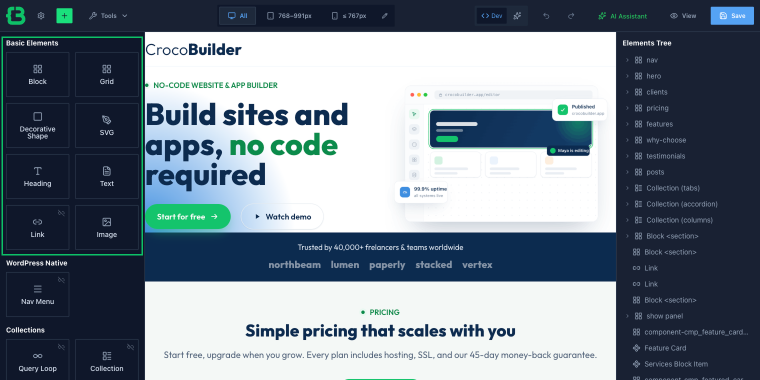
The Link element is worth singling out. In most builders, a linked button with an icon inside it requires a specific widget, a specific icon field, and specific layout options baked into that widget. In CrocoBuilder, Link is a container.
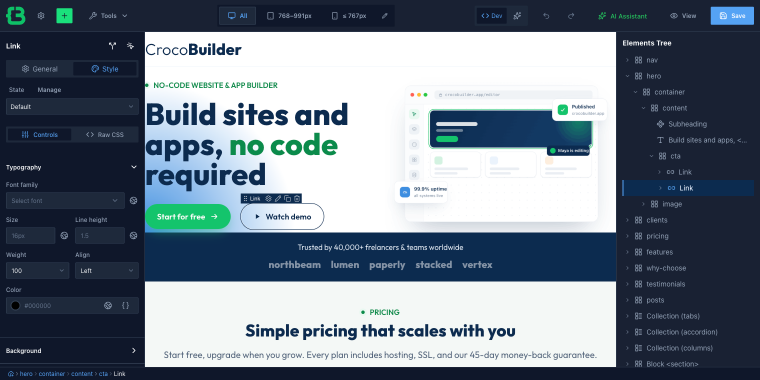
You drop whatever you want inside it: text, SVG, an image, a full card layout, and the whole thing becomes a link. One element, no workarounds.
The other two layout elements, Block and Grid, follow the same logic.
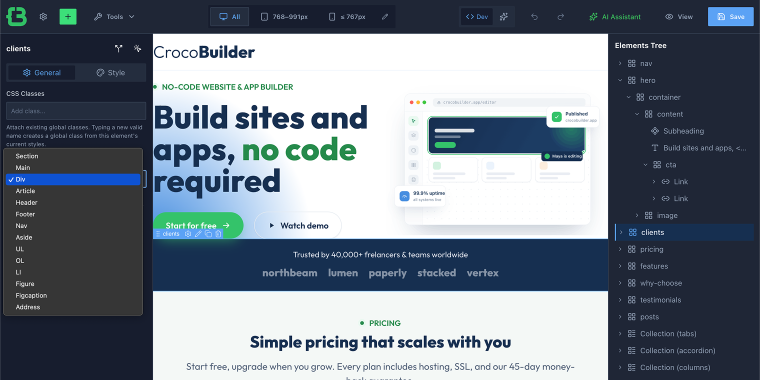
Block is a semantic container; you pick its HTML tag (“Section,” “Main,” “Div,” “Article,” “Header,” “UL,” whatever the document structure requires).
Grid is a CSS grid container with the same tag flexibility, built-in grid controls, and a raw CSS override if you need it.
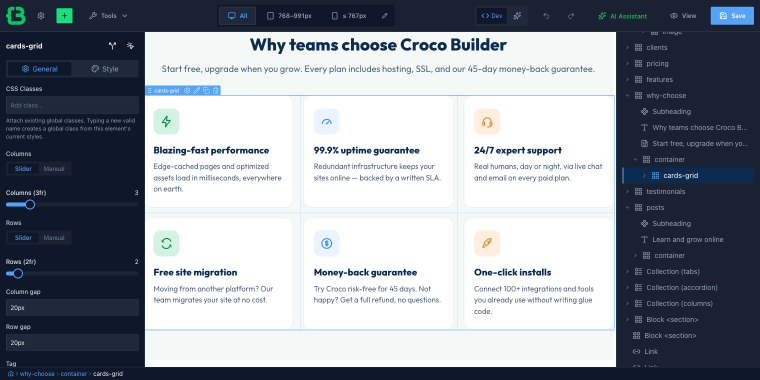
Existing in the DOM as exactly one element.
For agencies handing off projects, the last point matters as much as the first two. When a client makes changes outside the builder or hires a different developer, the HTML will remain readable even without context.
Collections
Collections are a group of two elements designed for displaying sets of content: Collection for rich, multi-layout content blocks, and Query Loop for dynamic data-driven loops.
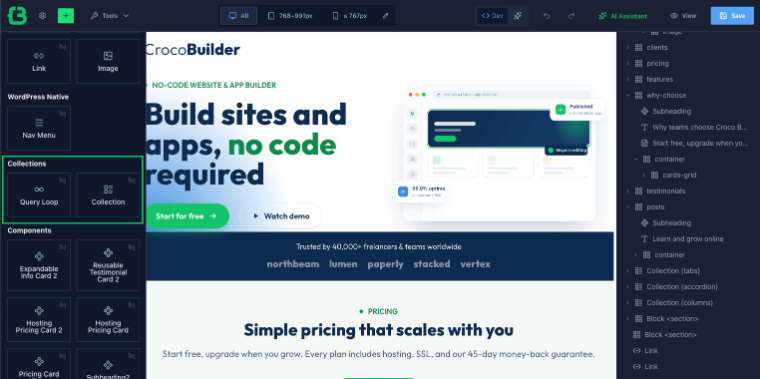
Collection
Collection handles rich-content tabs, accordions, sliders, and column grids, but with a different model than you’d expect. You create the content once, but you can change the behavior mode, choosing among Tabs, Accordion, Slider, and Columns.
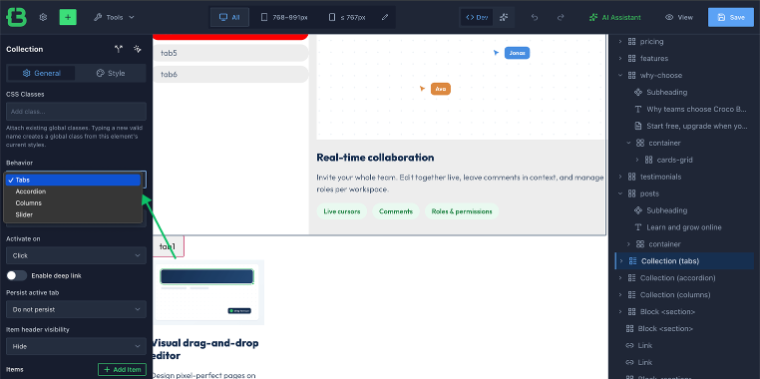
The content will not change, but the layout will. If a client decides mid-project that the services section should be a slider instead of tabs, that’s one dropdown option below, not a rebuild.
Query Loop
Query Loop is the dynamic look-alike to JetEngine’s Listing Grid within the builder. It queries post types, applies filters, and renders results using a loop template you build visually. Display mode expansion is planned for a future update.
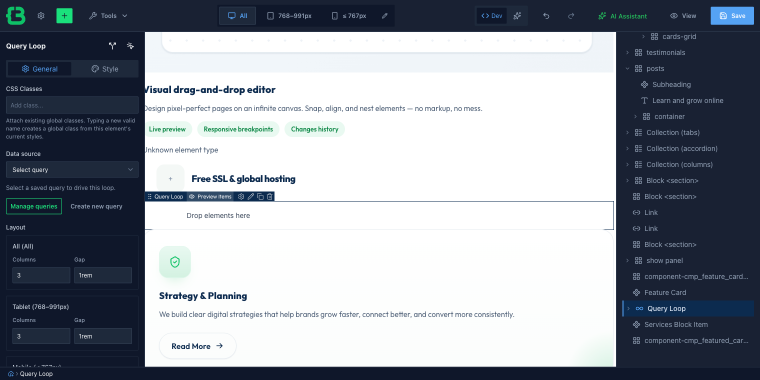
Please note that you can access the Query Builder from the top bar panel by clicking on the “Tools” link.
Beyond the built-in set, CrocoBuilder uses elements registration API WordPress for third-party elements. The model is the same one that brought JetPlugins’ widgets into the Elementor panel; external elements register themselves and appear in the builder’s panel alongside native elements.
Design System tools
Most builders give you a Global Kit, a place to set heading fonts, and a primary color. That’s not a design system; that’s a theme preset. The difference matters when you’re building something that needs to stay consistent across dozens of templates, custom post types, and components built by more than one person.
CrocoBuilder is shipped with a set of tools that together form an actual design system layer.
CSS Classes Manager
You can access the CSS Classes Manager from the top bar “Tools” link.
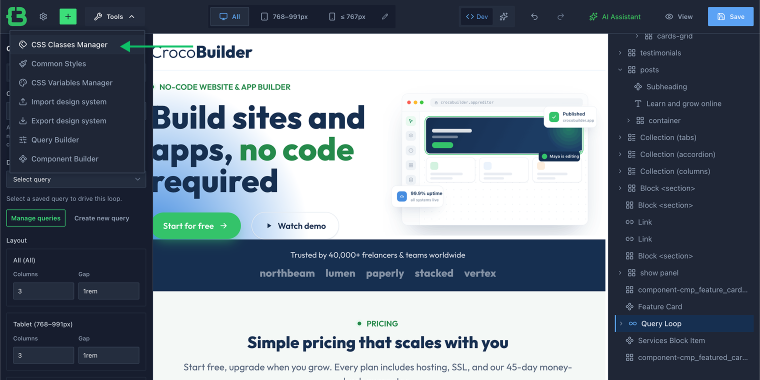
CSS Classes Manager solves a problem that sounds minor until you’ve hit it: in most builders, a class you create in the style panel is saved with a generated name or scoped to the builder’s context.
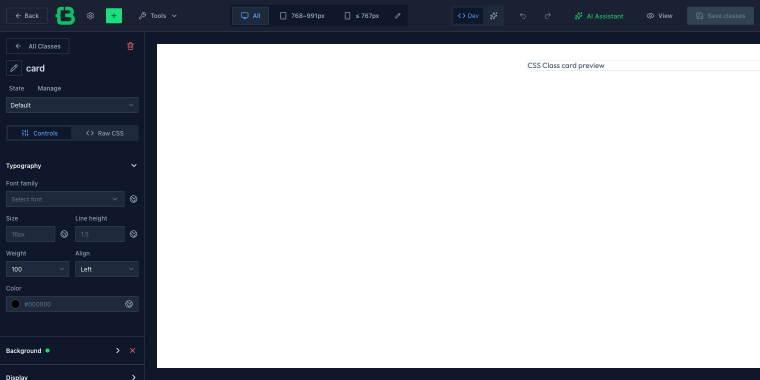
In CrocoBuilder, the class is saved with the name you gave it. That means you can use .card-header in the builder, in a custom template, in a block, or in a hand-written stylesheet; it’s the same class everywhere.
Common Styles
You can access the Common Styles from the top bar “Tools” link.
The Common Styles let you create named selectors, .heading, .button-primary, and .card, and define their styles through the same controls available on individual elements.
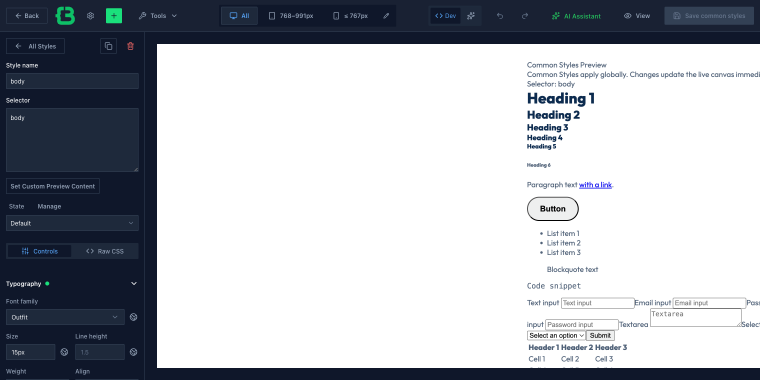
The result is a set of global rules that any element can inherit by adding the class. It functions as a utility layer you define once and maintain in one place.
CSS Variables
You can access the CSS Variables from the top bar “Tools” link.
The CSS Variables work exactly as the name suggests: you define –color-primary, –font-heading, –radius-card, and those variables are available everywhere: in the builder’s controls, in your raw CSS, and in any external stylesheet that targets the same root.
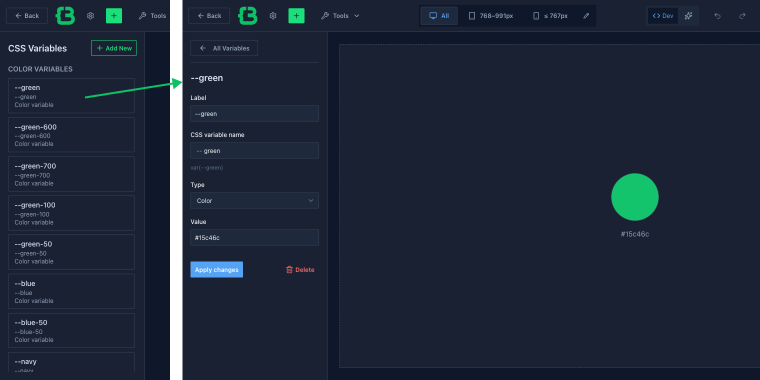
Change the value once, and it updates across the entire site. This isn’t a builder abstraction over CSS variables; it is CSS variables.
Import/Export design system
The Import/Export design system option (available under the link “Tools” in the top bar) takes this further. If your project uses Bootstrap or an internal CSS framework, you can import the stylesheet directly.
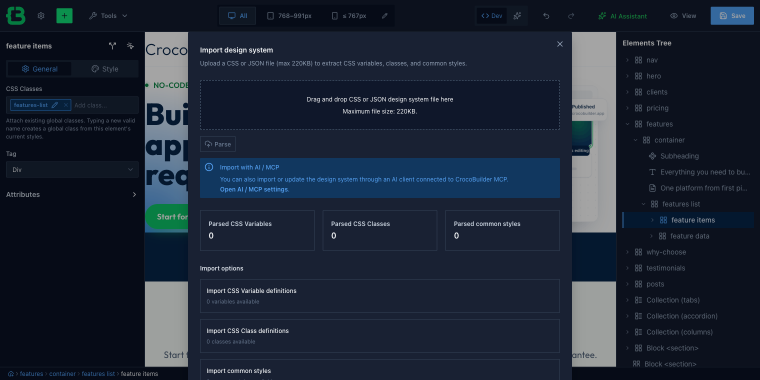
The builder will parse it, making all classes and CSS variables available in the CSS Classes Manager, which it finds and controls. This way, you can connect your own design system to the CrocoBuilder.
With CrocoBuilder, the entire design system is exportable.
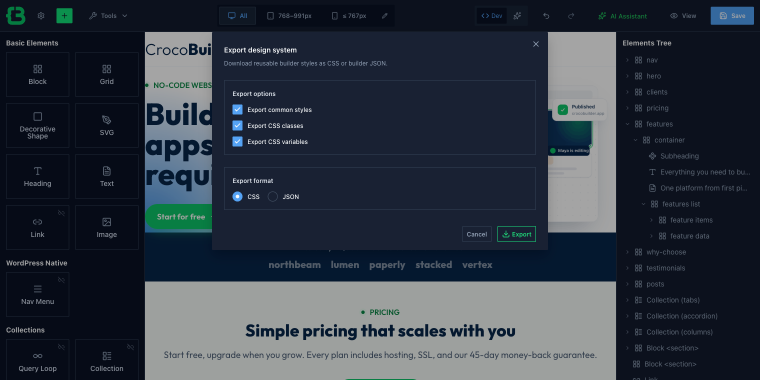
Common styles, CSS classes, and CSS variables can be downloaded as a CSS file or as JSON, which is helpful for reusing the same system across multiple projects or syncing it with an external codebase.
Query Builder
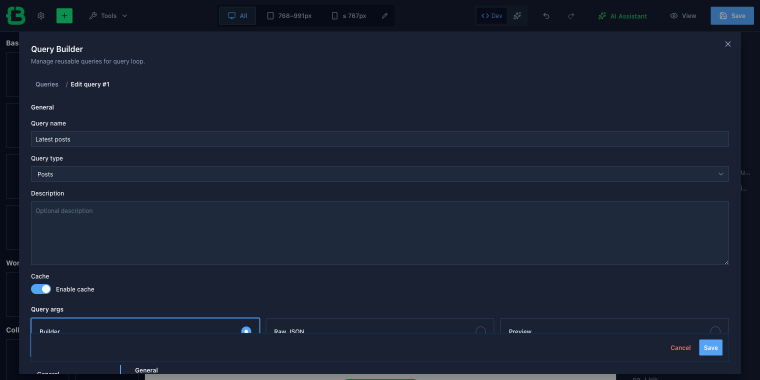
The Query Builder in CrocoBuilder (available via the “Tools” link in the top bar) manages the data layer behind those Query Loops. If you’ve used the Query Builder in JetEngine, the logic is identical: post type, status, order, filters, and meta conditions. The interface and mental model carry over directly.
Component Builder
A component created with Component Builder (available under the link “Tools” in the top bar) can be used in a post, a custom template, or anywhere else on the site. The properties you defined are still editable in context.
In practice, this means that an agency can build a Pricing Card component, hand the project to a client, where the client can update the price, the feature list, and the CTA without touching the structure or code.
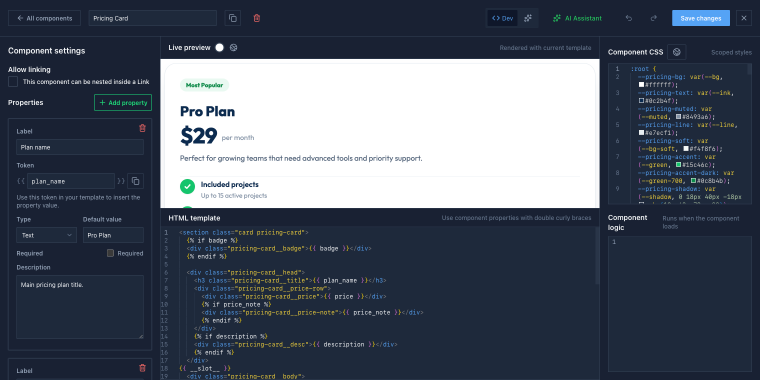
A component built in CrocoBuilder can be used in a post, a Custom Post Type (CPT), or anywhere else on the site. The properties you defined remain editable in context.
Interactions, States, and Visibility
Interactions work on a trigger/action model. Triggers are: “Mouse Enter,” “Mouse Leave,” “Page Load,” “Content Load,” “Enter Viewport,” “Leave Viewport,” “Click.” Actions are: “Hide element,” “Show element,” “Set attribute,” and “Delete attribute.”
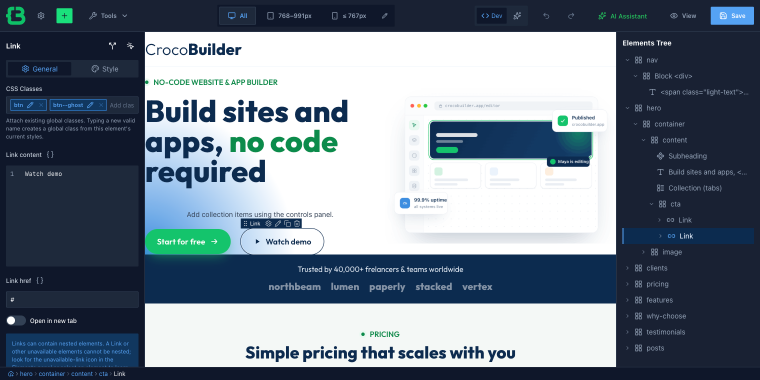
The practical implication: patterns that previously required either a dedicated widget (with its fixed structure and limited layout options) or custom JS can now be built from generic elements with Interactions layered on top.
State Manager
The State Manager feature covers the CSS side of the same problem. Every element has built-in states, “Hover,” “Active,” “Focus,” “Focus Visible,” and “Before,” each with its own style overrides in the same Unified Style Control Panel.
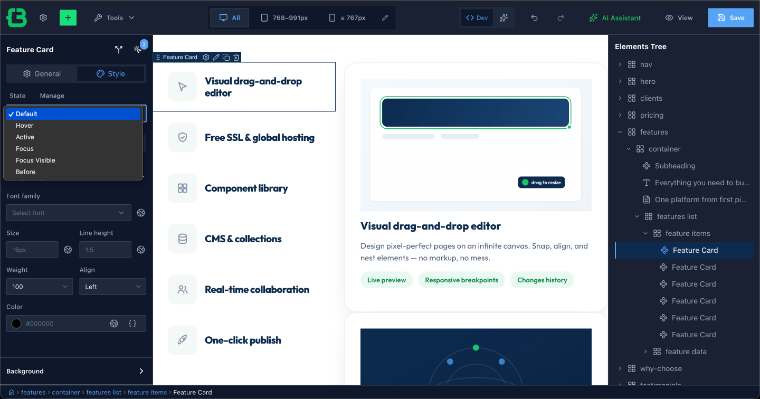
If the built-in states don’t cover your case, you can define custom ones. The result is that interactive styling lives next to the element it applies to, rather than in a separate stylesheet hunting for the right selector.
Display Conditions
The Display Conditions feature brings JetEngine’s Dynamic Visibility system into the builder.
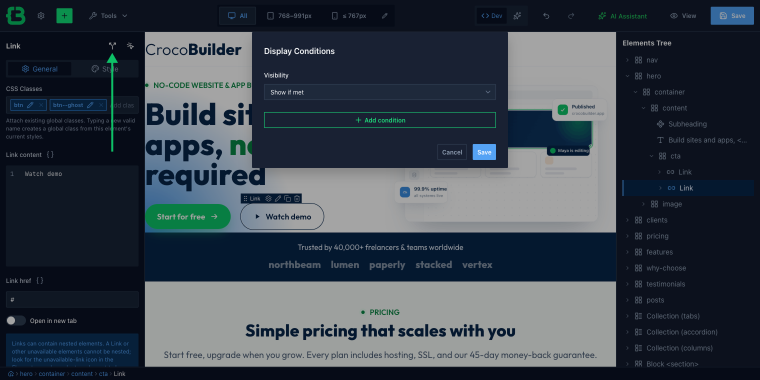
“Show,” “Hide,” or conditionally render any element based on a condition set, user role, post meta value, query parameter, device type, and more. If you’ve used Dynamic Visibility in JetEngine before, the same logic applies here, on any element, without an extra widget wrapper.
Mobile Breakpoint Manager
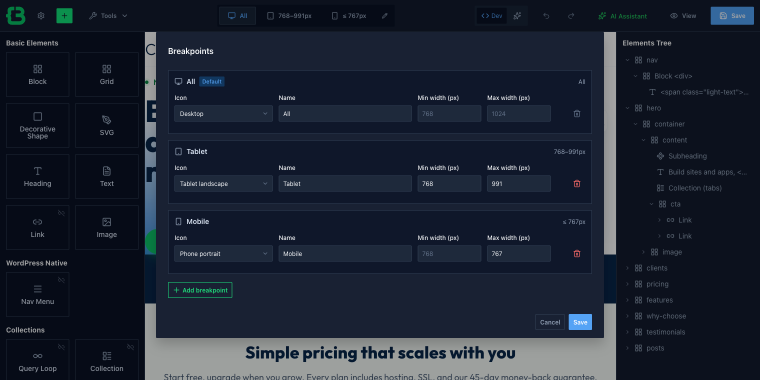
The Mobile Breakpoint Manager closes the loop on responsive control. Instead of working within a fixed set of breakpoints, you define your own, name them, set the viewport width, and manage content display per breakpoint independently.
AI Assistant
The AI Assistant is where the architectural decisions from the previous sections pay off. I’m something of a vibecoder myself, and I might write a prompt: “Create a Hero Section for a dental clinic.” The AI will generate all the necessary elements using the tools mentioned above, along with some basic copy.

The AI Assistant will read the project’s CSS variables, class names, color values, and fonts, and will output a layout that fits within your design system. After generation, the component includes editable elements, so the content can be updated without touching the structure.

Theme Builder
The Theme Builder gives you a Tree View of the entire site structure (including the header, footer, archive templates, single post templates, 404, and search results) and lets you add or edit any of them with a single click from a single panel.
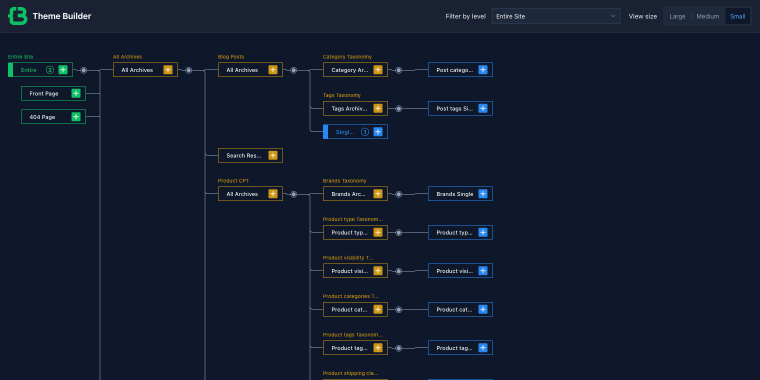
It’s the equivalent of what JetThemeCore provides: global template management without switching between separate screens. If you’ve built the site structure in JetThemeCore before, the workflow is the same. Each template in the tree supports display conditions (assign it to a specific post type, taxonomy, user role, or any combination) using the same condition set.
GitHub-based Versioning
GitHub-based Versioning syncs builder content with a GitHub repository. That means pull requests, commit history, and rollbacks for pages and templates, the same workflow your team already uses for theme files and custom plugins.

MCP Integration
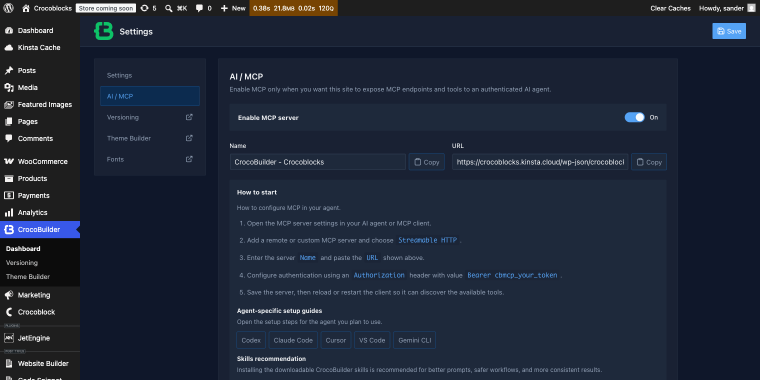
MCP Integration connects CrocoBuilder to any MCP-compatible AI agent. You’ll be able to write a task in Claude or another agent, and it creates pages, components, queries, styles, and variables directly on the site through the builder’s API.
FAQ
CrocoBuilder is a clean DOM WordPress page builder, built on an atomic DOM architecture; one editor element produces one DOM element, with no wrappers. Combined with a design system that lives in real CSS and AI that reads your project’s existing tokens before generating anything, it’s built for dynamic, developer-controlled front ends rather than static content sites.
No, but the two are designed to work together. CrocoBuilder is basically a WordPress builder for JetEngine that manages dynamic data, custom post types, and relationships. If your project uses JetEngine, the integration is native, with no adapter layer. If it doesn’t, CrocoBuilder still works as a standalone builder.
CrocoBuilder’s AI Component Assistant reads your project’s CSS variables, class names, colors, and fonts before generating anything. The output is a real builder component with editable Properties, not a code block to paste and maintain separately.
It’s designed for developers and agencies building dynamic, data-driven sites. The level of control it offers (atomic DOM page builder output, raw CSS sync, custom breakpoints, component properties) is a feature for technical users and a steeper learning curve for everyone else. If you’re building a straightforward content site without a dynamic WordPress site builder, a lighter builder may be a better fit.
Conclusion
CrocoBuilder is a different kind of bet than switching between visual builders. It uses a different architecture, atomic output, a design system that lives in real CSS, and AI that works inside your project rather than alongside it.
For teams already invested in JetPlugins, it’s the piece that was always missing. For developers who’ve hit the ceiling of what nested-wrapper builders can cleanly produce, it’s worth evaluating based on the DOM output and design system alone before the AI features enter the conversation.
CrocoBuilder is available today. Explore the documentation, and join the evolution of WordPress page builders, starting by building with an AI‑powered WordPress page builder right now.