When you work with Elementor long enough, you eventually hit a wall as the built-in widgets simply can’t deliver the visual variety or flexibility you want. The JetElements plugin extends Elementor with a rich collection of advanced widgets, helping designers create layouts that are not only beautiful but functional and dynamic. And when it comes to building image galleries or portfolios, JetElements often becomes the secret ingredient behind those websites that look effortlessly polished.
Let’s explore what makes JetElements the best photo gallery plugin for WordPress among creators, how its gallery widgets work in real projects, and why many consider it one of the most universal tools for crafting visually striking and interactive websites.
What Is JetElements?
JetElements is a powerful plugin for Elementor, designed to expand the builder’s capabilities with a collection of advanced widgets that cover everything from content display to interactive visuals. The plugin offers over 40 widgets, making it one of the most universal tools for Elementor users who want to create dynamic, visually engaging websites without coding.
JetElements focuses on flexibility and performance. Each widget is built to integrate easily into the Elementor interface, giving you full control over layout, styling, and responsiveness. Among these widgets are key elements for building WordPress image galleries, sliders, portfolios, pricing tables, post grids, testimonials, and interactive content blocks, which are customizable through the Elementor panel.
JetElements is also fully compatible with WooCommerce, allowing users to display products in advanced layouts or create custom product galleries that go far beyond the default WooCommerce design. The plugin’s attention to responsive behavior ensures all layouts look great on mobile, tablet, and desktop devices.
JetElements Gallery Widgets Explained
JetElements includes several powerful gallery widgets that turn Elementor into a fully featured WordPress gallery plugin. So, what exactly does it offer? Let’s explore the widgets included in the plugin and see how each one helps you build unique image layouts for your WordPress website.
Advanced Carousel widget
The Advanced Carousel widget lets you create dynamic and responsive image sliders with full control over animation, layout, and navigation. You can display photos, banners, or promotional visuals using custom transitions, autoplay, and navigation arrows or dots. Each slide can include titles, buttons, or links, turning a simple slider into an interactive visual element. It’s perfect for showcasing product highlights or client work while maintaining a lightweight design that adapts to all screen sizes.
Portfolio gallery widget
For users who need more structure and interactivity, the Portfolio widget provides a perfect balance between design and functionality. It allows you to display projects, case studies, or product showcases in a grid layout with sorting and filtering options. Combined with JetSmartFilters, you can turn this into an interactive catalog where users can filter images by category or tag in real time.
Slider and Image Carousel widgets
If your design calls for movement and visual flow, JetElements also includes Slider and Image Carousel widgets. These tools let you display images in a rotating slider format with customizable navigation arrows, autoplay options, and transition effects. You can easily control every detail of animation speed, layout, and responsiveness.
Image Comparison widget
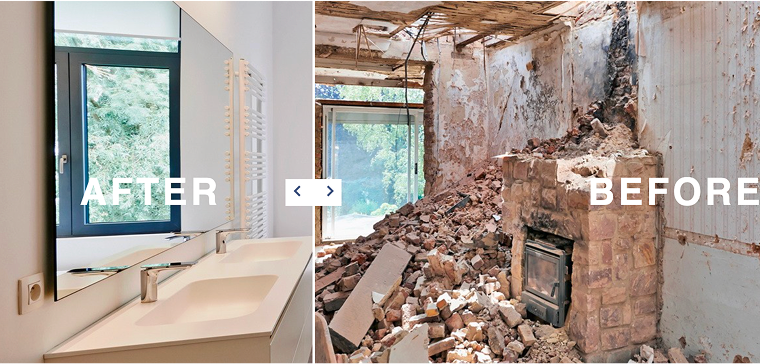
The Image Comparison widget adds a more interactive element to your visual content. It allows you to display two images side by side with a draggable divider, often used for before/after showcases, design transformations, or renovation results. This feature is especially popular among photographers and designers, where visual contrast helps share results or progress clearly.
Instagram widget
If you want to improve your WordPress image gallery with live social media content, the Instagram widget connects your site directly to your Instagram account. It automatically pulls recent posts and displays them in customizable grid or masonry layouts. You can adjust the number of columns, image spacing, and hover effects to maintain a consistent look with the rest of your website.
Design Flexibility and User Experience
When it comes to galleries, visuals matter just as much as usability. JetElements stands out because it gives designers complete freedom to shape how images are displayed, animated, and interacted with. The result isn’t just a visually appealing gallery, but one that feels natural to explore.
Every gallery widget featured in the previous section demonstrates just how flexible JetElements can be. In the video examples, you can see that each widget adapts to different content types, screen sizes, and design approaches.
From a design perspective, users can:
- choose between grid, masonry, or carousel layouts;
- adjust image ratios, spacing, and alignment;
- add captions, hover effects, or interactive overlays;
- control transitions and animations for sliders and carousels;
- customize typography and color schemes to match any brand style.
For the user experience, JetElements ensures that galleries remain fast, responsive, and intuitive. Built-in support for lazy loading and responsive scaling also guarantees that galleries load quickly, across all devices.
What makes JetElements particularly strong is that all these adjustments happen visually within Elementor, without any external tools, shortcodes, or complex settings. Designers can instantly preview how changes affect the final layout.
How to Use the JetElements Plugin?
Getting started with JetElements is simple. After installing and activating the plugin, you can choose which widgets to enable or disable in the JetElements Settings panel. This helps keep your website lightweight by loading only the features you actually use.
Once activated, all JetElements widgets appear directly inside the Elementor editor, where you can easily add them using drag-and-drop. Each widget includes its own customization options, so you can adjust every detail visually, without touching code.
You can use JetElements to build sliders, portfolios, carousels, or other visual sections in just a few clicks, designing everything in real time.
Below, you can see a short video example of how I use JetElements to create any section.
📚 Read also: Creating a Marketing Agency Dynamic Portfolio Website With Crocoblock
What Else Can JetElements Do
JetElements isn’t only a WordPress photo gallery plugin but a complete toolkit for Elementor that lets you build dynamic and interactive layouts without additional extensions. While many users discover JetElements through its gallery WordPress plugin capabilities, it offers much more for site builders.
Media and layout widgets
- Video Player: embed videos from YouTube, Vimeo, or self-hosted sources with full styling control. Ideal for enhancing visual storytelling alongside your image galleries.
- Inline SVG: display scalable vector graphics or icons while maintaining sharp visuals on all devices, complementing the look of your WordPress gallery sections.
Data visualization and metrics
- Line Chart, Bar Chart, Pie Chart, Progress Bar, Circle Progress: these widgets turn raw numbers into eye-catching visuals. If your site combines imagery with data, JetElements becomes one of the best WordPress gallery plugin options for creative presentations.
Content and layout widgets
- Posts widget: display blog posts, projects, or any CPT in organized layouts.
- Logo Showcase: present brand partners or client logos in responsive carousels, visually balancing your photo gallery WordPress plugin sections with professional content blocks.
- Testimonials, Services, Team Member: add human-focused sections that bring context to your work.
Marketing and interactive widgets
- Animated Box, Animated Text, Headline: add motion to your headlines and callouts, helping your WordPress photo gallery sections feel more dynamic.
- Banner, Dropbar: build hero sections or promotional banners that combine text, visuals, and motion.
- Subscribe Form, Contact Form 7 widgets: collect leads and inquiries directly from your page while maintaining design consistency.
Pricing
JetElements can be purchased as a standalone plugin or as part of the Crocoblock All-Inclusive subscription.
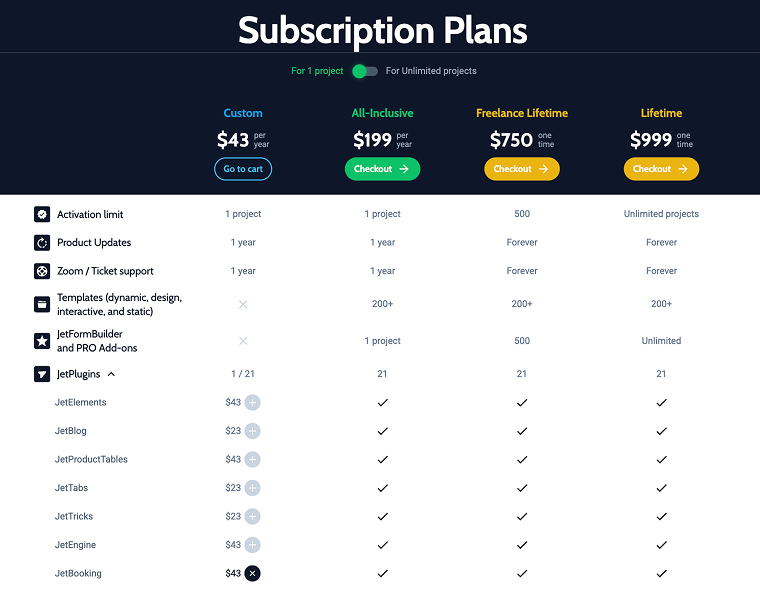
If you only need JetElements, the plugin costs $43 per year, which includes updates and support for one website. This is a good option for users who primarily want to expand Elementor’s widget library without investing in the full Crocoblock suite.
For those building multiple websites or planning to use additional Crocoblock tools such as JetEngine or JetSmartFilters, the All-Inclusive plan at $199 per year offers much better value. It includes access to the entire collection of JetPlugins, along with updates, support, and dynamic templates from the Crocoblock library.
Both plans include one year of updates and technical support, and you can upgrade from a single plugin license to the full bundle at any time.
Real Examples of Websites Using JetElements
Now it’s time to see JetElements in action. The best way to understand a plugin’s potential is to look at how real businesses use it to build their websites. The examples below showcase how our clients combined design and functionality, and maybe they’ll inspire your next project too.
Detuatu

Detuatu took a clean and elegant approach to building trust with their visitors. By using the Testimonials widget, they placed client feedback right on the homepage – concise, visually balanced, and clear. It’s a simple yet powerful way to establish credibility and connect with potential customers from the very first scroll.
Mi Mai

Mi Mai is pure elegance. From the moment you open their website, everything feels visually harmonious and easy to navigate. The brand used JetElement’s widget to showcase various treatment options, allowing users to browse services with ease. It’s a great example of how thoughtful design can turn a service list into a stunning experience.
Stibo Complete

Stibo Complete showcases its case studies with sophistication and clarity. Their interactive photo gallery invites visitors to slide through projects, view high-quality visuals, and explore project details without chaos.
Bagla Group

Bagla Group, a global packaging company, used JetElements’ animated features to highlight its worldwide presence. Animated visuals of countries and cities instantly make the site feel dynamic and alive, adding a layer of interactivity that keeps visitors engaged while exploring their international reach.
ACRE
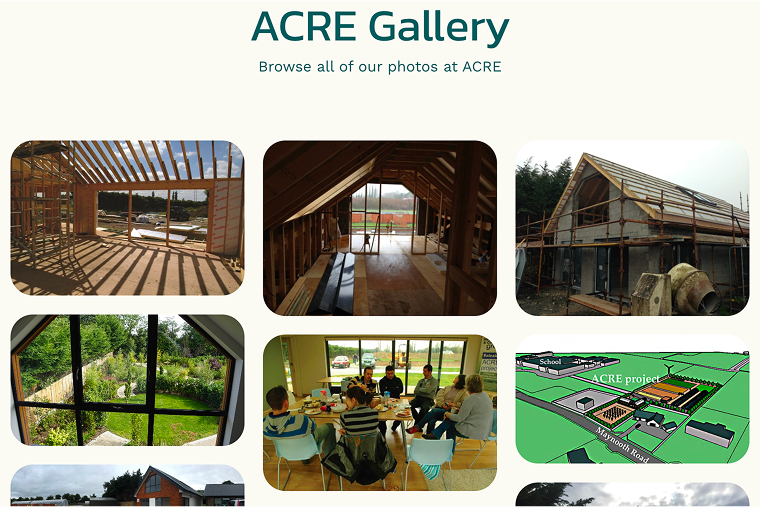
ACRE opted for the Portfolio widget, giving visitors an easy way to explore their projects and areas of expertise. It’s a small design touch that transforms static project listings into a polished, user-friendly showcase that reflects the company’s professionalism.
FAQ
JetElements works perfectly with the free version of Elementor, so you don’t need Elementor Pro to use it. However, it’s fully compatible with the Pro version as well.
JetElements is more than a gallery plugin; it’s a complete design toolkit for Elementor. You can use it to build galleries, carousels, charts, pricing blocks, testimonials, and much more.
Yes. JetElements uses Elementor’s drag-and-drop interface, so you don’t need coding skills. Beginners can start building professional galleries and layouts right away.
Conclusion
When you first look at JetElements, it’s easy to mistake it for just another Elementor add-on. But spend a few minutes exploring its widgets, and you quickly realize that it’s not just a plugin, it’s a toolkit that turns static pages into visual experiences.
JetElements gives you the freedom to design exactly the way you want. The combination of customization, performance, and dynamic integration makes it one of those rare tools that grow with your creativity rather than limiting it.
And maybe that’s what truly makes JetElements most wanted. If you’ve ever felt that standard Elementor galleries couldn’t quite capture your vision, JetElements might just be the missing piece that brings your images and ideas to life.