In an eCommerce environment, one feature that has become vital for modern online stores is the quick view functionality. This tool allows shoppers to preview product details without leaving the current page. This seemingly simple feature can significantly reduce bounce rates and increase conversion.
The WordPress quick view plugin niche is crowded with options, each promising to deliver the perfect Elementor quick view solution. While most offer basic functionality, only a few provide the flexibility, customization options, and seamless integration that modern eCommerce stores require.
In this article, we’ll explore the top quick view plugins for WooCommerce in 2026, pointing out their strengths and limitations. More importantly, we’ll demonstrate why the combination of JetWooBuilder and JetPopup from Crocoblock represents a paradigm shift in how quick view functionality should be implemented – providing unmatched control, customization, and performance.
How to Make Use of the Quick View Feature
Before diving into plugin comparisons, it’s crucial to understand how quick view functionality can be properly implemented to maximize its effectiveness. The key lies not just in having a “Quick View” button, but in having complete control over its design, behavior, and integration with your existing store layout.
Adding a quick view pop-up with JetWooBuilder and JetPopup
The most advanced approach to implementing quick view functionality involves using JetWooBuilder in combination with JetPopup. This method offers complete design freedom while ensuring seamless integration with your WooCommerce store.
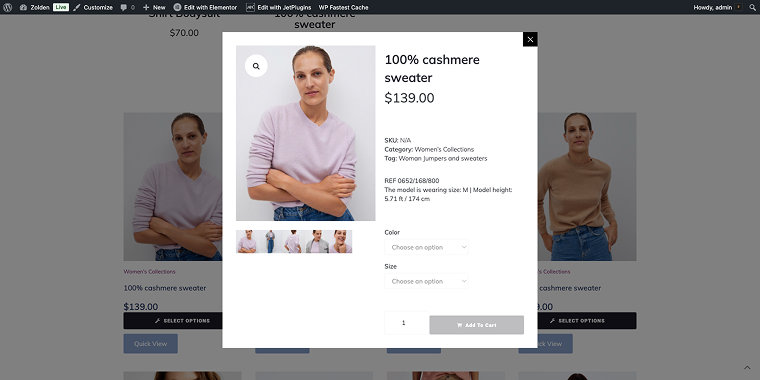
JetWooBuilder allows you to create custom shop templates, including an archive page with perfectly positioned quick view buttons. Unlike the limited, pre-designed templates offered by most quick-view WordPress plugins, this approach allows you to build pop-ups from scratch using Elementor builder. Here’s how we can build a custom quick-view pop-up using these Crocoblock plugins.
Create an empty pop-up (go to WordPress Dashboard > JetPopup, and click the “Create New Popup” button) with your desired layout.
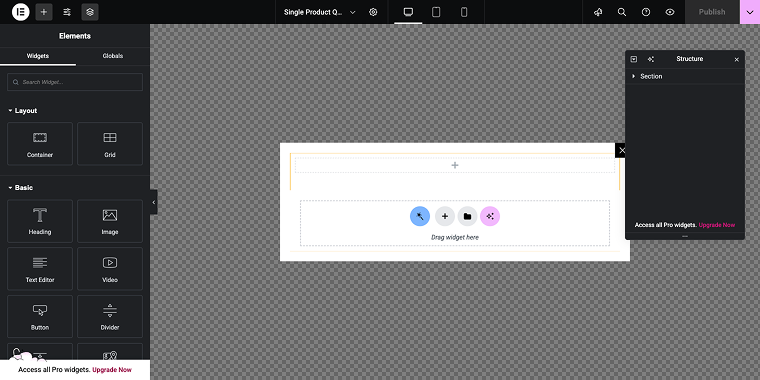
Then you need to create three templates with JetWooBuilder (going to WordPress Dashboard > Crocoblock > Woo Page Builder, and then clicking on the “Create New Template” button):
- a single product template that will render the product inside the pop-up window;
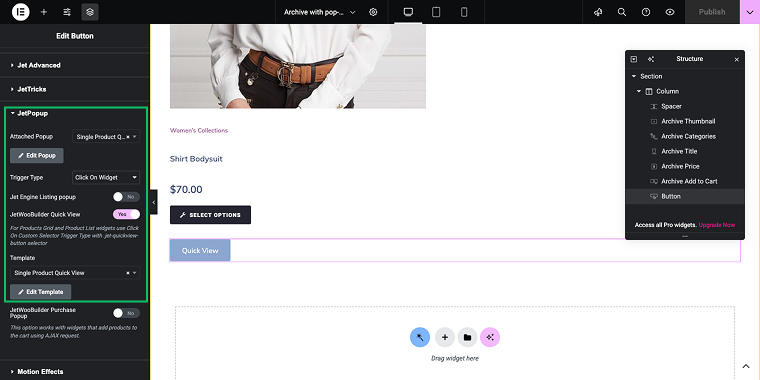
- an archive template that will feature a “Quick View” button, which will trigger the pop-up;
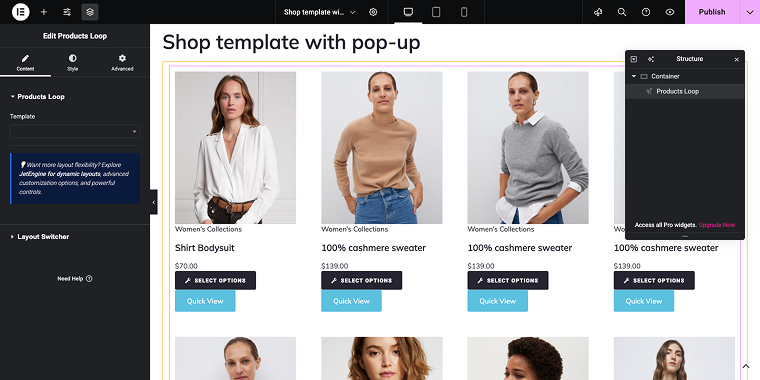
- a custom shop page template that renders a product feed, where each product features a “Quick View” button and an “Add to Cart” button.
In the Settings tab of the Button widget, navigate to the JetPopup tab and connect the button to the previously created pop-up (in the field Attached Popup) and a single product template (in the field Template). Also, enable the “Click On Widget” trigger type.
To illustrate the process, we’ll create a basic shop template featuring a Products Loop widget that displays all the information shown by the widgets in the Archive template.
This level of integration makes your quick view pop-ups feel like a natural part of your store, rather than an added feature.
Enabling the quick view in the Product Grid widget
For stores using product grid layouts, JetWooBuilder provides even more advanced options. First, add the Products Grid widget to the shop template.
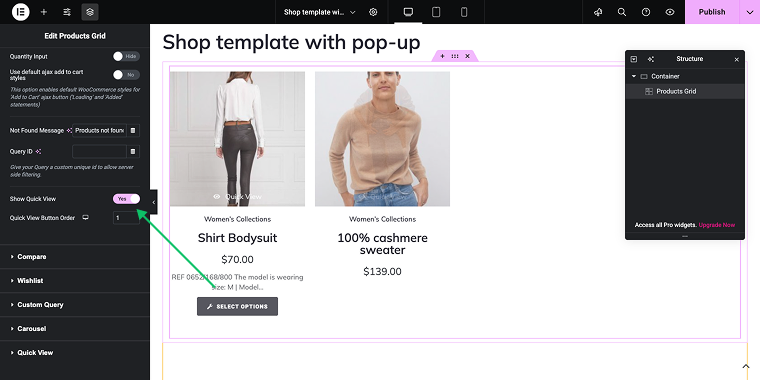
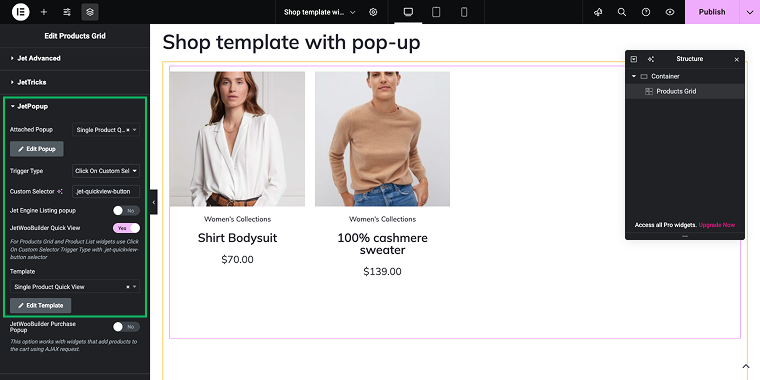
Then, go to the Settings tab of the widget and scroll down to the JetPopup tab to access a similar set of settings as in the previous method. The main difference is that in this case, we’ll use the trigger type “Click on Custom Selector” with a .jet-quickview-button value specified in the Custom Selector field.
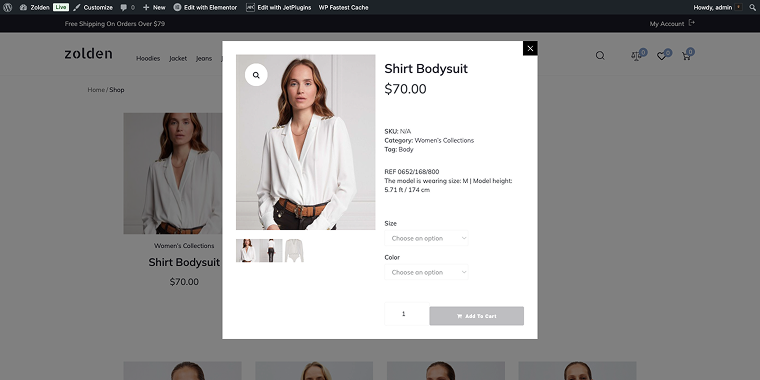
And just like that, we’ll get a nice-looking, quick view pop-up on the front end that’s triggered by a “Quick view” button appearing when you hover over the product image.
Top 6 WooCommerce Quick View Plugins Compared
Product Quick View for WooCommerce (Premium)
🏆 Best for small to medium-sized stores looking for an enhanced UI/UX quick view solution with multilingual support and easy navigation features.

The Product Quick View for WooCommerce plugin enhances the shopping experience by enabling fast product previews with easy navigation, providing a user-friendly interface that makes browsing products easier. It is fully customizable to suit your store’s design and functionality. This plugin focuses on enhancing the overall user experience by enabling customers to quickly access essential product information without needing to navigate away from the current page.
Pricing: starts at $39 per year (pricing varies by license type).
Key features:
- enhanced UI/UX interface design;
- fast product preview functionality;
- easy product navigation system;
- full customization options;
- WPML multilingual support;
- mobile-responsive design.
Pros:
- fully customizable to match store branding;
- easy navigation between products;
- regular updates from the WooCommerce marketplace;
- professional support available;
- mobile-optimized experience.
Cons:
- limited advanced customization compared to page builder solutions;
- restricted to predefined pop-up layouts;
- annual subscription required;
- basic styling options only.
JetWooBuilder + JetPopup by Crocoblock (Premium)
🏆 Best for developers and agencies requiring complete design freedom and advanced customization capabilities.
JetWooBuilder, combined with JetPopup, offers the most comprehensive solution for creating custom product quick view experiences. Unlike other WooCommerce solutions that limit you to predefined templates, this combination provides complete visual control over every aspect of your quick view functionality.
Pricing: JetPopup’s price starts at $22 per year, and JetWooBuilder’s price begins at $43 per year. Both plugins are available as part of the Crocoblock All-Inclusive subscription, which costs $199 per year for one project.
Key features:
- complete Elementor integration;
- custom pop-up design capabilities;
- advanced trigger options;
- dynamic visibility support;
- multiple pop-up types and animations.
Pros:
- unlimited design possibilities;
- works with any Elementor theme;
- multiple trigger types available;
- excellent value for money (unlimited sites);
- regular updates and new features;
- professional support team;
- no coding required for customization.
Cons:
- steep learning curve for advanced features;
- might be overkill for simple stores.
Quick View & Buy for WooCommerce (Premium)
🏆 Best for stores wanting to combine quick view with instant purchase functionality for streamlined shopping experiences.
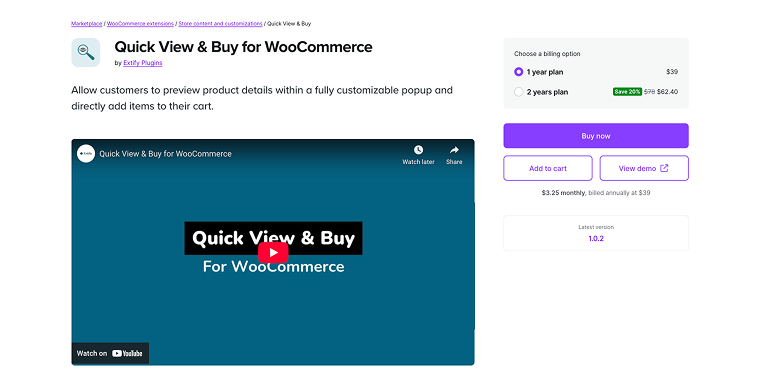
The Quick View & Buy WooCommerce extension enhances the quick view feature by allowing customers to purchase products directly from the pop-up, eliminating the need to visit the product page. It is designed for stores that want to reduce the steps between discovering a product and completing a purchase.
Pricing: $39 per year for a single-site license.
Key features:
- quick view with direct purchase option;
- AJAX-powered cart additions;
- quantity selector integration;
- mobile optimized.
Pros:
- simple purchasing process;
- reduces clicks to purchase;
- good for simple product catalogs;
- supports variable products.
Cons:
- limited pop-up design options;
- no visual page builder integration;
- may not work with complex product types;
- requires technical knowledge for advanced customization.
WPC Smart Quick View for WooCommerce (Freemium)
🏆 Best for small to medium businesses needing a free solution with decent customization options.
WPC Smart Quick View offers an advanced site navigation experience that helps minimize bounce rates and improve site rankings. This free plugin offers a good balance between functionality and ease of use, making it popular among WordPress users who want a quick view without premium costs.
Pricing: free core plugin; premium features start at $34.
Key features:
- free core functionality;
- basic customization options;
- mobile responsive design;
- multiple button positions;
- works with most themes.
Pros:
- fully-functional free version;
- easy setup process;
- good documentation;
- regular updates;
- lightweight code;
- works with most WooCommerce themes;
- no subscription required.
Cons:
- basic pop-up styling options;
- no advanced trigger configurations;
- not integrated with page builders.
Woo Quick View (Free)
🏆 Best for budget-conscious store owners needing basic quick-view functionality with minimal setup.

The Woo Quick View plugin enables customers to quickly view products without needing to visit the product page. It offers the most straightforward way to add quick view functionality, emphasizing core features rather than advanced customization.
Pricing: free.
Key features:
- completely free;
- simple installation;
- automatic button placement;
- basic pop-up design;
- mobile compatibility;
- minimal configuration required.
Pros:
- totally free to use;
- easy to install, lightweight plugin;
- works with most themes;
- no ongoing costs;
- regular security updates.
Cons:
- very limited customization options;
- basic pop-up design only;
- no advanced features;
- limited support options;
- cannot modify pop-up layout.
Quick View for WooCommerce (Premium)
🏆 Best for professional stores requiring reliable, quick view functionality with good customization balance and professional support.

The Quick View solution provides a middle ground between basic, free plugins and comprehensive, premium options. It delivers professional-grade features with reasonable customization options, making it suitable for established businesses that require reliability without complex setups.
Pricing: $39 for a single site, $69 for five sites.
Key features:
- professional pop-up design;
- multiple display options;
- customizable button styles;
- AJAX-powered functionality;
- responsive design;
- gallery image support.
Pros:
- good value for money;
- professional support;
- clean, modern design;
- multiple customization options;
- works with popular themes;
- regular updates;
- one-time payment (no subscription).
Cons:
- limited to predefined pop-up layouts;
- no page builder integration;
- cannot create custom pop-up designs;
- fewer advanced features than premium alternatives;
- no conditional display options.
FAQ
While it’s technically possible, you’d need to handle AJAX requests, create pop-up HTML/CSS, manage responsive design, and ensure compatibility with WooCommerce updates. For most users, a reliable and quick-view plugin WooCommerce solution, such as JetWooBuilder + JetPopup, offers better value, saves development time, and provides professional support.
JetWooBuilder, combined with JetPopup, provides the most robust support for complex product variations. Unlike basic quick-view WordPress plugins that may struggle with variable products, this solution enables you to design custom pop-up layouts that can handle any product complexity. You can create different pop-up templates for various product types and use conditional logic to display relevant variation options.
Performance can vary greatly between plugins. Free plugins may load unnecessary scripts or use inefficient AJAX calls. Premium solutions, such as JetWooBuilder and JetPopup, are optimized for performance and only load essential assets. They also offer better caching compatibility and cleaner code output. Always test your chosen plugin with performance monitoring tools to ensure it doesn’t negatively affect your site speed.
Conclusion
The quick view plugin landscape for WooCommerce in 2026 presents many options, but not all are equal. While basic free solutions can support simple stores, official WooCommerce extensions offer dependable functionality. However, they all share common limitations: limited customization options, preset pop-up designs, and restricted integration capabilities.
This is where Crocoblock’s combination of JetWooBuilder and JetPopup truly stands out as a game-changer. Instead of forcing you to fit your store into plugin limitations, this solution adapts to your specific needs and design requirements. The unlimited design options, advanced conditional logic, and seamless Elementor integration make it the top choice for professional stores and agencies.