You might have noticed that Crocoblock offers two WordPress template-building plugins: JetWooBuilder and JetThemeCore. But what’s the difference?
How to decide which option is better and which plugin suits your particular needs? In this article, I will discuss the main features of JetWooBuilder and JetThemeCore plugins. I will compare them to see what similarities they have and which features are completely unique.
The main key to choosing a plugin is your site’s purpose and the tasks you face. To put it briefly, JetWooBuilder is specialized for building custom WooCommerce templates and product displays, while JetThemeCore is a generalized WordPress theme-building toolkit for headers/footers, archive/single layouts, and core site structure. Now, let’s discover what makes each plugin special and what you need to consider when choosing a template builder.
JetWooBuilder: Main Features
As I have already stated, JetWooBuilder is a WooCommerce-focused custom templates builder. The plugin fully integrates into the WooCommerce system and allows you to create custom templates for single product pages, archives, shop pages, and so on. Let’s glance over the main features of the JetWooBuilder plugin.
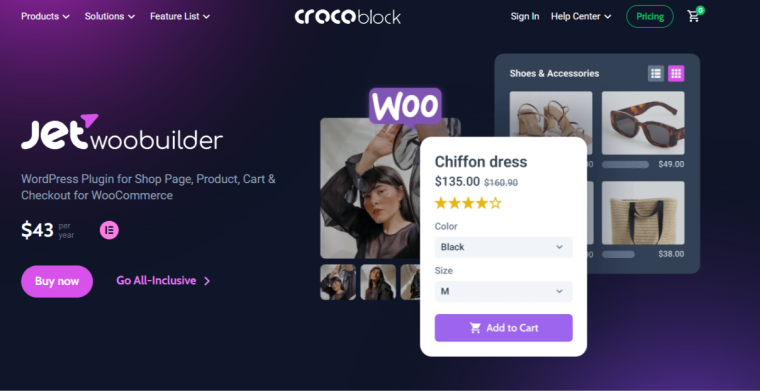
Custom WooCommerce templates
First and foremost, JetWooBuilder allows you to visually edit and customize templates for all the standard WooCommerce websites. With JetWooBuilder, you can create:
- single product template;
- archive item;
- category item;
- shop page template;
- cart template;
- checkout template;
- thank you page template;
- my account template.
You are not limited to default WooCommerce layouts — you can visually customize basic templates with an even more advanced toolkit using the Elementor page editor. The templates’ logic is intuitively clear, not only for developers but for designers as well.
In addition to page templates, the plugin allows you to build and customize product and category cards and loops, controlling how items are displayed across shop and archive pages.

Dynamic WooCommerce widgets
Templates are the core of any template builder, but what makes them functional are the dynamic widgets used to construct them. One of the main pros of Crocoblock is its dynamics and flexibility, so it is not a surprise that there are more than 60 dynamic widgets designed to display WooCommerce data such as products, categories, prices, and other store information.
All the widgets are grouped by their template type — thus, you see what exact elements can be used on which template.
Additionally, you can switch on and off any widgets when proceeding to WordPress Dashboard > Crocoblock > JetPlugins Settings > JetWooBuilder > Widgets for better performance, if you are sure they will not be used for page building.
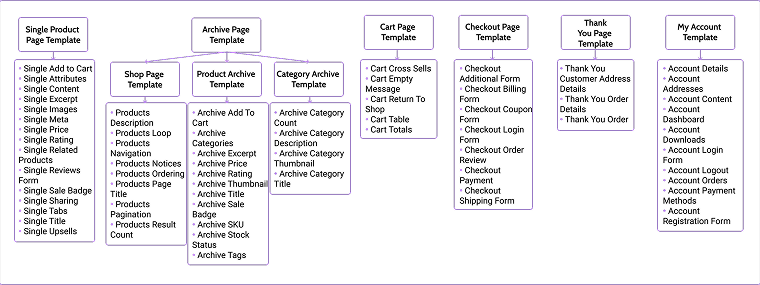
So, there are five global widgets. These widgets are available when editing any page:
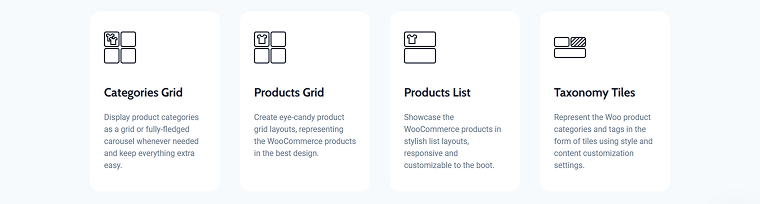
In the following picture, you can see the widgets available when editing the product single template, the archive product template, the archive category template, the shop product template, cart and checkout template, thank-you page template, and My Account page template.
Check the JetWooBuilder plugin page to learn more about every widget.
WooCommerce logic and display control
Obviously, you can set up the templates for the needed pages. Or even combine default pages with some custom templates, applying custom templates to the shop and single pages, and keeping the default look for the Checkout and Cart pages. But you can also apply the conditional display logic inside the templates. For example, display a widget only for products in a certain category or apply pagination to the long product lists.
One of the best examples is the Single Related Products widget: it allows you to display recently added products that have the same tags or categories without any additional settings. You can simply use one widget to display products from the same category.
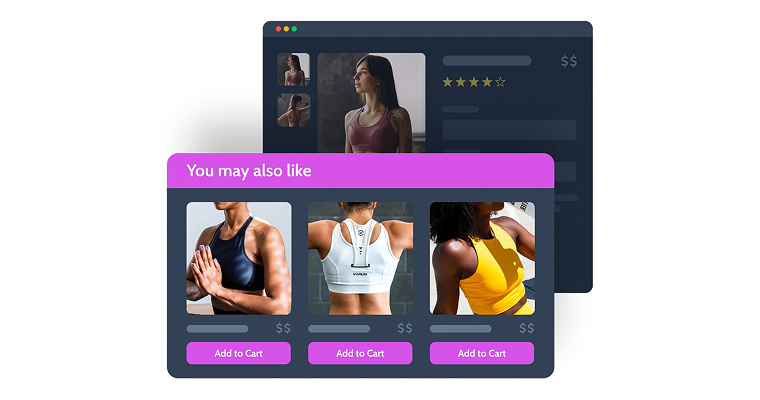
Another useful tool is the Products Pagination widget for the shop page. The principle of the widget’s work you can guess from its name: it allows you to split the store items into pages with a certain quantity of products on each.

JetThemeCore: Main Features
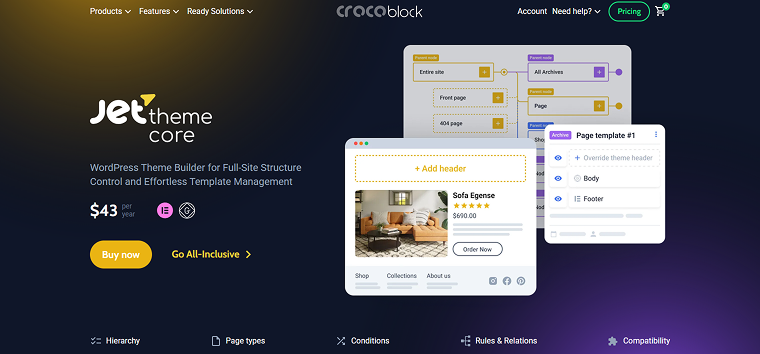
Comparing the JetThemeCore plugin to JetWooBuilder, I can definitely say that JetThemeCore’s functionality is wider. It is not about one plugin being better or worse — it is about the purpose. JetThemeCore is a generalized WordPress theme-building toolkit for the core site structure. While JetWooBuilder allows editing the body of WooCommerce templates, JetThemeCore offers editing possibilities for the whole template and its parts.
It is worth noting that JetThemeCore is not WooCommerce specialized, so it does not allow displaying products, their details, prices, etc. That’s why Crocoblock developers created JetWooBuilder.
Theme template builder
JetThemeCore is a theme template builder. What exactly does it mean? The plugin is not limited to the page templates or some particular type of websites (such as JetWooBuilder is limited to WooCommerce-based sites). So, you can build the following pages and sections with non-WooCommerce-specific content:
- page template;
- header template;
- footer template;
- section template;
- archive template;
- single template.

These templates are the basics that open the way to even more specialties, such as a 404 page, search results archive, thank you page, blog, and CPT archives, and many more.
Template library
That’s useful to build your custom templates, but sometimes you simply want to use a premade configuration. The Magic Button function provides a library of more than 8K of pre-designed template sets and blocks, such as hero sections, footer kits, inner page layouts, and section kits.
You can insert the individual design sections while editing a page. To open them:
- Edit a page/template with Elementor/Gutenberg.
- Click the Magic Button.
- The JetThemeCore Library opens.
There, you can insert any desired page part. All the blocks are conveniently grouped by placement, and you can even search by topic, such as blog, finance, or education. These blocks are essentially pre-designed Elementor sections.
Theme conditions and assignment
One of the key capabilities of JetThemeCore is its display conditions system, which allows you to control exactly where a template is applied across the site. When creating a template (such as a header, footer, archive, or single post layout), you can assign conditions that determine where the template should be used. These conditions act as rules that match specific content types or site areas.
Except for the standard logic of “one template for one page/archive, etc.,” JetThemeCore offers advanced conditions to control each template’s output:
- Device — apply custom page layouts to desktop, tablet, and mobile;
- User role — make templates visible to admins, editors, customers, etc.;
- URL parameter — show dynamic content based on query strings.
Besides these special conditions, you, of course, can assign templates according to the common rules:
- entire site — apply a template globally;
- post type — apply to posts, pages, or custom post types;
- taxonomy archives — categories, tags, or custom taxonomies;
- specific pages or posts — target individual content entries.
This mechanism allows building modular theme structures, where different templates are automatically applied depending on the content being viewed.
For example, a site might use:
- one header template for the blog;
- another header for WooCommerce pages;
- and a custom archive template for a specific custom post type.
Feature Comparison of JetWooBuilder and JetThemeCore
At this point, you clearly see that both WordPress plugins JetWooBuilder and JetThemeCore can be used for creating templates and conditionally assigning them to the pages. Although they focus on different areas of a WordPress site, they share several architectural principles and development patterns.
Both plugins are built to extend visual theme development in Elementor and introduce template-based workflows for dynamic content. Talking about key similarities, I include the following:
| Feature | JetWooBuilder | JetThemeCore |
| Dynamic content support | Works with WooCommerce objects such as products, prices, ratings, and add-to-cart elements. | Works with standard WordPress entities such as posts, pages, archives, and custom post types. |
| Conditional template assignment | Templates can be assigned to WooCommerce pages such as products, shop archives, and categories. | Templates can be assigned to the entire site, specific post types, taxonomies, individual pages, or according to the user’s role or device. |
| Elementor-based template editing | Templates are created and edited visually in Elementor using WooCommerce widgets. | Templates are created and edited in Elementor/Gutenberg using general WordPress layout elements. |
| Template-driven architecture | WooCommerce layouts can replace default store templates without editing PHP theme files. | Global site templates, such as headers, footers, and archives, can replace traditional theme files. |
Together, these shared features make the plugins compatible components of a larger Crocoblock-based development workflow, where JetThemeCore manages the overall WordPress site structure, and JetWooBuilder handles WooCommerce-specific templates.
Moreover, JetThemeCore and JetWooBuilder can work together, as JetWooBuilder allows you to have full control of the WooCommerce-specific templates, with their specific widget and functionality. But with JetThemeCore, you can set the specific header and footer for the Single Product page. But it is also important to emphasize that the plugins are not interchangeable.
Unique Features
If JetWooBuilder and JetThemeCore are so similar, what’s the difference then? As I stated earlier, the main key you need to pay attention to when choosing between two plugins is the purpose. Each plugin is designed to solve a different architectural layer of a WordPress site. Understanding their unique capabilities helps you choose the right tool for specific tasks.
Unique features of JetWooBuilder
JetWooBuilder functions primarily as a store logic and product display engine. Its core focus is deep integration with WooCommerce data structures, allowing you to build fully customized eCommerce layouts without editing WooCommerce template files.
JetWooBuilder is a visual editor for all WooCommerce templates, including critical store pages such as the Cart, Checkout, and My Account pages, ensuring that the entire purchasing flow matches the site’s design system.
The plugin provides WooCommerce-specific widgets and dynamic data sources that expose product information such as prices, galleries, product metadata, and add-to-cart functionality directly inside the Elementor interface. This makes it possible to construct flexible product templates and shop layouts visually.
A standout feature is the control over product presentation. The Single Related Products and Pagination widgets allow you to break up product listings, design custom grids or carousels, and apply display logic directly to products in WooCommerce catalogs.
Overall, JetWooBuilder is designed specifically to manage the presentation and structure of WooCommerce stores, making it a specialized tool for building and scaling WooCommerce interfaces.
Unique features of JetThemeCore
JetThemeCore operates at a broader level as a site structure and universal layout engine. Instead of focusing on e-commerce functionality, it provides tools for controlling the overall architecture of a WordPress theme.
The plugin allows building key structural elements such as headers, footers, and global layout sections directly in Elementor or Gutenberg. These elements can then be assigned across different parts of the website using advanced display conditions.
Another notable capability is the extensive template sets and blocks library, which allows users to import ready-made layout components or entire template collections. This accelerates the development process by providing pre-designed structural elements that can be customized further.
JetThemeCore also introduces a visual sitewide design system, where templates can be created once and applied consistently across multiple pages or content types. Through its flexible display conditions, templates can be assigned based on post types, taxonomies, specific pages, user roles, or devices.
In practice, JetThemeCore serves as the foundation for building the overall theme structure, while specialized plugins such as JetWooBuilder extend visual design possibilities for WooCommerce layouts.
FAQ
First and foremost, if you need to customize the WooCommerce elements, use JetWooBuilder, as it has specific templates and dynamic widgets for WooCommerce. JetWooBuilder allows customization of product pages, shop archives, cart, checkout, and account templates.
But if you need full theme structure control. If your goal is to design headers, footers, and global non-WooCommerce-specific layouts, JetThemeCore can be used. Remember that JetThemeCore does not provide WooCommerce-oriented widgets, so it definitely will not be enough for WooCommerce site customization.
Combine both plugins if necessary. Many projects use JetThemeCore for the site structure and JetWooBuilder for the store interface.
Yes, JetThemeCore allows you to build a full layout structure visually without editing PHP files. To do this:
1. Create a new template in Crocoblock > JetThemeCore > Theme Builder.
2. Choose the template type, such as header, footer, archive, or single page.
3. Design the layout in Elementor/Gutenberg using dynamic widgets and content.
4. Assign display conditions to determine where the template appears on the website.
This approach replaces traditional WordPress theme templates with visual layouts.
JetWooBuilder allows customization of WooCommerce templates without editing the template files’ code. To customize store pages:
1. Create a WooCommerce template in JetWooBuilder.
2. Open the template in Elementor and add dynamic product widgets.
3. Insert widgets such as Add to Cart, Price, Gallery, or Reviews.
4. Assign the template to product pages, shop pages, or checkout layouts by proceeding to WooCommerce > Settings > JetWooBuilder.
This method keeps WooCommerce core files intact while allowing complete design flexibility.
Yes, both plugins can work together in a single project because they control different parts of the site architecture. The recommended workflow is:
– Use JetThemeCore for the global structure: headers, footers, and site-wide templates.
– Use JetWooBuilder for WooCommerce pages: product pages, shop layouts, cart, and checkout templates.
Assign templates with conditions so each layout appears only in the required sections. This setup creates a modular architecture where the theme structure and store interface are managed independently.
JetThemeCore can handle basic template structures, while JetWooBuilder provides deeper WooCommerce integration. So when you need to create WooCommerce templates with full control over dynamics, I still recommend using the JetWooBuilder plugin.
Conclusions
To conclude the discussion, let’s focus on the following main points to consider when choosing between JetWooBuilder and JetThemeCore plugins for your WordPress site:
- JetWooBuilder is more specialized: it’s essential when WooCommerce is core to your project — it provides a visual editor for WooCommerce pages. It provides deep integration with WooCommerce data, allowing you to build single product pages, shop archives, cart, checkout, and My Account layouts directly in Elementor. Its dynamic WooCommerce widgets and product query tools make it easy to display products, pricing, stock status, related items, and add-to-cart functionality exactly as you need.
- JetThemeCore is broader: if your goal is to build or redesign the overall WordPress website layout set, JetThemeCore is the choice. It excels when you need full control over the site structure, including headers, footers, single pages, archive templates, and global sections. Its template sets and blocks library, combined with advanced display conditions, allows you to create a consistent design system across the entire website without touching PHP files.
Since eCommerce is not limited to the shop page only, feel free to combine JetThemeCore and JetWooBuilder plugins, considering their purposes and focuses.